

Advanced Text Generation Techniques and Tools
Chapter 7 of Hands-On Large Language Models: Advanced text generation pipelines, orchestration with LangChain, memory management, and autonomous agents

Why a single prompt stops being enough
A single prompt is often enough when the task is simple and self-contained. If you need a brief answer, a rewrite, or a one-off classification, prompt design may be all you need. The limit appears when the same task must be repeated, routed, validated, or combined with other steps. At that point, the question is no longer only how to get a better response from the model. It is how to build a reusable process around the model so the result is consistent each time.
📘 Buy the Entire Book – Available on Amazon Worldwide (If you are paid subscriber, use the url at the end of this article to download the book for free!)
You can now purchase the complete book directly from Amazon in your country:
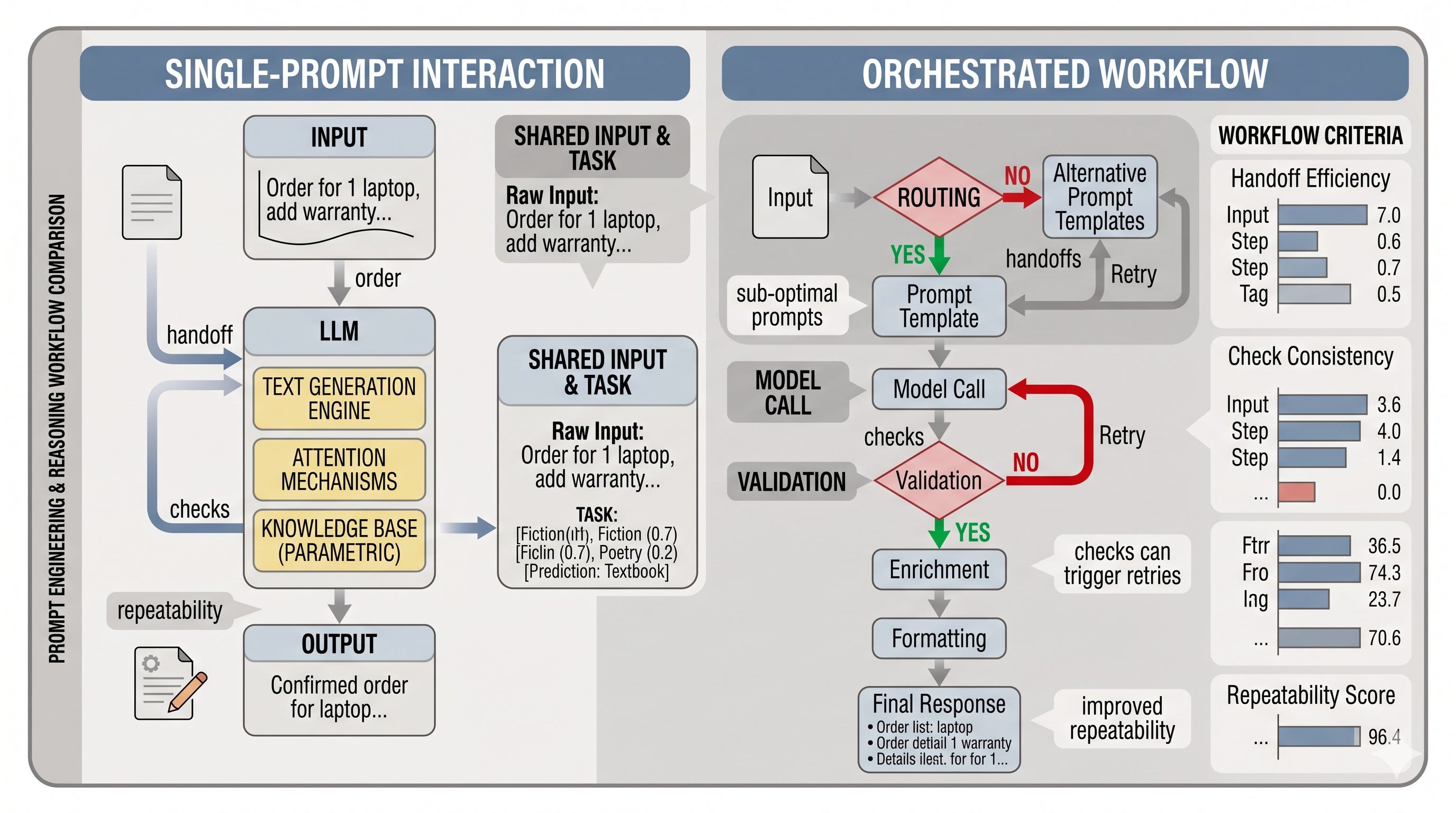
That shift matters because LLM applications become systems, not just prompts. A support workflow, for example, may need a ticket summary, a tone check, a response draft, and a final formatting pass. One prompt can produce each piece, but it does not by itself ensure the order, the handoffs, or the checks that make the workflow dependable. In that sense, prompt engineering is about behavior you ask for, while orchestration is about behavior you design for.
Orchestration as the layer around model calls
Orchestration is the control layer that sits around generation. It decides how inputs move through the application, when model calls happen, what happens to intermediate output, and which modules can intervene before the final response is returned. Prompt design shapes the model’s input. Orchestration shapes the workflow that surrounds the model.
A useful metaphor is a recipe versus an assembly line. A prompt can tell the model what to make, but orchestration determines how the work is sequenced, checked, and assembled. That is why orchestration improves quality, repeatability, and structure in real applications: it makes the process explicit instead of leaving every response to a single pass.
LangChain as the organizing framework
LangChain is the framework used in this chapter to keep that system view organized. It is not required for every LLM application, but it gives the chapter a shared language for connecting model I/O, templates, chains, memory, and agents. Thinking in that framework makes it easier to see which part of the application is responsible for input shaping, which part manages workflow, and which part handles longer-lived context or tool use.
This is also where the distinction between prompt engineering and orchestration becomes useful. Prompt engineering improves the wording of a request. Orchestration arranges the reusable structure around that request. LangChain helps separate those concerns so the application does not collapse into one oversized prompt that is hard to understand or maintain.
Chains, memory, and agents in the workflow stack
Chains are the most predictable orchestration pattern. They connect model calls and other modules into a known sequence, which makes them well suited to workflows with clear steps. Memory extends the interaction across turns so earlier context can remain available. Agents add flexibility by letting the system choose actions at runtime when the next step is not fully known in advance.
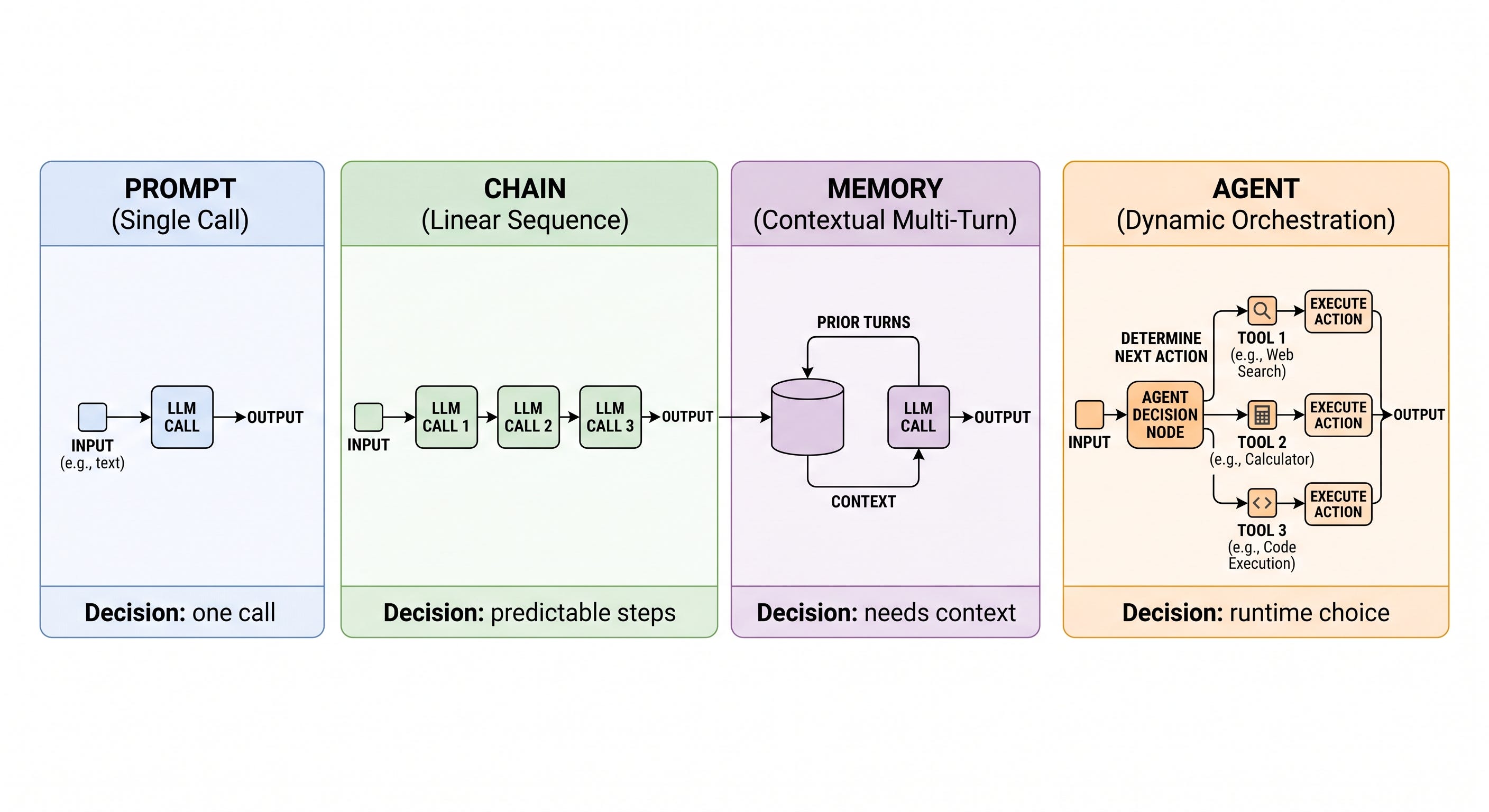
A simple decision rule follows from that spectrum. Use a prompt when one model call is enough. Use a chain when the steps are predictable. Use an agent when the next action depends on what happens at runtime. Chains give control, agents give flexibility, and memory supports continuity when the conversation itself carries important context.
How orchestration improves real systems
The practical value of orchestration shows up in maintainability and repeatability. A workflow built from explicit steps is easier to test, easier to revise, and easier to extend than a single prompt that tries to do everything at once. It is also easier to improve output quality because validation, routing, and enrichment can happen before the final generation step instead of being left to chance.
That is why this chapter moves beyond prompt engineering without abandoning it. Prompt design still matters, but the larger goal is to design the system around the model. LangChain provides one practical way to do that, and the patterns introduced here will prepare you for memory and agents later in the chapter. Retrieval will come later as a complement to orchestration by supplying external context, but the foundation is the same: structure the workflow so the model is part of a reliable application, not an isolated call.
What to expect next in the chapter
The next sections move from this motivation into the mechanics of model loading, prompt templates, chains, memory, and agents, with retrieval reserved for the following chapter.
Loading local and hosted models for chain-based generation
Start with the deployment decision: local vs hosted
Before a prompt ever reaches a chain, the model itself has to be available somewhere. In practice, that means choosing between local inference and a hosted API, and the choice affects far more than convenience. A local model gives you control over data, predictable access, and the ability to experiment offline, but it asks for hardware, model files, and a little more patience during setup. A hosted model removes most of that friction, but shifts the trade-off toward network dependence, usage limits, and external cost. For this chapter, the local path is useful because it makes the mechanics visible, yet the hosted fallback keeps the workflow accessible on a laptop or in a constrained environment.
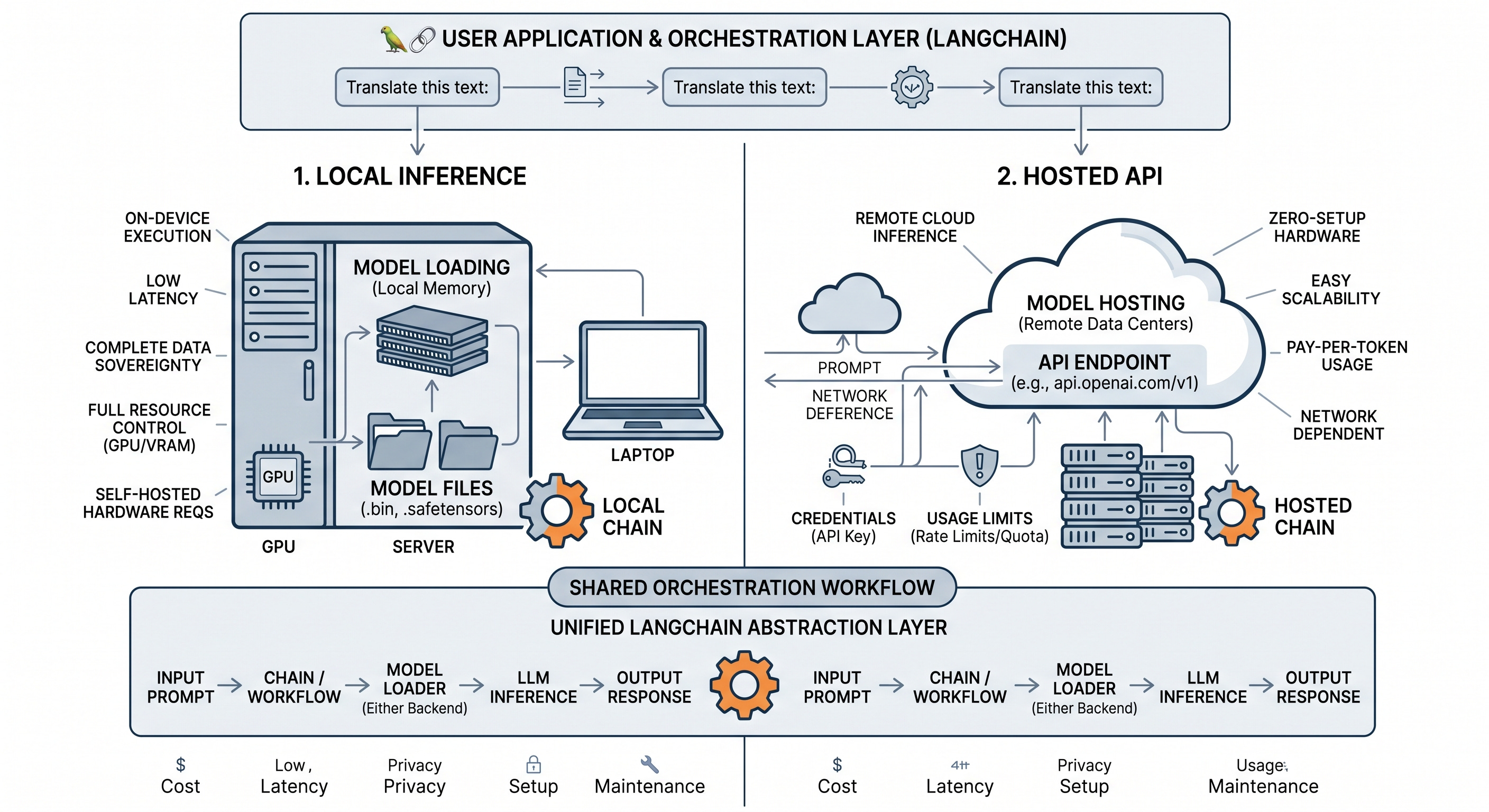
A good rule of thumb is simple. If you are iterating on prompt structure, chain design, or message formatting, a hosted model is often the fastest way to get moving. If you want to inspect deployment constraints, work offline, or understand how much model size and context budget shape behavior, a local model is worth the extra setup. The important point is that the orchestration layer should stay conceptually stable even when the backend changes; only the engine underneath needs to swap.
What quantization changes in practice
The local model in this chapter uses a quantized GGUF file. Quantization compresses the model weights by storing them with fewer bits than a full-precision model would use. You can think of it as packing a suitcase more tightly: the contents are still there, but they have been folded into a smaller space so the model can fit on more modest hardware. That smaller footprint usually means lower VRAM usage and often faster inference, especially on consumer machines. The cost is that the model no longer preserves every detail of the original parameters, so a little fidelity is traded away for practicality.
That trade-off is exactly why quantized models matter. A large model in full precision may be inconvenient or impossible to run locally, while a compressed variant can become usable without changing the surrounding application logic. The same idea underlies many modern local deployment choices: reduce precision enough to make the model portable, but not so much that the quality drops below what the task needs.
Fetch and load the local GGUF model in LangChain
The example in this chapter uses a GGUF artifact downloaded from Hugging Face. The specific file matters because the precision variant is part of the contract between the model and your hardware. Choosing a different variant changes memory use, speed, and sometimes output quality, so the file name is not just a label; it is part of the deployment decision.
!wget https://huggingface.co/microsoft/Phi-3-mini-4k-instruct-gguf/resolve/main/Phi-3-mini-4k-instruct-fp16.ggufOnce the file is available locally, LangChain can wrap it through LlamaCpp. This is the local model interface for the chapter, and the parameters you pass here shape the generation behavior before any chain is built on top.
from langchain import LlamaCpp

# Make sure the model path is correct for your system!
llm = LlamaCpp(
    model_path="Phi-3-mini-4k-instruct-fp16.gguf",
    n_gpu_layers=-1,
    max_tokens=500,
    n_ctx=2048,
    seed=42,
    verbose=False
)
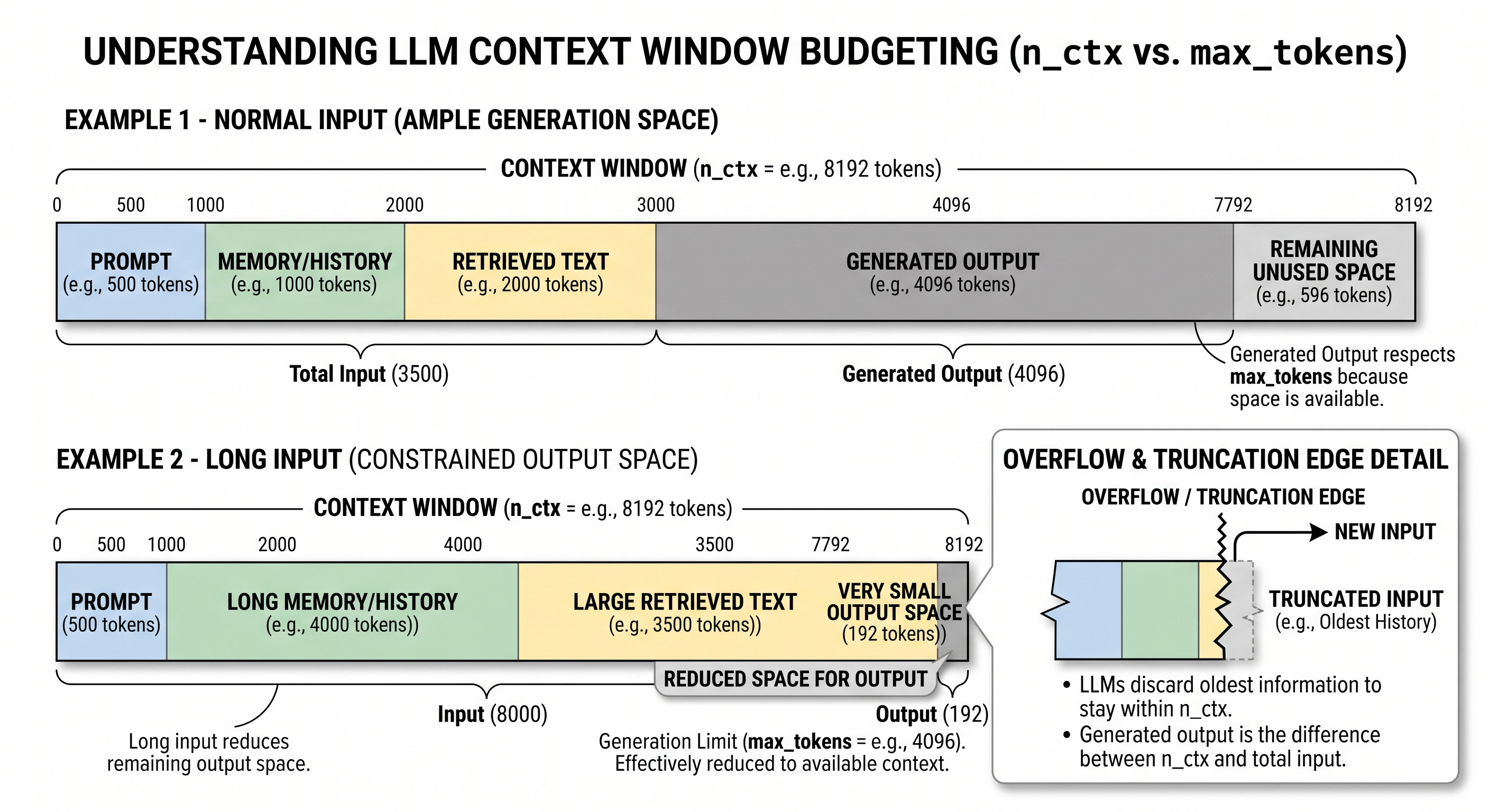
The practical meaning of those settings is straightforward. model_path points to the GGUF file you downloaded. n_gpu_layers controls how much of the model is offloaded to the GPU when that is available. max_tokens caps the length of the generated answer, which is part of your token budget. n_ctx sets the context window the model can condition on, and that matters because every extra instruction, conversation turn, or retrieved snippet has to fit alongside the answer you hope to generate. seed helps make experiments repeatable, and verbose keeps the output quieter while you are testing.
That context limit is easy to underestimate. Think of it as a suitcase that must hold both the prompt and the response. If you keep stuffing history into the prompt, you leave less room for the answer, and eventually the model has to truncate, ignore, or compress something. This is why context size becomes a design constraint later in the chapter when chains and memory start accumulating text.
Why the raw model call can fail without the right prompt shape
Once the model is loaded, it is tempting to call it directly and assume that any text input will work. With some instruct or chat-tuned models, that assumption is wrong. The model may be running correctly, but the request still fails because the input shape does not match the format it expects. That is less like a runtime crash and more like sending a valid HTTP request to the wrong endpoint schema.
llm.invoke("Hi! My name is Maarten. What is 1 + 1?")

''
The empty result is the important lesson. The model is not broken; the prompt contract is incomplete. Some models need a specific instruction wrapper, a chat template, or other formatting cues before they respond sensibly. In other words, prompt formatting is not an optional refinement layered on top of the model. For certain backends, it is part of the interface definition.
That distinction matters for the rest of the chapter. If the request format is unstable, every downstream chain inherits that fragility. Once you know the model’s expected shape, you can stop hand-assembling prompts and move toward reusable templates that enforce the right structure every time.
Use a hosted chat model when local inference is not practical
The hosted fallback follows the same overall pattern but uses an API-backed chat model instead of a local GGUF file. Operationally, that changes where the computation happens and what constraints matter most. You no longer manage model files or local GPU placement, but you do need credentials, network access, and a model service that fits your use case.
from langchain.chat_models import ChatOpenAI

# Create a chat-based LLM
chat_model = ChatOpenAI(openai_api_key="MY_KEY")
This is the same interface idea in a different engine. The point is not that one path is universally better than the other, but that the surrounding generation workflow can remain portable when the model-loading layer is abstracted cleanly. That portability is exactly why the chapter moves next from model invocation to chains: once the backend is in place, the real productivity gain comes from composing prompts, inputs, and outputs into repeatable workflows rather than hand-calling the model one request at a time.
Why templates beat one-off prompts
A one-off prompt is fine when you are experimenting, but it becomes brittle the moment the same task needs to run again with different inputs. In practice, the useful unit is not a single prompt string; it is a prompt template, which is a stable prompt frame with named slots for the parts that change. That distinction matters because the reusable part is the workflow contract, while the variable part is just the data you feed into it.
For the ReviewDesk workflow, that difference is easy to see. A support summary might be rewritten into a clean answer draft today, then reused tomorrow for a different ticket, a different tone, or a different product line. If the structure of the request stays mostly the same, a template gives you consistency without forcing you to copy and edit prose by hand. If the task itself needs to be split into distinct decisions, such as naming a title before drafting a response, then the problem has outgrown a single prompt and is ready for chaining.
Defining variables and model-specific prompt format
A prompt template is useful because it makes the changing parts explicit. Instead of hiding the input inside a long string, you name the fields that the chain expects. That turns prompt writing into a small interface design exercise: the template defines what information must be supplied, and the model receives the formatted text that results from filling those slots.
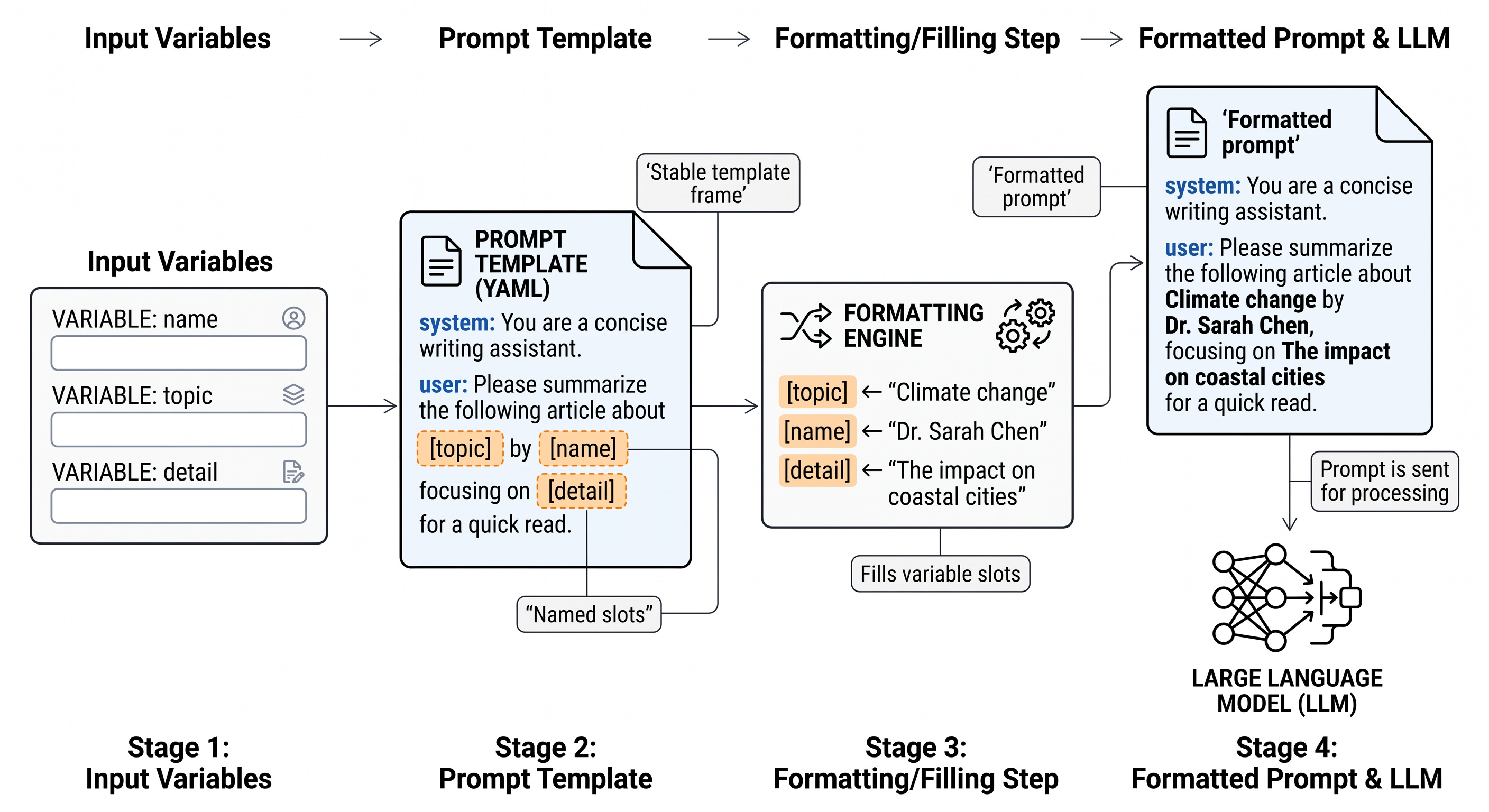
Some models also care about exact formatting. A chat-oriented model may expect role markers, delimiters, or other special tokens around the user and assistant turns. In that case, the template is not only about wording; it is also about preserving the structure the model was trained to recognize. If that structure is wrong, the model can still produce text, but the chain may become less reliable because the model is being asked to read a format it does not expect.
from langchain import PromptTemplate

# Create a prompt template with the "input_prompt" variable
template = """<s><|user|>
{input_prompt}<|end|>
<|assistant|>"""
prompt = PromptTemplate(
    template=template,
    input_variables=["input_prompt"]
)
Wiring a prompt directly into an LLM
Once the prompt is packaged as a template, the next step is to connect it to the model. LangChain’s pipe syntax makes that composition explicit: the prompt formats the input, and the model consumes the formatted result. Conceptually, this is the smallest useful chain. It is still just one step, but the step is now reusable and named instead of being a hand-written string glued to a model call.
The invocation also becomes clearer. You do not send the model a free-form blob of text; you provide a mapping that matches the template’s variable names. That small discipline pays off quickly, because it makes the call site readable and reduces the chance of silently passing the wrong value into the prompt.
basic_chain = prompt | llm

# Use the chain
basic_chain.invoke(
    {
        "input_prompt": "Hi! My name is Maarten. What is 1 + 1?",
    }
)
Reusing the same pattern for different jobs
The real value of templates shows up when the same structure is reused for a different task. A business-name generator, a ticket summarizer, and a response drafter can all follow the same pattern even though they solve different problems. The only thing that changes is the variable name and the wording around it. That is the hallmark of a good template: when the nouns change but the workflow stays stable, you have separated the prompt’s public interface from its implementation.
# Create a Chain that creates our business' name
template = "Create a funny name for a business that sells {product}."
name_prompt = PromptTemplate(
    template=template,
    input_variables=["product"]
)
Breaking a generation task into linked steps
A larger generation task often becomes easier to control when it is decomposed into smaller stages. The ReviewDesk analogue is straightforward. Suppose you have a short ticket summary and want first a concise title, then a character sketch for a response style, and finally a full draft. Each step can focus on one subgoal, which makes the output easier to inspect and easier to correct.
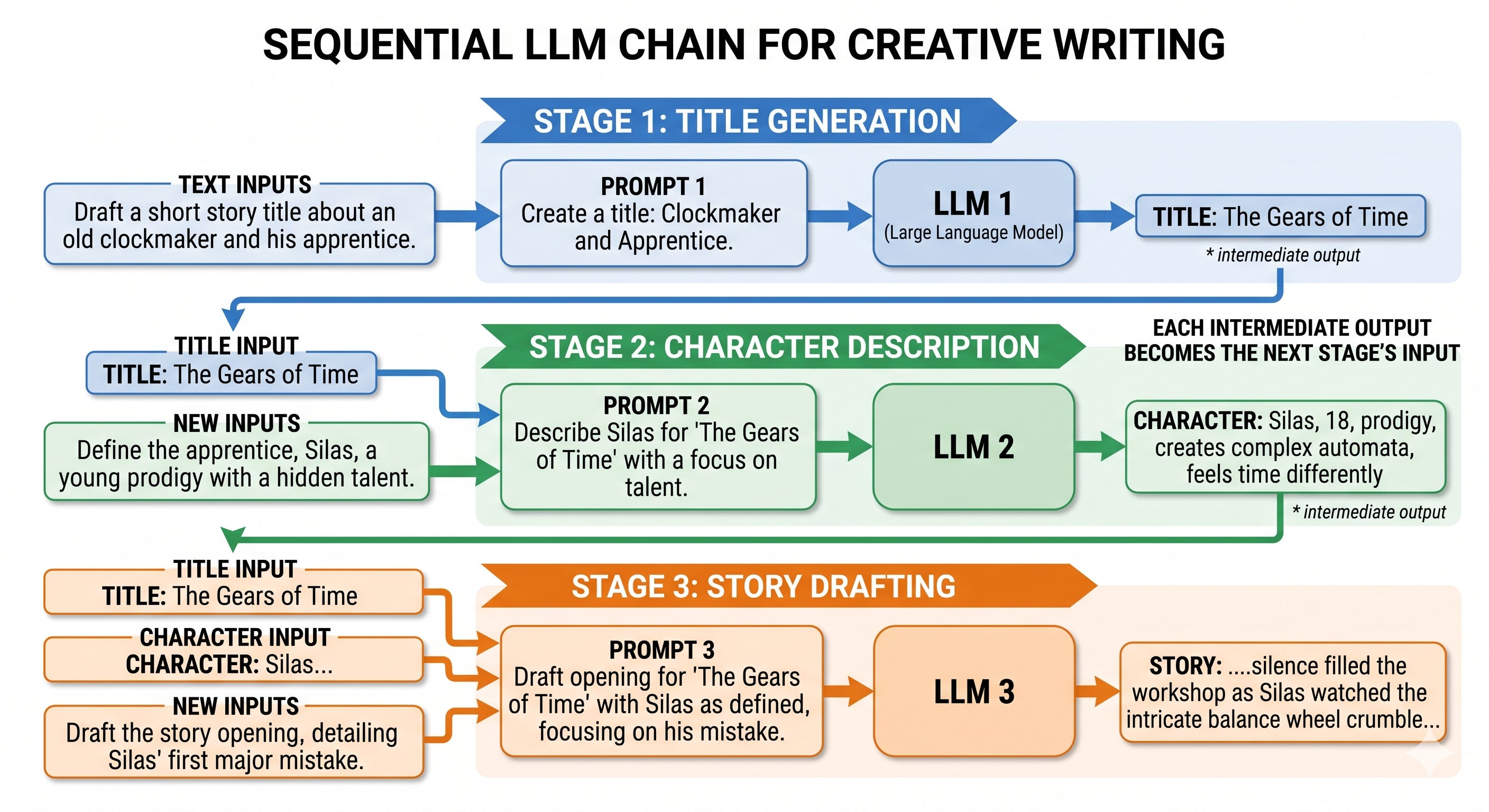
This is where sequential chaining becomes more than syntactic convenience. The title is not just another string; it is a labeled artifact that later prompts can use. The character description is likewise not a final answer but a structured intermediate result. By giving each stage a specific role, you make the hidden subgoals visible, much as a kitchen keeps prep, plating, and finishing separate so each station knows exactly what to hand off.
from langchain import LLMChain

# Create a chain for the title of our story
template = """<s><|user|>
Create a title for a story about {summary}. Only return the title.<|end|>
<|assistant|>"""
title_prompt = PromptTemplate(template=template, input_variables=["summary"])
title = LLMChain(llm=llm, prompt=title_prompt, output_key="title")

title.invoke({"summary": "a girl that lost her mother"})

# Create a chain for the character description using the summary and title
template = """<s><|user|>
Describe the main character of a story about {summary} with the title {title}. Use only two sentences.<|end|>
<|assistant|>"""
character_prompt = PromptTemplate(
    template=template, input_variables=["summary", "title"]
)
character = LLMChain(llm=llm, prompt=character_prompt, output_key="character")

# Create a chain for the story using the summary, title, and character description
template = """<s><|user|>
Create a story about {summary} with the title {title}. The main character is: {character}. Only return the story and it cannot be longer than one paragraph. <|end|>
<|assistant|>"""
story_prompt = PromptTemplate(
    template=template, input_variables=["summary", "title", "character"]
)
story = LLMChain(llm=llm, prompt=story_prompt, output_key="story")

# Combine all three components to create the full chain
llm_chain = title | character | story

llm_chain.invoke("a girl that lost her mother")
Reading, passing, and constraining intermediate outputs
Output keys are the shipping labels of a chain. They tell you what each stage produced and what the next stage should expect. In the example above, the first step stores its result as title, the second as character, and the third as story. That naming is not cosmetic; it is how the pipeline keeps track of which artifact should flow into which prompt.
This is also where many failures start. If a downstream prompt expects {title} but the upstream step saved its result under a different key, the chain breaks or receives the wrong field. The same issue appears when an intermediate output is too verbose. A title prompt that ignores the instruction to return only the title can pollute the next stage with extra text, which is why generation constraints belong inside the prompt rather than as an afterthought.
Choosing between a single prompt and a chain
Use a single prompt when the task is simple enough that one well-shaped request can handle it. Use a chain when the task has genuinely separable substeps, when you want intermediate artifacts you can inspect, or when the same structure will be reused across many inputs. A prompt template is the reusable interface; a chain is the orchestration around that interface. Keeping that boundary clear will matter even more in the next sections, where stateful memory and tool-using agents build on the same idea of explicit handoffs.
Conversation memory and the cost of keeping context
Why a plain chain does not remember yesterday
A plain LLM call is stateless. It answers from whatever text you include in the current prompt, and then the interaction ends. That is easy to miss because the first reply can feel conversational: if you tell the model your name in one turn and ask a related question immediately afterward, the answer may seem context-aware. But that impression can be misleading. The model is not carrying a private notebook between calls; unless you pass the earlier exchange back in, the next invocation starts fresh.
That distinction matters in a support workflow like ReviewDesk. Suppose a user says, “Hi, I’m Maarten, and I need help with a billing issue,” and the assistant responds helpfully. If a second call asks, “What is my name?” a basic chain has no reason to know. The missing ingredient is not a better prompt in the abstract, but a mechanism for carrying forward conversation state. In LangChain, that mechanism is memory.
Wiring chat history into the prompt
Memory does not replace the prompt. It feeds the prompt. The prompt template reserves a slot, often called chat_history or something equivalent, and the memory object fills that slot before the model is called. That separation is important: the chain orchestrates the call, the memory object stores and loads state, and the prompt template defines where that state should appear.
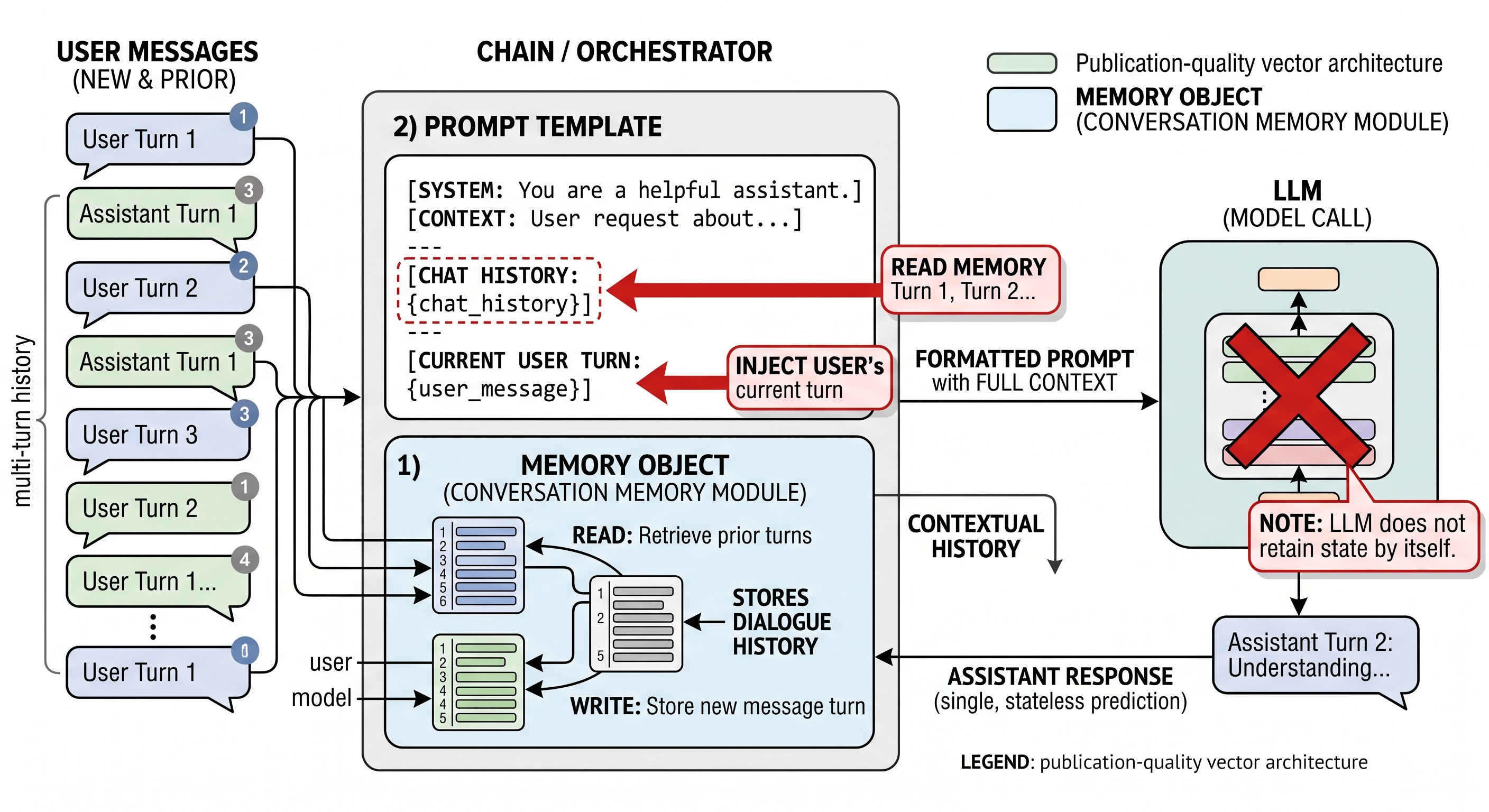
A useful mental model is chat-state compression. The chain is the delivery system, the prompt is the envelope, and memory decides how much of the prior conversation to pack into it. If the envelope has no history field, nothing from earlier turns can be injected, no matter how conversational the wording sounds.
Full-buffer memory as the simplest persistent transcript
The simplest baseline is ConversationBufferMemory. It keeps the full conversation transcript and sends it back into the prompt on each turn. Because nothing is discarded, it is the easiest strategy to reason about. If the user said it earlier, it is still available now. That makes buffer memory a good starting point for short, high-stakes conversations where exact recall matters more than efficiency.
template = """<s><|user|>Current conversation:{chat_history}\n\n{input_prompt}<|end|>\n<|assistant|>"""

prompt = PromptTemplate(
    template=template,
    input_variables=["input_prompt", "chat_history"]
)

memory = ConversationBufferMemory(memory_key="chat_history")

llm_chain = LLMChain(
    prompt=prompt,
    llm=llm,
    memory=memory
)
With that wiring in place, the same two-turn ReviewDesk exchange now behaves like a real conversation. The first invocation stores the user’s name, and the second can recover it because the entire transcript is still attached to the chain.
llm_chain.invoke({"input_prompt": "Hi! My name is Maarten. What is 1 + 1?"})
llm_chain.invoke({"input_prompt": "What is my name?"})
The advantage is clarity. The downside appears quickly in longer dialogs. Every new turn expands the prompt, which increases token usage, slows generation, and raises cost. Buffer memory is faithful, but it is also greedy. Like carrying every receipt in your wallet, it works until the accumulation becomes the problem.
Windowed memory: keep the recent turns, drop the rest
ConversationBufferWindowMemory trims that growth by keeping only the most recent k turns. The idea is a sliding window over the dialogue. Recent context stays available, older context falls away. This is often a better fit when the current exchange depends on the last few messages but not on the entire history.
memory = ConversationBufferWindowMemory(k=2, memory_key="chat_history")

llm_chain = LLMChain(
    prompt=prompt,
    llm=llm,
    memory=memory
)
With a small window, the chain can still answer follow-up questions tied to the recent exchange, but it eventually loses earlier facts. In a ReviewDesk conversation, that can be enough if the assistant only needs to maintain the active thread of one support case. If the user says their name and issue in one or two turns, the model can continue to refer to them correctly. If the discussion drifts long enough, earlier commitments, counts, or names may drop out of scope.
This is the most common trap with too-small windows: the model sounds coherent until it is asked about a detail that has already slid past the edge of the buffer. Windowed memory is therefore a budgeting tool, not a weaker version of buffer memory. It is an explicit decision to value recency over completeness.
Summary memory: compress the conversation instead of replaying it
ConversationSummaryMemory takes a different path. Instead of preserving the full transcript, it keeps a running summary of the interaction. After each turn, the earlier conversation is compressed into a shorter form, and that condensed state is what gets injected later. In effect, the model is asked to remember the story, not the transcript.
summary_prompt_template = """<s><|user|>Summarize the conversations and update with the new lines.\n\nCurrent summary:\n{summary}\n\nnew lines of conversation:\n{new_lines}\n\nNew summary:<|end|>\n<|assistant|>"""
summary_prompt = PromptTemplate(
    input_variables=["new_lines", "summary"],
    template=summary_prompt_template
)

memory = ConversationSummaryMemory(
    llm=llm,
    memory_key="chat_history",
    prompt=summary_prompt
)

llm_chain = LLMChain(
    prompt=prompt,
    llm=llm,
    memory=memory
)
Because the summary is updated incrementally, the chain can stay conversational across longer sessions without replaying everything. That is the main appeal: lower token cost and better scalability. But compression is never free. A summary tends to preserve the gist while softening exact wording, counts, and small commitments. The most subtle failure mode is summary drift, where the condensed history remains plausible but slowly becomes less precise. It is a little like a game of telephone played over many turns: the storyline survives, but the details can blur.
A direct inspection call makes the behavior less mysterious. You can ask the memory object what it currently holds and see that it returns the compressed state rather than the raw transcript.
memory.load_memory_variables({})That inspection step is useful because it reminds you that memory is just another component in the chain. The chain does not magically “remember”; it asks memory what should be inserted, then the prompt receives that state like any other input variable.
How to choose a memory strategy in practice
The choice among buffer, windowed, and summary memory is a trade-off among retention, token usage, latency, and accuracy. If the conversation is short and every detail matters, full buffer memory is the safest choice. If the assistant only needs the latest turns, a small window keeps the system lean. If the discussion is long-lived and the broad arc matters more than exact phrasing, summary memory is usually the most efficient option.
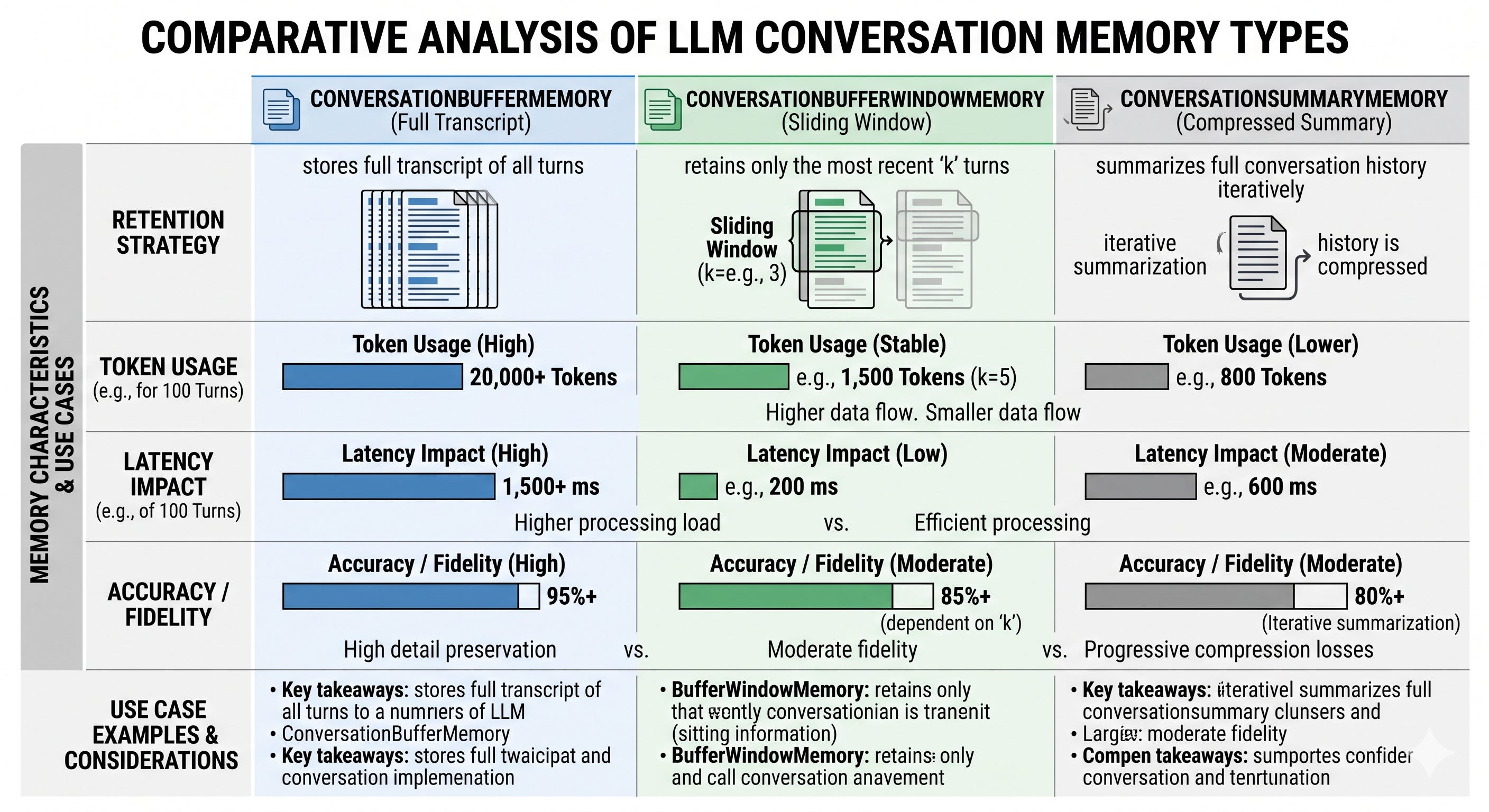
One useful rule is to think in terms of continuity versus knowledge. Memory is for continuity of the conversation, not for discovering facts outside the chat. A support assistant may remember that the user already described a billing issue, but it should not be treated as a database of policy documents or past tickets. When the task shifts from remembering the conversation to finding external information, memory is no longer enough on its own. That is the point where retrieval becomes the right tool, not a bigger buffer.
Agents, tools, and ReAct-style control flow
A fixed chain is like an assembly line. The same stations run in the same order every time, which is ideal when the task is predictable. An agent is different. It behaves more like a dispatcher that decides which specialist to call next, then uses that result to choose the following step. The change is not just that the agent is smarter. The change is that control flow is no longer predetermined. A chain follows a route; an agent selects the route as it goes.
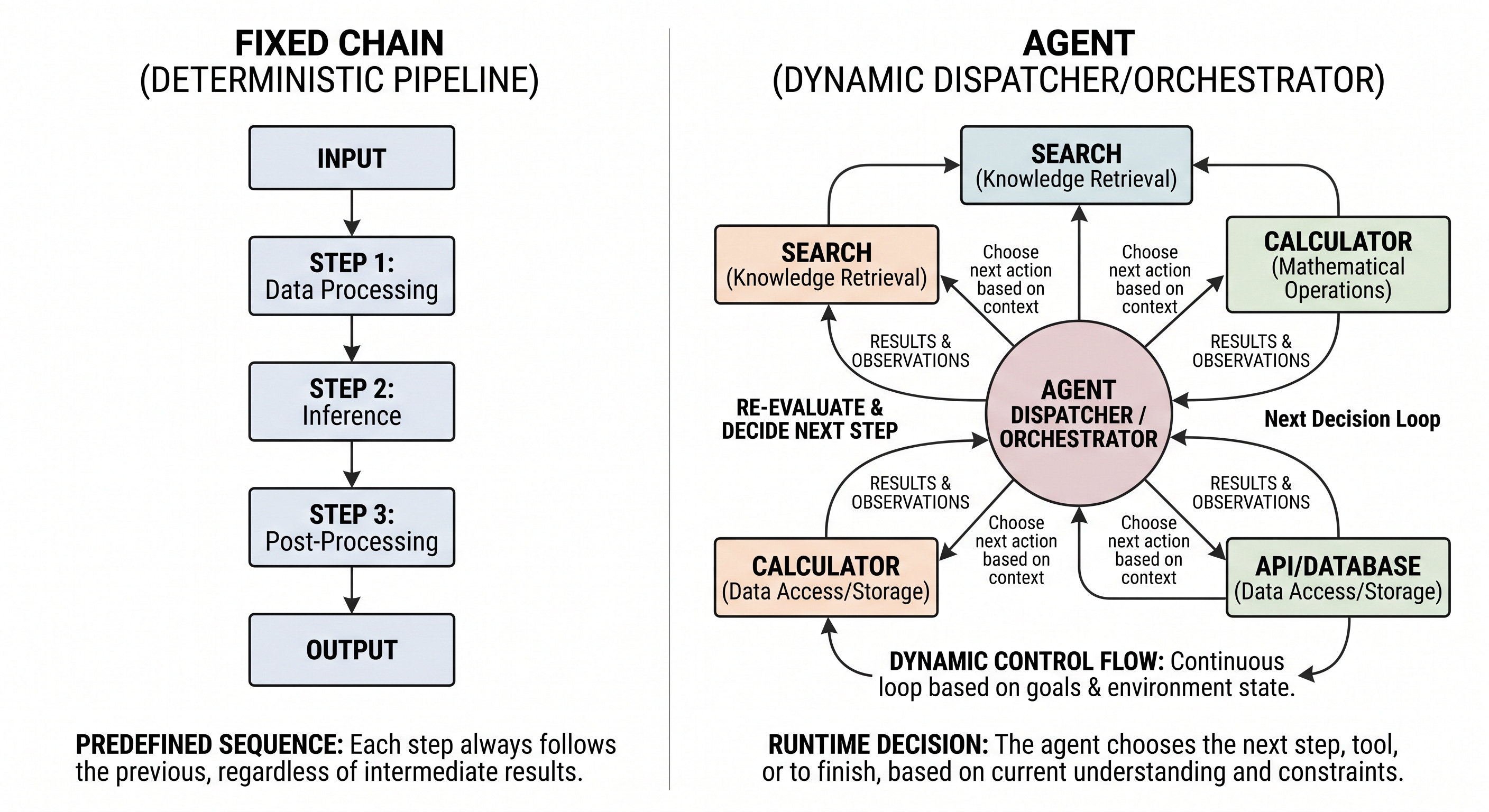
That matters when the answer depends on capabilities outside the model itself. If the task is stable and self-contained, a chain is usually simpler and safer. If the task needs current facts, a calculation, or a choice among several external actions, an agent becomes useful because it can orchestrate those steps dynamically. The model is still just generating text, but the runtime lets it decide when to search, when to calculate, and when to stop.
What counts as a tool, and why tools change the game
A tool is an external function that the agent can call through a defined interface. It is not a model weight, and it is not hidden reasoning. It is an explicit capability exposed to the agent so the model can use it as part of its plan. Search is one common tool type because it can fetch current or obscure facts. Math is another because it can support deterministic calculation even when the model should not be trusted to carry the arithmetic in its own text output.
This separation is the key idea. The model handles selection and coordination, while the tools handle execution. That makes the system compositional: search can be swapped for another retrieval service, and math can be replaced with a different calculator, without changing the basic control pattern. It also gives a practical heuristic for design. Use a chain when the steps are fixed. Use an agent when the next step depends on what just happened. Add tools when the model needs to reach beyond its own text generation.
ReAct as the loop that binds thinking to acting
ReAct turns that control pattern into a repeating loop of thought, action, and observation. The thought step is the model deciding what to do next. The action step names the tool and the input to send to it. The observation is the tool output that comes back into the system. That observation is then folded into the next decision, which is why the loop can adapt instead of merely replaying a script.
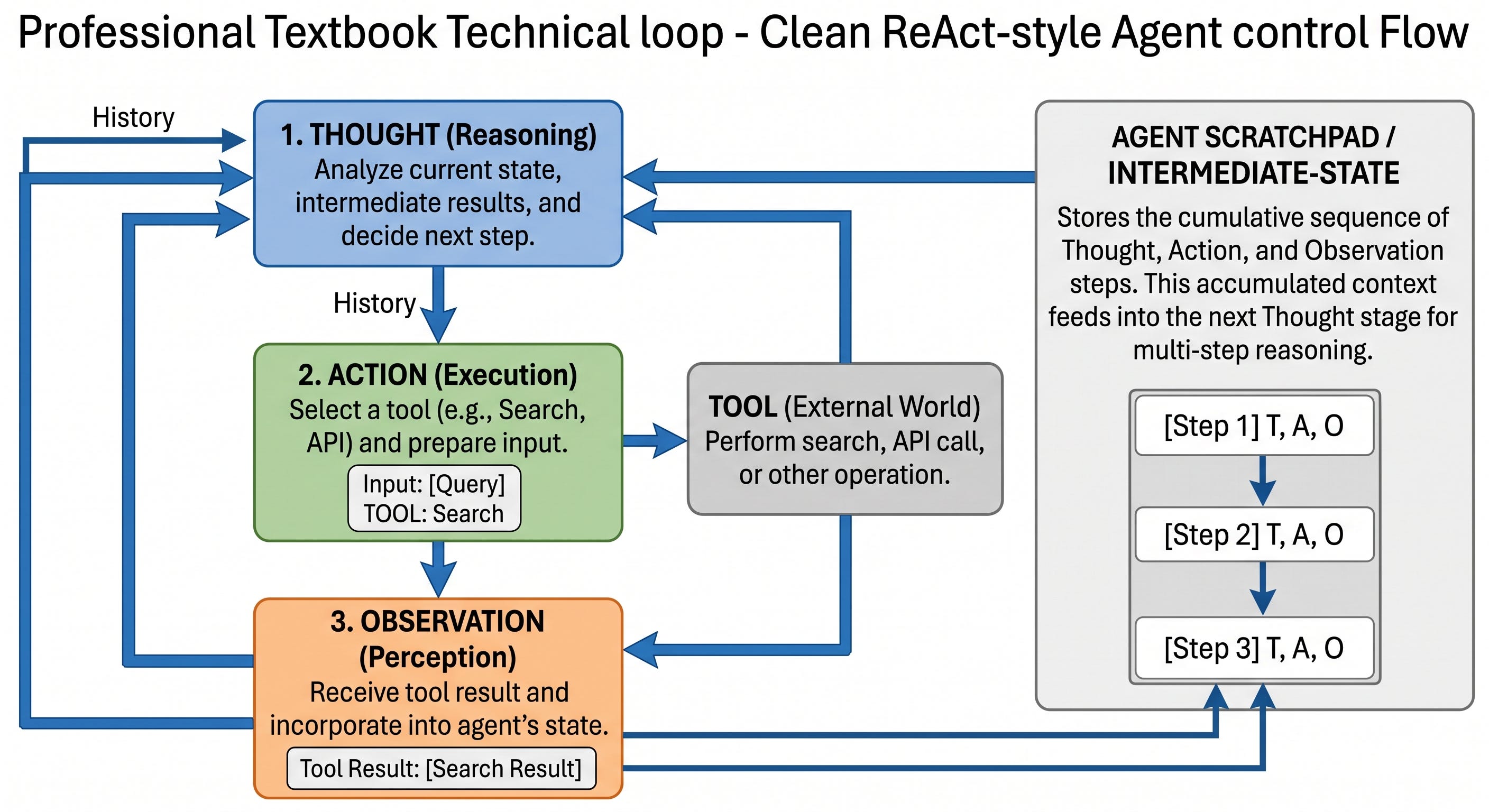
The scratchpad, or intermediate-step state, is what preserves that history. It records prior actions and observations so the agent can see what it has already tried before choosing the next move. Without that state, the model would have to make each decision in isolation. With it, each tool call becomes part of the context for the following turn.
The prompt has to make the available action space visible as well. Tool names and tool descriptions are injected into the template so the model knows what it is allowed to call and what each tool is for. That is a major difference from a free-form prompt. The agent is not inventing arbitrary actions; it is selecting from the tools that the runtime has exposed.
How LangChain wires tools, prompts, and execution
The implementation begins with the model. In the example, a hosted chat model is loaded with a zero temperature setting so the agent behaves more consistently when deciding among tools.
import os
from langchain_openai import ChatOpenAI

# Load OpenAI's LLMs with LangChain
os.environ["OPENAI_API_KEY"] = "MY_KEY"
openai_llm = ChatOpenAI(model_name="gpt-3.5-turbo", temperature=0)
Next comes the ReAct prompt. Its job is to define the interaction format and reserve placeholders for the tool list, tool names, the user input, and the scratchpad. That is what allows the same template to support many different runs while keeping the intermediate state attached to the current one.
# Create the ReAct template
react_template = """Answer the following questions as best you can. You have access to the following tools:

{tools}

Use the following format:

Question: the input question you must answer
Thought: you should always think about what to do
Action: the action to take, should be one of [{tool_names}]
Action Input: the input to the action
Observation: the result of the action
... (this Thought/Action/Action Input/Observation can repeat N times)
Thought: I now know the final answer
Final Answer: the final answer to the original input question

Begin!

Question: {input}
Thought:{agent_scratchpad}"""

prompt = PromptTemplate(
    template=react_template,
    input_variables=["tools", "tool_names", "input", "agent_scratchpad"]
)
The tools are then assembled into a shared list. Here the agent gets both a web search tool and an LLM-backed math tool. That combination is enough to show why agents matter: the model can fetch a live fact, then hand a numeric value to another capability for a deterministic follow-up step.
from langchain.agents import load_tools, Tool
from langchain.tools import DuckDuckGoSearchResults

# You can create the tool to pass to an agent
search = DuckDuckGoSearchResults()
search_tool = Tool(
    name="duckduck",
    description="A web search engine. Use this to as a search engine for general queries.",
    func=search.run,
)

# Prepare tools
tools = load_tools(["llm-math"], llm=openai_llm)
tools.append(search_tool)
The agent itself is created from the model, the tools, and the prompt. The executor is the runtime layer that makes the whole pattern work. It runs the loop, calls tools, gathers observations, and can print intermediate steps when verbose tracing is enabled. It also has to handle malformed action strings and parsing failures, because model output is not always perfectly formatted.
from langchain.agents import AgentExecutor, create_react_agent

# Construct the ReAct agent
agent = create_react_agent(openai_llm, tools, prompt)
agent_executor = AgentExecutor(
    agent=agent, tools=tools, verbose=True, handle_parsing_errors=True
)
A worked multi-step example: search plus arithmetic
The benefit of agentic control flow becomes clear with a query that mixes current information and computation. Suppose you want the current price of a MacBook Pro in USD and then want to convert that amount to EUR using an exchange rate. A fixed prompt can only guess at the live price. An agent can search for the current price first, then use the math tool on the retrieved value.
# What is the price of a MacBook Pro?
agent_executor.invoke(
    {
        "input": "What is the current price of a MacBook Pro in USD? How much would it cost in EUR if the exchange rate is 0.85 EUR for 1 USD."
    }
)
A typical run starts with the agent choosing search because it needs a live fact. The search tool returns an observation, which becomes input to the next decision. If the result is a price in USD, the agent can pass that value into the math tool to compute the EUR equivalent. The executor exposes those intermediate steps, so you can see both the tool call and the observation that followed it. That trace is valuable because it shows not just the final answer, but the path the agent took to get there.
This example also makes the division of labor obvious. The model is not doing the retrieval or the arithmetic itself. It is coordinating the search tool, the math tool, and the loop that connects them. That is what makes agent systems more flexible than chains, but also more fragile than chains, because each step depends on the quality of the previous one.
Where agents fail, and why retrieval comes next
Tool use adds power, but it also adds risk. A tool can return irrelevant or stale output. The model can produce malformed action text that fails parsing. A loop can continue taking actions without converging on a final answer. These are the kinds of failures that fixed chains largely avoid because their execution path is predetermined.
That trade-off is why retrieval-oriented systems come next. Agents are one way to orchestrate access to information, but they are not the only way, and they are not a replacement for retrieval architecture. The next chapter builds on this idea by showing how search and retrieval can be structured more deliberately, so the model can work with information in a more controlled way.
Use the url below to download the enitre book as pdf: