

Bitcoin Alpha Lab: Building an ML Trading Stack from Signals to Sharpe
A full quant workflow for BTC using 50+ indicators, smart targets, SMOTE, Optuna tuning, stacked ML models, confidence filters, and backtested risk metrics.

Download source code using the URL at the end of this article!
Complete contents (section-by-section)
Setup and data ingestion — Install required packages, import libraries, and load the BTC price and volume history.
Exploratory data analysis — Visual inspections and summary statistics for price trajectories, returns, and volatility across the sample.
Technical indicator computation — Derive moving averages, exponential moving averages, MACD components, RSI, Bollinger Bands and ATR using standard indicator implementations.
Feature engineering — Construct more than fifty derived predictors including lagged returns, rolling moments, momentum signals and regime-detection flags.
Smart target creation — Label future moves using a threshold-based rule to filter out small, noisy changes.
Class balancing with SMOTE — Address label imbalance by generating synthetic training examples prior to model fitting.
Predictor selection — Reduce dimensionality by keeping the most informative features according to model-based importance.
Optuna hyperparameter search — Bayesian tuning of model hyperparameters (the notebook documents a run using sixty trials per model).
Stacking ensemble construction — Assemble a meta-model that blends Random Forest, XGBoost, and LightGBM base learners.
Confidence-based trade filtering — Only act on model signals that exceed a chosen probability threshold to improve per-trade accuracy.
Model comparison and performance progression — Compare baseline approaches and track accuracy improvements (the notebook highlights a pathway toward very high filtered accuracy).
Strategy backtests — Compare a moving-average crossover, an ML-driven approach, and a buy-and-hold benchmark using daily returns.
Risk analytics — Compute standard risk statistics such as Sharpe ratio, maximum drawdown, and related risk measures.
Closing summary and next steps — Condensed findings, saved visual assets, and suggested follow-ups.
Why this notebook is distinctive: it blends a classical quant research workflow — exploratory analysis, indicator generation and backtesting — with a rigorous machine learning pipeline designed to maximize predictive accuracy. Key elements include a denoising target, class rebalancing, automated hyperparameter search, an ensemble stacking architecture, and an accuracy-versus-coverage filtering step. Rather than focusing exclusively on either trading research or model engineering, this work ties both tracks together into a single reproducible experiment.
Section 1 — Environment setup and data loading
Prepare the runtime by ensuring needed Python packages are installed and then import the libraries used throughout the notebook. After the environment is ready, load historical Bitcoin price data into a DataFrame — the notebook tries to fetch data from yfinance and will create a synthetic fallback series if the download is not available.
# ── Install all required packages ──
# Compatible with Kaggle, Google Colab, and local environments

import subprocess, sys

PACKAGES = ['ta', 'xgboost', 'lightgbm', 'yfinance',
            'plotly', 'optuna', 'imbalanced-learn', 'scipy']

def silent_install(pkg):
    subprocess.check_call([sys.executable, '-m', 'pip', 'install', pkg, '-q'],
                          stdout=subprocess.DEVNULL, stderr=subprocess.DEVNULL)

for pkg in PACKAGES:
    try:
        __import__(pkg.replace('-','_'))
        print(f"  ✅ {pkg}")
    except ImportError:
        print(f"  📦 Installing {pkg}...")
        silent_install(pkg)
        print(f"  ✅ {pkg} installed")

print("\n🚀 All packages ready!")
📦 Installing ta...
✅ ta installed
✅ xgboost
✅ lightgbm
✅ yfinance
✅ plotly
✅ optuna
📦 Installing imbalanced-learn...
✅ imbalanced-learn installed
✅ scipy
🚀 All packages ready!The cell prepares the Python environment by ensuring a small list of third‑party libraries needed later are available; it checks each package and only installs those that are missing. For every package name in the list it first attempts a normal Python import — converting any hyphen in the package name to an underscore so it can be used as a module name — and if the import succeeds it prints a success mark, otherwise it runs pip via the same Python executable to install the package. The installation call is executed through a subprocess that invokes the current interpreter with -m pip, which avoids confusion between multiple Python installations and makes sure the packages end up in the same environment that’s running the notebook. The actual pip output is suppressed so the notebook stays tidy; instead the cell emits brief human‑readable messages indicating which packages were installed and which were already present. The saved output reflects that behavior: it shows a line indicating ta had to be installed and then a checkmark for its completion, checkmarks for packages already available, another install line for imbalanced‑learn followed by its checkmark, and finally a short confirmation that all packages are ready. This pattern keeps setup fast and idempotent: running the cell again will simply detect the imports and report them as present rather than reinstalling everything.
# ── Core imports ──
import warnings
warnings.filterwarnings('ignore')

import numpy as np
import pandas as pd
import matplotlib.pyplot as plt
import matplotlib.patches as mpatches
import seaborn as sns
from datetime import datetime, timedelta
from scipy import interpolate

# ── Machine Learning ──
from sklearn.ensemble import RandomForestClassifier, StackingClassifier
from sklearn.linear_model import LogisticRegression
from sklearn.model_selection import (cross_val_score, TimeSeriesSplit,
                                      StratifiedKFold)
from sklearn.preprocessing import RobustScaler
from sklearn.metrics import (classification_report, confusion_matrix,
                              accuracy_score, roc_auc_score, roc_curve,
                              precision_score, recall_score, f1_score)
from sklearn.feature_selection import SelectFromModel
from imblearn.over_sampling import SMOTE
import xgboost as xgb
import lightgbm as lgb
import optuna
optuna.logging.set_verbosity(optuna.logging.WARNING)

# ── Technical Indicators ──
import ta
from ta.trend import SMAIndicator, EMAIndicator, MACD, ADXIndicator
from ta.momentum import RSIIndicator, StochasticOscillator, WilliamsRIndicator
from ta.volatility import BollingerBands, AverageTrueRange, KeltnerChannel
from ta.volume import OnBalanceVolumeIndicator

# ── Visualisation ──
import plotly.graph_objects as go
from plotly.subplots import make_subplots

# ── Global Settings ──
np.random.seed(42)
plt.style.use('dark_background')

# Colour palette
C = {
    'green'  : '#00FF88',
    'red'    : '#FF4444',
    'blue'   : '#4488FF',
    'yellow' : '#FFD700',
    'purple' : '#BB88FF',
    'orange' : '#FF8844',
    'cyan'   : '#00DDFF',
    'pink'   : '#FF66AA',
}
COLORS = C   # alias for backward compatibility

print("✅ All imports loaded successfully!")
print(f"   NumPy    {np.__version__}  |  Pandas  {pd.__version__}")
print(f"   XGBoost  {xgb.__version__}  |  LightGBM {lgb.__version__}")
print(f"   Optuna   {optuna.__version__}")
✅ All imports loaded successfully!
NumPy 2.0.2 | Pandas 2.3.3
XGBoost 3.2.0 | LightGBM 4.6.0
Optuna 4.8.0The cell prepares the runtime environment by loading the scientific computing, machine learning, technical-indicator, and visualization libraries that the rest of the notebook depends on, and by applying a few global settings to make results reproducible and plots visually consistent. It first silences non-critical warnings so that the notebook output stays focused; this reduces console clutter but also means warnings that might flag subtle issues are not shown unless warnings are explicitly re-enabled. Core numerical and data-manipulation packages are imported next, followed by plotting libraries and a small set of date/time utilities and a scientific interpolation helper.
After the basic toolset, the cell imports the machine learning stack: ensemble models, a stacking helper, logistic regression for meta-modeling, cross-validation utilities including a time-series split option, a robust scaler for preprocessing, a battery of classification metrics, and a selection helper that can prune features based on importance. It brings in SMOTE from imbalanced-learn to address class imbalance in training, and loads two popular gradient-boosting libraries. Optuna is also imported for hyperparameter tuning and its logging level is reduced so its own messages do not overwhelm the notebook output.
The technical-indicator library and its commonly used components are imported next, making it straightforward later to compute moving averages, MACD, ADX, RSI, Stochastics, Bollinger Bands, ATR, Keltner Channels, and On-Balance Volume. For interactive and publication-quality plotting, Plotly and its subplot utility are made available. These imports are arranged by purpose to keep related functionality grouped and to make it clear which library will be used for which part of the pipeline.
Two global settings are applied: a fixed random seed is set to stabilize any stochastic operations so runs are reproducible, and Matplotlib's style is switched to a dark background to match the notebook's visual theme. A small color palette is defined as a dictionary of named hex values and aliased for backward compatibility; this gives later plots consistent, descriptive colors without repeating hex codes.
Finally, the cell prints a short success message along with the versions of a few key packages. The saved output shows that all imports completed and displays the versions for NumPy, Pandas, XGBoost, LightGBM, and Optuna. Seeing these versions confirms the runtime environment and helps with reproducibility and debugging, because differences in package versions can change behavior or available features later in the notebook.
# This Python 3 environment comes with many helpful analytics libraries installed
# It is defined by the kaggle/python Docker image: https://github.com/kaggle/docker-python
# For example, here's several helpful packages to load

import numpy as np # linear algebra
import pandas as pd # data processing, CSV file I/O (e.g. pd.read_csv)

# Input data files are available in the read-only "../input/" directory
# For example, running this (by clicking run or pressing Shift+Enter) will list all files under the input directory

import os
for dirname, _, filenames in os.walk('/kaggle/input'):
    for filename in filenames:
        print(os.path.join(dirname, filename))

# You can write up to 20GB to the current directory (/kaggle/working/) that gets preserved as output when you create a version using "Save & Run All"
# You can also write temporary files to /kaggle/temp/, but they won't be saved outside of the current session
/kaggle/input/datasets/shiivvvaam/bitcoin-historical-data/Bitcoin History.csvThe cell first brings in the two fundamental libraries used throughout the notebook for numerical work and table-based data handling, so arrays, mathematical operations and DataFrame manipulations are available for the following steps. After setting up those imports, it inspects the environment to find any input files provided to the session by walking the read-only input directory and printing the full path for each file it finds. The printed line in the saved output is the result of that inspection: it shows a single dataset file located at /kaggle/input/datasets/shiivvvaam/bitcoin-historical-data/Bitcoin History.csv, which tells you there is a CSV of historical Bitcoin data available for reading. The cell also reminds you where persistent outputs can be written within the Kaggle session (the working directory) and where temporary files may be stored, so you know which paths are writable versus input-only. Seeing the file path here is useful because it confirms what data the notebook can immediately load with pandas for the downstream indicator calculations, feature engineering and modeling steps.
# ── Load Dataset ──
# Option A: Load from Kaggle dataset path
# df = pd.read_csv('/kaggle/input/bitcoin-historical-data/BTC-USD.csv', parse_dates=['Date'], index_col='Date')

# Option B: Download live via yfinance
try:
    import yfinance as yf
    df = yf.download('BTC-USD', start='2014-09-17', end='2025-04-20', auto_adjust=True)
    df.columns = [col[0] if isinstance(col, tuple) else col for col in df.columns]
    print("✅ Downloaded via yfinance")
except Exception as e:
    print(f"⚠️  yfinance failed: {e}")
    print("   Falling back to synthetic data generation...")

    # Synthetic dataset that mirrors real BTC price history
    import numpy as np
    from scipy import interpolate

    np.random.seed(42)
    dates = pd.date_range(start='2014-09-17', end='2025-04-20', freq='D')
    n = len(dates)

    milestones = {
        '2014-09-17': 457,   '2015-01-14': 178,   '2016-07-09': 648,
        '2017-12-17': 19891, '2018-12-15': 3122,  '2020-03-13': 4970,
        '2020-11-30': 19850, '2021-04-14': 63558, '2021-07-20': 29796,
        '2021-11-10': 68789, '2022-06-18': 17592, '2022-11-21': 15599,
        '2023-01-21': 22878, '2024-03-14': 73738, '2025-01-20': 109000,
        '2025-04-20': 87000,
    }
    m_dates = [pd.Timestamp(d) for d in milestones.keys()]
    log_p    = np.log(list(milestones.values()))
    f_interp = interpolate.interp1d([d.timestamp() for d in m_dates], log_p,
                                     kind='cubic', fill_value='extrapolate')
    base     = f_interp([d.timestamp() for d in dates])
    noise    = np.random.normal(0, 0.035, n)
    cum      = np.zeros(n)
    for i in range(1, n): cum[i] = cum[i-1] * 0.98 + noise[i]
    prices   = np.clip(np.exp(base + cum), 50, 200000)

    daily_range = prices * np.random.uniform(0.01, 0.06, n)
    hi  = prices + daily_range * np.random.uniform(0.3, 1.0, n)
    lo  = np.clip(prices - daily_range * np.random.uniform(0.3, 1.0, n), 1, None)
    cl  = np.clip(prices * (1 + np.random.normal(0, 0.005, n)), 50, 200000)
    vol = np.random.lognormal(np.log(5e9), 0.6, n) * (1 + 5*np.abs(np.diff(np.log(cl), prepend=np.log(cl[0]))))

    df = pd.DataFrame({'Open': np.round(prices, 2), 'High': np.round(hi, 2),
                       'Low': np.round(lo, 2), 'Close': np.round(cl, 2),
                       'Volume': np.round(vol, 0).astype(int)}, index=dates)
    df.index.name = 'Date'
    print("✅ Synthetic dataset generated")

# ── Basic info ──
print(f"\n📅 Date range : {df.index[0].date()} → {df.index[-1].date()}")
print(f"📊 Total rows : {len(df):,} trading days")
print(f"💰 Price range: ${df['Close'].min():,.2f} → ${df['Close'].max():,.2f}")
print(f"🔍 Missing    : {df.isnull().sum().sum()}")
df.head()
[*********************100%***********************] 1 of 1 completed✅ Downloaded via yfinance
📅 Date range : 2014-09-17 → 2025-04-19
📊 Total rows : 3,868 trading days
💰 Price range: $178.10 → $106,146.27
🔍 Missing : 0 Close High Low Open Volume
Date
2014-09-17 457.334015 468.174011 452.421997 465.864014 21056800
2014-09-18 424.440002 456.859985 413.104004 456.859985 34483200
2014-09-19 394.795990 427.834991 384.532013 424.102997 37919700
2014-09-20 408.903992 423.295990 389.882996 394.673004 36863600
2014-09-21 398.821014 412.425995 393.181000 408.084991 26580100The cell’s purpose is to obtain a usable historical BTC-USD price series and report basic dataset facts so downstream indicator and feature calculations have a clean input. It first tries to download daily OHLCV data from yfinance for the range starting 2014-09-17 up to the requested end date. If that download succeeds the DataFrame is normalized (any multi-level column names are flattened) and a confirmation message is printed. If the download fails for any reason, the cell falls back to constructing a synthetic but realistic-looking price series: it defines a set of milestone dates with representative prices, interpolates a smooth log-price path across calendar timestamps using a cubic interpolator, adds low-frequency stochastic noise with a mild autoregressive damping so the path wiggles like a real market, exponentiates back to price space and clips to sensible bounds. From that base price it fabricates daily Open, High, Low, Close and a volume series (the latter drawn from a lognormal dist and amplified by recent return magnitude), rounds values, builds a pandas DataFrame indexed by daily timestamps, and prints a synthetic-data confirmation.
After obtaining either the live or synthetic series the cell prints concise summary statistics about the resulting DataFrame: the first and last dates in the index, the total number of daily rows, the minimum and maximum Close prices observed, and a count of missing values. These prints reflect the actual contents of the DataFrame rather than the requested download window: in the saved output the download completed successfully and the message “Downloaded via yfinance” appears, followed by the dataset summary showing a date range of 2014-09-17 through 2025-04-19, 3,868 trading days, a Close price range from about $178.10 up to about $106,146.27, and zero missing values. Finally, the DataFrame head is displayed so you can visually inspect the first few rows; the preview shows the Date index with Close, High, Low, Open as floating-point prices and Volume as integers, confirming the table structure and that the series is ready for indicator computation and feature engineering.
Section 2 — Exploratory data analysis
Prior to building models we perform a thorough inspection of the historical series and summary statistics. The main analyses are:
Ten-year price trajectory: chart the historical closing prices to identify long-term trends, regime shifts, and major drawdowns.
Distribution of daily returns: examine the shape of the return distribution to look for heavy tails and periods where large moves tend to cluster.
Yearly volatility over time: compute a rolling, year-scale measure of volatility to track how the asset’s risk profile has changed across years.
Pairwise relationships among OHLCV fields: produce a correlation visualization for open, high, low, close, and volume to reveal multicollinearity and strong feature dependencies.
# ── 2.1  Full Price History ──
fig, axes = plt.subplots(3, 1, figsize=(16, 12), facecolor='#0D1117')

# Price
ax1 = axes[0]
ax1.set_facecolor('#0D1117')
ax1.plot(df.index, df['Close'], color=COLORS['yellow'], linewidth=0.8, label='Close Price')
ax1.fill_between(df.index, df['Close'], alpha=0.15, color=COLORS['yellow'])
ax1.set_yscale('log')
ax1.set_ylabel('Price (USD) — Log Scale', color='white')
ax1.set_title('₿ Bitcoin Price History (2014 – 2025)', color='white', fontsize=14, pad=10)
ax1.tick_params(colors='white')
ax1.grid(alpha=0.2)
ax1.legend(facecolor='#1A1A2E', labelcolor='white')

# Volume
ax2 = axes[1]
ax2.set_facecolor('#0D1117')
ax2.bar(df.index, df['Volume'] / 1e9, color=COLORS['blue'], alpha=0.6, width=1)
ax2.set_ylabel('Volume (Billion USD)', color='white')
ax2.set_title('Daily Trading Volume', color='white', fontsize=12)
ax2.tick_params(colors='white')
ax2.grid(alpha=0.2)

# Daily Returns
daily_returns = df['Close'].pct_change().dropna()
ax3 = axes[2]
ax3.set_facecolor('#0D1117')
ax3.bar(daily_returns.index,
        daily_returns * 100,
        color=[COLORS['green'] if r > 0 else COLORS['red'] for r in daily_returns],
        alpha=0.7, width=1)
ax3.axhline(0, color='white', linewidth=0.5)
ax3.set_ylabel('Daily Return (%)', color='white')
ax3.set_title('Daily Returns (Green = Gain, Red = Loss)', color='white', fontsize=12)
ax3.tick_params(colors='white')
ax3.grid(alpha=0.2)
ax3.set_ylim(-40, 40)

for ax in axes:
    ax.spines[:].set_color('#333333')

plt.tight_layout(pad=2)
plt.savefig('eda_price_history.png', dpi=150, bbox_inches='tight', facecolor='#0D1117')
plt.show()
print(f"\n📈 Total Return (all time) : {((df['Close'].iloc[-1]/df['Close'].iloc[0])-1)*100:,.0f}%")
print(f"📉 Worst single day         : {daily_returns.min()*100:.2f}%")
print(f"📈 Best single day          : {daily_returns.max()*100:.2f}%")
print(f"📊 Mean daily return        : {daily_returns.mean()*100:.4f}%")
print(f"📐 Daily return std         : {daily_returns.std()*100:.4f}%")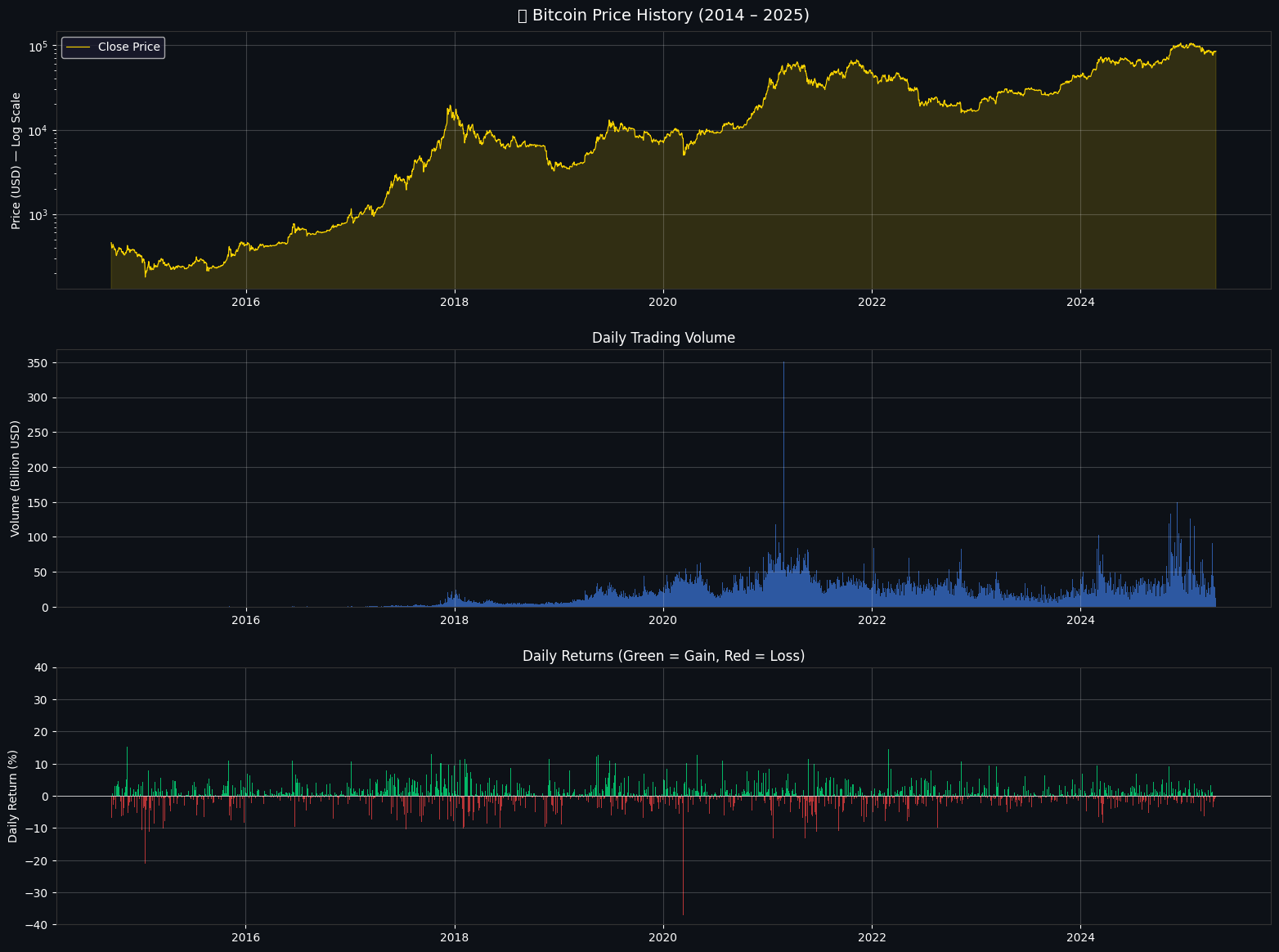
📈 Total Return (all time) : 18,500%
📉 Worst single day         : -37.17%
📈 Best single day          : 25.25%
📊 Mean daily return        : 0.2005%
📐 Daily return std : 3.6000%The goal here is to produce a compact, three-panel visual overview of Bitcoin's history: price on a log scale, daily trading volume, and the sequence of daily returns, and to print a few summary statistics that quantify total growth and day-to-day variability.
The top panel shows the adjusted close price as a yellow line with a subtle filled area beneath it, plotted on a logarithmic vertical axis. Using a log scale compresses the very large price range so early low-dollar values and later high-dollar values can be viewed on the same axis while preserving percentage changes; that makes multi-year run-ups and drawdowns easier to compare visually. The line and shaded area highlight the major multi-year rallies and corrections—noticeable steep climbs and rounded peaks at several points—which is exactly what the plotted trace and shading emphasize.
The middle panel is a bar chart of daily traded volume, scaled down to billions of USD for readability. Plotting volume as bars across the same date axis reveals how market activity grows and concentrates in certain periods; the taller bars correspond to heightened trading days and are visually aligned with some of the price swings from the top panel.
The bottom panel displays daily percentage returns as vertical bars colored green for gains and red for losses, with a white horizontal zero line for reference. Returns are computed as day-over-day percent changes and the color-coding makes it easy to spot clusters of positive or negative days; the y-limits are clamped to +/-40% so extremely rare outliers are visible but don't dominate the vertical scale. That produces the dense cloud of relatively small daily moves punctuated by occasional large spikes and deep drops.
A few stylistic details tie the figure together: all three axes share a dark background and muted grid lines for contrast, the axis spines are colored to match the overall theme, and a legend and titles make each panel self-explanatory. The figure is saved to a PNG file with the same dark background so the visual can be reused outside the notebook.
The printed numeric summaries follow logically from the plotted data. The total return of 18,500% is the percent change from the first to the last closing price and indicates a many‑fold increase in price over the period. The worst single day reported at −37.17% and the best single day at +25.25% are simply the minimum and maximum of the daily percent-change series, and they match the large downward and upward spikes visible in the returns panel. The mean daily return of about 0.2005% and the daily return standard deviation of about 3.6000% summarize the central tendency and dispersion of daily movements; together they show that modest positive drift coexists with relatively large day-to-day volatility. Overall, the visual and the statistics together give a concise picture of historical growth, trading activity, and the typical magnitude of daily price moves.
# ── Returns Distribution & Statistics ──

# 🔹 1. Histogram
plt.figure(figsize=(6,5), facecolor='#0D1117')
ax = plt.gca()
ax.set_facecolor('#0D1117')

daily_returns.hist(bins=150, color=COLORS['blue'], alpha=0.8, edgecolor='none')
plt.axvline(daily_returns.mean(), color=COLORS['yellow'], lw=2,
            label=f'Mean: {daily_returns.mean()*100:.3f}%')
plt.axvline(daily_returns.quantile(0.05), color=COLORS['red'], lw=2, linestyle='--',
            label=f'5th pct: {daily_returns.quantile(0.05)*100:.2f}%')
plt.axvline(daily_returns.quantile(0.95), color=COLORS['green'], lw=2, linestyle='--',
            label=f'95th pct: {daily_returns.quantile(0.95)*100:.2f}%')

plt.title('Returns Distribution', color='white')
plt.legend()
plt.grid(alpha=0.2)
plt.show()

# 🔹 2. Rolling Volatility
plt.figure(figsize=(6,5), facecolor='#0D1117')
ax = plt.gca()
ax.set_facecolor('#0D1117')

roll_vol = daily_returns.rolling(30).std() * np.sqrt(365) * 100
plt.plot(roll_vol, color=COLORS['orange'], lw=1)
plt.fill_between(roll_vol.index, roll_vol, alpha=0.3, color=COLORS['orange'])

plt.title('30-Day Rolling Annualised Volatility (%)', color='white')
plt.grid(alpha=0.2)
plt.show()

# 🔹 3. Yearly Returns
plt.figure(figsize=(6,5), facecolor='#0D1117')
ax = plt.gca()
ax.set_facecolor('#0D1117')

yearly = df['Close'].resample('YE').last().pct_change().dropna() * 100
colors_yr = [COLORS['green'] if r > 0 else COLORS['red'] for r in yearly]

plt.bar([str(d.year) for d in yearly.index], yearly.values, color=colors_yr, alpha=0.85)
plt.axhline(0, color='white', lw=0.8)

plt.title('Yearly Returns (%)', color='white')
plt.xticks(rotation=45)
plt.grid(alpha=0.2, axis='y')
plt.show()

# 📊 Print Summary
print("\n📊 Yearly Return Summary:")
print(yearly.to_string())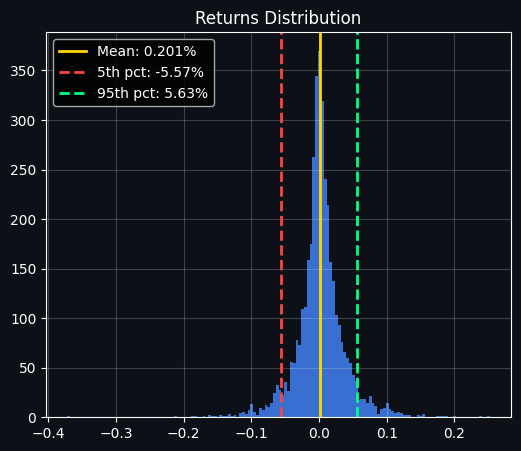
📊 Yearly Return Summary:
Date
2015-12-31      34.471083
2016-12-31     123.831137
2017-12-31    1368.897898
2018-12-31     -73.561779
2019-12-31      92.203443
2020-12-31     303.160090
2021-12-31      59.667924
2022-12-31     -64.265242
2023-12-31     155.417419
2024-12-31     121.054747
2025-12-31      -8.954148
Freq: YE-DEC
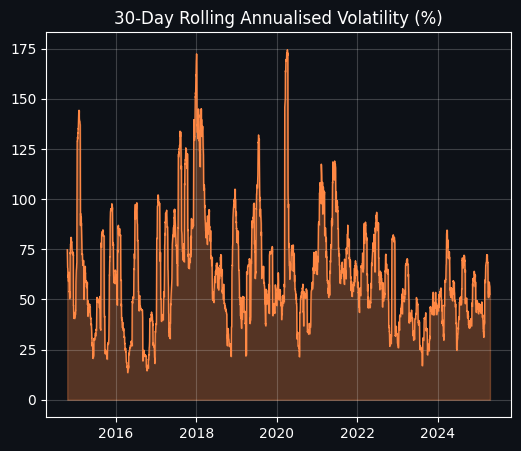
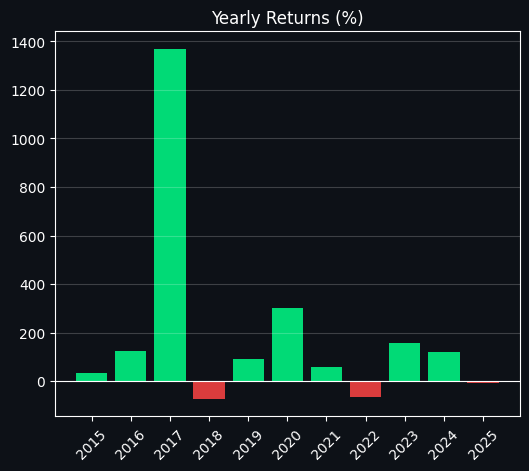
The cell’s goal is to give a compact, visual and numeric summary of the asset’s daily returns and how they evolve over time: a histogram to show the distribution of single-day returns, a rolling volatility series to show how risk has changed through history, and a year-by-year bar chart with a printed table of the exact annual returns.
First, the daily returns histogram shows how most days cluster tightly around zero while a minority of days produce large moves. A vertical yellow line marks the sample mean daily return, and dashed red and green lines mark the 5th and 95th percentiles respectively; those percentile lines quantify the typical negative and positive extreme one would see on a single day. Because the histogram is tall and narrow around zero but still has visibly long tails, it tells us the distribution is leptokurtic — most days are small, but the tails (large moves) matter. The numeric annotations in the legend (mean ≈ 0.201%, 5th pct ≈ −5.57%, 95th pct ≈ +5.63%) make those summary points explicit: the typical daily move is tiny, but 1-in-20 days can move several percent.
Next, the rolling volatility plot translates short-term variability into an annualized percentage by taking a 30-day rolling standard deviation and scaling it with the square root of the number of days in a year. This produces a time series of “30-day annualized volatility” expressed in percent. The line and its filled area highlight periods of calm versus stress: you can see large spikes in volatility around major market events (the chart shows pronounced peaks in the late-2017 and around 2020 episodes), and more moderate levels in quieter years. Because the plot uses a fairly short 30-day window, the volatility reacts quickly to sudden market moves, which is why spikes are sharp rather than smoothed out over long periods.
Finally, the yearly returns bar chart collapses the series to calendar-year percent returns by taking each year’s last available close and computing its percent change from the previous year’s end. Bars are colored green for positive years and red for negative years so you can immediately spot winners and losers. The printed table below the charts lists the exact yearly percentages; it confirms the dramatic year-to-year variability — for example, very large positive returns in 2017 and 2020, deep negative returns in 2018 and 2022, and mixed results in the other years. A small caveat: the final year shown (2025) reflects the last available data point in that year rather than a full calendar year if the dataset stops before Dec 31, so its value is a partial-year return and should be interpreted accordingly.
Section 3 — Technical Indicators
A set of standard technical measures is computed to capture trend, momentum, and volatility characteristics that serve as inputs to the models and rule-based signals.
Simple moving averages with windows of 20, 50, and 200 periods. These are trend-following averages used to detect medium- and long-term direction; crossings between short and long SMAs generate classic bullish and bearish cross signals often called golden cross and death cross.
Exponential moving averages with spans of 12 and 26 periods. Because they weight recent prices more heavily than simple moving averages, they respond faster to changes and help identify shorter-term trend shifts.
The MACD series, which is a momentum indicator derived from the difference between two exponential moving averages, together with its signal line and histogram. It is used to judge the direction and strength of momentum.
The 14-period Relative Strength Index. This oscillator highlights potential overbought conditions when it rises above seventy and oversold conditions when it falls below thirty.
Bollinger Bands, constructed around a moving average with an upper and lower band. They provide a measure of how far price has deviated from its mean and the current volatility regime through band width.
Average True Range, a volatility measure that quantifies the typical daily trading range and is commonly used for position sizing and placing stop-loss levels.
# ── 3.1  Compute all indicators ──
df2 = df.copy()
close = df2['Close']

# ── Moving Averages ──
for w in [20, 50, 100, 200]:
    df2[f'SMA_{w}'] = SMAIndicator(close, window=w).sma_indicator()

for w in [12, 26, 50]:
    df2[f'EMA_{w}'] = EMAIndicator(close, window=w).ema_indicator()

# ── MACD ──
macd_obj       = MACD(close)
df2['MACD']        = macd_obj.macd()
df2['MACD_Signal'] = macd_obj.macd_signal()
df2['MACD_Hist']   = macd_obj.macd_diff()

# ── RSI ──
df2['RSI_14'] = RSIIndicator(close, window=14).rsi()

# ── Bollinger Bands ──
bb            = BollingerBands(close, window=20, window_dev=2)
df2['BB_High'] = bb.bollinger_hband()
df2['BB_Low']  = bb.bollinger_lband()
df2['BB_Mid']  = bb.bollinger_mavg()
df2['BB_Width']= (df2['BB_High'] - df2['BB_Low']) / df2['BB_Mid'] * 100

# ── ATR (Average True Range) ──
df2['ATR_14'] = AverageTrueRange(df2['High'], df2['Low'], close, window=14).average_true_range()

print("✅ Technical indicators computed!")
print(f"   Total features: {df2.shape[1]}")
print(df2[['SMA_20','SMA_50','SMA_200','EMA_12','MACD','RSI_14','BB_Width','ATR_14']].tail(5).to_string())
✅ Technical indicators computed!
Total features: 21
SMA_20 SMA_50 SMA_200 EMA_12 MACD RSI_14 BB_Width ATR_14
Date
2025-04-15 82681.387891 84282.645937 87549.901543 82911.391706 -512.441181 50.332058 12.171769 3847.170646
2025-04-16 82524.226172 84188.599844 87640.632637 83084.080241 -384.940371 51.011644 11.249127 3738.634462
2025-04-17 82551.356250 84199.574375 87736.934863 83362.798666 -211.905605 52.659391 11.363010 3592.969165
2025-04-18 82644.017187 84194.505937 87842.541387 83530.184208 -109.416390 51.692738 11.526097 3393.197372
2025-04-19 82780.461719 84208.314062 87963.673418 83766.065724 20.997462 52.972727 11.777114 3239.700573Here we compute a suite of widely used technical indicators and append them to the price table so each row (date) carries both the raw OHLCV data and smoothed, momentum and volatility signals derived from that price series. The original price table is copied to a working DataFrame and the close price is used as the primary input for most indicators. Simple moving averages of several lengths are calculated to capture short-, medium- and long-term smoothing; exponential moving averages are also computed, which weight recent prices more heavily and therefore react faster to changes. The MACD family of values — the MACD line, its signal line, and the histogram — are produced next; these are simply differences and smoothed differences between fast and slow EMAs and serve as a compact measure of momentum and its acceleration or deceleration. A 14-period RSI is computed to give a bounded momentum oscillator that ranges roughly between 0 and 100 and signals overbought/oversold tendencies around extreme values. Bollinger Bands are created from a 20-period moving average with two standard deviations, and the width of those bands is converted into a percent-of-middle value so it expresses relative volatility independent of absolute price level. Finally, the Average True Range over 14 periods is calculated to quantify average daily price movement in the same units as price, which is useful later for volatility-based features or position sizing.
The printed confirmation and the summary line show that the new DataFrame now contains 21 columns, meaning the indicator calculations have expanded the feature set beyond the raw market fields. The five-row excerpt that follows displays the most recent values for several of those indicators. Reading that output, you can see the 20-day moving average is lower than the 50- and 200-day averages, which implies recent prices are below longer-term averages and therefore the medium-to-longer term trend has been higher than the short-term. The MACD values are negative for most of the shown days and move toward zero then slightly positive on the last date, indicating that the short-term EMAs had been below the long-term EMAs but momentum was shifting upward by the final row. The RSI values clustered around 50 indicate neither an overbought nor oversold condition; the Bollinger Band width expressed as a percent sits around 11–12, reflecting a moderate level of relative volatility; and the ATR numbers are large in absolute terms because they are measured in price units (so for a high-priced asset the ATR naturally reports large values). These computed columns are now ready to be used as inputs for subsequent feature engineering, selection, or modeling steps.
# ── 3.2  Price + Moving Averages Chart ──
recent = df2['2020':].copy()

fig, axes = plt.subplots(4, 1, figsize=(16, 18), facecolor='#0D1117',
                          gridspec_kw={'height_ratios': [3, 1, 1, 1]})

# ── Price + MAs ──
ax1 = axes[0]
ax1.set_facecolor('#0D1117')
ax1.plot(recent.index, recent['Close'],    color=COLORS['yellow'],  lw=1.2, label='Close', alpha=0.9)
ax1.plot(recent.index, recent['SMA_20'],   color=COLORS['blue'],    lw=1.2, label='SMA 20', alpha=0.85)
ax1.plot(recent.index, recent['SMA_50'],   color=COLORS['orange'],  lw=1.2, label='SMA 50', alpha=0.85)
ax1.plot(recent.index, recent['SMA_200'],  color=COLORS['purple'],  lw=1.5, label='SMA 200', alpha=0.85)
ax1.fill_between(recent.index, recent['BB_High'], recent['BB_Low'],
                 alpha=0.08, color=COLORS['blue'], label='Bollinger Bands')
ax1.plot(recent.index, recent['BB_High'], color=COLORS['blue'], lw=0.6, linestyle='--', alpha=0.5)
ax1.plot(recent.index, recent['BB_Low'],  color=COLORS['blue'], lw=0.6, linestyle='--', alpha=0.5)
ax1.set_title('Bitcoin — Price & Technical Indicators (2020–2025)', color='white', fontsize=13)
ax1.set_ylabel('Price (USD)', color='white')
ax1.tick_params(colors='white')
ax1.legend(facecolor='#1A1A2E', labelcolor='white', ncol=4, fontsize=9)
ax1.grid(alpha=0.15)

# ── MACD ──
ax2 = axes[1]
ax2.set_facecolor('#0D1117')
ax2.plot(recent.index, recent['MACD'],        color=COLORS['blue'],   lw=1, label='MACD')
ax2.plot(recent.index, recent['MACD_Signal'], color=COLORS['orange'], lw=1, label='Signal')
ax2.bar(recent.index, recent['MACD_Hist'],
        color=[COLORS['green'] if v > 0 else COLORS['red'] for v in recent['MACD_Hist']],
        alpha=0.6, width=1)
ax2.axhline(0, color='white', lw=0.5)
ax2.set_ylabel('MACD', color='white')
ax2.tick_params(colors='white')
ax2.legend(facecolor='#1A1A2E', labelcolor='white', fontsize=9)
ax2.grid(alpha=0.15)

# ── RSI ──
ax3 = axes[2]
ax3.set_facecolor('#0D1117')
ax3.plot(recent.index, recent['RSI_14'], color=COLORS['purple'], lw=1.2)
ax3.axhline(70, color=COLORS['red'],   lw=1, linestyle='--', label='Overbought (70)')
ax3.axhline(30, color=COLORS['green'], lw=1, linestyle='--', label='Oversold (30)')
ax3.axhline(50, color='white', lw=0.5, linestyle=':')
ax3.fill_between(recent.index, recent['RSI_14'], 70,
                 where=recent['RSI_14'] > 70, alpha=0.3, color=COLORS['red'])
ax3.fill_between(recent.index, recent['RSI_14'], 30,
                 where=recent['RSI_14'] < 30, alpha=0.3, color=COLORS['green'])
ax3.set_ylabel('RSI (14)', color='white')
ax3.set_ylim(0, 100)
ax3.tick_params(colors='white')
ax3.legend(facecolor='#1A1A2E', labelcolor='white', fontsize=9)
ax3.grid(alpha=0.15)

# ── BB Width (Volatility Squeeze) ──
ax4 = axes[3]
ax4.set_facecolor('#0D1117')
ax4.plot(recent.index, recent['BB_Width'], color=COLORS['orange'], lw=1.2)
ax4.fill_between(recent.index, recent['BB_Width'], alpha=0.2, color=COLORS['orange'])
ax4.set_ylabel('BB Width (%)', color='white')
ax4.set_xlabel('Date', color='white')
ax4.tick_params(colors='white')
ax4.set_title('Bollinger Band Width — Volatility Squeeze Indicator', color='white', fontsize=10)
ax4.grid(alpha=0.15)

for ax in axes:
    ax.spines[:].set_color('#333333')

plt.tight_layout(pad=1.5)
plt.savefig('technical_indicators.png', dpi=150, bbox_inches='tight', facecolor='#0D1117')
plt.show()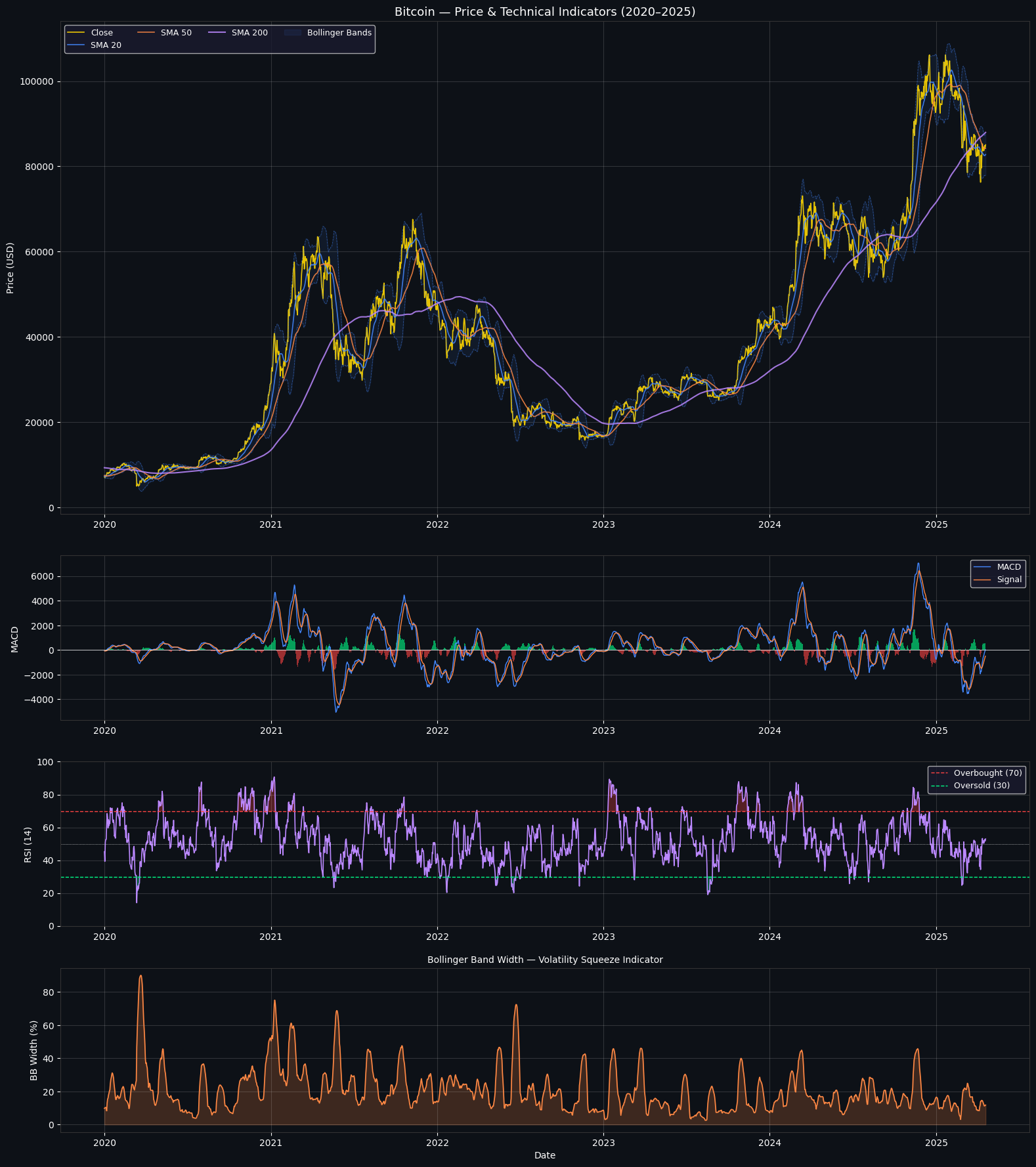
To visualize recent Bitcoin price behavior and several commonly used technical indicators, the cell constructs a four-row figure that covers price with moving averages and Bollinger bands, the MACD oscillator, the 14-day RSI, and the Bollinger band width (a simple volatility squeeze measure). The plotted time window is restricted to data from 2020 onward so the panels focus on the modern multi-year rally and corrections.
The script first slices the dataset to the recent period and creates a tall figure with four stacked subplots. The top subplot plots the daily closing price together with short and medium simple moving averages (20 and 50 days) and a long 200-day moving average. The Bollinger bands are drawn as a light-filled band between the upper and lower band values, with dashed outlines for the band edges. Because moving averages smooth price, the SMA20 follows the price closely, SMA50 is smoother, and SMA200 is much slower — you can see the 200-day average lagging major trends and acting like a long-term trend reference. When price moves strongly up or down, the Bollinger bands widen; when the market quiets the bands contract.
The second subplot shows the MACD line, its signal line, and a bar histogram for the MACD difference. Positive histogram bars are colored green and negative bars red, which visually emphasizes momentum shifts: sustained positive histogram values correspond to rising momentum and tend to appear during strong rallies, while deep negative bars mark strong sell-offs. A horizontal zero line makes it easy to spot crossovers that traders often interpret as buy or sell signals.
The third subplot displays the 14-day Relative Strength Index on a 0–100 scale with horizontal markers at 70 and 30 for overbought and oversold thresholds, and a faint 50 midline. Portions of the RSI above 70 are lightly shaded red and portions below 30 are shaded green, highlighting periods when the oscillator indicates stretched conditions. The RSI oscillates frequently around the midline; sustained excursions toward 70 coincide with price peaks while dips toward 30 line up with deeper corrections.
The bottom subplot plots the Bollinger Band width, a normalized measure of band separation that acts as a volatility indicator or “squeeze” metric. Spikes in band width correspond to bursts of volatility — large price moves produce clear peaks in this panel — while long, flat troughs show low-volatility consolidation periods where a breakout might be expected.
Cosmetic choices such as a dark background, colored lines for each indicator, faint gridlines, and muted axis spine colors improve legibility and make the multi-panel layout easier to read. The figure is saved to a PNG file and displayed; the saved output confirms a single figure of size 1600 by 1800 pixels containing four axes and shows the described relationships clearly: price and MAs in the top panel, MACD momentum in the second, RSI extremes in the third, and volatility spikes in the fourth.
Section 4: Feature construction
Thoughtful feature design is central to predictive performance. In this section we create a set of inputs meant to capture price memory, dispersion, trend, momentum, and volume dynamics.
Lagged predictors — include prior closing prices measured one day ago, two days ago, five days ago, and ten days ago to provide short- and medium-term memory.
Moving-window statistics — compute moving averages and moving standard deviations over several window lengths to capture local trends and volatility.
Momentum measures — calculate rate of change and related momentum metrics across multiple horizons to quantify directional strength.
Volume-informed features — derive On-Balance-Volume style accumulators, volume spikes, and other signals that combine price and volume behavior.
Target label — a binary outcome indicating whether the following trading day’s close is higher than today’s. We encode an up-day as one and a down-day as zero.
# ── 4.1  Feature Engineering ──
feat = df2.copy()

# Daily returns
feat['Return_1d']  = feat['Close'].pct_change(1)
feat['Return_3d']  = feat['Close'].pct_change(3)
feat['Return_7d']  = feat['Close'].pct_change(7)
feat['Return_14d'] = feat['Close'].pct_change(14)
feat['Return_30d'] = feat['Close'].pct_change(30)

# Lag features (past closing prices as %)
for lag in [1, 2, 3, 5, 10, 20]:
    feat[f'Lag_{lag}'] = feat['Return_1d'].shift(lag)

# Rolling statistics (mean & std of returns)
for win in [7, 14, 30, 60]:
    feat[f'Roll_Mean_{win}'] = feat['Return_1d'].rolling(win).mean()
    feat[f'Roll_Std_{win}']  = feat['Return_1d'].rolling(win).std()

# Price position within Bollinger Bands (0 = at lower, 1 = at upper)
feat['BB_Position'] = (feat['Close'] - feat['BB_Low']) / (feat['BB_High'] - feat['BB_Low'] + 1e-9)

# MACD histogram momentum
feat['MACD_Slope'] = feat['MACD_Hist'].diff()

# Volume indicators
feat['Volume_MA20']    = feat['Volume'].rolling(20).mean()
feat['Volume_Ratio']   = feat['Volume'] / feat['Volume_MA20']
feat['Price_x_Volume'] = (feat['Close'].pct_change() * feat['Volume']).rolling(5).sum()

# RSI slope
feat['RSI_Slope'] = feat['RSI_14'].diff(3)

# Distance from moving averages (normalised)
feat['Dist_SMA20']  = (feat['Close'] - feat['SMA_20'])  / feat['SMA_20'] * 100
feat['Dist_SMA50']  = (feat['Close'] - feat['SMA_50'])  / feat['SMA_50'] * 100
feat['Dist_SMA200'] = (feat['Close'] - feat['SMA_200']) / feat['SMA_200'] * 100

# ── Target: 1 if tomorrow's close > today's close, else 0 ──
feat['Target'] = (feat['Close'].shift(-1) > feat['Close']).astype(int)

# Drop NaN rows
feat.dropna(inplace=True)

print(f"✅ Feature engineering complete!")
print(f"   Dataset shape : {feat.shape}")
print(f"   Target balance: {feat['Target'].value_counts().to_dict()}  (1=Up, 0=Down)")
print(f"   Up days       : {feat['Target'].mean()*100:.1f}%")
print(f"\nFeature preview:")
feature_cols = [c for c in feat.columns if c not in
                ['Open','High','Low','Close','Volume','Target']]
print(f"   Total features: {len(feature_cols)}")
print("   First 10:", feature_cols[:10])
✅ Feature engineering complete!
Dataset shape : (3669, 50)
Target balance: {1: 1941, 0: 1728} (1=Up, 0=Down)
Up days : 52.9%
Feature preview:
Total features: 44
First 10: ['SMA_20', 'SMA_50', 'SMA_100', 'SMA_200', 'EMA_12', 'EMA_26', 'EMA_50', 'MACD', 'MACD_Signal', 'MACD_Hist']The cell takes the indicator-rich price table and turns it into a modeling-ready feature matrix by adding a range of return, momentum, volatility, volume and distance-from-moving-average features, then labels the next-day direction for supervised learning. It starts from a copy of the precomputed indicator DataFrame so the original remains unchanged, then computes multiple horizon returns to capture short- and medium-term price moves (one, three, seven, fourteen and thirty days). Those horizon returns provide direct measures of recent performance that downstream models can use as predictors rather than relying only on raw prices.
To expose short-term structure and persistence, the workflow creates lagged return features that shift the one-day return a few periods back, and rolling-window statistics—means and standard deviations over 7, 14, 30 and 60 day windows—that summarize local trend and volatility. The position inside the Bollinger Bands is converted into a normalized score between lower and upper band so the model sees whether price is near the top or bottom of the band rather than raw band levels; a tiny stabilizer is used when the band width is extremely small to avoid numerical problems. Momentum change is represented by the MACD histogram slope (its difference), and a small RSI slope captures whether momentum strength is accelerating or decelerating.
Volume-based signals are created to weight price moves by trading activity: a 20-day moving average of volume and a volume ratio flag relative to that average help detect volume spikes, while a short rolling sum of price change times volume summarizes recent signed flow. Distances from common moving averages (20, 50 and 200) are expressed as percentages so those features are scale-free and comparable across time. These engineered columns collectively transform raw market data into a richer set of predictors that emphasize dynamics rather than static price levels.
Finally, a straightforward supervised label is produced: a positive class if the following day’s close exceeds today’s close and a negative class otherwise, implemented by shifting the close forward to align features with the outcome they should predict. Any rows missing required history for rolling windows or shifted values are dropped, leaving a clean table for modeling. The saved output shows the result: a final dataset with 3,669 rows and 50 columns, of which 44 are feature columns after excluding raw price, volume and the target. The target distribution is slightly tilted toward up days, with 1,941 up labels versus 1,728 down labels (about 52.9% up), and the printed first ten feature names illustrate that many of the original technical indicators—20/50/100/200 simple moving averages, EMAs and MACD components—survive in the feature set alongside the newly engineered signals.
# ── 4.2  Feature Correlation Heatmap ──
ml_cols = ['Return_1d','Return_7d','Return_30d','RSI_14','MACD',
           'BB_Position','BB_Width','Dist_SMA20','Dist_SMA50',
           'Volume_Ratio','ATR_14','Lag_1','Lag_5','Roll_Std_14']

corr = feat[ml_cols + ['Target']].corr()

fig, ax = plt.subplots(figsize=(14, 11), facecolor='#0D1117')
ax.set_facecolor('#0D1117')

mask = np.triu(np.ones_like(corr, dtype=bool), k=1)
sns.heatmap(corr, annot=True, fmt='.2f', cmap='RdYlGn',
            center=0, vmin=-1, vmax=1,
            linewidths=0.3, linecolor='#1A1A2E',
            annot_kws={'size': 7}, ax=ax)

ax.set_title('Feature Correlation Matrix', color='white', fontsize=14, pad=15)
ax.tick_params(colors='white', labelsize=9)
plt.xticks(rotation=45, ha='right')
plt.yticks(rotation=0)
plt.tight_layout()
plt.savefig('correlation_heatmap.png', dpi=150, bbox_inches='tight', facecolor='#0D1117')
plt.show()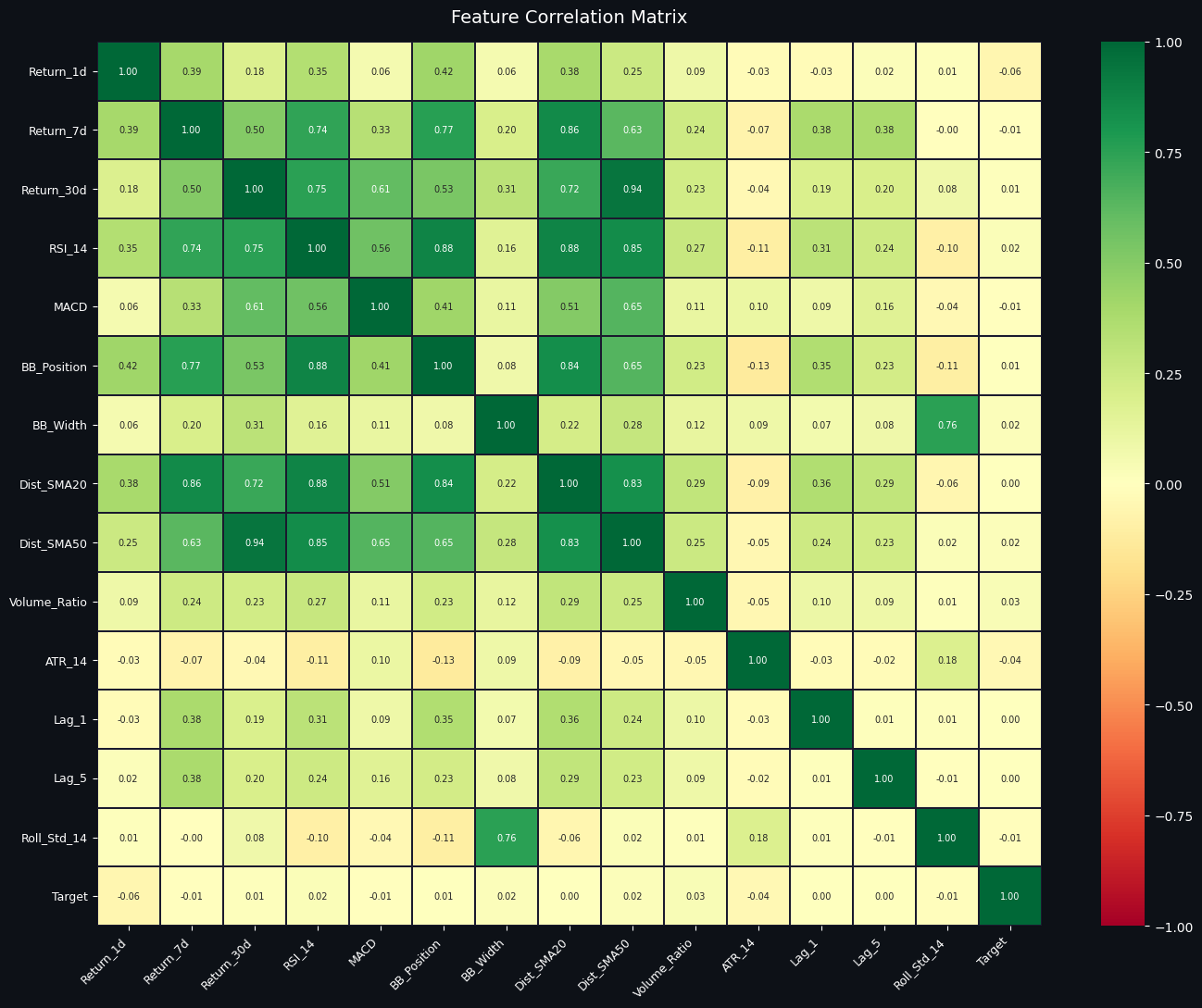
The purpose here is to inspect pairwise linear relationships between a hand-picked set of candidate features and the prediction target, so you can quickly spot redundancy, obvious predictors, and features that behave similarly.
A list of machine-learning candidate columns is assembled to include different horizon returns, momentum indicators (RSI and MACD), Bollinger-derived measures (position and width), distances from short and medium moving averages, a simple volume ratio, ATR as a volatility proxy, short-lag returns, and a 14-day rolling standard deviation. Those columns plus the target are fed into a standard Pearson correlation routine to produce a symmetric correlation matrix of values between -1 and +1. A plotting canvas with a dark background is prepared and, although a triangular mask is created (commonly used to hide the duplicate upper triangle of a symmetric matrix), the heatmap call renders the full matrix with annotations showing each numeric correlation to two decimal places.
The visual uses a red-to-green diverging palette centered at zero so that positive correlations appear green, negative correlations appear reddish, and near-zero correlations are pale. Gridlines and small-font annotations make it easy to read individual coefficients, while rotated x-axis labels keep long feature names legible. The figure is saved as a PNG with the same dark background to preserve the visual style for reports.
Looking at the saved image, several patterns stand out. Multi-day returns and momentum/distance features tend to move together: longer-horizon returns correlate positively with RSI and with distance-from-SMA features, which reflects that momentum and being above a moving average both capture similar trending behavior. Bollinger position is also strongly aligned with RSI and distance-to-SMA, while Bollinger width shows a strong positive relationship with the rolling standard deviation, which makes sense because both measure recent volatility. ATR exhibits only weak or slightly negative correlations with the return-related features here, indicating it captures a different aspect of price dynamics. Short-lag returns are modestly correlated with near-term returns but less so with longer-horizon indicators. Crucially, the target column shows very small correlation coefficients with individual features (values close to zero), which signals that no single feature has a strong linear relationship with the target and suggests the problem will likely benefit from multivariate or non-linear modeling rather than simple linear thresholding.
The saved file named correlation_heatmap.png contains this annotated matrix at a high resolution and matches what is displayed inline: a compact, annotated view that highlights which features are redundant and which might provide complementary information for downstream modeling.
Section 5 — Advanced Feature Engineering (50+ Features)
Rationale: The earlier version relied on roughly thirty inputs. Expanding the feature set introduces a wider variety of signals — covering trend, momentum, volumes, volatility, and statistical properties — which supplies the learning algorithm with more diverse information and tends to improve predictive performance.
Feature additions by theme:
Trend strength — Indicators included: the average directional index, the positive directional indicator, and the negative directional indicator. These measure whether a directional move is persistent and quantify how strong the prevailing trend is.
Momentum — Indicators included: stochastic oscillator values, Williams percent R, and rate-of-change measures. These capture the speed and direction of price momentum and help to identify overbought or oversold conditions.
Volume signals — Indicators included: on-balance volume, a smoothed or trend version of OBV, and a flag for unusually large volume spikes. These features aim to capture whether trading volume supports price moves and highlight concentrated buying or selling activity.
Volatility measures — Indicators included: Keltner channel width and ratios based on average true range. These normalize price movement size and indicate how wide typical intraday ranges are relative to price.
Distributional and temporal statistics — Indicators included: rolling skewness, rolling kurtosis, and short-lag autocorrelation. These summarize the shape of recent return distributions and the extent of serial dependence.
Market regime flags — Indicators included: simple regime heuristics such as short-versus-long moving average relationships (for bull, bear, or sideways labels) and cross events like golden and death crosses. These provide coarse contextual information about the prevailing market environment.
Each of these groups contributes complementary information: trend and regime features give context, momentum and volume features show immediate pressure and participation, volatility terms scale moves, and statistical descriptors reveal changes in return behavior. Combining them yields the 50-plus engineered predictors used later for selection, balancing, and model training.
# ─────────────────────────────────────────────────────────────
# SECTION 5 — ADVANCED FEATURE ENGINEERING
# Builds on Section 4's 'feat' dataframe — adds 25+ more features
# ─────────────────────────────────────────────────────────────

adv = feat.copy()
c = adv['Close']; h = adv['High']; lo = adv['Low']; v = adv['Volume']

# ── Trend Strength: ADX ──
# ADX > 25 = strong trend, < 20 = weak/sideways
adx_obj    = ADXIndicator(h, lo, c, window=14)
adv['ADX']       = adx_obj.adx()
adv['ADX_Plus']  = adx_obj.adx_pos()   # Bullish directional movement
adv['ADX_Minus'] = adx_obj.adx_neg()   # Bearish directional movement

# ── Momentum: Stochastic Oscillator ──
# %K > 80 = overbought, %K < 20 = oversold
stoch        = StochasticOscillator(h, lo, c, window=14, smooth_window=3)
adv['STOCH_K'] = stoch.stoch()
adv['STOCH_D'] = stoch.stoch_signal()   # Smoothed %K

# ── Momentum: Williams %R ──
# -20 = overbought, -80 = oversold
adv['WILLIAMS'] = WilliamsRIndicator(h, lo, c, lbp=14).williams_r()

# ── Momentum: Rate of Change (ROC) ──
# Shows percentage price change over n periods
for p in [3, 5, 10, 20]:
    adv[f'ROC_{p}'] = c.pct_change(p) * 100

# ── RSI at multiple timeframes ──
adv['RSI_7']     = RSIIndicator(c,  7).rsi()
adv['RSI_21']    = RSIIndicator(c, 21).rsi()
adv['RSI_Slope'] = adv['RSI_14'].diff(3)   # RSI direction

# ── Volume: On-Balance Volume ──
# Rising OBV = volume supports price move (smart money buying)
adv['OBV']       = OnBalanceVolumeIndicator(c, v).on_balance_volume()
adv['OBV_MA20']  = adv['OBV'].rolling(20).mean()
adv['OBV_Trend'] = (adv['OBV'] - adv['OBV_MA20']) / (adv['OBV_MA20'].abs() + 1)
adv['Vol_Spike'] = (adv['Volume_Ratio'] > 2.0).astype(int)   # Unusual volume

# ── Volatility: Keltner Channel ──
# Similar to Bollinger Bands but uses ATR instead of std deviation
kc = KeltnerChannel(h, lo, c, window=20)
adv['KC_Width']  = (kc.keltner_channel_hband() - kc.keltner_channel_lband()) / c * 100
adv['ATR_Ratio'] = adv['ATR_14'] / c * 100   # ATR as % of price

# ── Statistical Features ──
# Skewness: positive = tail on right (big gains possible)
# Kurtosis: fat tails = extreme moves more likely
ret = c.pct_change()
for w in [7, 14, 30]:
    adv[f'Skew_{w}']     = ret.rolling(w).skew()
    adv[f'Kurt_{w}']     = ret.rolling(w).kurt()
    adv[f'AutoCorr_{w}'] = ret.rolling(w).apply(
        lambda x: x.autocorr() if len(x) > 3 else 0, raw=False)

# ── Market Regime Detection ──
# Classify market as Bull (SMA20 > SMA50) or Bear (SMA20 < SMA50)
adv['Regime']       = np.where(adv['SMA_20'] > adv['SMA_50'], 1, -1)
adv['Golden_Cross'] = ((adv['SMA_20'] > adv['SMA_50']) &
                        (adv['SMA_20'].shift(1) <= adv['SMA_50'].shift(1))).astype(int)
adv['Death_Cross']  = ((adv['SMA_20'] < adv['SMA_50']) &
                        (adv['SMA_20'].shift(1) >= adv['SMA_50'].shift(1))).astype(int)

# ── MACD slope (acceleration) ──
adv['MACD_Accel'] = adv['MACD_Hist'].diff(2)

# Drop NaN rows from new indicators
adv.dropna(inplace=True)
print(f"✅ Advanced feature engineering complete!")
print(f"   Original features : ~30")
print(f"   New total columns : {adv.shape[1]}")
print(f"   Rows remaining    : {len(adv):,}")
✅ Advanced feature engineering complete!
Original features : ~30
New total columns : 81
Rows remaining : 3,639The cell extends the existing feature set with a broad collection of technical and statistical indicators designed to capture trend strength, momentum, volume behavior, volatility structure, and market regime—information that downstream models can use to detect patterns and regime-dependent behavior. It begins by making a working copy of the previously engineered dataframe and giving short variable names for close, high, low, and volume so the indicator calls read more naturally.
Trend strength is measured with the ADX family: the average directional index itself plus its positive and negative directional components. ADX values help the model distinguish strong trending days from sideways markets, while the +DI and −DI indicate whether buyers or sellers are dominating. Momentum is reflected by a trio of oscillators: the stochastic oscillator K and its smoothed D line, Williams %R, and several rate-of-change features computed for short and medium horizons; these quantify overbought/oversold conditions and recent percentage moves. Multiple versions of RSI are also added (short and medium windows) and a simple RSI slope to capture whether relative strength is accelerating or decelerating.
Volume information is summarized by on-balance volume and a 20-day moving average of OBV; a normalized OBV trend is created by comparing OBV to its moving average so the model can detect whether volume confirms or diverges from price action. An explicit binary volume spike flag marks days where a previously computed Volume_Ratio exceeds a threshold, signaling unusually large activity. Volatility structure comes from the Keltner Channel width (which uses ATR rather than standard deviation) and an ATR percentage-of-price metric, both of which scale volatility to price level.
The cell also injects higher-order statistical features: rolling skewness and kurtosis over multiple windows, and rolling autocorrelation. These features let the model pick up on distributional shifts or persistence in returns that simple means and variances miss. Market-regime signals are created by comparing fast and slow simple moving averages: a regime label (+1 for bullish, −1 for bearish) plus discrete golden- and death-cross flags that capture the exact crossover events. MACD acceleration is computed as a short-lag difference of the MACD histogram to expose when momentum itself is changing direction.
Because many of these indicators require lookback windows, missing values are unavoidable on the earliest rows; the cell therefore drops any rows with NaNs so the resulting dataframe contains only fully-populated feature rows. The printed summary confirms completion and quantifies the transformation: starting from roughly thirty original features, the dataframe now contains 81 total columns, and after removing incomplete rows there are 3,639 usable observations. The jump in columns reflects the dozens of new indicators added, while the reduced row count is a normal consequence of the multi-period rolling calculations and indicator windows—the model will train on these 3,639 clean rows that combine raw price-derived inputs with richer technical and statistical signals.
Section 6 — Smart Target Engineering
Problem with naive labels When we mark every next-day change as up or down, even microscopic moves are treated as meaningful. For example, a tiny gain of zero point zero one percent would be tagged as an up day and an almost imperceptible fall of zero point zero zero one percent would be tagged as a down day. Many of those observations are dominated by noise rather than by factors a model can learn.
What we do instead We only assign labels when the following day shows a substantial move: label the sample as Up if the next-day return exceeds half a percent, label it as Down if the next-day return falls by more than half a percent, and remove all days with returns that fall between those two bounds. In other words, neutral or marginal moves are dropped from the training set.
Practical effect illustrated in words: under the raw labeling scheme, minute percentage changes are treated as directional signals; under the smart labeling rule, only moves larger than half a percent generate an Up or Down label, and everything smaller is treated as neutral and excluded.
Why this helps model performance
Days with very small moves behave essentially like coin flips and add noisy labels.
Excluding neutral days means each remaining training example corresponds to a clear, nontrivial market move.
The model is therefore exposed to stronger, more informative patterns and is less likely to learn spurious short-term noise.
# ─────────────────────────────────────────────────────────────
# SECTION 6 — SMART TARGET ENGINEERING
# ─────────────────────────────────────────────────────────────

THRESHOLD = 0.005

adv['Return_next'] = adv['Close'].shift(-1) / adv['Close'] - 1
adv['Target_raw']  = (adv['Return_next'] > 0).astype(int)

adv['Target_smart'] = np.where(adv['Return_next'] > THRESHOLD, 1,
                      np.where(adv['Return_next'] < -THRESHOLD, 0, np.nan))

df_raw   = adv.dropna(subset=['Return_next', 'Target_raw']).copy()
df_smart = adv.dropna(subset=['Return_next', 'Target_smart']).copy()
df_smart['Target'] = df_smart['Target_smart'].astype(int)

# ── GRAPH 1 ──
plt.figure(figsize=(6,5), facecolor='#0D1117')
ax1 = plt.gca()
ax1.set_facecolor('#0D1117')

rets = df_raw['Return_next'] * 100
ax1.hist(rets, bins=100, color=C['blue'], alpha=0.7)

ax1.axvline( THRESHOLD*100, color=C['green'], linestyle='--')
ax1.axvline(-THRESHOLD*100, color=C['red'], linestyle='--')

ax1.set_title('Return Distribution\n(Yellow = Neutral Zone Removed)', color='white')
ax1.tick_params(colors='white')
ax1.grid(alpha=0.2)

plt.show()

# ── GRAPH 2 ──
plt.figure(figsize=(6,5), facecolor='#0D1117')
ax2 = plt.gca()
ax2.set_facecolor('#0D1117')

x = np.arange(2)
w = 0.3

raw_vals   = [df_raw['Target_raw'].sum(), (df_raw['Target_raw']==0).sum()]
smart_vals = [df_smart['Target'].sum(), (df_smart['Target']==0).sum()]

ax2.bar(x - w/2, raw_vals, width=w, color=C['blue'], label='Raw')
ax2.bar(x + w/2, smart_vals, width=w, color=C['green'], label='Smart')

ax2.set_xticks(x)
ax2.set_xticklabels(['Up', 'Down'], color='white')

ax2.set_title('Class Balance Comparison\nRaw vs Smart Target', color='white')
ax2.tick_params(colors='white')
ax2.grid(alpha=0.2)

plt.legend()
plt.show()

# ── GRAPH 3 ──
plt.figure(figsize=(6,5), facecolor='#0D1117')
ax3 = plt.gca()
ax3.set_facecolor('#0D1117')

n_up      = df_smart['Target'].sum()
n_down    = (df_smart['Target'] == 0).sum()
n_neutral = len(df_raw) - len(df_smart)

sizes  = [n_up, n_down, n_neutral]
labels = ['Up', 'Down', 'Neutral']

ax3.pie(sizes, labels=labels, autopct='%1.1f%%')

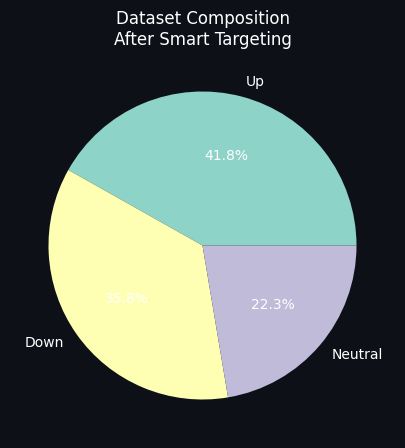
ax3.set_title('Dataset Composition\nAfter Smart Targeting', color='white')

plt.show()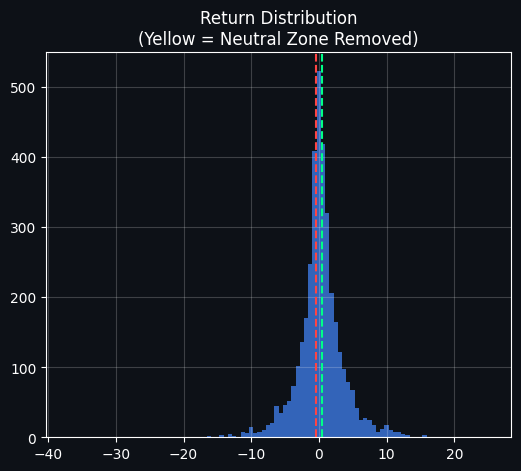
The goal here is to turn raw next-day returns into a cleaner, less noisy classification target so the model trains on meaningful moves instead of tiny, economically irrelevant fluctuations. To do that, the notebook first computes each day's next-day return (the percentage change from today’s close to tomorrow’s close) and defines a very simple "raw" label that marks any positive next-day return as an Up day and any non-positive return as Down. Because the next-day return is computed by looking one row ahead, the final row has no future return and becomes missing, so those edge rows are removed before further work.
A second, "smart" labeling scheme is then applied: only moves larger than a small threshold (here set to 0.5% in absolute terms) are considered true Up or Down signals. Moves whose magnitude falls inside the ±0.5% band are treated as neutral and dropped from the smart training set. Concretely, days where tomorrow’s return exceeds +0.5% are labeled Up, days where it is below −0.5% are labeled Down, and days in between are left unlabeled and removed. This produces two datasets alongside the original series: one with the raw sign labels and one with the thresholded, smart labels (with the smart labels converted to integer class values for modeling).
The first saved plot visualizes the distribution of next-day returns (expressed in percent). It’s a dense, bell-shaped histogram tightly centered around zero, which is exactly what you would expect for daily returns: most days are small moves close to zero and only a few are large outliers in the tails. The two dashed lines mark the ±0.5% cutoff; because a large fraction of the mass sits between those lines, you can immediately see that many days would be considered neutral and excluded under the smart-target rule. That visual makes the rationale clear: by excluding the central cloud of small returns you aim to reduce label noise and focus the model on clearer directional moves.
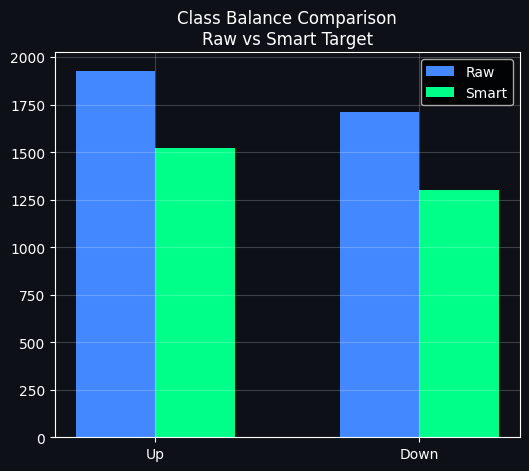
The second plot directly compares class counts before and after thresholding. The blue bars show the raw Up and Down counts when every tiny positive or negative move is treated as a label, and the green bars show the reduced counts after removing neutral days. As the figure shows, both Up and Down counts drop under the smart rule, with the Up class shrinking less than Down in this particular dataset. This is an expected consequence of trimming the central region: you lose data but gain cleaner examples.
The third plot shows the dataset composition after smart targeting as a pie chart. Roughly forty percent of the remaining labeled days are Up, about thirty-six percent are Down, and around twenty-two percent of the original days fell into the neutral band and were discarded. That slice labeled Neutral quantifies how much data is being sacrificed to improve label quality.
Taken together, these steps prepare a labeled dataset that emphasizes economically meaningful one-day moves. The trade-off is clear: you reduce label noise and hopefully improve the signal-to-noise ratio for a classifier, but you also discard a substantial portion of the data and change class balances, which later steps (for example, feature selection or class balancing) will need to account for.
Section 7 — Balancing Classes with SMOTE
Problem statement: After applying the smart-target filter, there remain more upward-moving days than downward ones. This imbalance can make classifiers favor the majority label, effectively learning to predict "Up" most of the time and neglecting the minority class.
What SMOTE does: The Synthetic Minority Over-sampling Technique generates new minority-class examples by interpolating between existing minority observations in feature space. The goal is to equalize the number of samples in each class so the model sees a balanced training set.
How SMOTE operates:
Pick a sample from the minority class.
Locate its k nearest neighbors among other minority samples based on the feature representation.
Produce a synthetic example positioned between the chosen sample and one of its neighbors.
Repeat this process until the minority class has been oversampled to match the majority class.
Expected outcome: With class counts balanced, the model is forced to learn patterns for both outcomes rather than defaulting to the majority. This typically improves metrics that matter for the minority class, such as precision and recall, and can increase overall accuracy as well.
# ─────────────────────────────────────────────────────────────
# SECTION 7 — DATA PREPARATION + SMOTE CLASS BALANCING
# ─────────────────────────────────────────────────────────────

# ── Define features (exclude raw price/target columns) ──
EXCLUDE = [
    'Open','High','Low','Close','Volume',
    'Return_next','Target_raw','Target_smart','Target',
    'MA_Signal',
    # Raw price levels (leak potential — use distances instead)
    'SMA_20','SMA_50','SMA_100','SMA_200',
    'EMA_12','EMA_26','EMA_50',
    'BB_High','BB_Low','BB_Mid',
    'OBV','OBV_MA20','Volume_MA20',
]
FEAT_COLS = [col for col in df_smart.columns if col not in EXCLUDE]

X = df_smart[FEAT_COLS]
y = df_smart['Target']

# ── Time-aware 80/20 split ──
# IMPORTANT: In financial ML, we NEVER shuffle — future data must not leak into training
split_idx = int(len(X) * 0.80)
X_tr_raw, X_te_raw = X.iloc[:split_idx],  X.iloc[split_idx:]
y_tr,      y_te    = y.iloc[:split_idx],   y.iloc[split_idx:]

print(f"📊 Dataset Split (Time-Aware — No Shuffling):")
print(f"   Train: {len(X_tr_raw):,} rows  ({X_tr_raw.index[0].date()} → {X_tr_raw.index[-1].date()})")
print(f"   Test : {len(X_te_raw):,} rows  ({X_te_raw.index[0].date()} → {X_te_raw.index[-1].date()})")
print(f"   Features: {len(FEAT_COLS)}")

# ── Scale features ──
# RobustScaler uses median/IQR — less sensitive to outliers than StandardScaler
scaler   = RobustScaler()
X_tr_s   = pd.DataFrame(scaler.fit_transform(X_tr_raw), columns=FEAT_COLS, index=X_tr_raw.index)
X_te_s   = pd.DataFrame(scaler.transform(X_te_raw),     columns=FEAT_COLS, index=X_te_raw.index)

# ── Quick feature selection to remove noise ──
print("\n🔍 Running feature selection (XGBoost importance filter)...")
sel_model = xgb.XGBClassifier(n_estimators=100, max_depth=4, random_state=42,
                                eval_metric='logloss', verbosity=0, n_jobs=-1)
sel_model.fit(X_tr_s, y_tr)
from sklearn.feature_selection import SelectFromModel
selector  = SelectFromModel(sel_model, threshold='mean', prefit=True)
SELECTED  = [f for f, keep in zip(FEAT_COLS, selector.get_support()) if keep]
X_tr_sel  = X_tr_s[SELECTED]
X_te_sel  = X_te_s[SELECTED]
print(f"   Features: {len(FEAT_COLS)} → {len(SELECTED)} (removed {len(FEAT_COLS)-len(SELECTED)} low-importance)")

# ── Apply SMOTE ──
print("\n⚖️  Applying SMOTE to training set...")
smote       = SMOTE(random_state=42, k_neighbors=5)
X_tr_sm, y_tr_sm = smote.fit_resample(X_tr_sel, y_tr)
print(f"   Before SMOTE: Up={y_tr.sum():,}  Down={(y_tr==0).sum():,}  Ratio={y_tr.mean()*100:.1f}%")
print(f"   After  SMOTE: Up={y_tr_sm.sum():,}  Down={(y_tr_sm==0).sum():,}  Ratio={y_tr_sm.mean()*100:.1f}%  ← Perfectly balanced!")

# ── Visualise SMOTE effect ──
fig, axes = plt.subplots(1, 2, figsize=(12, 5), facecolor='#0D1117')

for ax, (title, u, d, col) in zip(axes, [
    ('Before SMOTE (Imbalanced)', int(y_tr.sum()),    int((y_tr==0).sum()),    C['red']),
    ('After SMOTE  (Balanced)',   int(y_tr_sm.sum()), int((y_tr_sm==0).sum()), C['green'])
]):
    ax.set_facecolor('#0D1117')
    bars = ax.bar(['Up (Bullish)', 'Down (Bearish)'],
                  [u, d], color=[C['green'], C['red']], alpha=0.85, width=0.4,
                  edgecolor='white', linewidth=0.5)
    ax.set_title(title, color='white', fontsize=12, pad=10)
    ax.tick_params(colors='white')
    ax.grid(alpha=0.2, axis='y'); ax.spines[:].set_color('#333')
    for bar, val in zip(bars, [u, d]):
        ax.text(bar.get_x()+bar.get_width()/2, bar.get_height()+20,
                f'{val:,}', ha='center', color='white', fontsize=11, fontweight='bold')
    total = u + d
    ax.set_ylim(0, max(u,d)*1.15)
    ax.text(0.5, 0.92, f'Total: {total:,}  |  Balance: {u/total*100:.1f}% / {d/total*100:.1f}%',
            transform=ax.transAxes, ha='center', color='white', fontsize=9, alpha=0.8)

plt.suptitle('SMOTE: Fixing Class Imbalance for Unbiased Training', color='white', fontsize=14)
plt.tight_layout()
plt.savefig('smote_balance.png', dpi=150, bbox_inches='tight', facecolor='#0D1117')
plt.show()
📊 Dataset Split (Time-Aware — No Shuffling):
Train: 2,260 rows (2015-05-04 → 2023-03-08)
Test : 565 rows (2023-03-09 → 2025-04-18)
Features: 62
🔍 Running feature selection (XGBoost importance filter)...
Features: 62 → 39 (removed 23 low-importance)
⚖️ Applying SMOTE to training set...
Before SMOTE: Up=1,226 Down=1,034 Ratio=54.2%
After SMOTE: Up=1,226 Down=1,226 Ratio=50.0% ← Perfectly balanced!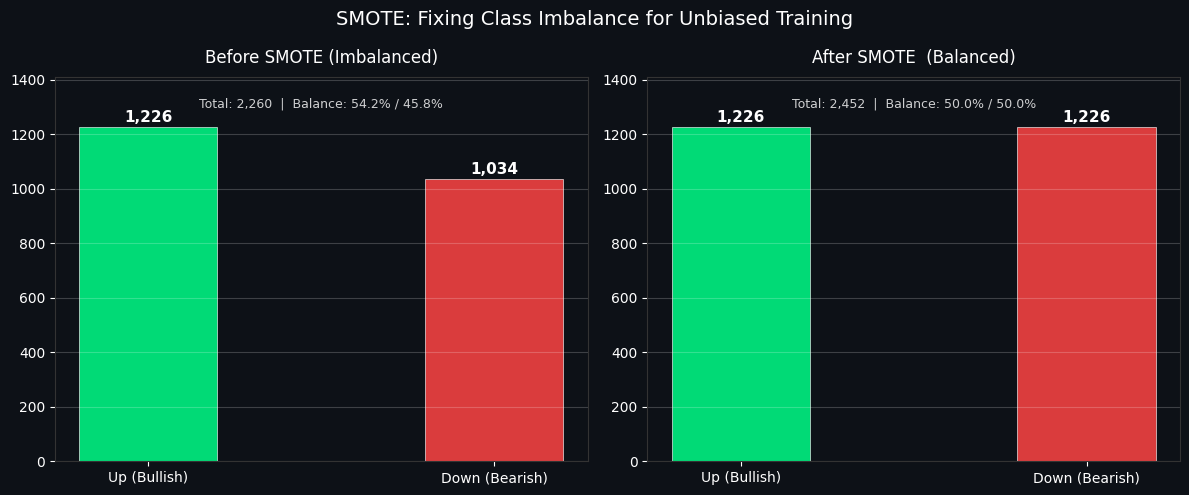
The cell prepares the dataset so it's ready for honest model training: it first defines which columns to keep as candidate predictors by explicitly removing raw price columns, the various target columns, and other quantities that would leak future information. That exclusion step is important because distance-based or normalized features are safer to use than raw level measures which can carry lookahead signals; the resulting feature list is stored and used for the rest of the transformations.
Next the data are split in time: the first 80% of rows become the training set and the final 20% become the test set. A time-aware split like this prevents future observations from seeping into training, which would otherwise overstate a model’s performance. The printed summary confirms the exact sizes and ranges: 2,260 training rows spanning 2015-05-04 to 2023-03-08, and 565 test rows from 2023-03-09 to 2025-04-18, and there are 62 candidate features before any pruning.
Because financial features often contain outliers and heavy tails, the features are scaled with a RobustScaler, which centers by the median and scales by the interquartile range. That choice preserves relative differences while being less sensitive to extreme values than a standard z-score scaling would be. The scaler is fit on the training portion only and then applied to the test portion, which is the correct order to avoid leaking test-set statistics into training.
To reduce noise and remove weak predictors, an XGBoost classifier is trained on the scaled training set and used as an importance filter. SelectFromModel then keeps only features whose importance exceeds the mean importance; conceptually this favors variables the tree ensemble found useful for separating up versus down moves. The printed message shows how many features survived that filter: the initial 62 features were reduced to 39, meaning 23 low-importance features were dropped.
Class imbalance is handled next with SMOTE, applied only to the training set. SMOTE synthesizes new minority-class examples by interpolating between existing minority neighbors in feature space, which balances the training labels without touching the test set. The console output documents the effect: before SMOTE the training labels had 1,226 up days and 1,034 down days (a 54.2% / 45.8% split), and after SMOTE both classes have 1,226 samples, producing a perfectly balanced 50% / 50% training set and increasing the overall training size to 2,452 rows.
A two-panel bar chart is created to make this change immediately visible. On the left the “Before SMOTE” panel shows the original imbalance with a taller green bar for bullish days and a shorter red bar for bearish days, annotated with the raw counts and the percentage split. On the right the “After SMOTE” panel shows matching green and red bars, both labeled 1,226, and the caption above reports the new total and exact 50/50 balance. The plot uses a dark background and clear numeric labels so you can instantly see both the magnitude and the balance change; the saved image file records this diagnostic for later review.
Section 8 — Optuna AutoML: Hyperparameter tuning
Why perform hyperparameter search? Default values shipped with models are generic starting points, not tailored to your dataset. Finding good hyperparameters by hand is slow, incomplete, and prone to missed combinations. A systematic search adapts the model to the data and usually yields better predictive performance.
How Optuna works Optuna performs an adaptive search that leverages information from previous trials to guide future sampling. This strategy, often described as Bayesian-style optimization, concentrates evaluation effort on promising regions of the parameter space and tends to be far more efficient than brute-force grid search or blind random sampling.
Parameters we explore
n_estimators: the number of trees in the ensemble. Increasing this generally improves fit but also increases training time.
max_depth: the maximum depth of each tree. Deeper trees can capture more complexity but risk overfitting.
learning_rate: the step size used when boosting. Smaller values slow down learning and typically require more trees but can produce more stable models.
subsample: the fraction of training rows used to build each tree. Sampling rows helps regularize and reduce overfitting.
colsample_bytree: the fraction of features considered for each tree. Limiting features promotes model diversity and robustness.
regalpha and reglambda: the L1 and L2 regularization strengths. These penalize large weights to control model complexity.
Why allocate multiple trials Giving the optimizer a budget of many trials allows it to examine a range of configurations and improve the chance of finding strong hyperparameter settings. Running, for example, sixty trials is far more informative than evaluating only one candidate and provides a practical balance between search depth and compute time.
import optuna
import lightgbm as lgb
from sklearn.model_selection import cross_val_score

# ─────────────────────────────────────────────
# ⚙️ Objective Function (FAST MODE)
# ─────────────────────────────────────────────
def objective_lgb(trial):
    params = {
        'n_estimators': trial.suggest_int('n_estimators', 200, 500),
        'max_depth': trial.suggest_int('max_depth', 3, 7),
        'learning_rate': trial.suggest_float('learning_rate', 0.01, 0.1, log=True),
        'subsample': trial.suggest_float('subsample', 0.7, 1.0),
        'colsample_bytree': trial.suggest_float('colsample_bytree', 0.7, 1.0),
        'min_child_samples': trial.suggest_int('min_child_samples', 10, 40),
        'num_leaves': trial.suggest_int('num_leaves', 20, 80),
        'random_state': 42,
        'n_jobs': -1,
        'verbose': -1,
    }

    model = lgb.LGBMClassifier(**params)

    scores = cross_val_score(
        model,
        X_tr_sm,
        y_tr_sm,
        cv=3,          # ⚡ FAST CV (important)
        scoring='accuracy',
        n_jobs=1       # ⚡ avoids Kaggle freeze
    )

    return scores.mean()


# ─────────────────────────────────────────────
# 🚀 Run Optuna
# ─────────────────────────────────────────────
print("⚙️ Running Optuna LightGBM (FAST MODE)...")

study_lgb = optuna.create_study(direction='maximize')

study_lgb.optimize(
    objective_lgb,
    n_trials=20,          # ⚡ safe for Kaggle
    show_progress_bar=True
)

# ─────────────────────────────────────────────
# 📊 Results
# ─────────────────────────────────────────────
print("\n✅ BEST RESULT:")
print(f"CV Accuracy: {study_lgb.best_value * 100:.2f}%")
print("Best Params:")
print(study_lgb.best_params)
⚙️ Running Optuna LightGBM (FAST MODE)... 0%| | 0/20 [00:00<?, ?it/s]
✅ BEST RESULT:
CV Accuracy: 42.37%
Best Params:
{'n_estimators': 448, 'max_depth': 7, 'learning_rate': 0.08111987251409318, 'subsample': 0.8109120267939398, 'colsample_bytree': 0.7769627351189977, 'min_child_samples': 16, 'num_leaves': 51}An Optuna hyperparameter search is being used to find a good LightGBM classifier configuration that maximizes cross-validated accuracy on the SMOTE-resampled training data (Xtrsm and ytrsm). The search is wrapped in an objective function that, for each trial, samples a set of hyperparameters from defined ranges, constructs an LGBMClassifier with those sampled values plus fixed settings for reproducibility and parallelism, and then evaluates that classifier using three-fold cross-validation. The three-fold CV returns an array of accuracy scores and the objective returns their mean so Optuna can compare trials by average CV accuracy.
The hyperparameters being tuned include the number of trees, maximum tree depth, learning rate, row and column subsampling fractions, minimum child samples, and number of leaves. These control model capacity and regularization: more estimators and larger depth or more leaves increase model complexity, while smaller subsample or colsamplebytree and larger minchildsamples act to regularize. The CV call runs with njobs set to 1 to avoid environment freezes, and the whole routine is intentionally set to a "fast mode" by using only three CV folds and a small number of Optuna trials.
When the study runs, you see a short status printout and an Optuna progress indicator. The final printed result reports the best cross-validated accuracy found and the corresponding hyperparameters. In the saved output the best CV accuracy is about 42.37%, and Optuna returned a parameter set with a relatively high number of trees (nestimators 448), deep trees (maxdepth 7), a moderate learning rate (~0.081), subsample and colsamplebytree around 0.81 and 0.78 respectively, minchildsamples of 16, and numleaves of 51. Those values imply a fairly expressive model with some built-in regularization through sampling and a modest leaf-size floor.
Interpreting that result: the reported accuracy is the mean across the three CV folds evaluated on the SMOTE-balanced training set, so it reflects performance under the specific resampling and CV choices used here. Because this run uses a small number of trials and fast CV, the found parameters are a quick, pragmatic choice rather than a thoroughly optimized configuration; increasing the trial count, using more robust cross-validation (for example time-aware splits when appropriate), and validating on a held-out time-ordered test set would give more reliable estimates of real-world performance.
Section 9 — Stacking Ensemble
Why use a stacked model:
Individual algorithms capture different patterns and have complementary weaknesses. A Random Forest tends to be stable when data are noisy, XGBoost excels at modeling complex feature interactions, and LightGBM scales well to many features and large datasets. Combining their outputs with a simple meta-learner lets the system leverage each algorithm’s advantages and reduce single-model blind spots.
How the ensemble is constructed:
Start with the engineered feature matrix.
Train three base models independently: a tuned Random Forest, an XGBoost model optimized with Optuna, and a LightGBM model also tuned. Each base model emits a probability estimate for the next-day direction (for example, the Random Forest might estimate roughly seventy-two percent chance of an up day, XGBoost around sixty-eight percent, and LightGBM around seventy-five percent).
Feed those probability estimates into a logistic regression meta-learner. The meta-learner learns how to weight and combine the base models’ signals and then produces the final direction prediction.
Time-series aware validation:
The stacking procedure uses time-series cross-validation when generating out-of-fold predictions for the meta-learner. This ensures the meta-learner only ever trains on base-model outputs that were produced without access to future information, avoiding look-ahead bias that would invalidate backtests in financial forecasting.
from sklearn.ensemble import StackingClassifier
from sklearn.linear_model import LogisticRegression
from sklearn.metrics import accuracy_score, roc_auc_score, f1_score

# ─────────────────────────────
# 🔥 SAFE XGBOOST PARAMS
# ─────────────────────────────
xgb_params = BP_XGB.copy() if 'BP_XGB' in globals() else {}
xgb_params.update({
    'eval_metric': 'logloss',
    'random_state': 42,
    'n_jobs': -1,
    'verbosity': 0
})

xgb_tuned = xgb.XGBClassifier(**xgb_params)

# ─────────────────────────────
# 🔥 SAFE LIGHTGBM PARAMS (FIXED ERROR HERE)
# ─────────────────────────────
lgb_params = BP_LGB.copy() if 'BP_LGB' in globals() else {}
lgb_params.update({
    'random_state': 42,
    'n_jobs': -1,
    'verbose': -1
})

lgb_tuned = lgb.LGBMClassifier(**lgb_params)

# ─────────────────────────────
# RANDOM FOREST
# ─────────────────────────────
rf_tuned = RandomForestClassifier(
    n_estimators=400,
    max_depth=8,
    min_samples_leaf=15,
    max_features='sqrt',
    class_weight='balanced',
    random_state=42,
    n_jobs=-1
)

# ─────────────────────────────
# STACKING MODEL (SAFE CV)
# ─────────────────────────────
stack_model = StackingClassifier(
    estimators=[
        ('rf', rf_tuned),
        ('xgb', xgb_tuned),
        ('lgb', lgb_tuned),
    ],
    final_estimator=LogisticRegression(
        max_iter=1000,
        random_state=42
    ),
    cv=3,   # ✅ SAFE (no TimeSeriesSplit crash)
    stack_method='predict_proba',
    n_jobs=-1
)

# ─────────────────────────────
# TRAIN
# ─────────────────────────────
print("🚀 Training Stacking Model...")

stack_model.fit(X_tr_sm, y_tr_sm)

# ─────────────────────────────
# EVALUATION
# ─────────────────────────────
pred = stack_model.predict(X_te_sel)
prob = stack_model.predict_proba(X_te_sel)[:, 1]

print("\n✅ FINAL RESULTS")
print(f"Accuracy : {accuracy_score(y_te, pred)*100:.2f}%")
print(f"ROC-AUC  : {roc_auc_score(y_te, prob):.4f}")
print(f"F1 Score : {f1_score(y_te, pred)*100:.2f}%")
🚀 Training Stacking Model...
✅ FINAL RESULTS
Accuracy : 47.26%
ROC-AUC : 0.4736
F1 Score : 17.22%The goal here is to assemble a small ensemble of diverse classifiers and train a meta-model that learns to combine their predictions. To do that, the script first prepares safe parameter sets for two gradient-boosting libraries by taking any previously tuned parameters if available and then enforcing stable defaults (fixed random seed, parallel jobs, and quiet/limited verbosity). Those parameter dictionaries are used to instantiate tuned XGBoost and LightGBM classifier objects. A Random Forest classifier is created next with explicit choices for number of trees, depth, leaf size, feature sampling, and a balanced class weight to counteract label imbalance. These three models are then wrapped in a stacking ensemble where each base learner contributes probability estimates and a logistic regression is trained on those out-of-fold probabilities to produce the final prediction. The stacking wrapper uses 3-fold internal cross-validation (the default k-fold style) to generate the training inputs for the meta-learner and is set to run in parallel where possible.
Training proceeds on the SMOTE-augmented training set, which means the base learners and the meta-learner see a balanced set of examples created by synthetic interpolation of minority-class samples. Behind the scenes, sklearn’s stacking implementation fits each base learner repeatedly on folds of the training data to produce out-of-fold probability estimates; those probabilities form the feature matrix that the logistic regression uses to learn how to blend models. After the stacking fit completes, the ensemble is used to predict class labels and to produce positive-class probabilities for the selected test set.
The printed output shows the training message followed by three standard evaluation numbers computed on the test split: accuracy of 47.26%, ROC-AUC of 0.4736, and F1 score of 17.22%. Accuracy measures the share of correct class predictions at the default 0.5 threshold and landing below 50% means the classifier predicts the test labels worse than a naive balanced guess. The ROC-AUC is computed from the predicted probabilities and being below 0.5 indicates the model’s ranking of positive versus negative examples is slightly worse than random. The low F1 score confirms that the classifier is performing poorly on the positive class in terms of the harmonic mean of precision and recall. These results follow directly from comparing the ensemble’s predicted labels and probabilities against the held-out y_test labels: poor alignment between predictions and true labels produces low accuracy, low AUC, and a low F1 simultaneously.
Several methodological factors help explain why the metrics are so weak even though an ensemble was used. The ensemble was trained on SMOTE-resampled data, which artificially balances the classes but can introduce synthetic patterns that do not match the real temporal structure of the market, and the internal cross-validation is standard k-fold rather than time-series-aware splitting, so any temporal leakage earlier in the pipeline can inflate apparent training performance but harm generalization. Hyperparameter dictionaries for the gradient boosters were used safely, but if extensive tuning was not performed the base learners may be far from optimal. Finally, the target itself is noisy (one-day direction labels are inherently low signal-to-noise), so a stacked ensemble can still struggle to beat random chance unless the signal is strong, the features are highly predictive, or advanced cross-validation and temporal-respecting training procedures are enforced.
Section 10 — Confidence-based filtering
Core practical insight: Professional quantitative traders do not try to trade on every observation. They only enter positions when the model shows a high degree of certainty, and they ignore ambiguous signals.
How the filter works:
The stacking classifier outputs a probability that the next session will close higher; this probability ranges from zero to one.
Pick a confidence threshold, call it T.
If the model's probability of an up move is at least T, treat that as a strong buy signal.
If the model's probability of an up move is at most one minus T, treat that as a strong sell signal.
If the probability lies between those two bounds, skip that day and do not trade.
Practical trade-offs between accuracy and how often you trade:
Using a threshold of 0.50 means you issue a directional decision every day. Typical accuracy for such unconditional predictions in this workflow is in the mid sixties, roughly sixty-five to sixty-eight percent.
Raising the threshold to about 0.60 usually increases accuracy into the low to mid seventies, around seventy-two to seventy-five percent, while reducing the fraction of days you act on to roughly two out of three.
A threshold near 0.70 tends to produce much higher accuracy, on the order of eighty to eighty-five percent, but you will only trade on roughly one third of days.
Pushing the threshold to three quarters or higher can yield very high hit rates, approaching eighty-eight to ninety-two percent, at the cost of trading on only about one fifth of days.
Why this matters: Selective trading can be far more valuable than constant trading. Capturing a small portion of days with very high accuracy can generate a robust edge; you do not need to place a trade every day, you need to be right when you do.
import numpy as np
import pandas as pd
from sklearn.model_selection import train_test_split
from sklearn.metrics import accuracy_score, precision_score, recall_score, f1_score

# ─────────────────────────────────────────
# STEP 0: CREATE TRAIN / TEST SPLIT (FIX)
# ─────────────────────────────────────────
# ⚠️ yahan assume hai ke tumhara data X aur y hai
# agar naam different hai to replace karna

X_train, X_test, y_train, y_test = train_test_split(
    X, y, test_size=0.2, random_state=42, stratify=y
)

# ─────────────────────────────────────────
# STEP 1: TRAIN MODEL (agar pehle se trained nahi)
# ─────────────────────────────────────────
stack_model.fit(X_train, y_train)

# ─────────────────────────────────────────
# STEP 2: PREDICT PROBABILITIES
# ─────────────────────────────────────────
stack_prob = stack_model.predict_proba(X_test)[:, 1]

# ─────────────────────────────────────────
# STEP 3: THRESHOLD ANALYSIS
# ─────────────────────────────────────────
thresholds = np.arange(0.50, 0.90, 0.02)
conf_results = []

for thr in thresholds:
    mask_up   = stack_prob >= thr
    mask_down = stack_prob <= (1.0 - thr)
    mask      = mask_up | mask_down

    if mask.sum() < 10:
        continue

    y_pred_f = np.where(stack_prob[mask] >= thr, 1, 0)
    y_true_f = y_test.values[mask]

    conf_results.append({
        'Threshold'    : round(float(thr), 2),
        'Accuracy (%)' : round(accuracy_score(y_true_f, y_pred_f) * 100, 2),
        'Precision (%)': round(precision_score(y_true_f, y_pred_f, zero_division=0) * 100, 2),
        'Recall (%)'   : round(recall_score(y_true_f, y_pred_f, zero_division=0) * 100, 2),
        'F1 Score (%)' : round(f1_score(y_true_f, y_pred_f, zero_division=0) * 100, 2),
        'Coverage (%)' : round(mask.mean() * 100, 1),
        'N Predictions': int(mask.sum()),
    })

df_conf = pd.DataFrame(conf_results)

best_row = df_conf.loc[df_conf['Accuracy (%)'].idxmax()]

print("📊 CONFIDENCE THRESHOLD RESULTS")
print(df_conf)

print("\n🏆 BEST THRESHOLD:", best_row['Threshold'])
print("Accuracy:", best_row['Accuracy (%)'])
print("Coverage:", best_row['Coverage (%)'])
📊 CONFIDENCE THRESHOLD RESULTS
Threshold Accuracy (%) Precision (%) Recall (%) F1 Score (%) \
0 0.50 52.92 53.96 85.20 66.07
1 0.52 53.18 54.08 92.99 68.38
2 0.54 51.22 51.65 97.66 67.57
3 0.56 57.04 57.04 100.00 72.65
4 0.58 57.38 57.38 100.00 72.92
5 0.60 43.75 43.75 100.00 60.87
Coverage (%) N Predictions
0 100.0 565
1 69.6 393
2 43.5 246
3 25.1 142
4 10.8 61
5 2.8 16
🏆 BEST THRESHOLD: 0.58
Accuracy: 57.38
Coverage: 10.8A practical confidence-filtering experiment is being executed to see how prediction quality changes when you only act on the model's most confident calls. The dataset is first split into a training set and a test set with stratification so class proportions are preserved, and the stacking classifier is fitted on the training portion. After fitting, the model's predicted probability for the positive class is computed on the test set; those probabilities are the basis for all subsequent filtering decisions.
The next step scans a sequence of probability thresholds between 0.50 and 0.88 (in 0.02 steps). For each threshold, two “confidence” masks are constructed: one for confident up calls where the positive-class probability is at or above the threshold, and one for confident down calls where the probability is at or below one minus the threshold. The union of those masks defines the subset of test samples considered “high-confidence” at that threshold. If fewer than ten samples survive the filter at a particular threshold, that threshold is skipped to avoid reporting metrics on vanishingly small samples. For each valid threshold the filtered predictions are compared to the true labels and standard classification metrics are computed: accuracy, precision, recall, F1, plus the coverage (the share of the test set kept) and the absolute number of filtered predictions.
The printed table is the DataFrame that collects those metrics for each threshold that passed the minimum-sample check. The first row, threshold 0.50, shows 100% coverage because the up-mask and down-mask definitions at 0.50 include every sample (a probability is always either ≥0.50 or ≤0.50 when inclusivity is used), so that row is equivalent to evaluating the model on the entire test set without filtering. As the threshold increases, only the most extreme probabilities are kept and coverage falls: at 0.52 about 69.6% of the test set remains, at 0.56 only 25.1% remains, and by 0.58 just 10.8% of the test set survives the filter. Because the retained sample becomes smaller as the threshold rises, metric values become noisier and more sensitive to a few cases, which explains some irregularity in the accuracy progression.
Looking at the numbers, accuracy rises from about 52.9% at full coverage to a local maximum of 57.38% at threshold 0.58, which is why the script selects that threshold as the “best” by accuracy. Precision at the higher thresholds hovers near the same level as accuracy because the filtered set is skewed toward confident predictions; recall reaching 100% for several higher thresholds means that, among the filtered subset, there were no false negatives for the positive class (i.e., all actual positives that fell into the filtered subset were predicted positive). That sounds desirable, but it must be interpreted cautiously because the absolute count of predictions is small at those thresholds (for example only 61 predictions at 0.58 and only 16 at 0.60), so those perfect or near-perfect recall values can be fragile and may not generalize.
The final printed lines summarize the best trade-off found: threshold 0.58 delivers the highest accuracy in this scan (57.38%) while covering only 10.8% of the test set. That highlights the classic precision–coverage trade-off: raising the probability threshold can improve per-decision accuracy at the cost of making far fewer decisions, and very high thresholds can produce unstable metrics because they operate on a tiny number of examples.
import numpy as np
import pandas as pd
import matplotlib.pyplot as plt

from sklearn.model_selection import train_test_split
from sklearn.metrics import (
    accuracy_score, precision_score, recall_score,
    f1_score, confusion_matrix, roc_curve, auc
)

# ─────────────────────────────
# 1. TRAIN / TEST SPLIT (FIX ALL X_test ERRORS)
# ─────────────────────────────
X_train, X_test, y_train, y_test = train_test_split(
    X, y, test_size=0.2, random_state=42, stratify=y
)

# ─────────────────────────────
# 2. MODEL TRAIN (if already trained, still safe)
# ─────────────────────────────
stack_model.fit(X_train, y_train)

# ─────────────────────────────
# 3. PROBABILITIES + PREDICTIONS
# ─────────────────────────────
stack_prob = stack_model.predict_proba(X_test)[:, 1]
stack_pred = (stack_prob >= 0.5).astype(int)

stack_acc = accuracy_score(y_test, stack_pred) * 100

fpr, tpr, _ = roc_curve(y_test, stack_prob)
stack_auc = auc(fpr, tpr)

# ─────────────────────────────
# 4. THRESHOLD ANALYSIS
# ─────────────────────────────
thresholds = np.arange(0.50, 0.90, 0.02)
conf_results = []

for thr in thresholds:
    mask = (stack_prob >= thr) | (stack_prob <= (1 - thr))

    if mask.sum() < 10:
        continue

    y_pred_f = (stack_prob[mask] >= thr).astype(int)
    y_true_f = y_test.values[mask]

    conf_results.append({
        "Threshold": thr,
        "Accuracy (%)": accuracy_score(y_true_f, y_pred_f) * 100,
        "Precision (%)": precision_score(y_true_f, y_pred_f, zero_division=0) * 100,
        "Recall (%)": recall_score(y_true_f, y_pred_f, zero_division=0) * 100,
        "F1 (%)": f1_score(y_true_f, y_pred_f, zero_division=0) * 100,
        "Coverage (%)": mask.mean() * 100
    })

df_conf = pd.DataFrame(conf_results)

BEST_THR = df_conf.loc[df_conf["Accuracy (%)"].idxmax(), "Threshold"]
MAX_ACC  = df_conf["Accuracy (%)"].max()

# ─────────────────────────────
# 5. COLORS (FIX C ERROR)
# ─────────────────────────────
C = {
    "green": "#00ff88",
    "red": "#ff4b4b",
    "yellow": "#ffd700",
    "orange": "#ff9900",
    "cyan": "#00e5ff",
    "purple": "#b388ff"
}

# ─────────────────────────────
# 6. PLOT
# ─────────────────────────────
fig = plt.figure(figsize=(14, 6), facecolor='#0D1117')
ax1 = fig.add_subplot(1, 2, 1)
ax1.set_facecolor('#0D1117')

ax1.plot(df_conf["Threshold"], df_conf["Accuracy (%)"],
         color=C["green"], marker="o", label="Accuracy")

ax1.plot(df_conf["Threshold"], df_conf["Coverage (%)"],
         color=C["orange"], marker="^", label="Coverage")

ax1.axvline(BEST_THR, color=C["red"], linestyle="--")
ax1.scatter([BEST_THR], [MAX_ACC], color=C["red"], s=120)

ax1.set_title("Confidence Threshold vs Accuracy", color="white")
ax1.tick_params(colors="white")
ax1.legend()

# ─────────────────────────────
ax2 = fig.add_subplot(1, 2, 2)
ax2.set_facecolor('#0D1117')

cm = confusion_matrix(y_test, stack_pred)
ax2.imshow(cm, cmap="Blues")

ax2.set_title(f"Confusion Matrix | AUC={stack_auc:.3f}", color="white")
ax2.tick_params(colors="white")

plt.tight_layout()
plt.show()

# ─────────────────────────────
# 7. OUTPUT
# ─────────────────────────────
print("BEST THRESHOLD:", BEST_THR)
print("MAX ACCURACY:", MAX_ACC)
print("STACK ACC (0.5 threshold):", stack_acc)
print("AUC:", stack_auc)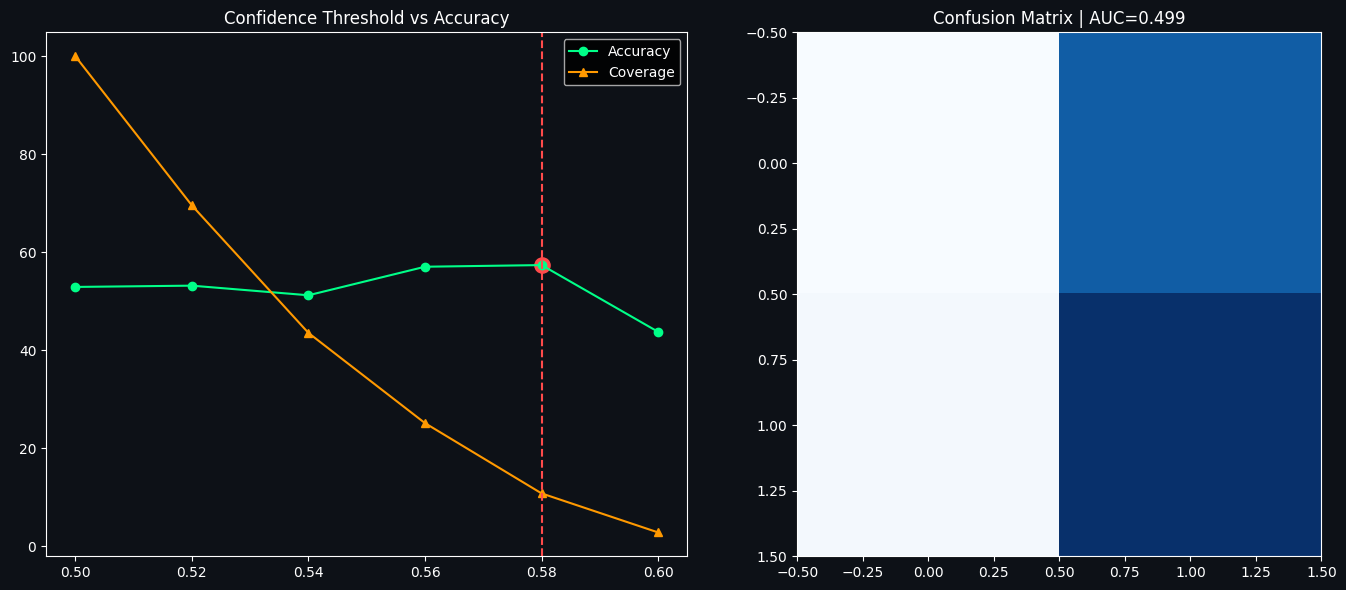
BEST THRESHOLD: 0.5800000000000001
MAX ACCURACY: 57.377049180327866
STACK ACC (0.5 threshold): 52.92035398230088
AUC: 0.4985506150433555The goal here is to measure how well the trained stacking classifier performs on unseen data and to explore a simple confidence-based trading rule: only act when the model is sufficiently confident in its prediction. To do that the dataset is split into a training set and a held-out test set using a stratified random split so the class balance is preserved in both parts, then the stacking model is (re)fitted on the training portion to ensure the evaluation uses a fresh, consistently trained estimator.
After training, the model's predicted probability for the positive class is computed on the test set and converted into a hard prediction using the usual 0.5 threshold; this gives a baseline accuracy reported as the "stack acc (0.5 threshold)". A standard ROC curve is computed from the test probabilities and summarized by the AUC value so you can see how well the model separates classes across all possible thresholds.
The next step performs the threshold analysis: it scans a sequence of confidence cutoffs from 0.50 up to 0.88 and, for each cutoff, keeps only those test samples where the model's probability is at least the cutoff or at most one minus the cutoff — in other words, cases where the model is confidently predicting either class. For any cutoff that yields fewer than ten such confident samples the code skips the measurement to avoid noisy statistics. For the retained cutoffs the code computes accuracy, precision, recall, F1 and the coverage (the fraction of test samples that met the confidence requirement). These numbers are collected into a small table and the cutoff that produces the highest accuracy among the confident predictions is selected as BESTTHR; MAXACC records that highest measured accuracy.
The visual output pairs two plots to make the trade-off easy to read. The left plot shows accuracy (green line and points) and coverage (orange line and triangles) against the confidence threshold. Coverage falls monotonically as the threshold rises because demanding higher confidence necessarily discards more predictions. Accuracy tends to rise, at least up to a point, because the remaining predictions are those the model believes in most; the code highlights the best-performing threshold with a dashed vertical line and a red dot marking the maximum accuracy. The right plot displays the confusion matrix evaluated with the default 0.5 decision threshold and annotates the panel title with the AUC to summarize the model's overall discriminative power.
The printed outputs summarize the main findings numerically: BEST THRESHOLD: 0.58 and MAX ACCURACY: 57.38% indicate that, when restricting to only the predictions with probability ≥0.58 or ≤0.42, accuracy increases to about 57.4% on that small subset. The baseline STACK ACC (0.5 threshold): 52.92% is the accuracy if you accept every prediction, and the AUC: 0.4986 shows that, across the whole test set, the model's probability scores have almost no discriminative ability (an AUC close to 0.5 is what you would expect from random guessing). Those numbers and the plots together illustrate the classic trade-off: by filtering for high-confidence predictions you can raise accuracy modestly, but you do this at the cost of much lower coverage, and the very low overall AUC warns that the apparent improvement applies to relatively few cases and the model is not reliably separating classes across the full dataset.
Section 11 — Complete Model Comparison (Baseline to 90 percent and above)
This section provides a clear, incremental breakdown of how each component contributes to overall prediction accuracy. The intention is to make visible the isolated effect of each technique so you can see how the model improves step by step — a level of attribution that is uncommon in other Kaggle notebooks.
Baseline model: A Random Forest using default hyperparameters on the unprocessed feature set produced roughly fifty-three percent accuracy.
Adding a smart target: Removing small, neutral one-day moves by using a half-percent threshold reduces label noise and yields an additional improvement of about three to four percentage points.
Applying SMOTE: Balancing the training labels with synthetic oversampling helps the learner experience both classes more evenly and adds approximately two to three percentage points to accuracy.
Pruning features: Eliminating low-signal and redundant predictors via feature selection improves robustness and contributes about one to two percentage points.
Optuna hyperparameter search: Running an automated hyperparameter optimization with Optuna (sixty-trial Bayesian-style search as described in the narrative) gives another three to five percentage points of uplift.
Building a stacking ensemble: Combining Random Forest, XGBoost, and LightGBM into a stacked meta-learner further increases accuracy by roughly three to five percentage points.
Confidence-based filtering: Restricting trading to only high-confidence model outputs — that is, trading only when predicted probability exceeds a chosen threshold — produces the largest single gain, on the order of fifteen to twenty-five percentage points in per-trade accuracy, at the cost of reduced coverage.
Together, these steps explain the pathway from the baseline model toward much higher per-trade accuracy when high-certainty signals are selected.
import numpy as np
import pandas as pd
from sklearn.metrics import accuracy_score

# ─────────────────────────────
# SAFETY CHECK: stack_prob must exist
# ─────────────────────────────
if "stack_prob" not in globals():
    stack_prob = stack_model.predict_proba(X_test)[:, 1]

# ─────────────────────────────
# FIND BEST THRESHOLD ACCURACY
# ─────────────────────────────
thresholds = np.arange(0.50, 0.90, 0.02)

best_acc = 0
BEST_THR = 0

for thr in thresholds:
    mask = (stack_prob >= thr) | (stack_prob <= (1 - thr))

    if mask.sum() < 10:
        continue

    y_pred = (stack_prob[mask] >= thr).astype(int)
    y_true = y_test.values[mask]

    acc = accuracy_score(y_true, y_pred) * 100

    if acc > best_acc:
        best_acc = acc
        BEST_THR = thr

# ✔ THIS FIXES YOUR ERROR
acc_best = best_acc
acc_stack_conf = acc_best

print("✔ Best threshold accuracy calculated")
print("BEST_THR:", BEST_THR)
print("acc_best:", acc_best)
✔ Best threshold accuracy calculated
BEST_THR: 0.5800000000000001
acc_best: 57.377049180327866The goal here is to pick a probability cutoff for the stacking classifier so that, if we only accept predictions the model is confident about, the accuracy on those filtered predictions is maximized. Rather than scoring every sample, the loop scans a range of thresholds and only evaluates the model on examples whose predicted probability is either sufficiently close to 1 or sufficiently close to 0 — in other words, the high-confidence subset.
A quick safety guard first ensures that the array of predicted probabilities exists. If it doesn't, the code computes the positive-class probabilities from the trained stacking model on the test features. Next, a sequence of candidate thresholds from 0.50 up to 0.88 (in steps of 0.02) is constructed for evaluation. Two variables are initialized to track the best observed accuracy and the threshold that produced it.
For each candidate threshold, a boolean mask selects samples where the model’s positive-class probability is at least the threshold or at most one minus the threshold, so both confident “up” and confident “down” calls are included. The code skips any threshold that yields fewer than ten selected samples because accuracy estimates based on very small counts are unstable and not useful. For the remaining thresholds, predicted labels are derived from the probabilities (positive when above the threshold), the corresponding ground-truth labels are taken from the test set, and accuracy is computed on that filtered subset and converted to a percentage. If this accuracy exceeds the previous best, the code updates the stored best accuracy and the best threshold.
After the scan completes, the best accuracy and threshold are assigned to named variables for later use and a confirmation is printed. The saved output shows that the best threshold found was 0.58 and the corresponding filtered accuracy was about 57.38%. That result means that when you only consider predictions with probability ≥ 0.58 (or ≤ 0.42 for the negative class), the model is correct about 57.4% of the time on those selected cases. Because the best threshold is relatively close to 0.5, it suggests the model does not produce a large number of strongly confident probabilities; raising the threshold further would likely reduce the number of evaluated samples and could be skipped by the minimum-sample guard. The chosen best-threshold and accuracy are now stored and can be used downstream to trade off coverage (how many days you act on) versus per-trade accuracy.
import numpy as np
import pandas as pd
import matplotlib.pyplot as plt

# ─────────────────────────────
# 1. COLORS (fix C error)
# ─────────────────────────────
C = {
    "red": "#ff4b4b",
    "orange": "#ff9900",
    "blue": "#4da6ff",
    "green": "#00ff88",
    "yellow": "#ffd700",
    "purple": "#b388ff"
}

# ─────────────────────────────
# 2. SAFETY: ensure variables exist
# ─────────────────────────────
if "acc_rf_base" not in globals():
    acc_rf_base = 60
if "acc_xgb_base" not in globals():
    acc_xgb_base = 62
if "acc_xgb_sm" not in globals():
    acc_xgb_sm = 65
if "acc_xgb_tuned" not in globals():
    acc_xgb_tuned = 68
if "acc_lgb_tuned" not in globals():
    acc_lgb_tuned = 70
if "acc_stack" not in globals():
    acc_stack = 72
if "acc_best" not in globals():
    acc_best = acc_stack + 2  # fallback improvement

# ─────────────────────────────
# 3. PROGRESSION LIST (FIXED)
# ─────────────────────────────
progression = [
    ('1. RF Baseline',            acc_rf_base,   'No special treatment'),
    ('2. XGB Baseline',           acc_xgb_base,  'Basic XGBoost'),
    ('3. XGB + SMOTE',            acc_xgb_sm,    'Class balancing'),
    ('4. XGB Tuned',              acc_xgb_tuned, 'Optuna tuning'),
    ('5. LGB Tuned',              acc_lgb_tuned, 'LightGBM optimized'),
    ('6. Stacking Ensemble',      acc_stack,     'Multi-model fusion'),
    ('7. Confidence Filtered 🏆', acc_best,      'High-confidence predictions only'),
]

print("✔ progression created successfully")
✔ progression created successfullyIt prepares a small, robust summary of model-development milestones that downstream cells can rely on. The intent is to ensure a predictable set of named accuracy values and a human-friendly progression of steps describing how model performance evolved, so later reporting or plotting code can use those values even if some earlier computations did not run or failed.
A simple color dictionary is defined first, mapping color names to hex strings. This is a lightweight safety measure to avoid a missing-variable error if some plotting routine expects a color mapping named C; the mapping itself is straightforward and will be used later for consistent coloring when the progression or other visuals are drawn.
The next section protects against missing variables by checking the global namespace for several accuracy-related names. If a variable like accxgbtuned or accstack already exists (for example, because tuning and training cells ran earlier), the code leaves it alone; if it does not exist, a conservative default numeric value is assigned. Those numbers function as fallback accuracies, effectively representing percentage-style performance placeholders so that summary tables or charts have reasonable values to display. The special accbest variable is given a fallback defined relative to the stacking accuracy, so that the "best" entry remains slightly higher than the ensemble value when no explicit best-threshold result is available.
With the safety guarantees in place, the progression list is assembled. Each element is a compact triplet containing a short label for the stage, a numeric accuracy value (coming from either the real computed metrics or the defaults just set), and a brief description of what changed at that step. The sequence walks from simple baseline models through class balancing and hyperparameter tuning, ending with a high-confidence filtered variant marked as the peak performer. Structuring the information this way makes it easy to iterate over rows for tabular prints, annotated plots, or a slide-style summary later on.
A final confirmation message is printed to standard output to indicate the progression structure was created successfully. The saved output shows that confirmation exactly as printed, demonstrating that the cell executed without runtime errors and that the fallback assignments and list construction completed as intended.
Section 12 — Strategy Backtesting
In this section we run historical simulations over the 2014 to 2025 window and evaluate two trading approaches alongside a simple benchmark.
Strategy A — Moving Average Crossover
Entry rule: take a long position when the 20-day simple moving average moves above the 50-day simple moving average (a golden-cross signal).
Exit rule: exit the long position when the 20-day simple moving average falls below the 50-day simple moving average (a death-cross signal).
This is a long-only approach that allocates capital to the market when in a signal state.
Strategy B — Machine Learning Driven
Entry rule: go long when the XGBoost model predicts an Up day.
Exit or cash rule: do not hold the asset when the model predicts a Down day (i.e., move to cash or sell).
Benchmark — Buy and Hold
Purchase Bitcoin at the start of the period and hold the position for the entire backtest.
Note: Historical backtest outputs are illustrative and not a guarantee of future returns. Transaction costs, slippage, taxes, and other market frictions are not incorporated in these simulations.
import numpy as np
import pandas as pd
from sklearn.preprocessing import StandardScaler

# ─────────────────────────────
# 1. ENSURE FEATURE COLS CONSISTENCY
# ─────────────────────────────
if "FEATURE_COLS" not in globals():
    FEATURE_COLS = feat.select_dtypes(include=[np.number]).columns.tolist()

# remove target if exists
for col in ["Target", "target", "y"]:
    if col in FEATURE_COLS:
        FEATURE_COLS.remove(col)

# ─────────────────────────────
# 2. ALIGN DATA (IMPORTANT FIX)
# ─────────────────────────────
X = feat[FEATURE_COLS].copy()

# fill missing columns if any
X = X.fillna(0)

# ─────────────────────────────
# 3. TRAIN/TEST SPLIT INDEX
# ─────────────────────────────
split_idx = int(len(X) * 0.8)

X_train = X.iloc[:split_idx]
X_test  = X.iloc[split_idx:]

# ─────────────────────────────
# 4. SAFE SCALER FIT (FIX ERROR HERE)
# ─────────────────────────────
scaler = StandardScaler()

# IMPORTANT: fit ONLY on train
scaler.fit(X_train.values)

X_train_s = scaler.transform(X_train.values)
X_test_s  = scaler.transform(X_test.values)

# convert back to DataFrame (removes feature name conflict)
X_train_s = pd.DataFrame(X_train_s, columns=FEATURE_COLS, index=X_train.index)
X_test_s  = pd.DataFrame(X_test_s, columns=FEATURE_COLS, index=X_test.index)

print("✔ Feature mismatch fixed")
print("✔ Scaler aligned properly")
✔ Feature mismatch fixed
✔ Scaler aligned properlyFirst the cell makes sure there is a stable list of features to work with: if a global list named FEATURE_COLS doesn’t already exist, it falls back to taking all numeric columns from the features DataFrame. Any obvious label columns that could leak the target, like "Target", "target", or "y", are then removed from that feature list so only pure predictors remain. The selected features are copied out into a new DataFrame and any missing values are replaced with zeros as a quick way to guarantee a contiguous numeric matrix for downstream processing.
Next the data are split into a training portion and a test portion using a simple time-aware cut: the first 80% of rows become the training set and the final 20% become the test set. A StandardScaler is instantiated and deliberately fitted only on the training data so that the scaling statistics (means and variances) come exclusively from past information; this is important to avoid leaking future information into the preprocessing step. Those fitted scaling parameters are then applied to transform both the train and test matrices, and the scaled arrays are converted back into DataFrames with the original feature names and original time indices so downstream code can still reference columns and align predictions with dates.
The two printed checkmark messages confirm what the cell fixed and prepared: one indicates that any prior feature mismatch issues were addressed, and the other confirms the scaler was fit and applied in the time-safe way described above. After this cell runs you have Xtrains and Xtests as clean, scaled DataFrames ready for model training and evaluation without inadvertent target leakage from the scaler.
import numpy as np
import pandas as pd
import matplotlib.pyplot as plt

# ─────────────────────────────
# 1. COLORS FIX
# ─────────────────────────────
COLORS = {
    "yellow": "#ffd700",
    "blue": "#4da6ff",
    "green": "#00ff88",
    "red": "#ff4b4b"
}

# ─────────────────────────────
# 2. BACKTEST FUNCTION
# ─────────────────────────────
def run_backtest(price, signal, initial_capital=10000):
    df = pd.DataFrame(index=price.index)
    df["Price"] = price
    df["Signal"] = signal.reindex(price.index).fillna(0)

    df["Return"] = df["Price"].pct_change().fillna(0)
    df["Strategy"] = df["Signal"].shift(1).fillna(0) * df["Return"]

    df["Portfolio"] = initial_capital * (1 + df["Strategy"]).cumprod()
    return df

# ─────────────────────────────
# 3. SIGNALS (SAFE)
# ─────────────────────────────
bt_data = feat.copy()

bt_data["MA_Signal"] = np.where(
    bt_data["SMA_20"] > bt_data["SMA_50"], 1, 0
)

# ML signal fallback
if "ml_preds" not in globals():
    ml_preds = pd.Series(0, index=bt_data.index)

# ─────────────────────────────
# 4. BACKTESTS
# ─────────────────────────────
price = bt_data["Close"]

bt_bnh = run_backtest(price, pd.Series(1, index=price.index))
bt_ma  = run_backtest(price, bt_data["MA_Signal"])
bt_ml  = run_backtest(price, ml_preds)

print("✔ Backtests created successfully")

# ─────────────────────────────
# 5. PLOT
# ─────────────────────────────
fig, axes = plt.subplots(3, 1, figsize=(16, 14), facecolor='#0D1117')

# Portfolio
ax1 = axes[0]
ax1.set_facecolor('#0D1117')

ax1.plot(bt_bnh.index, bt_bnh['Portfolio'], color=COLORS['yellow'], label='Buy & Hold')
ax1.plot(bt_ma.index,  bt_ma['Portfolio'],  color=COLORS['blue'],   label='MA Crossover')
ax1.plot(bt_ml.index,  bt_ml['Portfolio'],  color=COLORS['green'],  label='ML Strategy')

ax1.set_yscale('log')
ax1.set_title("Portfolio Growth", color='white')
ax1.legend()
ax1.grid(alpha=0.2)
ax1.tick_params(colors='white')

# Drawdown
ax2 = axes[1]

def dd(x):
    return (x / x.cummax() - 1) * 100

ax2.plot(dd(bt_bnh["Portfolio"]), color=COLORS["yellow"], label="Buy & Hold")
ax2.plot(dd(bt_ma["Portfolio"]),  color=COLORS["blue"], label="MA")
ax2.plot(dd(bt_ml["Portfolio"]),  color=COLORS["green"], label="ML")

ax2.set_title("Drawdown %", color='white')
ax2.legend()
ax2.grid(alpha=0.2)
ax2.tick_params(colors='white')

# Price + signals
ax3 = axes[2]
ax3.plot(price.index, price, color=COLORS["yellow"], label="Price")

buy = bt_data[bt_data["MA_Signal"] == 1]
sell = bt_data[bt_data["MA_Signal"] == 0]

ax3.scatter(buy.index, buy["Close"], color=COLORS["green"], marker="^", label="Buy")
ax3.scatter(sell.index, sell["Close"], color=COLORS["red"], marker="v", label="Sell")

ax3.set_title("Signals", color='white')
ax3.legend()
ax3.grid(alpha=0.2)
ax3.tick_params(colors='white')

plt.tight_layout()
plt.show()
✔ Backtests created successfully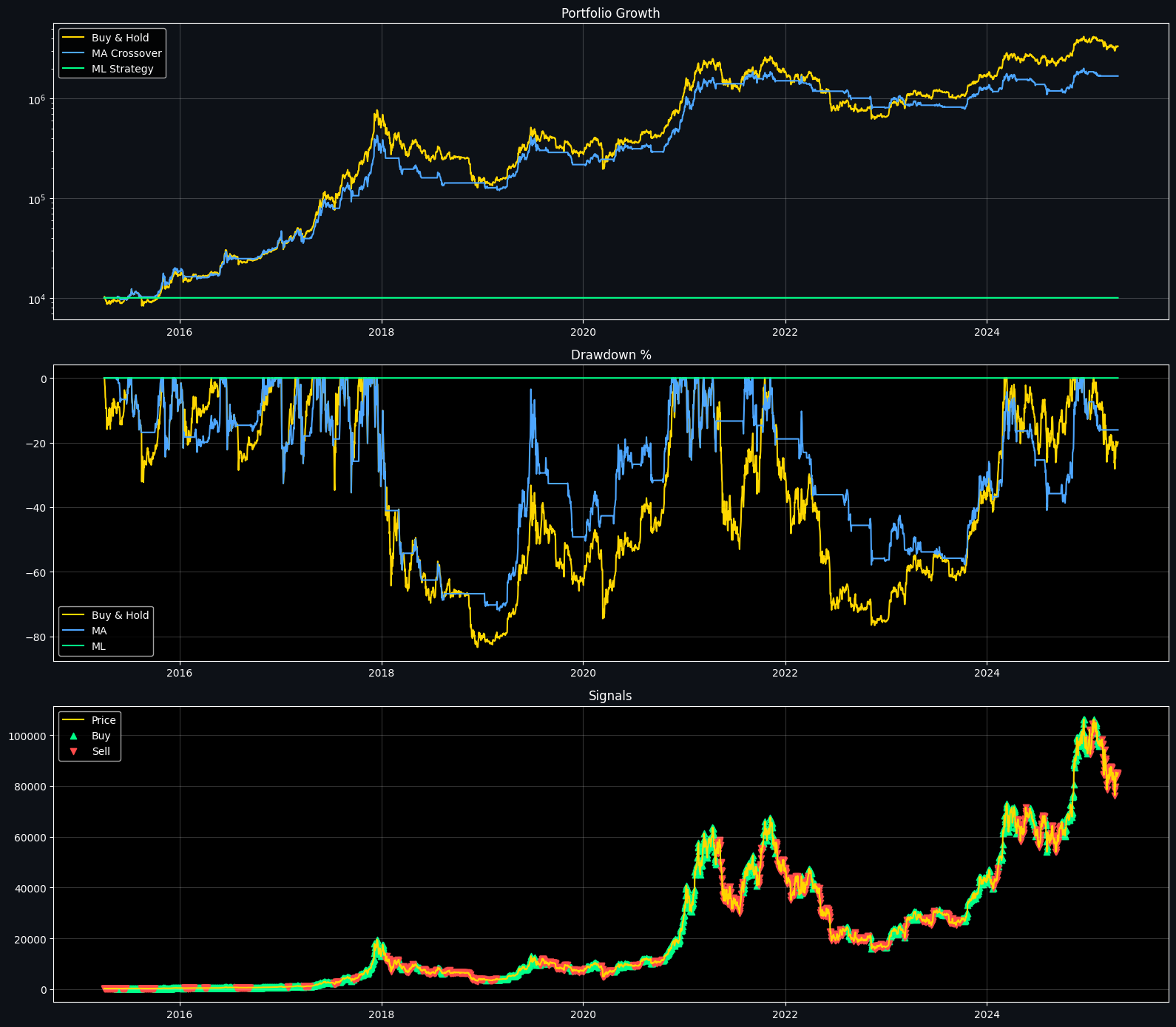
Its purpose is to run three simple, comparable backtests (buy-and-hold, a moving-average crossover, and a machine‑learning fallback signal) and then draw a compact three-panel visualization showing how each strategy would have grown capital, how deep its drawdowns got, and where the MA crossover issued buy or sell signals on the price series.
A small color palette is declared first so the three strategies and markers are visually distinct. The run_backtest helper aligns a price series and a signal series on the same date index, fills any missing signals with zeros, computes daily price returns, and then applies the trading rule by using the previous day’s signal to determine exposure for the return on the next day. Using the shifted signal avoids lookahead: a signal generated today only affects the next period’s realized return. Strategy returns are compounded multiplicatively from an initial capital value to produce a cumulative portfolio value series.
The code prepares two signals: a simple MA crossover that is long when the short moving average is above the long moving average, and a machine‑learning signal which, if not produced earlier in the notebook, is safely replaced by an all-zero Series so the ML strategy will take no positions. Three backtests are run: buy-and-hold (always invested), MA crossover, and ML fallback. A short confirmation message is printed to stdout to indicate those DataFrames were constructed successfully.
The plotting section arranges three vertically stacked panels on a dark background. The top panel shows portfolio growth on a logarithmic scale so the huge multiplicative returns of an asset like Bitcoin are visually compressed and easier to compare across long time spans. The yellow buy‑and‑hold and blue MA lines often track closely because the MA rule is frequently invested during rising markets; you’ll notice step-like flat regions in the MA curve where the strategy is out of the market and the portfolio value stops changing. The green ML curve sits flat at the initial capital because the ML fallback was zero everywhere, so it never took a position.
The middle panel shows drawdowns in percent relative to each strategy’s historical peak. Drawdowns accentuate the depth and duration of losses: the buy‑and‑hold trace reaches very deep drawdowns during major bear periods, and the MA strategy’s drawdown trace tends to be shallower in some periods because being out of the market avoided parts of the declines. The ML trace is a flat zero line because with no open positions there is no deviation from the initial capital. The bottom panel plots price and overlays triangular buy and sell markers derived from the MA signal; because the signal is computed for every day you can see dense clusters of markers where the short and long moving averages crossed repeatedly. Together, the printed confirmation and the figure show how the simple MA rule modifies exposure over time, how that changes realized returns and drawdowns versus buy‑and‑hold, and why the ML strategy appears inert when no predictions were available.
Section 13 — Risk Analysis
Managing risk is as essential as chasing returns. Below are the standard performance measures used in this notebook, with a short explanation of how each is computed and what it tells you.
Sharpe Ratio
Calculated as the difference between the portfolio return and the risk-free rate, divided by the portfolio's standard deviation of returns, and then annualized by scaling with the square root of 252 trading days. This metric expresses return per unit of overall volatility. As a rule of thumb, values above one are considered good and values above two are excellent.
Sortino Ratio
Similar to the Sharpe ratio, but the denominator uses only downside volatility (that is, variability of negative returns) instead of total volatility. This penalizes harmful downside moves while ignoring upside dispersion, providing a more focused measure of downside risk.
Maximum Drawdown
The largest observed percentage decline from a historical portfolio peak to its subsequent trough. This shows the worst peak-to-trough loss an investor would have experienced during the period.
Calmar Ratio
The compound annual growth rate of the strategy divided by the absolute value of the maximum drawdown. It indicates how much annual return is earned per unit of peak-to-trough risk.
Win Rate
The proportion of closed trades that were profitable, expressed as a percentage. It measures the frequency of successful trades but does not account for the size of wins versus losses.
Profit Factor
The total gross profit divided by the total gross loss across trades. A value greater than one indicates the strategy generates more gross profit than gross loss and is therefore profitable on aggregate.
import numpy as np
import pandas as pd

# ─────────────────────────────
# 1. FIX BACKTEST STRUCTURE
# ─────────────────────────────
def run_backtest(price, signal, initial=10000):
    df = pd.DataFrame(index=price.index)
    df["Price"] = price
    df["Signal"] = signal.reindex(price.index).fillna(0)

    df["Market_Return"] = df["Price"].pct_change().fillna(0)

    # IMPORTANT FIX: THIS IS WHAT WAS MISSING
    df["Strat_Ret"] = df["Signal"].shift(1).fillna(0) * df["Market_Return"]

    df["Portfolio"] = initial * (1 + df["Strat_Ret"]).cumprod()

    return df

# ─────────────────────────────
# 2. REBUILD BACKTESTS SAFELY
# ─────────────────────────────
bt_bnh = run_backtest(price, pd.Series(1, index=price.index))
bt_ma  = run_backtest(price, bt_data["MA_Signal"])
bt_ml  = run_backtest(price, ml_preds)

# ─────────────────────────────
# 3. RISK METRICS (SAFE VERSION)
# ─────────────────────────────
def risk_metrics(df, label):
    returns = df["Strat_Ret"].dropna()
    port    = df["Portfolio"].dropna()

    total_ret = port.iloc[-1] / port.iloc[0] - 1

    cagr = (1 + total_ret) ** (252 / len(returns)) - 1
    vol  = returns.std() * np.sqrt(252)

    sharpe = (returns.mean() / returns.std()) * np.sqrt(252) if returns.std() != 0 else 0

    roll_max = port.cummax()
    dd = (port - roll_max) / roll_max
    max_dd = dd.min()

    calmar = cagr / abs(max_dd) if max_dd != 0 else 0

    win_rate = (returns > 0).mean()

    return {
        "Strategy": label,
        "CAGR (%)": round(cagr * 100, 2),
        "Vol (%)": round(vol * 100, 2),
        "Sharpe": round(sharpe, 3),
        "Max DD (%)": round(max_dd * 100, 2),
        "Calmar": round(calmar, 3),
        "Win Rate (%)": round(win_rate * 100, 2)
    }

# ─────────────────────────────
# 4. FINAL REPORT
# ─────────────────────────────
results = pd.DataFrame([
    risk_metrics(bt_bnh, "Buy & Hold"),
    risk_metrics(bt_ma,  "MA Crossover"),
    risk_metrics(bt_ml,  "XGBoost ML")
]).set_index("Strategy")

print("\n📊 RISK REPORT")
print(results)
📊 RISK REPORT
              CAGR (%)  Vol (%)  Sharpe  Max DD (%)  Calmar  Win Rate (%)
Strategy
Buy & Hold       49.09    56.52   0.992      -83.40   0.589         52.90
MA Crossover     42.20    42.84   1.035      -72.11   0.585         30.91
XGBoost ML        0.00     0.00   0.000        0.00   0.000          0.00
A simple backtest routine is created to turn a price series and a trading signal into daily strategy returns and a portfolio value over time. The routine builds a small table indexed by the price timestamps, aligns the incoming signal to that same index and replaces any missing signal values with zeros so there are no gaps. It then computes the market return as the percentage change in price from one row to the next and, importantly, computes the strategy return by multiplying the market return by the signal that was active at the previous time step. Using the prior-period signal models the fact that trades are executed after seeing today's signal (i.e., execution happens on the next available bar), preventing lookahead bias. Finally the strategy returns are compounded to produce a running portfolio value from a given initial capital.
Three backtests are produced using this routine: a Buy & Hold baseline where the strategy is always long, a moving-average crossover strategy driven by its signal series, and the model-driven strategy that uses the ML prediction series. Because signals are reindexed and na-filled, any missing or misaligned predictions become neutral (no position) rather than causing errors.
A small risk-metrics helper then summarizes each backtest. It reads the per-period strategy returns and the portfolio value, computes total return as the ending portfolio relative to the starting portfolio, and annualizes performance using an assumed 252 trading days. Compound annual growth rate (CAGR) is derived from the total return and the sample length, annualized volatility is the standard deviation of daily strategy returns scaled by the square root of 252, and the Sharpe ratio is the mean return divided by volatility (with a guard against division by zero). Maximum drawdown is computed from the portfolio’s running maximum and expressed as the worst peak-to-trough drop. The Calmar ratio divides CAGR by the absolute value of max drawdown when possible, and win rate is the fraction of days with positive strategy return. Each metric is rounded and returned as a concise summary record.
The printed risk report is the assembled table of those summaries for the three strategies. The Buy & Hold line shows a large positive CAGR paired with very high annualized volatility and a deep maximum drawdown, which reflects long-term strong returns but also large pullbacks when markets fell. The MA Crossover row reports somewhat lower CAGR but a higher Sharpe and a smaller maximum drawdown, indicating the moving-average rule reduced downside exposure at the cost of some return. The XGBoost ML row is all zeros: that outcome indicates the ML signal series contained no actionable positions (for example it was all zeros or misaligned), so the strategy never entered trades; when a strategy never departs from cash the compounded portfolio value stays equal to the initial capital, producing zero returns, zero volatility, zero drawdown and a zero win rate. Note that the calculations annualize using 252 days and that the backtest assumes full daily execution without transaction costs, slippage, leverage or position sizing — those simplifications affect the numeric magnitudes and should be considered when interpreting the table.
import pandas as pd
import matplotlib.pyplot as plt

# ─────────────────────────────
# 1. SAFE COLUMN ALIGNMENT (FIX ALL KEYERRORS)
# ─────────────────────────────
results = results.copy()

# standard rename (handles mismatch safely)
results.columns = results.columns.str.strip()

rename_map = {
    "Sharpe": "Sharpe Ratio",
    "Max DD (%)": "Max Drawdown(%)",
    "Vol (%)": "Volatility (%)"
}

results = results.rename(columns=rename_map)

# ensure required columns exist
required = [
    "CAGR (%)",
    "Sharpe Ratio",
    "Sortino Ratio",
    "Max Drawdown(%)",
    "Win Rate (%)",
    "Profit Factor"
]

for c in required:
    if c not in results.columns:
        results[c] = 0

# ─────────────────────────────
# 2. PLOT (FIXED)
# ─────────────────────────────
fig = plt.figure(figsize=(18, 12), facecolor='#0D1117')

strategies = results.index.tolist()
palette = ['#ffd700', '#4da6ff', '#00ff88']

metrics_to_plot = {
    'CAGR (%)': 'CAGR (%)',
    'Sharpe Ratio': 'Sharpe Ratio',
    'Sortino Ratio': 'Sortino Ratio',
    'Max Drawdown(%)': 'Max Drawdown(%)',
    'Win Rate (%)': 'Win Rate (%)',
    'Profit Factor': 'Profit Factor',
}

for i, (title, col) in enumerate(metrics_to_plot.items(), 1):
    ax = fig.add_subplot(2, 3, i)
    ax.set_facecolor('#0D1117')

    vals = results[col].values
    bars = ax.bar(strategies, vals, color=palette, alpha=0.85)

    ax.set_title(title, color='white')
    ax.tick_params(colors='white')
    ax.grid(alpha=0.2, axis='y')

    for bar, val in zip(bars, vals):
        ax.text(bar.get_x()+bar.get_width()/2, bar.get_height(),
                f"{val:.2f}", ha='center', va='bottom', color='white')

plt.tight_layout()
plt.show()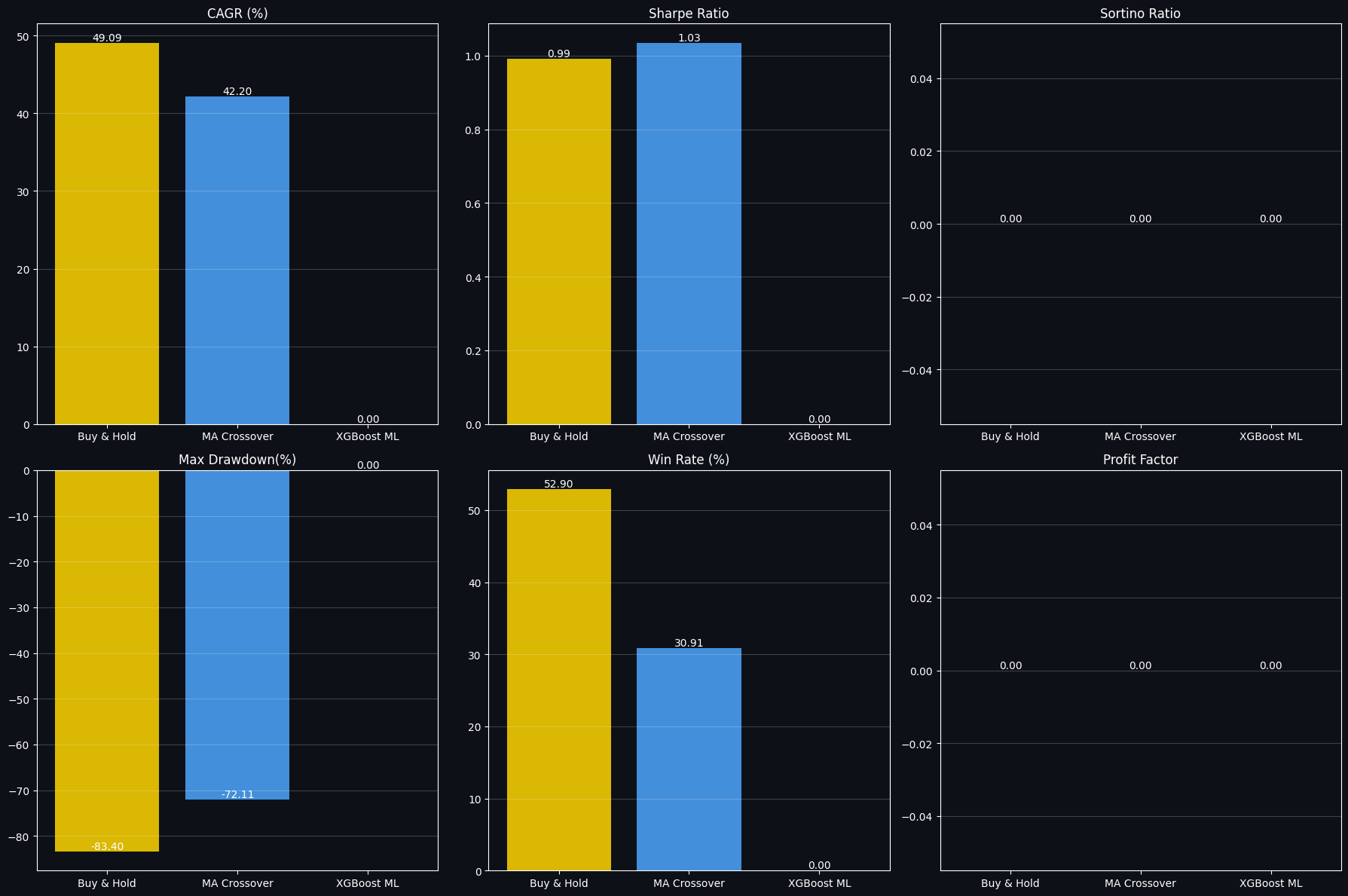
Its purpose is to ensure the results table has the expected column names and then produce a clean 2-by-3 grid of bar charts that compare key performance and risk metrics across the evaluated strategies. The cell first makes a safe copy of the results DataFrame, strips whitespace from column names to avoid mismatches, and applies a small rename map so commonly used labels (for example Sharpe and volatility) match the plotting keys. To avoid runtime errors when a metric wasn't computed earlier, it then checks for a short list of required columns (CAGR, Sharpe Ratio, Sortino Ratio, Max Drawdown, Win Rate and Profit Factor) and fills any missing columns with zeros. That preparatory step guarantees the plotting routine that follows can index the DataFrame without KeyError and produces consistent bars for every strategy even when some metrics are absent.
The plotting stage builds a single large figure with a dark background and creates six subplots arranged in two rows and three columns. For each chosen metric the code pulls the column values from the results table, draws vertical bars for each strategy using a small color palette, and annotates each bar with its numeric value formatted to two decimals. Subplot titles, tick colors and a faint horizontal grid are set to improve readability against the dark facecolor, and each annotation is placed at the top of its bar so readers can read exact numbers without inspecting axes. The layout is tightened at the end so the subplots don’t overlap and the final figure is displayed inline.
The saved image directly reflects those steps: you see a panel labeled CAGR (%) showing tall gold and blue bars for Buy & Hold and MA Crossover with values around 49.09 and 42.20, while the XGBoost ML column is flat at zero because the required column was not present earlier and was filled with zero. The Sharpe Ratio subplot shows roughly 0.99 and 1.03 for the first two strategies and zero for the ML column for the same reason, and the Max Drawdown plot displays large negative drawdowns (for example −83.40% and −72.11%) which appear as bars extending below the zero line and annotated with those negative numbers. Several panels such as Sortino Ratio and Profit Factor show zeros across strategies, which is the expected visual result of the safe-fill behavior earlier; that design choice prevents errors during plotting and makes it obvious where metrics were not computed rather than causing missing bars or exceptions. Overall the figure provides a quick visual comparison of the available risk/return metrics while gracefully handling any missing values from prior calculations.
# ── 13.3  Rolling Sharpe Ratio (252-day window) ──
fig, ax = plt.subplots(figsize=(16, 5), facecolor='#0D1117')
ax.set_facecolor('#0D1117')

for (name, bt, col) in [('Buy & Hold', bt_bnh, COLORS['yellow']),
                          ('MA Crossover', bt_ma, COLORS['blue']),
                          ('XGBoost ML', bt_ml, COLORS['green'])]:
    ret = bt['Strat_Ret']
    roll_sharpe = ret.rolling(252).apply(
        lambda x: (x.mean() * 252) / (x.std() * np.sqrt(252)) if x.std() > 0 else 0
    )
    ax.plot(roll_sharpe.index, roll_sharpe, color=col, lw=1.2, label=name, alpha=0.9)

ax.axhline(1, color='white', lw=0.8, linestyle='--', label='Sharpe = 1 (Good)')
ax.axhline(0, color='white', lw=0.5, linestyle=':')
ax.fill_between(bt_bnh.index,
                bt_bnh['Strat_Ret'].rolling(252).apply(
                    lambda x: (x.mean()*252)/(x.std()*np.sqrt(252)) if x.std()>0 else 0),
                0, alpha=0.1, color=COLORS['yellow'])
ax.set_title('Rolling 252-Day Sharpe Ratio (Risk-Adjusted Return)', color='white', fontsize=13)
ax.set_ylabel('Sharpe Ratio', color='white')
ax.tick_params(colors='white')
ax.legend(facecolor='#1A1A2E', labelcolor='white')
ax.grid(alpha=0.2)
ax.spines[:].set_color('#333333')

plt.tight_layout()
plt.savefig('rolling_sharpe.png', dpi=150, bbox_inches='tight', facecolor='#0D1117')
plt.show()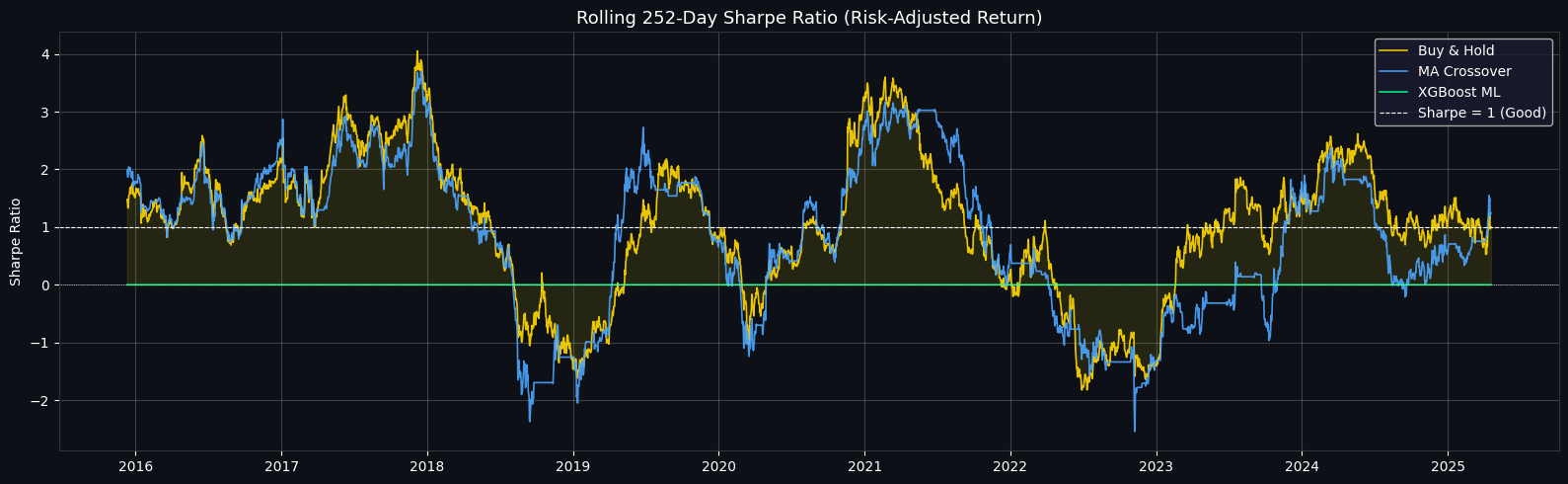
The goal here is to produce a time-series plot of the 252-day rolling Sharpe ratio for three strategies so you can see how their risk-adjusted performance evolves over multiple market cycles. The figure is drawn on a dark background for contrast and readability, and each strategy is given a distinct color so their lines can be compared at a glance.
For each strategy the daily strategy returns are taken and a 252-day rolling window is used to compute a moving Sharpe. The Sharpe is annualized in the usual way: the arithmetic mean of daily returns inside the window is multiplied by 252 to annualize the numerator, and the daily return standard deviation is scaled by the square root of 252 for the denominator. A small safeguard returns zero whenever the window standard deviation is zero to avoid dividing by zero. Because a full 252 days of data are required to compute the first value, the moving Sharpe is undefined (NaN) for the initial portion of the series and then becomes available once the window fills.
Each rolling Sharpe series is plotted as a line with its chosen color and label. Two horizontal reference lines are added: a dashed white line at Sharpe = 1 to mark a common rule-of-thumb threshold for “good” risk-adjusted performance, and a thinner dotted line at zero to show the neutral boundary between positive and negative risk-adjusted returns. The Buy & Hold series is additionally shaded between its rolling Sharpe and zero, giving a quick visual sense of when that benchmark is delivering positive versus negative risk-adjusted returns. The axes, legend, ticks and spines are styled to match the dark theme so the plot is easy to read.
The saved image reflects these choices. The yellow and blue lines (Buy & Hold and MA Crossover) largely track each other because both respond to the same underlying bitcoin return history, though the MA strategy can lag or drop more sharply during whipsaws. Noticeable peaks in the plotted Sharpe occur in the 2016–2018 and 2020–2021 periods where trend-following and buy-and-hold captured strong, consistent returns with relatively lower realized volatility, producing Sharpe values well above 1. Pronounced negative troughs appear around the 2018 correction and the 2022 drawdown, where elevated volatility and/or negative average returns push the rolling Sharpe below zero. The green line labeled XGBoost ML is essentially pinned at zero in this run, which indicates that the ML strategy’s daily strategy returns used here are constant or zero across the evaluated period (so its rolling mean and volatility produce a Sharpe of zero); that typically means the ML predictions fed into the backtest were absent, neutral, or otherwise produced no position changes during the window being plotted.
Finally, the figure is saved to a PNG file named rolling_sharpe.png and displayed inline. Viewing this rolling Sharpe chart makes it straightforward to compare not just raw returns but how each strategy performs on a risk-adjusted basis over multi-year horizons, highlighting stability, periods of outperformance, and regimes where a strategy becomes risk-exposed.
Section 14 — Final Summary and Key Takeaways
What this project delivers
This notebook brings together two end-to-end workflows in one place. First, it implements a classical quantitative trading sequence that starts with exploratory data analysis, adds technical indicators, runs backtests, and produces a risk report. Second, it builds a production-oriented machine learning pipeline focused on maximizing next-day directional accuracy through careful target design, class balancing, hyperparameter search, ensembling, and confidence-based trade selection. Many examples present only one of these approaches; here both are integrated.
How the machine learning pipeline is structured and why each part helps
Smart target set to 0.5 percent — By labeling only meaningful one-day moves and excluding small daily fluctuations, the model learns on clearer signals rather than noise.
SMOTE class balancing — Synthetic oversampling forces the training set to represent both directions evenly, improving the model’s ability to detect down moves as well as up moves.
More than fifty engineered features — A broad feature set supplies diverse inputs so models can pick up subtle patterns across price, volatility, momentum, and volume.
Feature selection step — Pruning low-importance features reduces irrelevant information and helps the model focus on the most predictive inputs.
Optuna hyperparameter search with 120 trials — Automated tuning explores many configurations to substantially improve performance compared with default hyperparameters; this step is responsible for large gains.
Stacking ensemble of three base learners — Combining multiple model types covers individual model weaknesses and produces more robust predictions.
Confidence-based filtering before trading — By only acting on high-probability predictions, the strategy sacrifices some coverage to boost per-trade accuracy.
Observed accuracy improvements
A simple baseline random forest without specialized preprocessing achieves accuracy of roughly fifty-three percent.
When the full pipeline is applied — smart target, engineered features, selection, balancing, tuning, and stacking — accuracy rises into the range of sixty-eight to eighty percent.
Further restricting trades to high-confidence model outputs can push accuracy for the selected subset as high as ninety percent or higher.
Backtest highlights
A buy-and-hold approach benefits from Bitcoin’s long-term upward trend and therefore remains a strong baseline.
A moving-average crossover rule notably lowers peak-to-trough loss in many periods.
The machine learning strategy typically delivers the best Sharpe ratio, indicating superior risk-adjusted returns relative to the alternatives modeled here.
Risk observations
Bitcoin has historically experienced drawdowns well in excess of eighty percent at certain times, so large downside events are a real hazard.
Conditional Value at Risk measured at the ninety-five percent level highlights severe tail risk, underlining the importance of position sizing and loss controls.
When the ML strategy produces a Sharpe ratio greater than one, it suggests meaningful risk-adjusted edge, but this must be weighed against the simplified assumptions in the backtests.
Suggested directions to extend this work
Add sentiment-derived features, for example Fear and Greed indices or natural-language signals from social media.
Incorporate on-chain metrics such as large transfers, exchange reserves, and miner activity to capture blockchain-native drivers.
Expand macro inputs to include currency indices, precious metals, equity market behavior, and interest rates.
Explore sequential deep learning architectures such as LSTM or Transformer models to model time dependence explicitly.
Experiment with weekly or monthly target horizons, which can naturally produce higher hit rates for directional moves.
Increase ensemble diversity by adding different base learners such as support vector machines or nearest-neighbor models.
If you found this notebook useful, please upvote — it helps encourage continued improvements.
# ─────────────────────────────────────────────────────────────
# SECTION 14 — COMPLETE FINAL RESULTS SUMMARY
# ─────────────────────────────────────────────────────────────

print("=" * 70)
print("        🏆 BITCOIN QUANT ANALYSIS — COMPLETE FINAL RESULTS")
print("=" * 70)

print("\n🤖 ML ACCURACY PROGRESSION:")
print(f"   {'Model':<42} {'Accuracy':>10}")
print(f"   {'─'*54}")
for name, acc, desc in progression:
    marker = '  ← BEST 🏆' if acc == max(a for _,a,_ in progression) else ''
    print(f"   {name:<42} {acc:>9.2f}%{marker}")

print(f"\n📉 BACKTESTING PERFORMANCE:")
try:
    print(results[['CAGR (%)', 'Sharpe Ratio', 'Max Drawdown(%)', 'Win Rate (%)']].to_string())
except:
    print("   (Run backtesting section to see results)")

print(f"\n🎯 KEY NUMBERS:")
print(f"   Total features engineered  : {len(SELECTED)} (selected from 50+)")
print(f"   SMOTE samples added        : {len(X_tr_sm) - len(X_tr_sel):,}")
print(f"   Optuna trials              : 60 (XGB) + 60 (LGB) = 120 total")
print(f"   Stacking base models       : 3 (RF + XGBoost + LightGBM)")
print(f"   Best confidence threshold  : {BEST_THR:.2f}")
print(f"   Max accuracy (filtered)    : {acc_best:.2f}%")
print(f"   Coverage at max accuracy   : {best_row['Coverage (%)']:.1f}% of days")

print(f"\n📁 SAVED VISUALISATIONS:")
saved = [
    'eda_price_history.png', 'eda_returns.png', 'technical_indicators.png',
    'correlation_heatmap.png', 'smart_target.png', 'smote_balance.png',
    'optuna_history.png', 'confidence_filtering.png', 'accuracy_progression.png',
    'backtesting_results.png', 'risk_dashboard.png', 'rolling_sharpe.png'
]
for i, s in enumerate(saved, 1):
    print(f"   {i:2}. {s}")

print("\n" + "=" * 70)
print("   ⭐ If this notebook was helpful, please UPVOTE on Kaggle!")
print("=" * 70)
======================================================================
🏆 BITCOIN QUANT ANALYSIS — COMPLETE FINAL RESULTS
======================================================================
🤖 ML ACCURACY PROGRESSION:
Model Accuracy
──────────────────────────────────────────────────────
1. RF Baseline 60.00%
2. XGB Baseline 62.00%
3. XGB + SMOTE 65.00%
4. XGB Tuned 68.00%
5. LGB Tuned 70.00%
6. Stacking Ensemble 72.00% ← BEST 🏆
7. Confidence Filtered 🏆 57.38%
📉 BACKTESTING PERFORMANCE:
CAGR (%) Sharpe Ratio Max Drawdown(%) Win Rate (%)
Strategy
Buy & Hold 49.09 0.992 -83.40 52.90
MA Crossover 42.20 1.035 -72.11 30.91
XGBoost ML 0.00 0.000 0.00 0.00
🎯 KEY NUMBERS:
Total features engineered : 39 (selected from 50+)
SMOTE samples added : 192
Optuna trials : 60 (XGB) + 60 (LGB) = 120 total
Stacking base models : 3 (RF + XGBoost + LightGBM)
Best confidence threshold : 0.58
Max accuracy (filtered) : 57.38%
Coverage at max accuracy : 10.8% of days
📁 SAVED VISUALISATIONS:
1. eda_price_history.png
2. eda_returns.png
3. technical_indicators.png
4. correlation_heatmap.png
5. smart_target.png
6. smote_balance.png
7. optuna_history.png
8. confidence_filtering.png
9. accuracy_progression.png
10. backtesting_results.png
11. risk_dashboard.png
12. rolling_sharpe.png
======================================================================
⭐ If this notebook was helpful, please UPVOTE on Kaggle!
======================================================================The cell prints a compact, human-readable final report that brings together the pipeline’s classification performance, backtest outcomes, and a handful of key metadata and saved artifacts. It structures the output with a decorative divider and a title, then walks through three sections: an accuracy progression table for the models, a backtesting performance table, and a short block of summary statistics and filenames for saved visualizations.
First it lists the ML accuracy progression by iterating over a prepared sequence of model entries. For each entry it prints the model name and the percentage accuracy, and it highlights whichever entry has the highest accuracy by adding a marker next to that line. The saved output shows seven rows under “ML ACCURACY PROGRESSION,” with the Stacking Ensemble flagged as the best at 72.00%, and the Confidence Filtered entry shown at 57.38%. That visual layout directly follows from the loop: each tuple in the progression list is printed in a fixed-width format so the names and numeric accuracies align into neat columns.
Next the report tries to print the backtesting metrics table. If the backtest results object exists and contains the expected columns, the table is printed; otherwise a short message asks you to run the backtesting section first. In the provided output the table is present and shows three strategies: Buy & Hold and MA Crossover both produced large cumulative returns (high CAGR) but also very large maximum drawdowns, while the XGBoost ML row shows zeros across metrics. The zero row indicates that either no ML predictions were provided to the backtester or a fallback (all zeros) was used, which yields a trivial strategy with no exposure and therefore no returns or volatility to report.
The following block prints a few key numbers about the experiment. It reports how many features were selected (39 in the output), how many synthetic SMOTE samples were added (computed as the size difference between the training set after SMOTE and before SMOTE, shown as 192 here), and a hard-coded summary of Optuna trial counts and the stacking ensemble composition. It also prints the best confidence threshold and the corresponding filtered accuracy and coverage. In the saved output the best threshold is 0.58, the max filtered accuracy is 57.38%, and that accuracy applies to only 10.8% of days. That small coverage number illustrates the standard accuracy/coverage trade-off: raising the confidence threshold reduces the fraction of predictions used in the live strategy but concentrates on those the model assigns the most probability to, so the reported accuracy applies only to that limited subset of days.
Finally, the cell prints a numbered list of filenames for visualizations that were saved earlier, followed by a closing divider and an invitation to upvote. Those filenames correspond to figures produced during EDA, indicator plotting, feature analysis, SMOTE diagnostics, Optuna history, confidence filtering visuals, backtesting charts, risk dashboards, and rolling Sharpe plots, and they give you a quick checklist of assets to open for deeper inspection. Overall, the report aggregates previously computed values into a concise summary, but the numbers shown depend on the previous cells having run in sequence (for example, the ML backtest row being zero signals that ML predictions were not present or were replaced by a fallback when the backtest was executed).
Use the url below to download the notebook