

Hand Digit Recognition In Java
This article has the source code for hand digit recognition in Jva a

The first image shows the structure of this java application:
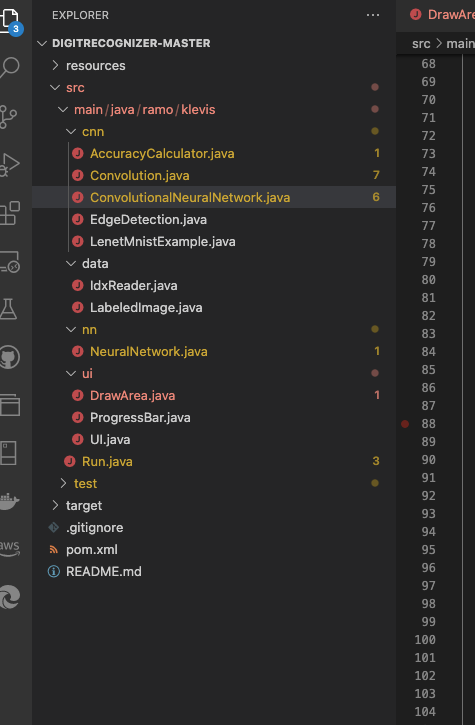
Now let’s write the user interface first:
import java.awt.*;
import java.awt.event.MouseAdapter;
import java.awt.event.MouseEvent;
import java.awt.event.MouseMotionAdapter;

import javax.swing.*;
import javax.swing.border.TitledBorder;


public class DrawArea extends JComponent {

    private final Font sansSerifBold = new Font("SansSerif", Font.BOLD, 18);
    // Image in which we're going to draw
    private Image image;
    // Graphics2D object ==> used to draw on
    private Graphics2D g2;
    // Mouse coordinates
    private int currentX, currentY, oldX, oldY;
    public DrawArea() {
        setDoubleBuffered(false);
        setBorder(BorderFactory.createTitledBorder(BorderFactory.createEtchedBorder(),
                "Please draw a digit",
                TitledBorder.LEFT,
                TitledBorder.TOP, sansSerifBold, Color.BLUE));
        addMouseListener(new MouseAdapter() {
            public void mousePressed(MouseEvent e) {
                // save coord x,y when mouse is pressed
                oldX = e.getX();
                oldY = e.getY();
            }
        });

        addMouseMotionListener(new MouseMotionAdapter() {
            public void mouseDragged(MouseEvent e) {
                // coord x,y when drag mouse
                currentX = e.getX();
                currentY = e.getY();

                if (g2 != null) {
                    g2.setStroke(new BasicStroke(10));
                    // draw line if g2 context not null
                    g2.drawLine(oldX, oldY, currentX, currentY);
                    // refresh draw area to repaint
                    repaint();
                    // store current coords x,y as olds x,y
                    oldX = currentX;
                    oldY = currentY;
                }
            }
        });
    }

    protected void paintComponent(Graphics g) {
        if (image == null) {
            // image to draw null ==> we create
            image = createImage(getSize().width, getSize().height);
            g2 = (Graphics2D) image.getGraphics();
            // enable antialiasing
            g2.setRenderingHint(RenderingHints.KEY_ANTIALIASING, RenderingHints.VALUE_ANTIALIAS_ON);
            // clear draw area
            clear();
        }

        g.drawImage(image, 0, 0, null);
    }

    public void clear() {
        g2.setPaint(Color.white);
        // draw white on entire draw area to clear
        g2.fillRect(0, 0, getSize().width, getSize().height);
        g2.setPaint(Color.black);
        repaint();
    }

    public Image getImage() {
        return image;
    }

    public void setImage(Image image) {
        this.image = image;
    }
}
The rest of the article is under paid feature. Please subscribe it’s just one cup of coffee and you get access to this code + all the codes on this channel are presented here. It helps me pay my tuition fees, if you can support then please otherwise rest of the code is on medium. Medium Page [Only some part of code is published there.]
