

Pandas DataFrame With Tensorflow
In this tutorial I will show all the working with Pandas Dataframe with Tensorflow

This tutorial provides examples of how to load pandas DataFrames into TensorFlow.
You will use a small heart disease dataset provided by the UCI Machine Learning Repository. There are several hundred rows in the CSV. Each row describes a patient, and each column describes an attribute. You will use this information to predict whether a patient has heart disease, which is a binary classification task.
import pandas as pd
import tensorflow as tf

SHUFFLE_BUFFER = 500
BATCH_SIZE = 2
Download the CSV file containing the heart disease dataset:
csv_file = tf.keras.utils.get_file('heart.csv', 'https://storage.googleapis.com/download.tensorflow.org/data/heart.csv')Read the CSV file using pandas:
df = pd.read_csv(csv_file)This is what the data looks like:
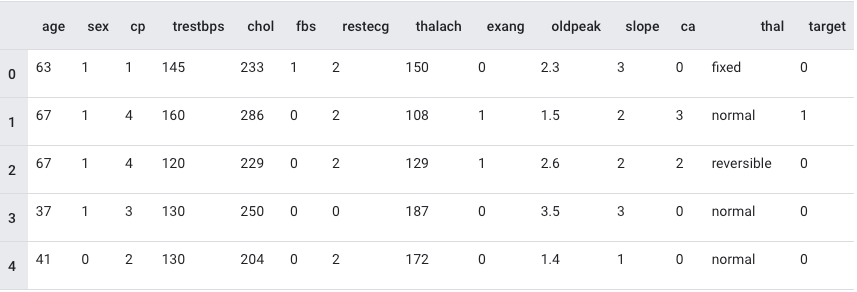
A DataFrame as an array
If your data has a uniform datatype, or dtype, it's possible to use a pandas DataFrame anywhere you could use a NumPy array. This works because the pandas.DataFrame class supports the __array__ protocol, and TensorFlow's tf.convert_to_tensor function accepts objects that support the protocol.
Take the numeric features from the dataset (skip the categorical features for now):
numeric_feature_names = ['age', 'thalach', 'trestbps',  'chol', 'oldpeak']
numeric_features = df[numeric_feature_names]
numeric_features.head()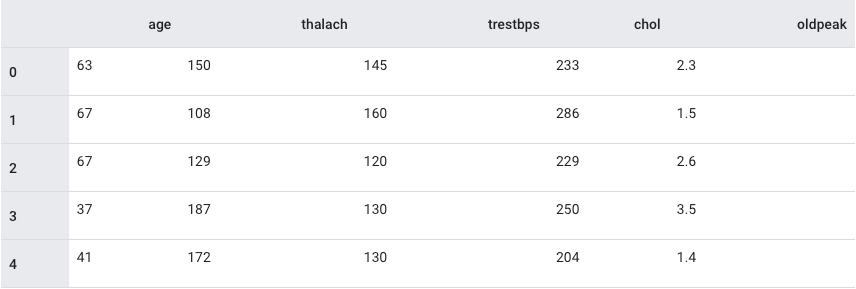
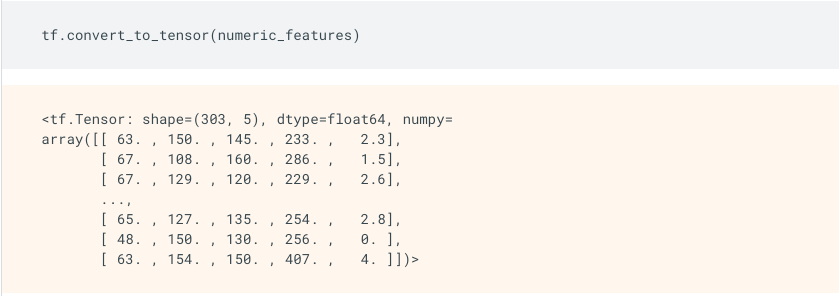
The DataFrame can be converted to a NumPy array using the DataFrame.values property or numpy.array(df). To convert it to a tensor, use tf.convert_to_tensor:
The rest of the article is under paid subscription, please consider subscribing for the complete tutorial.
