

Prompt Engineering
Chapter 6 of Hands-On Large Language Models: Iterative prompt design, controlling text generation with temperature and top-p, and structured JSON output parsing

From Representation Models to Generative Prompts
Earlier chapters treated text models mainly as representation engines. A review could become an embedding, a support ticket could become a feature vector, and a document could become a label. That perspective is still valuable, but prompt engineering starts when the goal changes. Instead of asking a model to reveal information already encoded in text, we ask it to produce new text that serves a task. The mental model shifts from extracting a signal to directing a generation.
That shift is important because generation is open ended. A classifier usually lives inside a small answer space, while a generative model can move in many plausible directions. The prompt is the operating surface for that process. It is the control layer through which we frame the task, set the tone, and indicate what kind of output should come next. Prompt engineering is not a writing trick and it is not a substitute for model capability. It is a practical engineering discipline for making the model legible to the task.
📘 Buy the Entire Book – Available on Amazon Worldwide (If you are paid subscriber, use the url at the end of this article to download the book for free!)
You can now purchase the complete book directly from Amazon in your country:
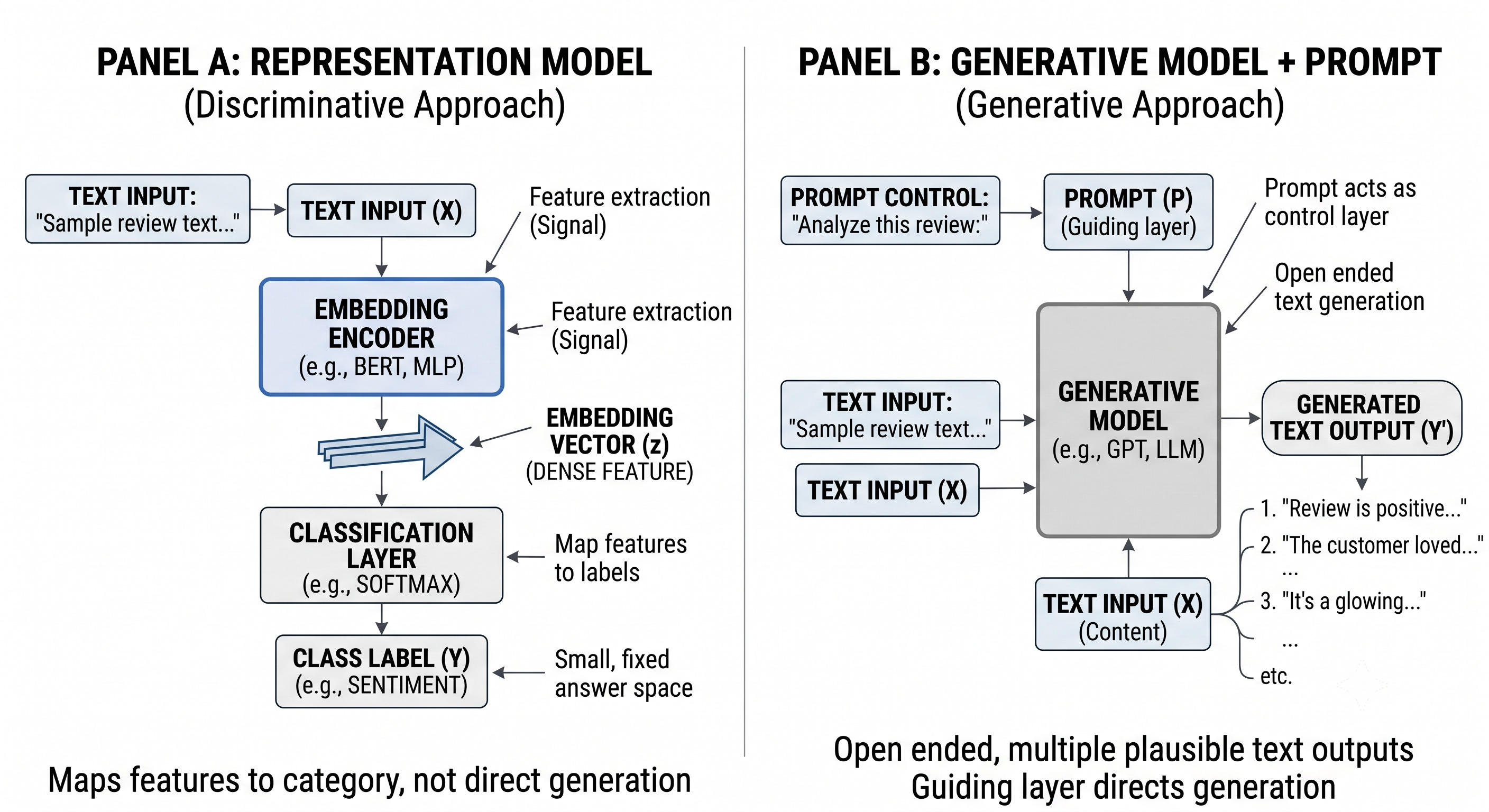
Seen that way, prompt engineering becomes an iterative workflow. You define the intent, examine what the model returns, notice where it drifts or overreaches, and revise the wording or structure. A weak prompt often behaves like an underspecified test case: it leaves too much room for the model to guess. Better prompts reduce that uncertainty by tightening the task boundary, making the expected behavior clearer, and improving consistency across runs and users. Stronger models help, but they do not remove the need for this control loop. Ambiguity, variability, and task-specific constraints still affect whether the output is useful in practice.
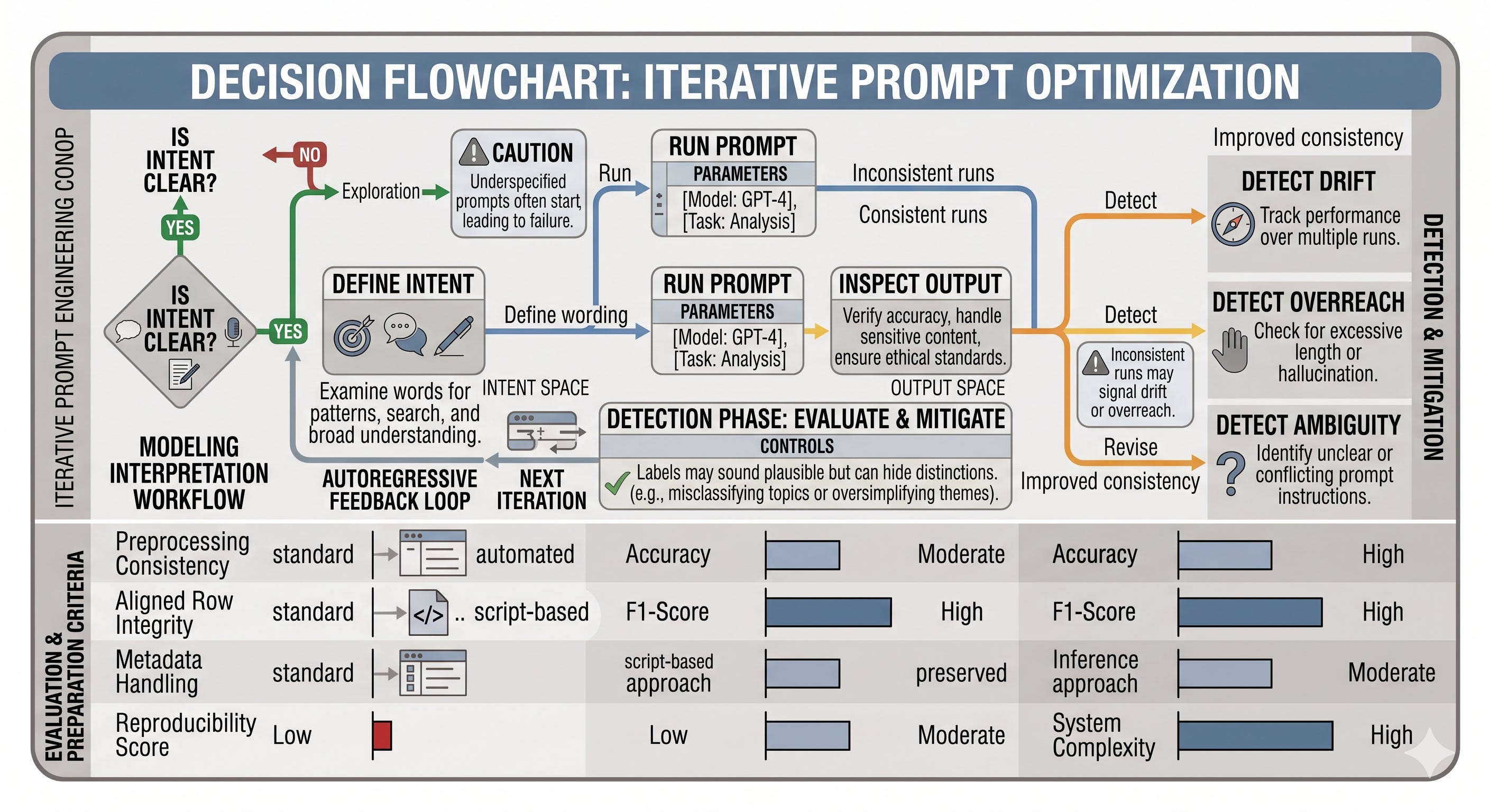
ReviewDesk makes the change in mindset easy to see. In a representation-first flow, a support item might be assigned a category for analysis. In a generation-first flow, the same item becomes a request for the next text the system should produce, such as a concise reply draft or a short internal summary. The business task is no longer just, what label is this, but what should the model produce next.
That is why prompt structure continues to matter even as models improve. Good prompts help the system stay consistent, easier to inspect, and easier to use downstream. They also set up the next concerns in this chapter: how to reason with generated outputs, how to verify them, and how to evaluate whether the result is actually fit for the job. Prompt engineering is the first control mechanism, not the last one.
Loading a Chat Model and Controlling Sampling
Why Start with a Small Open Chat Model
Prompt engineering becomes practical only when you can observe how a model changes as the prompt and decoding settings change. That is why a small open chat model is a sensible starting point instead of a large closed service hidden behind an API. A compact model is easier to run on modest hardware, cheaper to experiment with, and fast enough to support repeated trial and error. In other words, it gives you a low-friction place to learn the workflow before you move on to larger systems.
A model such as Phi-3-mini is especially useful in this learning phase because it is compact enough to be realistic on limited VRAM while still behaving like a modern instruct-tuned chat model. That makes it a good fit for iterative work: you can revise a prompt, rerun it, and inspect the difference without waiting on heavyweight infrastructure. The goal here is not to claim that this model is universally best. The goal is to choose a practical baseline that keeps experimentation simple.
Loading the Model, Tokenizer, and Generation Pipeline
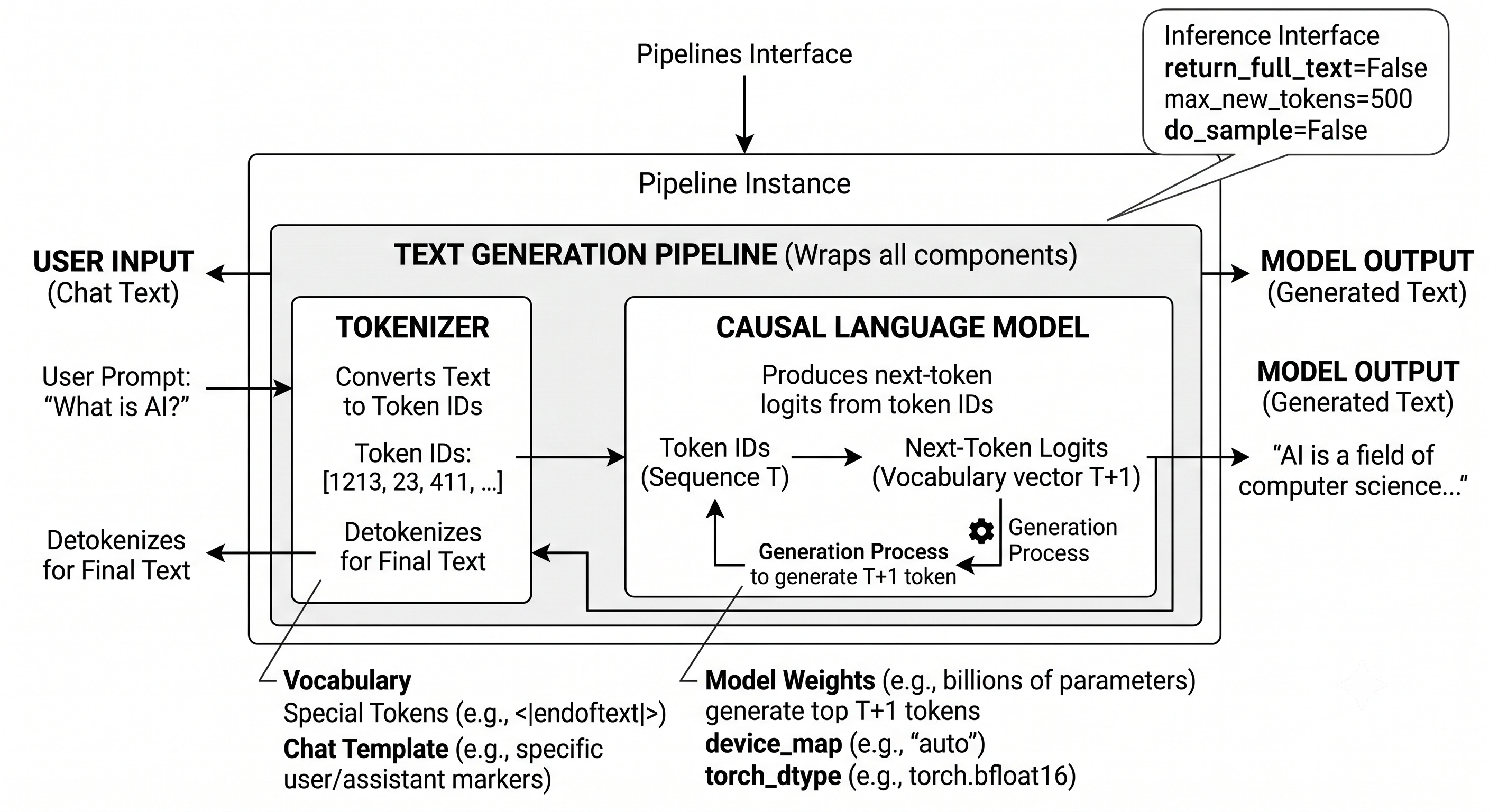
The standard Transformers workflow is to load a causal language model, load its tokenizer, and then wrap both in a text-generation pipeline. Each object has a distinct role. The model contains the learned weights. The tokenizer contains the vocabulary and special tokens needed to turn text into token IDs and back again. The pipeline is a convenience layer that packages inference into a single interface.
import torch
from transformers import AutoModelForCausalLM, AutoTokenizer, pipeline

# Load model and tokenizer
model = AutoModelForCausalLM.from_pretrained(
    "microsoft/Phi-3-mini-4k-instruct",
    device_map="cuda",
    torch_dtype="auto",
    trust_remote_code=True,
)
tokenizer = AutoTokenizer.from_pretrained("microsoft/Phi-3-mini-4k-instruct")

# Create a pipeline
pipe = pipeline(
    "text-generation",
    model=model,
    tokenizer=tokenizer,
    return_full_text=False,
    max_new_tokens=500,
    do_sample=False,
)
This configuration establishes a deterministic baseline. return_full_text=False keeps the output focused on the newly generated continuation instead of echoing the original prompt. max_new_tokens limits how far the response can grow. do_sample=False disables sampling, so generation follows the most likely next token at each step. That makes the result repeatable, which is exactly what you want when you are checking whether a prompt change caused a different answer.
The pipeline also makes the code easier to read. Instead of wiring generation calls by hand, you pass in a prompt or a message list and let the wrapper handle the inference details. That simplicity matters early in the workflow, because it lets you focus on prompt behavior rather than on low-level generation mechanics.
How Chat Messages Become a Serialized Prompt
Chat models are usually written against a message list rather than a single string. The list is the form you control as the developer, but it is not yet the exact input the model sees. Before generation, the tokenizer applies a model-specific chat template that serializes the messages into a prompt string and inserts the control tokens the model expects.
# Prompt
messages = [
    {"role": "user", "content": "Create a funny joke about chickens."}
]

# Generate the output
output = pipe(messages)
print(output[0]["generated_text"])
The structure above is simple on purpose. The key idea is that the message object is only the starting point. The pipeline turns that structure into the actual text representation the model conditions on.
# Apply prompt template
prompt = pipe.tokenizer.apply_chat_template(messages, tokenize=False)
print(prompt)
That printed string is the serialized prompt. It may include role tags, separators, and end markers that do not appear in the original message list. Those details are model-specific, which is why chat templates are not portable in a universal way. A prompt that is formatted correctly for one model can be serialized differently for another, even if the user-visible content looks identical.
A useful way to think about the distinction is that the message list is your instruction, while the chat template is the translation into the model’s dialect. When a response looks odd, too verbose, or unexpectedly truncated, the first thing to inspect is often the serialized prompt rather than the message object alone.
Turning On Sampling: Temperature, Top-p, and Output Variability
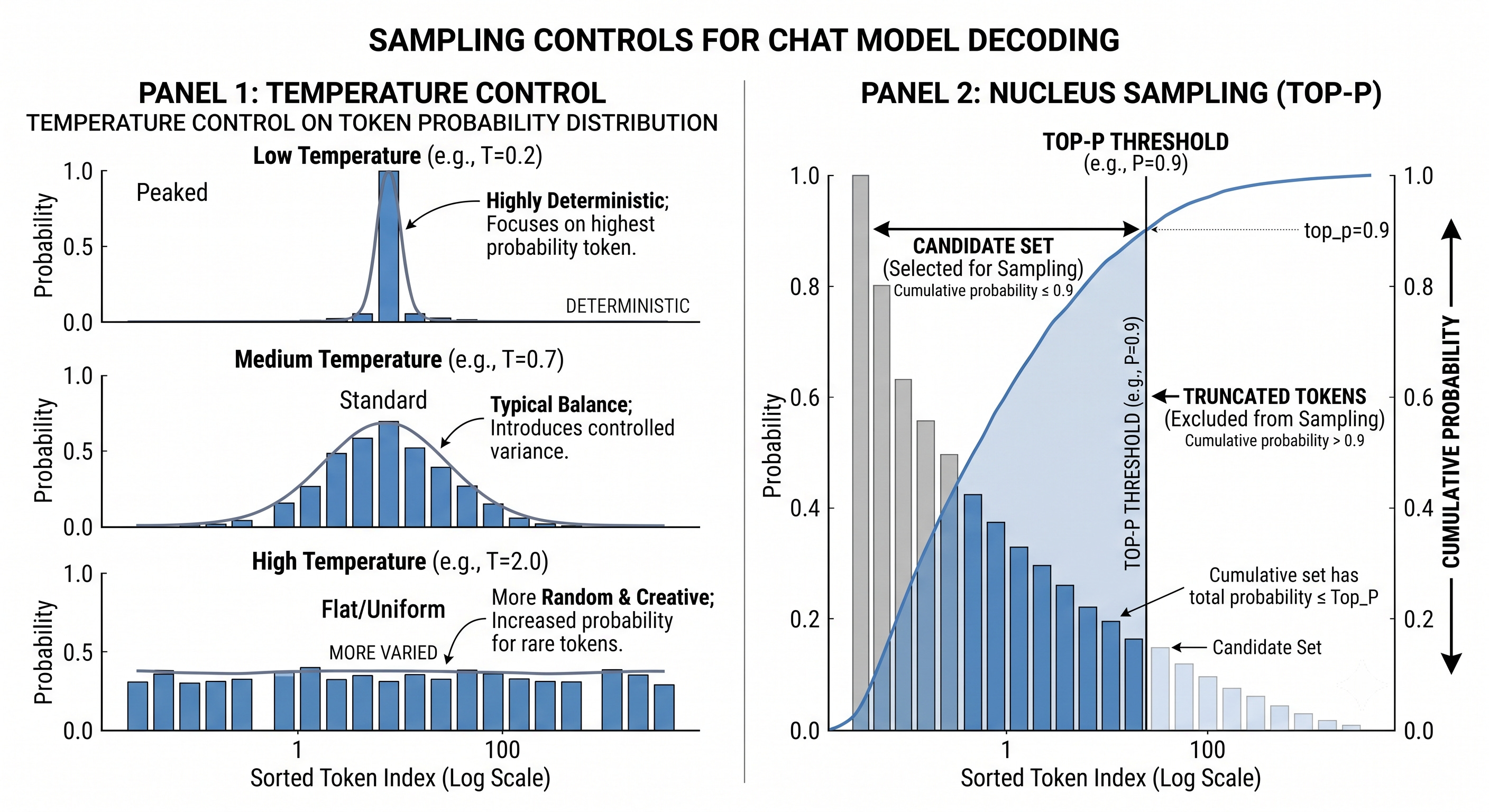
Deterministic decoding is the baseline, but it is not the only useful behavior. When sampling is enabled, the model has more freedom in how it selects the next token. Temperature and top-p are the two main controls for shaping that freedom.
Temperature adjusts how sharply the model favors the most likely tokens. Lower values concentrate probability mass on the top candidates and make outputs more predictable. Higher values spread probability more widely and make less likely tokens more available. In practice, that means a low temperature usually gives steadier wording, while a higher temperature usually produces more variation.
# Using a high temperature
output = pipe(messages, do_sample=True, temperature=1)
print(output[0]["generated_text"])
Top-p, also called nucleus sampling, uses cumulative probability mass to limit the candidate set. Instead of considering every token, the model keeps the smallest set of tokens whose combined probability reaches the chosen threshold. This makes the pool adaptive to the prompt and the model state. A related concept is top-k, which keeps a fixed number of highest-probability tokens, but temperature and top-p are the main controls you are likely to use most often.
# Using a high top_p
output = pipe(messages, do_sample=True, top_p=1)
print(output[0]["generated_text"])
Sampling should be treated as a reliability choice, not just a creativity feature. The more freedom you allow, the more likely the output is to vary from run to run. That variability can be helpful, but it also means you may need more validation if the output feeds a customer-facing or workflow-critical task. Deterministic generation is often the best debugging mode because fixed output makes it easier to tell whether a change came from the prompt or from the decoding settings.
Reading the Same Prompt Three Ways: Deterministic, Tempered, and Nucleus-Sampled
In ReviewDesk, imagine a support request asking for a polite reply to a customer who has failed to log in several times. With deterministic decoding, the response is usually stable and conservative, which makes it easier to review and compare. With a higher temperature, the wording may become more varied and expressive. With top-p sampling, the answer remains focused on plausible continuations but has more room to choose among them. The prompt stays the same while the decoding policy changes.
That difference matters because support, triage, and drafting workflows usually need reliability before style. Sampled outputs are useful examples, but they are not guaranteed to repeat exactly on another run, especially when temperature or top-p is enabled. For that reason, deterministic settings are a good place to start whenever you want to debug a prompt or isolate the effect of a formatting change.
From Single Prompt to Prompt Assembly
A prompt is easier to design when you stop treating it as one uninterrupted string and start treating it as an assembly of reusable parts. That shift matters because prompt engineering is not just about writing well once. It is about building an interface to the model that can be edited, tested, and reused across tasks. In practice, the useful question is not whether a prompt is long or short, but which parts are doing the work and how those parts interact.
A modular prompt makes that structure visible. If a response is too vague, the likely cause may be a missing instruction, weak context, an unclear format cue, or a mismatch between the audience and the tone. Thinking this way turns prompt writing into a debugging exercise. You can toggle one component at a time, observe the output, and learn which part actually changes the model’s behavior. That is a more reliable habit than rewriting everything from scratch whenever the result disappoints you.
Anatomy of a Modular Prompt
A prompt can be built from several reusable design units. Persona sets the role the model should inhabit, such as a support agent, analyst, or editor. Instruction states the job to perform. Context supplies the background that makes the job meaningful. Format tells the model how the answer should be shaped. Audience specifies who the output is for. Tone guides voice and level of formality. Data is the concrete content the task acts on. These pieces overlap in practice, but each one gives a different kind of control.
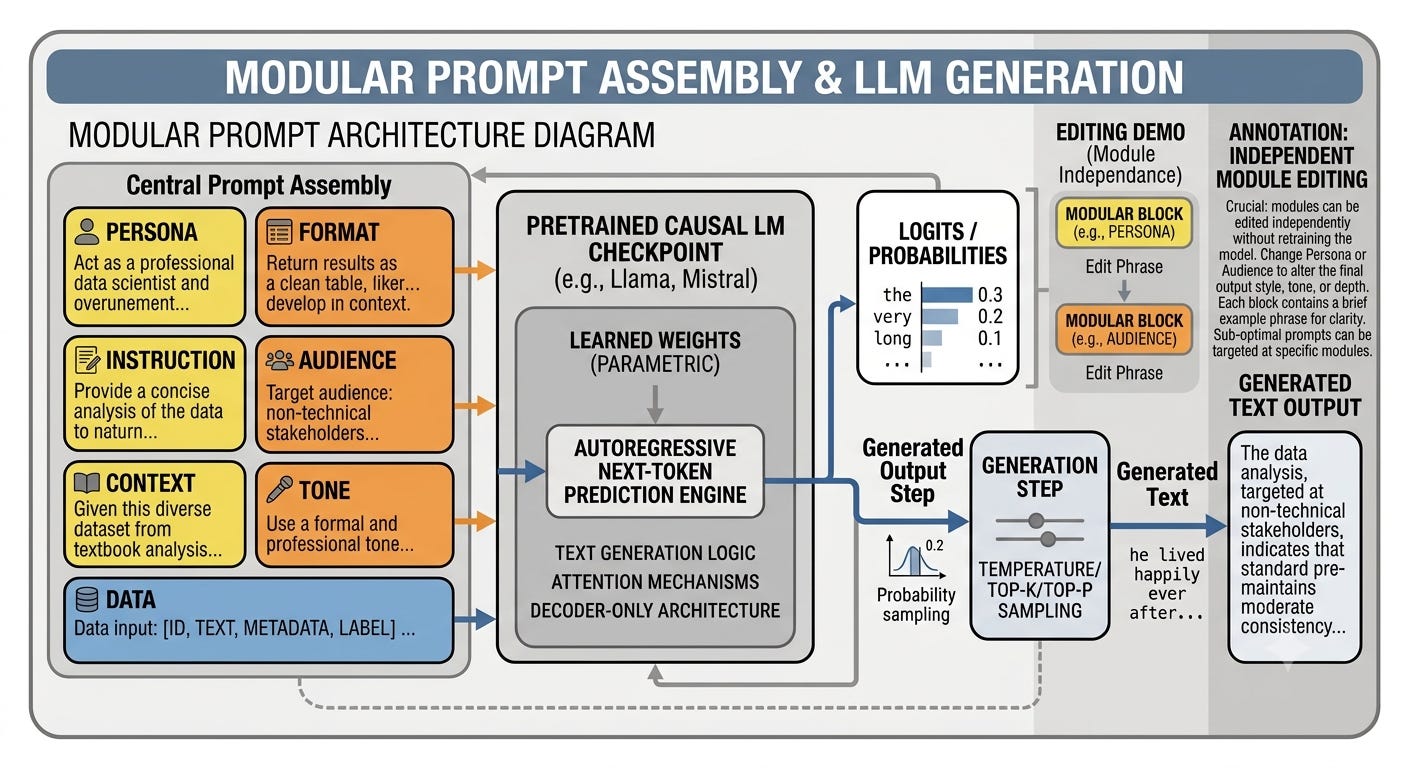
They are not a universal schema. A prompt does not need every field, and the fields do not need to appear in one fixed order. The point is to make the design choices explicit so they can be reused or removed deliberately. That is why prompt composition is best understood as a set of modules rather than a rigid template. If persona says “brief and direct” while tone says “detailed and explanatory,” the prompt sends mixed signals. If context is added late after the main instruction, it may still help, but the model may attend to the earlier framing more strongly. Ordering is not magic, but it does affect which cue feels dominant.
Consider a support-style summarization prompt. The persona can establish an expert voice, the instruction can ask for a concise summary, the context can explain that the goal is to extract the most important points, the format can request a labeled output, the audience can point to busy researchers, the tone can keep the result professional, and the data field can hold the text to summarize. Each component narrows the space of acceptable completions in a different way. If one part is removed, the output often changes in a visible and useful way. If the format cue disappears, the answer may become less structured. If the audience cue disappears, the wording may become less tailored. If the tone cue changes, the same content may feel more casual or more formal.
# Prompt components
persona = "You are an expert in Large Language models. You excel at breaking down complex papers into digestible summaries.\n"
instruction = "Summarize the key findings of the paper provided.\n"
context = "Your summary should extract the most crucial points that can help researchers quickly understand the most vital information of the paper.\n"
data_format = "Create a bullet-point summary that outlines the method. Follow this up with a concise paragraph that encapsulates the main results.\n"
audience = "The summary is designed for busy researchers that quickly need to grasp the newest trends in Large Language Models.\n"
tone = "The tone should be professional and clear.\n"
text = "MY TEXT TO SUMMARIZE"
data = f"Text to summarize: {text}"

# The full prompt - remove and add pieces to view its impact on the generated output
query = persona + instruction + context + data_format + audience + tone + data
The engineering value here is not the string concatenation itself. It is the ability to edit one field at a time and compare outputs. That makes prompt work feel closer to A/B testing than to one-shot writing. You can remove the audience clause, shorten the context, or move the format cue earlier and inspect what changes. This is especially useful when a prompt needs to be maintained over time, because each component can be revised without losing the whole structure.
Prompt Tuning by Editing the Pieces
Prompt refinement is usually iterative. Add a component, remove one, or reorder them, then compare the result. If the answer becomes more precise after adding format, that field is earning its place. If a persona statement causes unnecessary verbosity, it may be too strong for the task. If a context block is helpful only when placed near the instruction, that ordering choice is worth keeping. The point is to isolate cause and effect so the prompt behaves like a controlled design, not a guess.
A good rule of thumb is to change one thing at a time when possible. That makes the output easier to interpret. It also helps you distinguish a genuinely useful constraint from a cosmetic one. Prompt design becomes more stable when you treat each field as a testable feature rather than as decoration.
One-Shot Examples as Behavior Demonstrations
Another way to steer a model is to show it a worked example inside the prompt. This is one-shot in-context learning. It is not training, and it does not update the model’s weights. The example only changes the context the model is currently conditioning on. That distinction matters because a prompt example can demonstrate a pattern, but it does not rewrite the model’s underlying knowledge.
One-shot prompting is best understood as behavior demonstration. It can teach style, response shape, label mapping, or task format. It is useful when you want the model to imitate a pattern rather than infer it from a long rule description. It is less reliable as a way to inject brand-new facts the model never learned. A single example can show how a reply should sound, but it cannot guarantee durable factual learning the way training would.
With chat-based models, the example is usually written as role-structured messages. Those messages are then serialized through the model’s chat template into the actual input format expected by that model. The distinction is important. The message list is the structured prompt design, while the template serialization is the model-specific conversion step that turns that structure into tokens. In other words, the example is not just text; it is a sequence of roles and contents that the template packages for generation.
# Use a single example of using the made-up word in a sentence
one_shot_prompt = [
    {
        "role": "user",
        "content": "A 'Gigamuru' is a type of Japanese musical instrument. An example of a sentence that uses the word Gigamuru is:"
    },
    {
        "role": "assistant",
        "content": "I have a Gigamuru that my uncle gave me as a gift. I love to play it at home."
    },
    {
        "role": "user",
        "content": "To 'screeg' something is to swing a sword at it. An example of a sentence that uses the word screeg is:"
    }
]
print(tokenizer.apply_chat_template(one_shot_prompt, tokenize=False))

# Generate the output
outputs = pipe(one_shot_prompt)
print(outputs[0]["generated_text"])
This pattern is useful when the task is mostly about format or style. A single example can show how a ticket summary should be phrased, how a classification label should appear, or how a handoff note should be structured. It is not a shortcut to knowledge acquisition. It is a way of showing the model the pattern you want it to continue.
Chaining Prompts into a Workflow
Prompting also becomes more powerful when it is split across multiple calls. Chain prompting uses the output of one call as input to the next. Instead of asking the model to do everything in one pass, you let it perform one subtask, capture the intermediate output, and then reuse that result downstream. This is a workflow pattern, not a new model capability.
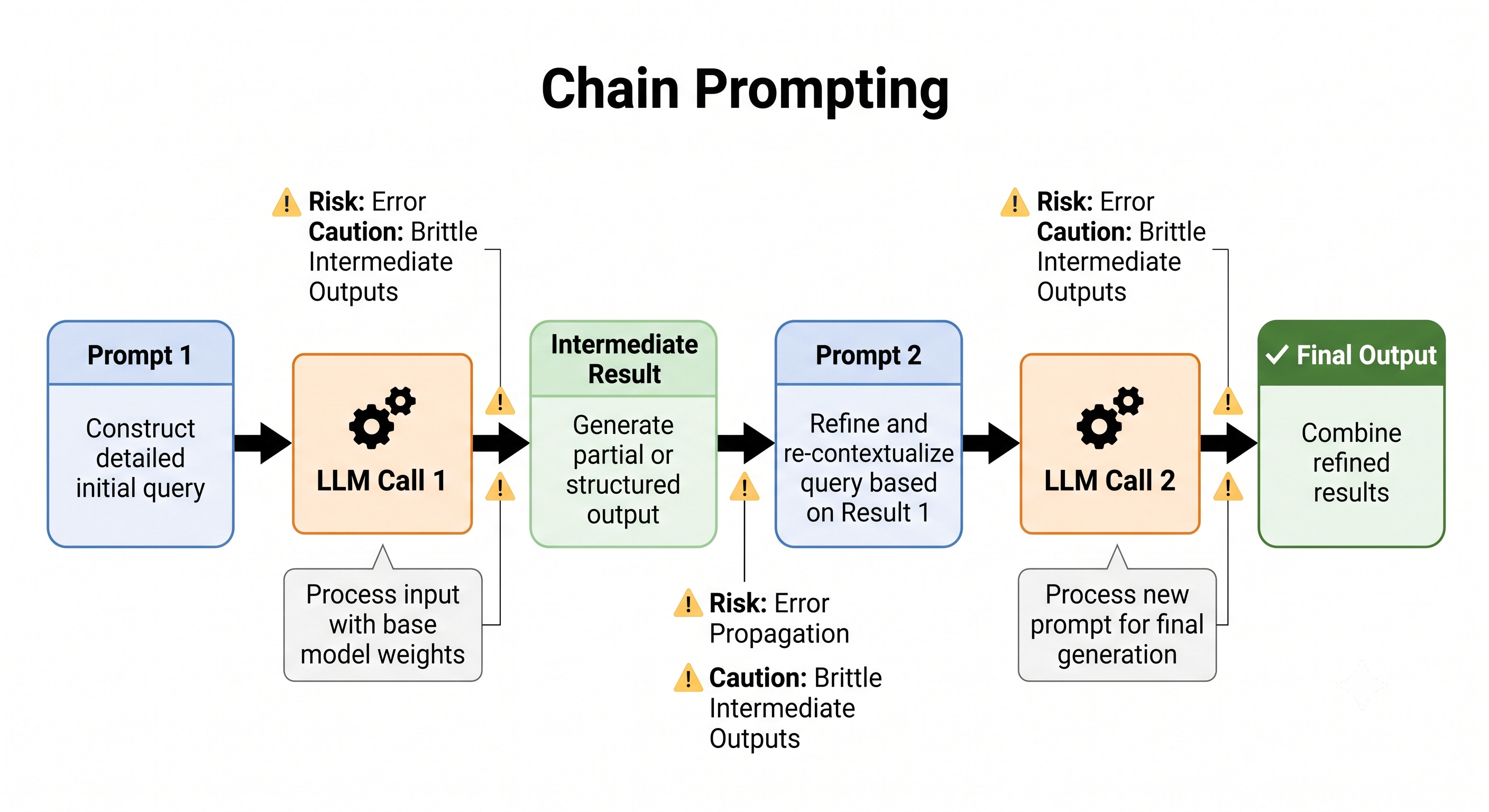
That separation is valuable when a task naturally breaks into stages. One call can draft a name, summary, or internal note. A later call can transform that draft into a customer-facing message, a shorter pitch, or a cleaner revision. The first output becomes a controlled input for the second prompt. That makes the pipeline easier to reason about because each step has a narrower purpose.
# Create name and slogan for a product
product_prompt = [
    {"role": "user", "content": "Create a name and slogan for a chatbot that leverages LLMs."}
]
outputs = pipe(product_prompt)
product_description = outputs[0]["generated_text"]
print(product_description)

# Based on a name and slogan for a product, generate a sales pitch
sales_prompt = [
    {"role": "user", "content": f"Generate a very short sales pitch for the following product: '{product_description}'"}
]
outputs = pipe(sales_prompt)
sales_pitch = outputs[0]["generated_text"]
print(sales_pitch)
In this example, the first call produces the product name and slogan, and the second call consumes that output to produce a sales pitch. That handoff is the key idea. Chain prompting is useful when you want decomposition, drafting, or refinement. It is often preferable to a single prompt when the full task is too broad, when the first pass is exploratory, or when the second pass needs a cleaner input than the raw source text.
It also has failure modes. Errors can accumulate across steps, vague intermediate outputs can become worse in the next call, and brittle handoffs can cause the later prompt to lose the original intent. For that reason, chain prompting works best when each intermediate output is named clearly and is specific enough to support the next stage. Think of it as an assembly line: each station does a smaller job, but each station also depends on the quality of the previous one.
What Modular Prompting Can and Cannot Do
Modular prompting improves steering, clarity, and reuse, but it does not retrain the model. Prompt examples do not update weights. They do not create permanent knowledge. They only shape the behavior of the current interaction. That is why prompt design and model training are related but fundamentally different. Prompting works by changing inputs; training works by changing parameters.
The practical takeaway is simple. Use modular prompts when you want to control behavior, demonstrate style, or decompose a task into stages. Use chain prompting when a single pass is too crowded and intermediate results will help. Use examples when you want to demonstrate a pattern. Keep in mind that these methods improve structure, not certainty. The next section extends that idea by moving toward techniques that ask the model to work through tasks more deliberately.
What reasoning-oriented prompting is trying to change
Ordinary prompt refinement mainly changes what the model says. Reasoning-oriented prompting tries to change the process the model is nudged to produce before it settles on an answer. That difference matters when the task has hidden structure, overlapping labels, or underspecified details. In those situations, a prompt that asks for intermediate work can make the output more stable than a prompt that simply asks for a polished response.
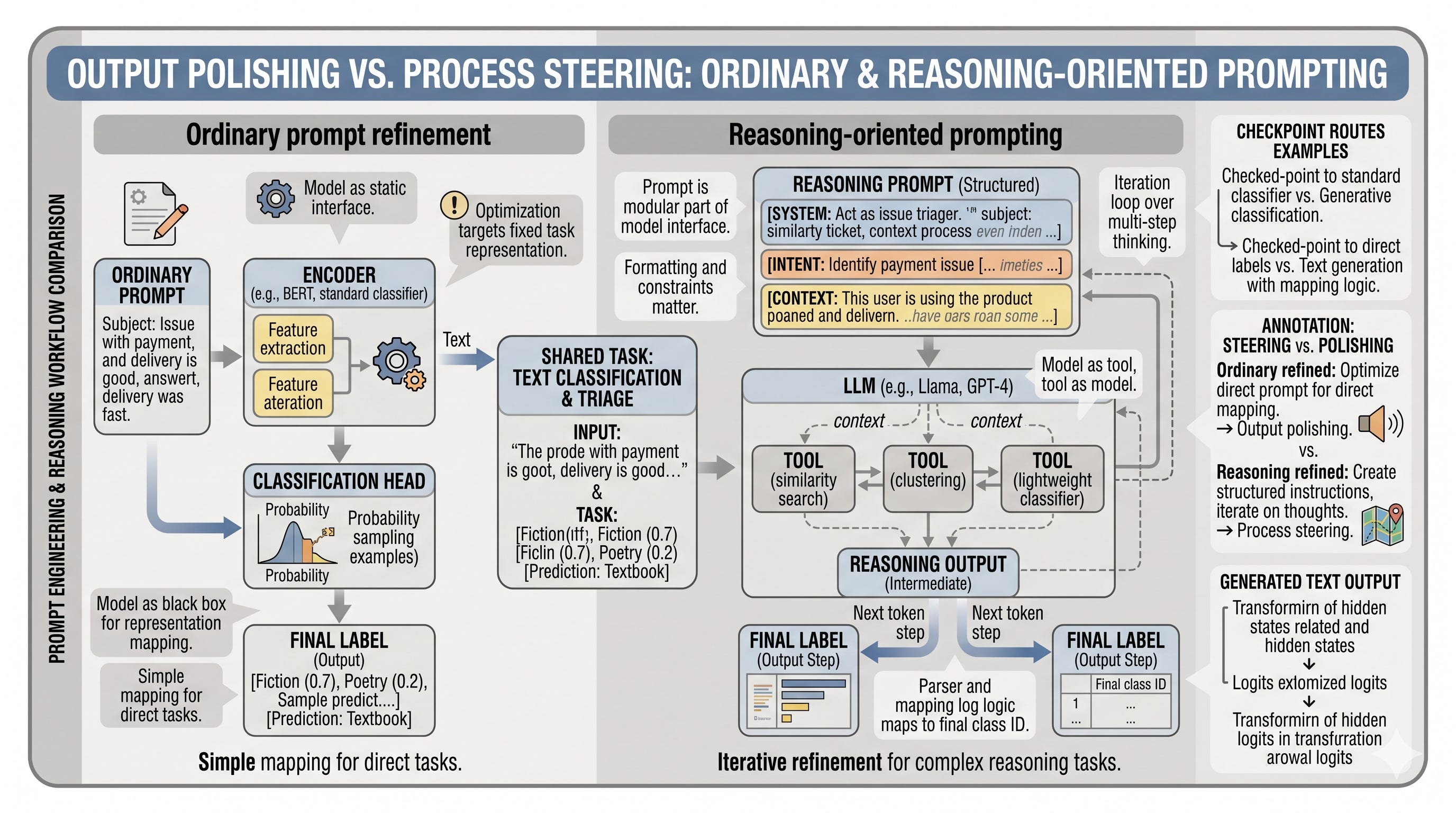
The important point is not that the model becomes a person-like reasoner. It does not suddenly think the way a human does. The practical effect is narrower and more useful: the prompt can steer generation toward a stepwise style that exposes intermediate choices, which often improves average reliability on messy tasks. For ReviewDesk, that is helpful when a ticket mentions several plausible categories at once and the model needs to compare evidence instead of guessing from the first clue.
Chain-of-thought prompting as single-path guided reasoning
Chain-of-thought prompting is the simplest version of this idea. You show the model one worked example that includes intermediate reasoning, then ask a new question in the same format. The example acts as a pattern for the next completion, so the model is more likely to produce a visible reasoning trace before giving the final label. This is useful when the answer depends on a hidden condition or on weighing more than one clue.
Here is a compact ReviewDesk-style example. The first ticket is answered with a brief justification, and the second ticket is left for the model to solve in the same style.
cot_prompt = [
    {"role": "user", "content": "Ticket: 'I was charged twice, but I also can't access my account after the password reset.' Classify the main issue and briefly explain why."},
    {"role": "assistant", "content": "The billing problem is the clearest actionable issue because the duplicate charge is explicit. Access trouble is present, but the payment issue is the strongest label. Final answer: billing."},
    {"role": "user", "content": "Ticket: 'My subscription renewed today, but the app says my plan expired and the invoice looks wrong.' Classify the main issue and briefly explain why."}
]

outputs = pipe(cot_prompt)
print(outputs[0]["generated_text"])
The worked example matters because it demonstrates not just the final format but the expected treatment of evidence. That is why chain-of-thought often helps on ambiguous support tickets, policy triage, or any other task where the label depends on comparing several plausible interpretations. It is still only a prompt-level nudge, though. A reasoning trace can look convincing and still be wrong if the task statement is unclear or if the model latches onto the wrong clue early.
Zero-shot chain-of-thought: triggering reasoning without examples
Zero-shot chain-of-thought keeps the same goal but removes the example. Instead of demonstrating reasoning, it asks for it directly with a short cue such as “think step by step.” This lighter version is useful when you want to save context, avoid crafting a demonstration, or quickly test whether a task benefits from explicit reasoning guidance.
zeroshot_cot_prompt = [
    {"role": "user", "content": "Ticket: 'My subscription renewed today, but the app says my plan expired and the invoice looks wrong.' Think step by step, then give the main issue."}
]

outputs = pipe(zeroshot_cot_prompt)
print(outputs[0]["generated_text"])
A short cue can still change generation style because it alters what the model is trying to produce next, even without examples. In practice, this is often a good first step. If it works, the prompt stays compact. If it does not, that is a clue that the task may need a better framing, a few-shot example, or a clearer decision rule rather than just a larger model.
Self-consistency: sample several reasoning traces and aggregate the answer
Self-consistency goes beyond a single reasoning path. Instead of trusting one completion, you sample several completions under stochastic decoding and then aggregate the final answers. The idea is simple: if the prompt is robust, different sampled traces should arrive at the same label. If the prompt is fragile, the variation between samples exposes that instability, and voting over the answers often improves the final decision.
This method depends on diversity in the samples, so decoding settings matter. If temperature is too low or top_p is too restrictive, the samples may be nearly identical and self-consistency loses much of its value. If sampling is too loose, the outputs can become noisy in a different way. The practical goal is enough diversity to reveal alternative reasoning paths while keeping the completions plausible.
For ReviewDesk, this is useful when a ticket could reasonably fit more than one category and the first answer is unreliable. A single pass might lock onto the most obvious word in the text. Several sampled passes make it more likely that the dominant pattern emerges, and a simple majority vote over the final labels often gives a better result.
The tradeoff is cost. Multiple samples mean more tokens, more latency, and more compute expense. That makes self-consistency a good fit for unstable or high-value decisions, but a poor fit for easy tasks where a single answer is already good enough.
Tree-of-thought: branching into alternative solution paths
Tree-of-thought extends the same general idea, but it changes the unit of exploration. Instead of sampling several final answers, it branches into several intermediate solution paths, compares them, and keeps the promising ones while discarding the weak ones. The key difference is that this is about path exploration, not answer voting.
That distinction is important. Self-consistency asks, in effect, which complete answer shows up most reliably across samples. Tree-of-thought asks which partial line of reasoning appears most promising before the answer is finalized. It is a drafting-and-narrowing process rather than a voting process.
A simplified ReviewDesk prompt can imitate this by asking for a few candidate interpretations and then a final choice.
tot_prompt = [
    {"role": "user", "content": "Ticket: 'I was charged after canceling, and the dashboard still says my payment failed.' Consider a few possible interpretations, compare them briefly, then choose the best category and explain why."}
]

outputs = pipe(tot_prompt)
print(outputs[0]["generated_text"])
You can think of the method as asking the model to draft several candidate explanations, debate which one fits best, and then narrow to the strongest branch. That is enough to capture the practical idea without turning the prompt into a full search algorithm. Tree-of-thought is most useful when the task is open-ended or when the model needs to choose among several plausible paths rather than retrieve one obvious fact.
Choosing a reasoning strategy in practice
A simple mental model helps. Use a single-pass prompt when the task is straightforward. Use self-consistency when the task is unstable and the cost of a wrong answer is higher than the cost of extra sampling. Use tree-of-thought when the task requires comparing several competing interpretations or exploring a small decision space before choosing.
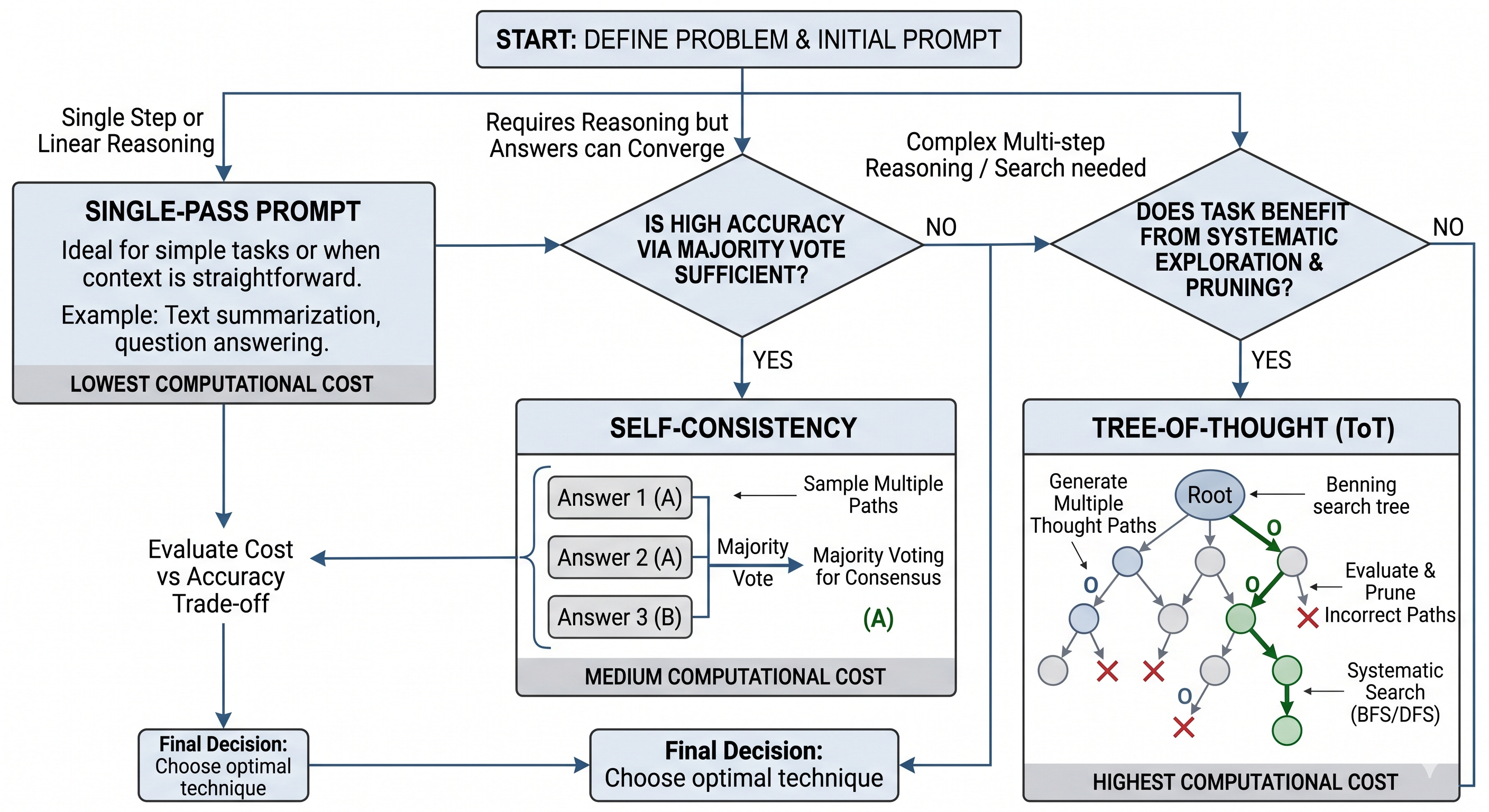
All three methods improve prompt behavior and often improve average outcomes, but none of them guarantees correctness. They reduce uncertainty; they do not eliminate it. If the ticket is ambiguous, underspecified, or high stakes, you should still verify the result with downstream checks or human review. The strongest practical benefit of reasoning-oriented prompting is not perfect logic. It is a better chance of getting a careful answer when the problem itself is not already easy.
Structured Output, Verification, and Constrained Decoding
Structured output becomes a production requirement the moment a model response stops being a reading experience and starts being input for something else. A support triage system cannot “mostly” receive JSON. A database loader cannot guess where the category field ended. An API client cannot safely consume prose that looks organized to a human but fails at the border checkpoint of a parser. This is the practical distinction that matters here: a response can look right on screen and still not run right in software.
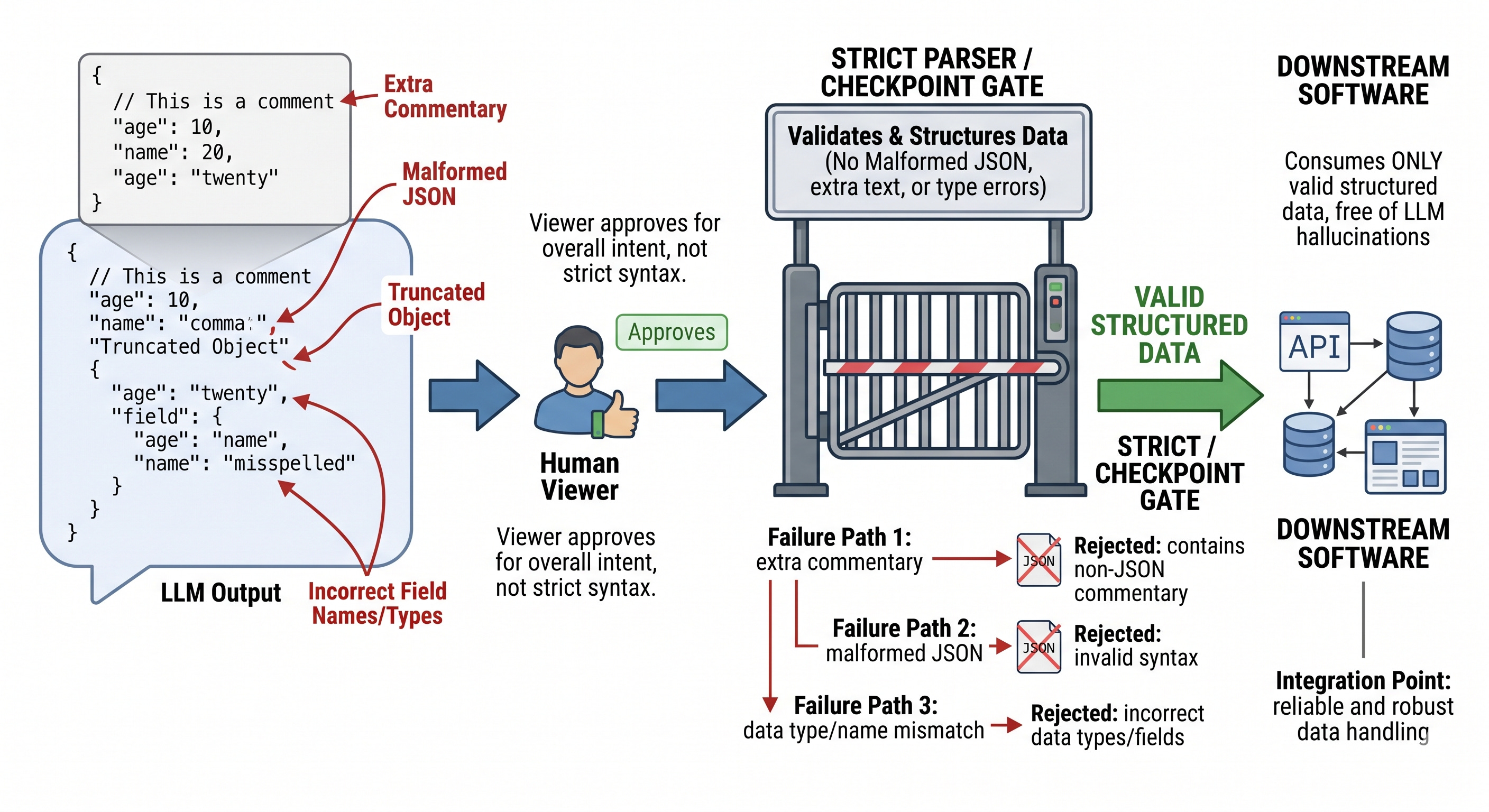
The simplest way to improve structure is to ask for it directly. A zero-shot prompt can request a fixed schema, but the model is still free to drift, add commentary, or return partial objects. In ReviewDesk, you might ask for a ticket classification result containing a category, a priority, and a short draft reply. That is enough to guide the model, but not enough to guarantee anything. If the task is forgiving, a prompt alone may be acceptable. If the output is going straight into another system, the same request becomes fragile.
prompt = [
    {
        "role": "user",
        "content": (
            "Classify this ReviewDesk ticket and return valid JSON with exactly these keys: "
            "category, priority, draft_response. "
            "Ticket: 'My login works on mobile but not on desktop after the last update.'"
        ),
    }
]

output = llm.create_chat_completion(messages=prompt, temperature=0)["choices"][0]["message"]["content"]
print(output)
A one-shot or few-shot template usually improves adherence because the model sees the target shape rather than merely being told about it. The example acts like a small map of the destination. You are not training the model, and you are not changing its weights; you are narrowing the space of likely completions by showing a format that should be imitated. That distinction is easy to miss. In-context examples are temporary steering signals, not new knowledge stored by the model.
prompt = [
    {
        "role": "user",
        "content": (
            "Return ReviewDesk tickets in this JSON format only:\n"
            '{"category":"...","priority":"...","draft_response":"..."}\n\n'
            "Example:\n"
            '{"category":"authentication","priority":"high","draft_response":"Please try resetting your password..."}\n\n'
            "Ticket: 'The billing page shows an error when I open it from Safari.'"
        ),
    }
]

output = llm.create_chat_completion(messages=prompt, temperature=0)["choices"][0]["message"]["content"]
print(output)
This is where the contrast between guidance and enforcement becomes important. Prompt shaping is persuasive; constrained decoding is restrictive. Prompting tells the model what kind of answer is wanted. Grammar-constrained decoding or JSON-enforced generation limits the next token choices so the model can only produce output that fits the allowed format. In other words, prompting steers the car, while constrained decoding puts rails on the road. The prompt still matters, but the runtime is now doing part of the reliability work.
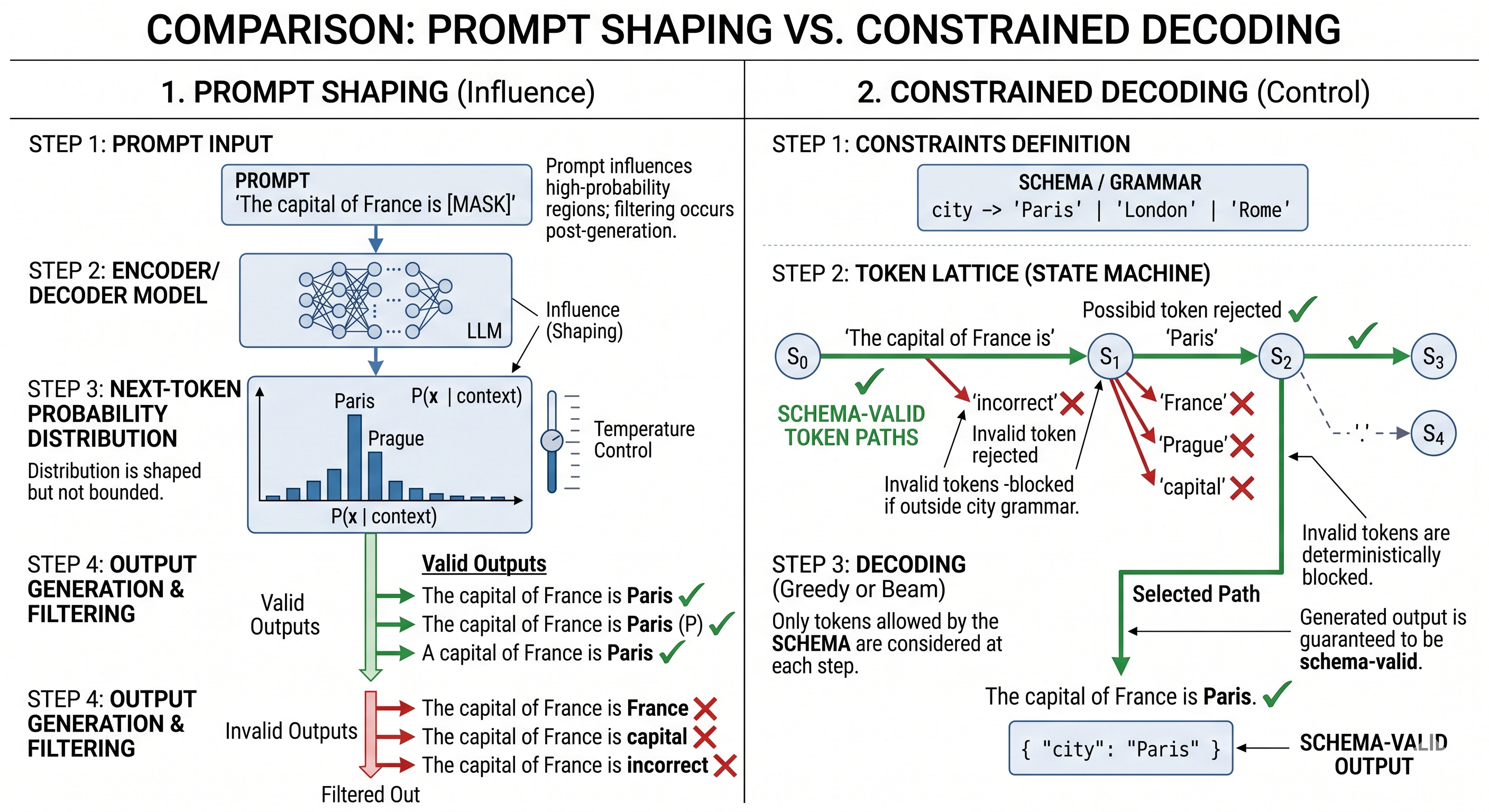
With runtimes that support structured generation, the same ReviewDesk task can be asked for as JSON-only output. A model such as a quantized GGUF chat model loaded through llama-cpp-python can be configured so the response must satisfy a JSON grammar or a JSON response format. That does not make the answer correct in the semantic sense, but it does strongly improve the guarantee that the string is machine-readable.
from llama_cpp.llama import Llama

llm = Llama.from_pretrained(
    repo_id="microsoft/Phi-3-mini-4k-instruct-gguf",
    filename="*fp16.gguf",
    n_gpu_layers=-1,
    n_ctx=2048,
    verbose=False,
)

output = llm.create_chat_completion(
    messages=[
        {
            "role": "user",
            "content": (
                "For this ReviewDesk ticket, return JSON with category, priority, and draft_response. "
                "Ticket: 'My invoice downloaded as a blank PDF.'"
            ),
        }
    ],
    response_format={"type": "json_object"},
    temperature=0,
)["choices"][0]["message"]["content"]

print(output)
The runtime can enforce shape, but it cannot enforce truth. That is why verification remains necessary. A visually plausible blob of text is not the same thing as valid JSON, and valid JSON is not the same thing as a correct or useful answer. Parsing is the first real test. If json.loads fails, the output is not ready. If parsing succeeds, the next step is to check that the expected fields are present and that their types make sense for the downstream consumer.
import json

parsed = json.loads(output)
print(json.dumps(parsed, indent=2))

required_keys = {"category", "priority", "draft_response"}
if not required_keys.issubset(parsed):
    raise ValueError(f"Missing keys: {required_keys - set(parsed)}")

if not isinstance(parsed["category"], str):
    raise TypeError("category must be a string")
if not isinstance(parsed["priority"], str):
    raise TypeError("priority must be a string")
if not isinstance(parsed["draft_response"], str):
    raise TypeError("draft_response must be a string")
That small parse-and-validate step is more than a convenience. It is the border checkpoint between generated text and usable data. If the model returns a malformed object, a truncated string, or a response with commentary wrapped around the JSON, the failure mode should be classified rather than ignored. A malformed object usually calls for regeneration. A truncated object often points to token limits or overly long outputs. Commentary-laden output may be fixed by stronger instructions or by constrained decoding. In a brittle pipeline, the right response is often to retry with lower temperature, a tighter schema, or a stricter decoder. In a less brittle workflow, it may be acceptable to reject the result and fall back to a human review path.
The operational rule is simple. Shape with examples when failure is tolerable, enforce with decoding when the downstream consumer is brittle, and validate whenever the output is reused programmatically. That sequence keeps prompt engineering from becoming guesswork. It treats malformed output as a workflow incident rather than as a cosmetic annoyance, which is exactly the mindset needed when a model stops being a chatbot and starts being a component.
Use the url below to download the enitre book as pdf: