

Recurrent Neural Networks for Quant Trading: Time-Series Forecasting
Building LSTM, GRU, and simple RNN models to predict asset returns and identify sequential market patterns

Use the URL at the end of this article to download the source code!
Imports and configuration
import warnings
warnings.filterwarnings('ignore')
The purpose here is simply to quiet down warning messages before the rest of the notebook runs. The warnings module is imported first so Python has a standard way to control how warnings are handled, and then the warning filter is set to ignore. Behind the scenes, that tells the interpreter not to print warning notices to the screen even if pandas or another library encounters something slightly unusual, such as a deprecated behavior or a formatting issue. Nothing is calculated or displayed here, so there is no saved output. The effect is just to keep later notebook output cleaner and easier to read while the data-processing steps continue.
from pathlib import Path

import numpy as np
import pandas as pd
This cell sets up the basic tools that the rest of the notebook will rely on. It brings in Path from the standard library so file locations can be handled cleanly, especially when building paths to data files. It also imports NumPy and pandas, which are the main libraries used for numerical work and tabular data manipulation throughout the notebook. There is no visible output here because the cell is only preparing the environment; it defines the names that later cells will use, but it does not yet load data, compute anything, or display results.
np.random.seed(42)This line sets the random seed for NumPy’s random number generator to 42, which makes any future random operations behave the same way each time the notebook runs. That matters when later steps involve sampling, shuffling, or any other stochastic process, because it keeps results reproducible and easier to debug or compare. Nothing is displayed because the command only changes the internal random state; it prepares the environment for consistent behavior rather than producing visible output.
idx = pd.IndexSliceThis line creates a handy shortcut for slicing pandas objects with MultiIndexes. A MultiIndex is pandas’ way of giving a table more than one level of indexing, such as date and ticker together, and selecting pieces from it can get a little awkward to write repeatedly. By assigning pandas’ special IndexSlice helper to the name idx, the notebook sets up a cleaner way to express those multi-level selections later on. Nothing is displayed when the cell runs because it is only defining a reusable object for future use, not producing any data or results yet.
Create the daily dataset
DATA_DIR = Path('..', 'data')This line sets up a path object that points to the data directory one level above the current working location. It gives the notebook a reusable reference for where the input and output files live, so later cells can load the stock price data and save the prepared datasets without hardcoding long file paths each time. Nothing is displayed when it runs because it is just defining a location for future use, not performing a calculation or producing a result.
prices = (pd.read_hdf(DATA_DIR / 'assets.h5', 'quandl/wiki/prices')
          .loc[idx['2010':'2017', :], ['adj_close', 'adj_volume']])
prices.info()
<class 'pandas.core.frame.DataFrame'>
MultiIndex: 5698754 entries, (Timestamp('2010-01-04 00:00:00'), 'A') to (Timestamp('2017-12-29 00:00:00'), 'ZUMZ')
Data columns (total 2 columns):
# Column Dtype
--- ------ -----
0 adj_close float64
1 adj_volume float64
dtypes: float64(2)
memory usage: 109.5+ MBThe cell loads the stock price data that will be used for the daily return dataset and immediately trims it down to the part needed for the next steps. It reads the HDF5 file from the data directory, pulls out the Quandl Wiki prices table, and then filters the rows to dates from 2010 through 2017 while keeping only the adjusted close and adjusted volume fields. That means the result is already narrowed to the time span and columns relevant for later return calculations, instead of carrying around the full raw dataset.
The saved output is the summary of that filtered table, which is what pandas shows when you ask for the data frame information. It confirms that the object is a DataFrame with a MultiIndex, meaning each row is identified by both a date and a ticker symbol. The index contains 5,698,754 rows, stretching from the first trading day in 2010 for ticker A through the last trading day in 2017 for ticker ZUMZ. The two retained columns are both floating-point values, one for adjusted closing price and one for adjusted trading volume, and the memory usage is a little over 100 MB. That output is useful because it verifies that the load worked, the filtering by date succeeded, and the dataset has the structure expected for the return calculations that come next.
Filter for the stocks with the highest trading activity
n_dates = len(prices.index.unique('date'))
dollar_vol = (prices.adj_close.mul(prices.adj_volume)
              .unstack('ticker')
              .dropna(thresh=int(.95 * n_dates), axis=1)
              .rank(ascending=False, axis=1)
              .stack('ticker'))
The purpose here is to measure how heavily each stock is traded on each date and then use that information to filter the universe of stocks. First, the number of unique trading dates is counted so the code knows how much history is available. That count is then used as a benchmark for deciding whether a ticker has enough observations to be kept.
Next, adjusted close prices are multiplied by adjusted volume. That combination gives dollar volume, which is a better measure of trading activity than volume alone because it reflects both how many shares traded and what those shares were worth. The result is then reshaped so that tickers become columns and dates remain the rows, making it easier to compare all stocks side by side on each day.
After that, columns with too many missing values are removed. The threshold requires a ticker to have data on at least 95% of the available dates, so stocks with sparse histories are filtered out before any ranking happens. Once the data is cleaned this way, each date’s stocks are ranked by dollar volume, with the most actively traded stocks receiving the highest priority in that daily cross-section. Finally, the table is stacked back into a long format indexed by ticker again.
The result, dollar_vol, is a series-like object that contains per-date dollar-volume rankings for the stocks that passed the availability filter. There is no displayed output from the cell itself, but the variable it creates is an important intermediate step for selecting the most liquid tickers in the next stage.
most_traded = dollar_vol.groupby(level='ticker').mean().nsmallest(500).indexThis line picks out the tickers that will make up the stock universe for the daily dataset. It starts from the dollar-volume series, groups the data by ticker, and averages that value across time for each stock. The result is a single summary measure per ticker showing its typical trading activity over the period. From there, the 500 tickers with the smallest values are selected by asking for the smallest entries in that grouped list, and only their index labels are kept. The saved result is just that ticker list, which becomes the filter used in the next step to limit the dataset to a fixed set of stocks.
returns = (prices.loc[idx[:, most_traded], 'adj_close']
           .unstack('ticker')
           .pct_change()
           .sort_index(ascending=False))
returns.info()
<class 'pandas.core.frame.DataFrame'>
DatetimeIndex: 2013 entries, 2017-12-29 to 2010-01-04
Columns: 500 entries, AAPL to CNC
dtypes: float64(500)
memory usage: 7.7 MBThe goal here is to turn the filtered price data into a clean matrix of daily returns that can be used for sequence modeling. The first part selects only the adjusted close prices for the stocks that were identified as the most traded, using the date and ticker structure of the original data to pull out exactly that slice. After that, the ticker labels are spread out into separate columns so each stock has its own return series side by side, which makes the data much easier to work with for machine learning. Once the prices are in this wide format, percentage change is computed from one day to the next, converting raw prices into daily returns. The final step reorders the dates from newest to oldest, which matches the way later parts of the notebook build rolling time windows by stepping backward through time.
The printed output is a quick check on the shape and type of the resulting table. It shows a DataFrame with 2013 trading dates running from late 2017 back to early 2010, and 500 columns, one for each selected ticker from AAPL through CNC. Every column is stored as a float, which makes sense because returns are continuous numeric values. The reported memory usage also gives a sense of scale: although the dataset is fairly wide, it is still compact enough to handle comfortably in memory.
Assemble 21-day return sequences
n = len(returns)
T = 21 # days
tcols = list(range(T))
tickers = returns.columns
The purpose here is to set up a few basic pieces of information that the later sequence-building step will need. First, the length of the returns data is stored in n, which gives the total number of time steps available. Then T is set to 21, defining the size of the historical window in days that each sample will use. That choice matters because it determines how much past information will be included whenever the data is turned into training examples. Next, tcols is created as a simple list of column positions from 0 up to 20, matching the 21 days in the window. Finally, the tickers variable captures the column names from the returns data, so the code has the set of stock symbols available when it reshapes or labels the sequence data later on. Nothing is displayed or saved yet, because this cell is just preparing the key dimensions and labels for the next transformations.
data = pd.DataFrame()
for i in range(n-T-1):
    df = returns.iloc[i:i+T+1]
    date = df.index.max()
    data = pd.concat([data,
                      df.reset_index(drop=True).T
                      .assign(date=date, ticker=tickers)
                      .set_index(['ticker', 'date'])])
data = data.rename(columns={0: 'label'}).sort_index().dropna()
data.loc[:, tcols[1:]] = (data.loc[:, tcols[1:]].apply(lambda x: x.clip(lower=x.quantile(.01),
                                                  upper=x.quantile(.99))))
data.info()
<class 'pandas.core.frame.DataFrame'>
MultiIndex: 995499 entries, ('A', Timestamp('2010-02-04 00:00:00')) to ('ZION', Timestamp('2017-12-29 00:00:00'))
Data columns (total 22 columns):
# Column Non-Null Count Dtype
--- ------ -------------- -----
0 label 995499 non-null float64
1 1 995499 non-null float64
2 2 995499 non-null float64
3 3 995499 non-null float64
4 4 995499 non-null float64
5 5 995499 non-null float64
6 6 995499 non-null float64
7 7 995499 non-null float64
8 8 995499 non-null float64
9 9 995499 non-null float64
10 10 995499 non-null float64
11 11 995499 non-null float64
12 12 995499 non-null float64
13 13 995499 non-null float64
14 14 995499 non-null float64
15 15 995499 non-null float64
16 16 995499 non-null float64
17 17 995499 non-null float64
18 18 995499 non-null float64
19 19 995499 non-null float64
20 20 995499 non-null float64
21 21 995499 non-null float64
dtypes: float64(22)
memory usage: 171.0+ MBThe goal here is to turn the raw return series into a supervised-learning table where each row represents one stock at one reference date, with a fixed-length history of past returns and a target value for the next move. The empty DataFrame is created first as a container, and then the loop walks forward through the return history one step at a time. For each position, it grabs a window of T plus one rows from the returns data: the extra row is important because it gives the forward value that will become the prediction target, while the first T rows serve as the input history.
Inside the loop, that window is reshaped so that time runs across columns and each ticker becomes its own row. The date attached to the sample is the last date in that window, and the ticker names are paired with it so the result can be indexed by both stock and date. Concatenating each window into the growing table builds a stacked panel of samples across the full time span, rather than leaving the data in its original time-series form.
After all windows are collected, the first column is renamed to label, which matches the convention that the forward return will be the value to predict. Sorting the index makes the rows orderly by ticker and date, and dropping missing values removes any incomplete windows that could have been created at the edges of the series or by gaps in the underlying data. The next step trims the return-history columns at the 1st and 99th percentiles, which keeps unusually large spikes from dominating model training while leaving the overall pattern of the data intact.
The saved output from data.info() shows the finished structure of the table. It is a large DataFrame with 995,499 rows, indexed by a two-level MultiIndex of ticker and date, which confirms that each observation is one stock on one day. There are 22 floating-point columns in total: one label column plus 21 history columns, matching the expected window length. Every column is fully populated after the cleaning step, and the memory usage reflects how large this stacked training set becomes once all of the rolling windows have been assembled.
data.shape(995499, 22)This cell is a quick sanity check on the prepared dataset. By asking for the shape of the data table, it reveals how many rows and columns are currently in memory after all of the earlier filtering, reshaping, and labeling steps. The result, 995499 by 22, means the dataset contains 995,499 individual examples and 22 fields for each one. Those fields include the target value and the fixed-length history features that were built from stock returns, so the column count reflects the final supervised-learning structure of the table. Seeing a large row count here is expected, because each ticker-date pair becomes its own sample once the time series has been stacked into a panel-like format.
data.to_hdf('data.h5', 'returns_daily')The purpose here is to save the prepared daily return dataset so it can be reused later without rebuilding it from scratch. The object being written, data, already contains the cleaned and stacked daily samples created in the earlier steps, with one row per ticker-date pair and columns for the forward return label and the historical return features. Writing it to an HDF5 file stores that table in a compact, structured format that works well for larger datasets like this one.
The file name, data.h5, identifies the storage location, and the key returns_daily tells HDF5 which dataset inside the file this table belongs to. If that key already exists, it will be replaced with the new version of the data. Since saving to disk does not produce a visible result by itself, there is no output shown after the cell runs. The important effect is that the daily dataset is now preserved on disk and can be loaded again later for modeling or analysis.
Prepare the weekly dataset
We begin by reading in the Quandl dataset of adjusted stock prices.
prices = (pd.read_hdf(DATA_DIR / 'assets.h5', 'quandl/wiki/prices')
          .adj_close
          .unstack().loc['2007':])
prices.info()
<class 'pandas.core.frame.DataFrame'>
DatetimeIndex: 2896 entries, 2007-01-01 to 2018-03-27
Columns: 3199 entries, A to ZUMZ
dtypes: float64(3199)
memory usage: 70.7 MBThe purpose here is to load the adjusted closing prices for all available stocks and reshape them into a regular date-by-ticker table that is easy to work with for later calculations. The data is read from the HDF5 file, the adjusted close field is selected, and then the index is unstacked so that dates become the rows and tickers become the columns. That turns the original stacked market data into a wide price matrix where each cell is the price of one stock on one day. The slice starting at 2007 trims the history to begin in that year, which keeps the dataset aligned with the later weekly analysis.
The final line asks pandas to summarize the resulting object, and the saved output is exactly that summary. It shows a DataFrame with 2,896 daily rows spanning from 2007-01-01 to 2018-03-27, and 3,199 ticker columns ranging from A to ZUMZ. Every column is stored as float64, which makes sense because prices are numeric and may include missing values represented internally as floating-point data. The memory usage gives a sense of the table’s size, showing that the reshaped price history is fairly large but still manageable in memory for the later processing steps.
Convert the data to weekly intervals
We begin by computing weekly returns for nearly 2,500 stocks that have complete data over the period from 2008 to 2017, using the procedure below:
returns = (prices
           .resample('W')
           .last()
           .pct_change()
           .loc['2008': '2017']
           .dropna(axis=1)
           .sort_index(ascending=False))
returns.info()
<class 'pandas.core.frame.DataFrame'>
DatetimeIndex: 522 entries, 2017-12-31 to 2008-01-06
Freq: -1W-SUN
Columns: 2489 entries, A to ZUMZ
dtypes: float64(2489)
memory usage: 9.9 MBThe goal here is to turn the raw price history into a cleaner weekly return table that is ready for the next modeling step. The prices are first grouped into weekly periods, and for each week the last available trading day is kept. That gives one representative price per stock per week, which is a common way to smooth daily noise and align the data to a consistent weekly cadence. From there, percentage change is computed, so each value now represents the stock’s return from one week to the next rather than the price level itself.
After the weekly returns are created, the date range is narrowed to 2008 through 2017 so the dataset covers the period of interest. Any stock columns with missing values are removed, which leaves only tickers with a complete enough weekly history to work with. The rows are then sorted in descending date order, so the most recent week appears first and earlier weeks follow below it. That reversed order is useful later when the notebook builds rolling windows over time.
The saved output from the information summary confirms exactly what remains after those transformations. The result is a DataFrame with 522 weekly observations, spanning from the end of 2017 back to the first week of 2008. It contains 2,489 stock columns, and every one of them is stored as a float64 return series. The memory usage is modest, which makes sense because returns are compact numeric values rather than full price histories.
returns.head().append(returns.tail())ticker A AAL AAN AAON AAP AAPL \
date
2017-12-31 -0.005642 -0.010648 -0.010184 -0.001361 -0.008553 -0.033027
2017-12-24 -0.003846 0.029965 0.090171 0.044034 -0.001490 0.006557
2017-12-17 0.003413 0.000784 -0.052591 -0.014006 0.003888 0.026569
2017-12-10 -0.019071 0.041012 -0.005359 -0.017882 0.010375 -0.009822
2017-12-03 -0.009660 0.009267 0.105501 0.013947 0.112630 -0.022404
2008-02-03 0.038265 0.252238 0.002941 0.095182 0.097833 0.028767
2008-01-27 -0.013963 -0.048762 0.191310 0.071788 0.043997 -0.194286
2008-01-20 -0.065000 0.086627 -0.080541 -0.054762 -0.007176 -0.065609
2008-01-13 0.035375 -0.041902 -0.037818 -0.046538 -0.101486 -0.040878
2008-01-06 -0.072553 -0.156356 -0.068707 -0.133301 -0.065496 -0.098984
ticker AAWW ABAX ABC ABCB ... ZEUS ZIGO \
date ...
2017-12-31 -0.024938 -0.001814 -0.006922 -0.019329 ... -0.029797 0.000000
2017-12-24 0.046087 0.032681 -0.007620 0.017598 ... 0.032153 0.000000
2017-12-17 0.004367 0.008396 0.074625 0.026567 ... 0.036715 0.000000
2017-12-10 -0.028014 -0.010386 0.020600 -0.054271 ... -0.002410 0.000000
2017-12-03 0.073838 -0.028456 0.045796 0.024717 ... 0.065742 0.000000
2008-02-03 0.006245 -0.078058 0.036913 0.083217 ... 0.137066 0.127561
2008-01-27 -0.008984 -0.090807 -0.034771 0.054572 ... 0.018349 -0.026292
2008-01-20 0.015818 -0.019721 -0.015219 -0.044397 ... 0.040573 0.010999
2008-01-13 -0.052095 0.097385 0.080137 -0.017313 ... -0.054176 -0.047993
2008-01-06 -0.029478 -0.098374 -0.037363 -0.132733 ... -0.027290 -0.075806
ticker ZINC ZION ZIOP ZIXI ZLC ZMH \
date
2017-12-31 0.000000 -0.009741 0.022222 -0.015730 0.000000 0.000000
2017-12-24 0.000000 0.026395 -0.068966 -0.024123 0.000000 0.000000
2017-12-17 0.000000 -0.018064 -0.018059 0.075472 0.000000 0.000000
2017-12-10 0.000000 0.016973 -0.015556 -0.055679 0.000000 0.000000
2017-12-03 0.000000 0.080475 0.014656 -0.006637 0.000000 0.000000
2008-02-03 0.286550 0.167722 -0.087879 0.069364 0.171949 0.193189
2008-01-27 -0.046975 0.136418 -0.003021 0.145695 0.042164 -0.014553
2008-01-20 -0.167109 -0.051614 -0.054286 -0.124638 0.037172 -0.037312
2008-01-13 -0.102381 0.037264 -0.022346 -0.172662 0.011799 0.051880
2008-01-06 -0.004739 -0.081058 0.101538 -0.143737 -0.134100 0.000752
ticker ZQK ZUMZ
date
2017-12-31 0.000000 -0.029138
2017-12-24 0.000000 0.067164
2017-12-17 0.000000 -0.051887
2017-12-10 0.000000 0.062657
2017-12-03 0.000000 0.047244
2008-02-03 0.127811 0.149083
2008-01-27 0.141892 0.118666
2008-01-20 -0.030144 -0.076969
2008-01-13 0.018692 -0.094249
2008-01-06 -0.133102 -0.269012
[10 rows x 2489 columns]This cell is just a quick peek at the return matrix so you can check that the data has been arranged the way you expect before moving on. It takes the first few rows and the last few rows of the returns table and joins them together into one display, which is a handy way to inspect both ends of a long time series without printing the entire dataset.
The output shows weekly return values laid out with dates down the left and tickers across the top. Because the table has already been sorted in reverse chronological order, the newest dates appear at the top and the oldest dates appear at the bottom. That is why the first visible rows are from late 2017 while the last ones are from early 2008. Each cell is a percent return for one stock in one week, so positive values indicate gains and negative values indicate losses. A lot of the later tickers have zeros in the 2017 rows because some securities no longer have active data by the end of the sample, and those missing or inactive entries have effectively been filled in a way that makes the table rectangular.
The shape in the output also tells you something important about the dataset. There are 2,489 ticker columns, which means this return panel is very wide and contains a large universe of stocks. By combining the head and tail, the cell gives a compact sanity check that the date ordering, the ticker layout, and the numerical values all look sensible before the data is used for the next preparation step.
Build and stack 52-week sequences
We will build the 52-week sequences in a stacked layout:
n = len(returns)
T = 52 # weeks
tcols = list(range(T))
tickers = returns.columns
The cell is setting up a few simple pieces of bookkeeping before the weekly sequence-building step. It first measures how many time points are available in the returns data, which gives a useful limit for later looping through the series. It then defines the sequence length as 52 weeks, so each example will represent one full year of weekly history. After that, it creates a list of column positions from 0 up to 51, which will be used to label the different weeks inside each sequence. Finally, it stores the ticker symbols from the returns table so the code can keep track of which stock each row belongs to when the data is reshaped. There is no saved output here because nothing is being displayed yet; this cell simply prepares values that the following cells will rely on when constructing the weekly dataset.
data = pd.DataFrame()
for i in range(n-T-1):
    df = returns.iloc[i:i+T+1]
    date = df.index.max()
    data = pd.concat([data, (df.reset_index(drop=True).T
                             .assign(date=date, ticker=tickers)
                             .set_index(['ticker', 'date']))])
data.info()
<class 'pandas.core.frame.DataFrame'>
MultiIndex: 1167341 entries, ('A', Timestamp('2017-12-31 00:00:00')) to ('ZUMZ', Timestamp('2009-01-11 00:00:00'))
Data columns (total 53 columns):
# Column Non-Null Count Dtype
--- ------ -------------- -----
0 0 1167341 non-null float64
1 1 1167341 non-null float64
2 2 1167341 non-null float64
3 3 1167341 non-null float64
4 4 1167341 non-null float64
5 5 1167341 non-null float64
6 6 1167341 non-null float64
7 7 1167341 non-null float64
8 8 1167341 non-null float64
9 9 1167341 non-null float64
10 10 1167341 non-null float64
11 11 1167341 non-null float64
12 12 1167341 non-null float64
13 13 1167341 non-null float64
14 14 1167341 non-null float64
15 15 1167341 non-null float64
16 16 1167341 non-null float64
17 17 1167341 non-null float64
18 18 1167341 non-null float64
19 19 1167341 non-null float64
20 20 1167341 non-null float64
21 21 1167341 non-null float64
22 22 1167341 non-null float64
23 23 1167341 non-null float64
24 24 1167341 non-null float64
25 25 1167341 non-null float64
26 26 1167341 non-null float64
27 27 1167341 non-null float64
28 28 1167341 non-null float64
29 29 1167341 non-null float64
30 30 1167341 non-null float64
31 31 1167341 non-null float64
32 32 1167341 non-null float64
33 33 1167341 non-null float64
34 34 1167341 non-null float64
35 35 1167341 non-null float64
36 36 1167341 non-null float64
37 37 1167341 non-null float64
38 38 1167341 non-null float64
39 39 1167341 non-null float64
40 40 1167341 non-null float64
41 41 1167341 non-null float64
42 42 1167341 non-null float64
43 43 1167341 non-null float64
44 44 1167341 non-null float64
45 45 1167341 non-null float64
46 46 1167341 non-null float64
47 47 1167341 non-null float64
48 48 1167341 non-null float64
49 49 1167341 non-null float64
50 50 1167341 non-null float64
51 51 1167341 non-null float64
52 52 1167341 non-null float64
dtypes: float64(53)
memory usage: 476.6+ MBThe purpose of this step is to turn a long table of return data into many supervised-learning samples, where each sample contains a fixed history window plus the next value to predict. The loop walks forward through the return series one starting point at a time, taking a slice of length T plus one extra row. That extra row is important because it gives the forward value that will sit alongside the history. For each slice, the code finds the most recent date in that window and uses it as the reference date for the sample.
Inside the loop, the selected block is reshaped so that time becomes the vertical direction and tickers become rows after the transpose. The date and ticker labels are then attached, and those two fields are moved into the index. This creates a panel-like layout with one row per ticker for a given reference date, which is exactly the kind of structure that is convenient for sequence models later on. Each pass through the loop produces another batch of these stacked samples, and all of them are concatenated into the growing DataFrame named data.
The output from data.info() confirms that the transformation worked and shows the shape of the resulting dataset. The table now has a MultiIndex made from ticker and date, with over 1.1 million rows, which means the rolling-window construction produced a very large number of ticker-date examples. It also has 53 numeric columns, all stored as float64. Those columns represent the values from the time window, with the final column coming from the forward day that was included in each slice. The fact that every entry is non-null indicates that the earlier cleaning steps succeeded in removing incomplete windows, and the memory usage reflects the size of the assembled training set.
data[tcols] = (data[tcols].apply(lambda x: x.clip(lower=x.quantile(.01),
                                                  upper=x.quantile(.99))))
The goal here is to trim extreme return values so the model sees a cleaner, more stable version of the data. The selected return-history columns are taken from the larger dataset and each column is processed separately. For every column, the code finds the 1st percentile and the 99th percentile of that column’s values, then limits anything below the lower cutoff up to that cutoff and anything above the upper cutoff down to that cutoff. Behind the scenes, this leaves the middle 98% of values unchanged while shrinking only the most unusual lows and highs, which helps reduce the influence of outliers without removing rows entirely.
The result is written back into the same set of columns in the dataset, so the underlying table keeps its shape but now contains clipped values instead of extreme spikes. There is no printed output because the operation is an in-place-style data cleanup step rather than something meant to display a result. The effect only becomes visible later when the prepared data is used for modeling or saved to disk.
data = data.rename(columns={0: 'fwd_returns'})The purpose here is to give the first column in the dataset a more meaningful name. Up to this point, that column is still carrying the generic name 0 because it came from the way the stacked return window was assembled. Renaming it to fwd_returns makes the table easier to understand and signals that this column holds the forward return value, which is the quantity being used as the target for the weekly dataset. Nothing is displayed when the cell runs because the operation simply updates the column label in the existing dataframe; the underlying values stay the same, only the name changes.
data['label'] = (data['fwd_returns'] > 0).astype(int)The purpose here is to turn the forward return into a simple direction signal that a model can learn more easily. The existing forward-return values are checked one by one to see whether they are positive, and that comparison produces a True-or-False result for each row. Those logical values are then converted into integers, so True becomes 1 and False becomes 0. The new values are written into the label column, replacing whatever was there before, so the dataset now carries a binary target instead of a continuous return. Since this step only changes the contents of the dataframe and does not print anything or save a file by itself, there is no visible output from the cell.
data.shape(1167341, 54)The cell checks the shape of the prepared data table so you can see how large the dataset is after all the earlier reshaping and cleaning steps. The result shows 1,167,341 rows and 54 columns. That size makes sense for a stacked time-series dataset: each row represents one ticker on one date, and the columns include the target value along with the fixed-length history features used for modeling. The row count tells you there are over a million ticker-date samples available, while the 54 columns reflect the label plus the return-window features and any remaining identifying information needed for the stored table.
data.sort_index().to_hdf('data.h5', 'returns_weekly')The final step is to write the weekly returns dataset into an HDF5 file so it can be reused later without rebuilding it from scratch. Before saving, the data is sorted by its index, which makes the rows appear in a consistent order, usually grouped cleanly by ticker and date. That matters because the dataset was assembled from many stacked windows of weekly returns, so sorting helps keep the stored table organized and easier to retrieve efficiently. The result is saved into the file named data.h5 under the key returns_weekly, which is the version of the weekly feature-and-label table that downstream model-building steps can load directly. Since this operation only writes data to disk, it produces no visible output when the cell runs.
Notebook 2 of 8: 01_univariate_time_series_regression
Source file: `01_univariate_time_series_regression_processed.ipynb`
Recurrent Neural Networks
Regression on a Single Time Series
This notebook shows how to predict the S and P 500 index with a recurrent neural network.
Imports and configuration
import warnings
warnings.filterwarnings('ignore')
The purpose of this cell is to quiet down non-critical warning messages so the notebook output stays easier to read. It first imports the warnings module, which is Python’s built-in way of controlling how warning messages are handled. Then it tells Python to ignore warnings from that point onward. Behind the scenes, this changes the warning filter for the current session, so issues that would normally appear as yellow warning messages will be suppressed unless something more serious goes wrong. Since the cell only adjusts this display behavior and does not compute anything or display a result, there is no saved output.
%matplotlib inline

from pathlib import Path

import numpy as np
import pandas as pd
import pandas_datareader.data as web
from scipy.stats import spearmanr

from sklearn.metrics import mean_squared_error
from sklearn.preprocessing import MinMaxScaler

import tensorflow as tf
from tensorflow.keras.callbacks import ModelCheckpoint, EarlyStopping
from tensorflow.keras.models import Sequential
from tensorflow.keras.layers import Dense, LSTM
from tensorflow import keras

import matplotlib.pyplot as plt
import seaborn as sns
The purpose of this cell is to set up everything the notebook will need for time-series forecasting, data preparation, model training, evaluation, and plotting. It begins by enabling inline plotting so that any figures created later will appear directly inside the notebook rather than in a separate window. After that, it brings in a collection of libraries for handling files and paths, working with numerical arrays and tabular data, downloading market data, measuring correlation, scaling values, building the neural network, and visualizing results.
Several of these imports are especially important for the workflow that follows. The path utility will later help manage output files and saved models in a cleaner, platform-independent way. NumPy and pandas provide the basic data structures for the time series. pandas_datareader is used to fetch the S&P 500 data from an external source. Spearman correlation and mean squared error are imported so the model’s predictions can be judged both by ranking agreement and by average error. MinMaxScaler prepares the data for neural network training by rescaling it into a bounded range, which is often helpful for LSTM models. TensorFlow and Keras supply the recurrent network layers, the Sequential model container, and the callbacks that will later save the best version of the model and stop training early if validation performance stops improving. Finally, Matplotlib and Seaborn are loaded for the plots that will be used to inspect the data, monitor training, and compare predictions with actual values.
There is no saved output from this cell because it only loads tools and definitions into memory. Nothing is computed yet, so the notebook stays quiet here; the real work begins in later cells that use these imports to fetch data, build the dataset, and train the network.
gpu_devices = tf.config.experimental.list_physical_devices('GPU')
if gpu_devices:
    print('Using GPU')
    tf.config.experimental.set_memory_growth(gpu_devices[0], True)
else:
    print('Using CPU')
Using CPUThe purpose here is to check whether TensorFlow can see a graphics processing unit and, if it can, to configure it so memory is allocated more carefully. The first line asks TensorFlow for a list of physical devices that belong to the GPU category. That returns either an empty list if no GPU is available or one or more GPU devices if the machine has them. The next part branches based on that result. When a GPU is found, the notebook prints a message saying it will use the GPU and then enables memory growth on the first GPU device, which tells TensorFlow not to grab all of the GPU memory at once at startup. That can help avoid unnecessary memory reservation and makes the setup friendlier when other processes may also need the GPU.
The saved output shows “Using CPU,” which means the device search came back empty and no GPU was detected by TensorFlow in the current environment. As a result, the memory-growth setting is skipped, because there is no GPU to configure. This kind of check is useful at the beginning of a notebook because it confirms what hardware the model will run on and makes the rest of the training behavior easier to interpret.
sns.set_style('whitegrid')
np.random.seed(42)
The purpose of this cell is to set up a consistent look for the plots and make the random behavior reproducible. The plotting style is changed to a white-grid theme so that later figures will have a cleaner background with light grid lines, which makes trends and comparisons easier to read. Setting the NumPy random seed to 42 fixes the starting point for any random number generation used later in the workflow, so operations that depend on randomness will produce the same results each time the notebook is run. There is no visible output because neither of these actions produces a printed result; they simply configure the environment for the cells that follow.
results_path = Path('results', 'univariate_time_series')
if not results_path.exists():
    results_path.mkdir(parents=True)
The purpose here is to make sure there is a folder available for saving later results from the analysis. It first builds a path pointing to a directory named results/univariatetimeseries, which is a convenient place to store files such as model checkpoints, plots, or any other outputs created during the workflow. After that, it checks whether that folder already exists on disk. If the directory is missing, it creates it, and the parents option allows any needed parent folders to be created as well. Since there is no saved output, nothing is displayed when the cell runs; instead, it quietly prepares the file system so later steps can write their results without running into a missing-folder error.
Load the Data
We pull the 2010 to 2018 series from the Federal Reserve Bank of St. Louis Data Service, also known as FRED, by using the pandas_datareader library that was introduced in Chapter 2 on Market and Fundamental Data.
sp500 = web.DataReader('SP500', 'fred', start='2010', end='2020').dropna()
ax = sp500.plot(title='S&P 500',
           legend=False,
           figsize=(14, 4),
           rot=0)
ax.set_xlabel('')
sns.despine()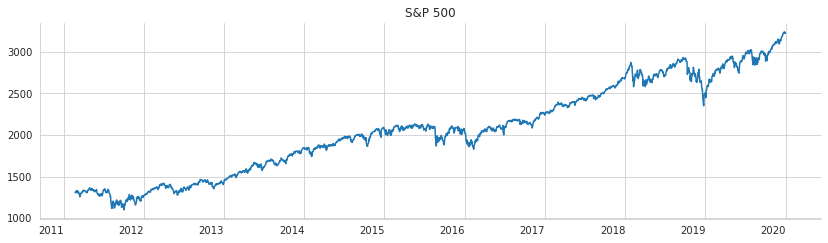
The cell begins by downloading daily S&P 500 data from the FRED database for the years 2010 through 2020 and immediately drops any missing values so the series is clean and continuous. Once the data are loaded, it is plotted as a single time series with the title “S&P 500.” The legend is turned off because there is only one line, and the figure is made wide enough to show the full decade-long trend clearly. The x-axis labels are kept horizontal for easier reading, and the x-axis label itself is removed so the chart looks cleaner and less cluttered.
The saved output is the resulting line chart. It shows the S&P 500 moving upward over time with noticeable dips and recoveries, which is exactly what you would expect from a historical market index. The line starts around the low 1000s near 2011, climbs steadily through the middle of the decade, shows some volatility around 2015 to 2016 and again in late 2018 to early 2019, and then rises sharply into 2020. The light grid and the removed top and right borders give the plot a simple, polished appearance, making the overall trend stand out more clearly.
Data preparation
scaler = MinMaxScaler()This cell creates a new MinMaxScaler object, which is the tool later used to rescale the S&P 500 values into a common 0-to-1 range. At this point nothing is transformed yet; the scaler is just being initialized so it can learn the minimum and maximum values from the data in a later step. That preparation matters because neural networks usually train more smoothly when inputs are on a consistent scale, especially for a time series like stock index values that can vary widely over time. Since no output is shown, the cell is simply setting up an object for the preprocessing stage that follows.
sp500_scaled = pd.Series(scaler.fit_transform(sp500).squeeze(),
                         index=sp500.index)
sp500_scaled.describe()
count 2229.000000
mean 0.451605
std 0.254561
min 0.000000
25% 0.238076
50% 0.447456
75% 0.659023
max 1.000000
dtype: float64The series of S&P 500 values is being rescaled here so it can be used more comfortably by the neural network. The scaler learns the minimum and maximum values in the original data and then transforms every observation into a number between 0 and 1. The result is wrapped back into a pandas Series and keeps the same date index as the original data, which matters because the time order needs to stay intact for later forecasting steps.
After the scaled series is created, its summary statistics are displayed to give a quick check of the transformation. The output shows 2,229 observations, which matches the amount of usable data after missing values are removed. The minimum is 0 and the maximum is 1 because MinMax scaling forces the series into that range. The mean and quartiles fall between those extremes, showing how the historical S&P 500 values are distributed after scaling. This kind of summary is useful as a sanity check: it confirms that the scaling worked and gives a sense of where most of the values now sit within the normalized range.
Building recurrent training examples from the time series
The data we are working with is a time-ordered sequence of values, one observation after another:
The series starts at the first recorded value, continues through each subsequent time step, and ends at the final observation. Here, the notation x at time t refers to the numeric value observed in period t, and T denotes the full length of the sequence.
To use an RNN for regression rather than classification, we reshape the series with a sliding window. This creates a moving set of input and target pairs, where each window of past values is paired with the next value the model should learn to predict, as shown in the animation below.
<img src="../assets/timeseries_windowing.gif" width=600 height=600/>
We will build sliding sequences that each cover 63 trading days, which is about three months, and then train a single LSTM layer with 20 hidden units to forecast the index one step into the future.
An LSTM layer expects its input to be organized in three dimensions:
Samples: each complete sequence is treated as one sample, and a batch is made up of one or more samples.
Time Steps: each sample is made of a series of ordered observation points.
Features: at each time step, the model receives one or more measured values.
In this S&P 500 example, there are 2,264 observations in total, so the data contains 2,264 time steps. Using a window length of 63 observations, we form overlapping sequences that move through the series one step at a time.
To make the idea easier to see, consider a shorter window length of T equal to 5. In that case, the input and output examples would look like the following:
The pattern is simple: each input consists of a fixed-length window of earlier observations, and the target is the very next value in the series.
For example, the first sample uses the five values from x one through x five to predict x six. The next sample shifts the window forward by one step, using x two through x six to predict x seven. This continues in the same way until the final window, which uses x T minus five through x T minus one to predict x T.
In general, when the window size is S, the model is written as a function that maps the previous S observations to the current value for each time step from S through T.
Each of the T minus S lagged input sequences is a vector of length S, and each one is paired with a single scalar target output.
We can apply the create_univariate_rnn_data() function to build input sequences by taking values from a moving window over the series:
def create_univariate_rnn_data(data, window_size):
    n = len(data)
    y = data[window_size:]
    data = data.values.reshape(-1, 1) # make 2D
    X = np.hstack(tuple([data[i: n-j, :] for i, j in enumerate(range(window_size, 0, -1))]))
    return pd.DataFrame(X, index=y.index), y
This cell defines a small helper function that turns a single time series into the kind of input an RNN can learn from. The basic idea is to take a rolling lookback window of past values and use that window to predict the next value in the sequence. That is a standard way to turn forecasting into a supervised learning problem.
The function first measures how long the series is and then separates out the target values by skipping the first few observations equal to the window size. Those skipped observations do not have enough history behind them to form a full input window, so they cannot be used as prediction targets yet. Next, the series is reshaped into a two-dimensional form because the stacking step that follows expects column-like data rather than a flat vector. Behind the scenes, this reshaping does not change the values themselves; it just changes the way they are organized in memory so they can be sliced consistently.
The input windows are built by taking several shifted slices of the series and placing them side by side. Each slice represents one lag, and the slices are ordered so that the oldest observation appears first and the most recent observation appears last. When these slices are combined, each row of the resulting matrix becomes one training example containing a full history window. The function then returns those input windows as a DataFrame, using the same date index as the target series so the inputs and outputs stay aligned in time. The target series is returned alongside it, ready to be paired with the corresponding windows during model training. Since the cell only defines the function, there is no visible output yet; its effect is to prepare a reusable data-construction step for later cells.
We use this function on the scaled stock index with a window size of 63 to build a two dimensional dataset whose shape is number of samples by number of timesteps:
window_size = 63This step sets the lookback period for the forecasting model. By assigning the value 63 to the window size, the notebook is telling later cells to use the previous 63 trading days as input when predicting the next S&P 500 value. Since 63 trading days is roughly three months, this choice gives the model a medium-length recent history to learn from, rather than just a few days or an entire year. Nothing is displayed here because the cell simply stores a number for later use, but that number becomes important when the time series is reshaped into sliding windows for the LSTM model.
X, y = create_univariate_rnn_data(sp500_scaled, window_size=window_size)This step turns the scaled S&P 500 series into a supervised learning dataset that an LSTM can work with. The helper function takes the one-dimensional time series and slices it into overlapping windows of 63 trading days, where each window becomes one input example and the value immediately after that window becomes the target to predict. Behind the scenes, this means the model is being taught a next-day forecasting task: it looks at a stretch of past index values and learns to estimate the following value.
The result is stored as two aligned arrays, one for the inputs and one for the outputs. Each row in the input data represents a sequence of past observations, and the matching target is the next point in the series. Because the series was already scaled before this step, the values are all in a normalized range, which makes them easier for the neural network to train on. There is no visible output from the cell because it is preparing data rather than displaying anything, but it creates the training examples that the later model-fitting steps depend on.
X.head() 0 1 2 3 4 5 \
DATE
2011-05-24 0.097240 0.096633 0.103069 0.106498 0.096740 0.097726
2011-05-25 0.096633 0.103069 0.106498 0.096740 0.097726 0.108250
2011-05-26 0.103069 0.106498 0.096740 0.097726 0.108250 0.103663
2011-05-27 0.106498 0.096740 0.097726 0.108250 0.103663 0.098515
2011-05-31 0.096740 0.097726 0.108250 0.103663 0.098515 0.103976
6 7 8 9 ... 53 54 \
DATE ...
2011-05-24 0.108250 0.103663 0.098515 0.103976 ... 0.120484 0.113439
2011-05-25 0.103663 0.098515 0.103976 0.103135 ... 0.113439 0.116508
2011-05-26 0.098515 0.103976 0.103135 0.091499 ... 0.116508 0.111426
2011-05-27 0.103976 0.103135 0.091499 0.095782 ... 0.111426 0.107549
2011-05-31 0.103135 0.091499 0.095782 0.092097 ... 0.107549 0.107320
55 56 57 58 59 60 \
DATE
2011-05-24 0.116508 0.111426 0.107549 0.107320 0.112785 0.114149
2011-05-25 0.111426 0.107549 0.107320 0.112785 0.114149 0.109324
2011-05-26 0.107549 0.107320 0.112785 0.114149 0.109324 0.101897
2011-05-27 0.107320 0.112785 0.114149 0.109324 0.101897 0.101388
2011-05-31 0.112785 0.114149 0.109324 0.101897 0.101388 0.103345
61 62
DATE
2011-05-24 0.109324 0.101897
2011-05-25 0.101897 0.101388
2011-05-26 0.101388 0.103345
2011-05-27 0.103345 0.105783
2011-05-31 0.105783 0.108310
[5 rows x 63 columns]The goal here is to take a quick look at the input matrix that was created from the stock series after it was turned into sliding windows. Each row now represents one training example, and each column represents one step back in time within the lookback window. Seeing the first few rows helps confirm that the data transformation worked as intended before the model uses it.
The output shows that there are 63 columns, which matches the chosen window length. The values are all small decimals because the original S&P 500 levels were scaled into a 0-to-1 range earlier, so these rows are no longer raw index values but normalized prices. The dates on the left are the timestamps attached to the end of each input window, meaning each row corresponds to a specific day and contains the 63 prior scaled observations leading up to that day. The fact that the numbers shift gradually from row to row also makes sense, because each new window reuses most of the previous observations and moves forward by one trading day at a time.
y.head()DATE
2011-05-24 0.101388
2011-05-25 0.103345
2011-05-26 0.105783
2011-05-27 0.108310
2011-05-31 0.114897
dtype: float64The cell asks for the first few entries of the target series, so it is used as a quick check on the data after the preprocessing steps that created the supervised-learning labels. The output shows a pandas Series indexed by date, which confirms that the target values are still aligned to the original trading calendar rather than being reduced to a plain array. The numbers themselves are the scaled next-day S&P 500 values, so they appear as small decimals between 0 and 1 instead of familiar index levels. The dates also make sense: the first target starts after the initial lookback window has been used to build the input sequences, which is why the series begins in late May 2011 rather than at the very start of the dataset. Seeing these first five rows is a simple but important sanity check that the forecasting target was constructed correctly and that the time index is preserved.
X.shape(2166, 63)This cell checks the shape of the input matrix that was created from the time series windows. The result shows 2,166 samples, and each sample contains 63 values, which matches the chosen lookback window size. In other words, the original single price series has already been transformed into a supervised learning dataset where each row represents one 63-day history segment that can be used to predict the next day’s S&P 500 value. The output confirms that the sliding-window preparation worked as expected and that there are 2,166 training examples in this tabularized form.
Train-test split
Because this is a time series, the split has to follow the order of time rather than being random. For that reason, we reserve the observations from the end of the sample as the hold-out portion, which serves as the test set. In this case, the period used for testing is 2018.
ax = sp500_scaled.plot(lw=2, figsize=(14, 4), rot=0)
ax.set_xlabel('')
sns.despine()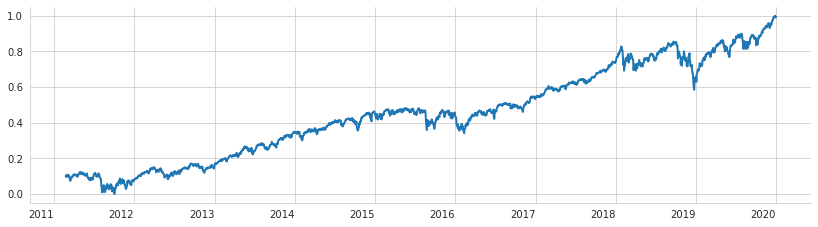
A quick line plot is being created here to show the scaled S&P 500 series over time. The data have already been transformed into the 0 to 1 range, so the y-axis in the output runs from near 0 up to 1 rather than showing the index’s original price levels. The line width is increased so the trend is easier to see, the figure is made wide enough to show the full time span clearly, and the date labels are kept horizontal for readability.
After plotting, the x-axis label is removed because the dates already speak for themselves and the default label would just add clutter. The final styling touch removes the top and right borders of the plot, which gives the figure a cleaner presentation and makes the trend line stand out more. The saved output reflects all of that: a simple, polished time series chart with a strong upward long-term pattern, a few sharp dips along the way, and no extra framing elements beyond the main axes and grid.
X_train = X[:'2018'].values.reshape(-1, window_size, 1)
y_train = y[:'2018']

# keep the last year for testing
X_test = X['2019'].values.reshape(-1, window_size, 1)
y_test = y['2019']
The purpose here is to split the sliding-window dataset into a training set and a test set while preserving the time order of the series. The data are not being shuffled, because with time series that would mix future information into the past and give an unrealistically optimistic view of performance. Instead, everything up through the end of 2018 is treated as the training period, and 2019 is held back as the testing period.
The first pair of lines takes the earlier portion of the input windows and target values and prepares them for the neural network. The feature array is reshaped into a three-dimensional structure, which is what an LSTM expects: one dimension for the number of samples, one for the length of each lookback window, and one for the single variable being observed, the S&P 500 value. The target values are kept in their matching one-dimensional form, since each window is meant to predict one next-step value.
The next pair of lines sets aside the final year as unseen data. The same windowed features are reshaped into the LSTM-friendly format, and the corresponding targets are separated out as the test labels. Because the split is based on dates rather than a random fraction of the rows, the model will later be evaluated on a genuinely future period, which makes the results more meaningful for forecasting. There is no printed output from the cell because its job is simply to organize the data in memory for the modeling step that follows.
n_obs, window_size, n_features = X_train.shapeThis step is pulling apart the shape of the training input array so the model setup can reuse those dimensions later. The training data for this LSTM has already been turned into three-dimensional sequences, and the shape of that array tells you how many training examples there are, how long each lookback window is, and how many features are in each time step. Because the series is univariate, the feature count is just one, but keeping it as a separate value makes the later model definition more flexible and less dependent on hard-coded numbers.
The first number captures the total count of training samples created from the sliding windows. The second number is the window length, which represents how many past days the model sees before making a prediction. The third number confirms that each time step contains only a single value, the scaled S&P 500 level. Nothing is displayed here because the line only assigns those dimensions to variables; its purpose is to prepare the information needed for the next modeling steps rather than produce visible output.
y_train.shape(1914,)This check is confirming the shape of the training target array, which is the list of values the model is meant to learn to predict. The result shows a one-dimensional array with 1,914 entries, so there are 1,914 training examples in total. Each entry corresponds to one next-day target value paired with a 63-day input window created earlier, and the one-dimensional shape makes sense because the model is doing regression on a single number at a time rather than predicting multiple outputs.
Keras LSTM Layer
Keras includes a number of recurrent neural network layers, each with its own set of configuration choices. The full details are available in the documentation.
LSTM is configured with the following arguments:
units: the number of hidden units in the layeractivation='tanh'recurrent_activation='hard_sigmoid'use_bias=Truekernel_initializer='glorot_uniform'recurrent_initializer='orthogonal'bias_initializer='zeros'unit_forget_bias=Truekernel_regularizer=Nonerecurrent_regularizer=Nonebias_regularizer=Noneactivity_regularizer=Nonekernel_constraint=Nonerecurrent_constraint=Nonebias_constraint=Nonedropout=0.0recurrent_dropout=0.0implementation=1return_sequences=Falsereturn_state=Falsego_backwards=Falsestateful=Falseunroll=False
Define the Model Architecture
After converting the time series into input and target pairs and splitting the data into training and testing portions, we are ready to build the recurrent neural network. Keras makes it straightforward to assemble the model with the following design:
the first layer is an LSTM layer with 20 hidden units, and its input shape is set to window_size by 1
the second layer is a dense layer with a single output unit
the loss function should be meansquarederror because this is a regression problem
Only a small amount of code is needed to put this together. For examples of how to create models in Keras, see the general Keras sequential model guide and the LSTM layer documentation. When setting up the optimizer, follow the approach recommended by Keras for recurrent neural networks.
rnn = Sequential([
    LSTM(units=10,
         input_shape=(window_size, n_features), name='LSTM'),
    Dense(1, name='Output')
])
A small recurrent neural network is being defined here for the forecasting task. The model is built as a simple Keras Sequential stack, which means the layers are arranged one after another so the output of one becomes the input to the next. The first layer is an LSTM layer with 10 hidden units. Its job is to read each sliding window of past S&P 500 values and learn patterns in their order over time, which is exactly what makes recurrent networks useful for sequence data. The input shape tells the model what each training example looks like: a sequence of length windowsize, with nfeatures values at each time step. Since this is a univariate problem, there is only one feature per time step.
After the LSTM has processed the whole sequence, its learned summary is passed to a Dense layer with a single output unit. That final neuron produces one numeric prediction, which matches the goal of predicting the next S&P 500 value as a regression problem. There is no saved output for this cell because it only constructs the model object; the architecture is defined in memory, but nothing is trained or displayed yet.
The model summary indicates that it contains 1,781 trainable parameters:
rnn.summary()Model: "sequential"
_________________________________________________________________
Layer (type) Output Shape Param #
=================================================================
LSTM (LSTM) (None, 10) 480
_________________________________________________________________
Output (Dense) (None, 1) 11
=================================================================
Total params: 491
Trainable params: 491
Non-trainable params: 0
_________________________________________________________________The purpose here is to display a compact summary of the trained neural network so you can inspect its structure before moving on to evaluation or interpretation. When this command runs, Keras prints a table describing each layer in the model, the shape of the data that comes out of that layer, and how many parameters that layer contains.
The output shows that the model is a simple sequential network with two layers. The first is an LSTM layer with 10 units, which takes the rolling time windows and learns a hidden representation of the recent S&P 500 history. Its output shape is listed as (None, 10), where None stands for the batch size, which can vary from one prediction call to another. The parameter count of 480 reflects the weights and biases the LSTM needs to connect the 63-timestep input sequence to its 10 internal memory units.
The second layer is a dense output layer with a single neuron. Its output shape is (None, 1), which makes sense because the model is predicting one value at a time: the next day’s scaled S&P 500 level. The 11 parameters here come from the 10 incoming values plus one bias term. At the bottom, Keras totals everything up and reports 491 trainable parameters in all, with none frozen. That small total confirms this is a lightweight forecasting model rather than a large deep network, which is appropriate for a one-dimensional time series task.
Fit the Model
We fit the network with the RMSProp optimizer, which is commonly used for recurrent neural networks, keep its default configuration, and compile the model with mean squared error as the loss function for this regression task:
optimizer = keras.optimizers.RMSprop(lr=0.001,
                                     rho=0.9,
                                     epsilon=1e-08,
                                     decay=0.0)
This cell sets up the optimizer that will be used to train the neural network. RMSprop is a common choice for recurrent models because it adapts the learning rate based on recent gradient behavior, which helps stabilize training when the model is working through sequential data. The learning rate is set to 0.001, which controls how large each parameter update can be, while rho at 0.9 determines how much of the recent gradient history is kept in the running average. The epsilon value is a small constant added for numerical stability so that division does not become problematic when values get very small. Decay is left at 0.0, so the learning rate is not reduced over time through this setting.
Nothing is printed when the cell runs because it only creates the optimizer object and stores it for later use. The actual effect of this step appears later when the model is compiled and trained with this optimizer.
rnn.compile(loss='mean_squared_error',
            optimizer=optimizer)
The purpose here is to prepare the recurrent neural network for training by telling it how to measure mistakes and how to update its weights. The model is set up for a regression task, so the loss function is mean squared error, which compares each predicted value with the true target and penalizes larger errors more heavily. That choice fits a forecasting problem like this because the goal is to predict a numerical value as accurately as possible, not to assign classes.
The optimizer is passed in from earlier setup, so the cell uses the training strategy that was already configured rather than creating a new one here. Behind the scenes, compiling a Keras model links together the network architecture, the loss function, and the optimization algorithm into a complete training object. After this step, the model is ready to learn from data during the next fitting stage, but nothing is trained yet and no output is shown because compiling mainly sets up the internal machinery rather than producing a visible result.
We set up an EarlyStopping callback and let the model train for as many as 100 epochs.
rnn_path = (results_path / 'rnn.h5').as_posix()
checkpointer = ModelCheckpoint(filepath=rnn_path,
                               verbose=1,
                               monitor='val_loss',
                               save_best_only=True)
This cell prepares a checkpoint for the neural network so the best version of the model can be saved during training. First it builds the path where the trained weights will be stored, converting the results location into a standard file path that Keras can use. Then it creates a ModelCheckpoint callback that watches the validation loss while the model trains. Because savebestonly is turned on, the file is updated only when the model improves on the validation set, rather than after every epoch. The verbose setting means training will print a message whenever a new best model is written. Nothing is displayed yet because the cell is only setting up this saving mechanism, but the saved file will later hold the most successful version of the model according to validation performance.
early_stopping = EarlyStopping(monitor='val_loss',
                              patience=20,
                              restore_best_weights=True)
This cell sets up an early stopping rule for model training, which is a way to prevent the network from continuing to learn after it stops improving on the validation data. It watches the validation loss and keeps track of whether that value is getting better from epoch to epoch. If the validation loss does not improve for 20 consecutive epochs, training will be stopped automatically. The patience setting gives the model some room to fluctuate, since validation performance can move around a little during training without that necessarily meaning the model has finished learning.
The final part is especially important because it tells the training process to restore the best weights seen during the run, rather than keeping the weights from the last epoch before stopping. That means even if the model starts to overfit after its best validation performance, the saved version will roll back to the point where it generalized best on the validation set. Since this cell only defines the callback and does not execute training on its own, there is no visible output yet; its effect appears later when the model training loop uses this callback to decide when to stop and which weights to keep.
lstm_training = rnn.fit(X_train,
                        y_train,
                        epochs=150,
                        batch_size=20,
                        shuffle=True,
                        validation_data=(X_test, y_test),
                        callbacks=[early_stopping, checkpointer],
                        verbose=1)
Epoch 1/150
95/96 [============================>.] - ETA: 0s - loss: 0.0162
Epoch 00001: val_loss improved from inf to 0.00766, saving model to results/univariate_time_series/rnn.h5
96/96 [==============================] - 1s 12ms/step - loss: 0.0161 - val_loss: 0.0077
Epoch 2/150
95/96 [============================>.] - ETA: 0s - loss: 5.0726e-04
Epoch 00002: val_loss improved from 0.00766 to 0.00135, saving model to results/univariate_time_series/rnn.h5
96/96 [==============================] - 1s 9ms/step - loss: 5.0613e-04 - val_loss: 0.0014
Epoch 3/150
94/96 [============================>.] - ETA: 0s - loss: 4.2700e-04
Epoch 00003: val_loss did not improve from 0.00135
96/96 [==============================] - 1s 9ms/step - loss: 4.2515e-04 - val_loss: 0.0033
Epoch 4/150
94/96 [============================>.] - ETA: 0s - loss: 4.0140e-04
Epoch 00004: val_loss did not improve from 0.00135
96/96 [==============================] - 1s 10ms/step - loss: 3.9946e-04 - val_loss: 0.0022
Epoch 5/150
91/96 [===========================>..] - ETA: 0s - loss: 3.7595e-04
Epoch 00005: val_loss did not improve from 0.00135
96/96 [==============================] - 1s 9ms/step - loss: 3.6440e-04 - val_loss: 0.0033
Epoch 6/150
96/96 [==============================] - ETA: 0s - loss: 3.4672e-04
Epoch 00006: val_loss improved from 0.00135 to 0.00068, saving model to results/univariate_time_series/rnn.h5
96/96 [==============================] - 1s 9ms/step - loss: 3.4672e-04 - val_loss: 6.7836e-04
Epoch 7/150
95/96 [============================>.] - ETA: 0s - loss: 3.1172e-04
Epoch 00007: val_loss did not improve from 0.00068
96/96 [==============================] - 1s 9ms/step - loss: 3.1417e-04 - val_loss: 0.0047
Epoch 8/150
93/96 [============================>.] - ETA: 0s - loss: 3.2092e-04
Epoch 00008: val_loss did not improve from 0.00068
96/96 [==============================] - 1s 9ms/step - loss: 3.1923e-04 - val_loss: 0.0014
Epoch 9/150
95/96 [============================>.] - ETA: 0s - loss: 2.9657e-04
Epoch 00009: val_loss improved from 0.00068 to 0.00043, saving model to results/univariate_time_series/rnn.h5
96/96 [==============================] - 1s 9ms/step - loss: 2.9568e-04 - val_loss: 4.3396e-04
Epoch 10/150
91/96 [===========================>..] - ETA: 0s - loss: 2.8456e-04
Epoch 00010: val_loss did not improve from 0.00043
96/96 [==============================] - 1s 9ms/step - loss: 2.8585e-04 - val_loss: 0.0016
Epoch 11/150
92/96 [===========================>..] - ETA: 0s - loss: 2.5980e-04
Epoch 00011: val_loss improved from 0.00043 to 0.00032, saving model to results/univariate_time_series/rnn.h5
96/96 [==============================] - 1s 9ms/step - loss: 2.6074e-04 - val_loss: 3.1798e-04
Epoch 12/150
91/96 [===========================>..] - ETA: 0s - loss: 2.6164e-04
Epoch 00012: val_loss did not improve from 0.00032
96/96 [==============================] - 1s 9ms/step - loss: 2.5868e-04 - val_loss: 4.8836e-04
Epoch 13/150
96/96 [==============================] - ETA: 0s - loss: 2.5184e-04
Epoch 00013: val_loss did not improve from 0.00032
96/96 [==============================] - 1s 9ms/step - loss: 2.5184e-04 - val_loss: 4.2231e-04
Epoch 14/150
95/96 [============================>.] - ETA: 0s - loss: 2.4671e-04
Epoch 00014: val_loss did not improve from 0.00032
96/96 [==============================] - 1s 10ms/step - loss: 2.4586e-04 - val_loss: 4.4436e-04
Epoch 15/150
91/96 [===========================>..] - ETA: 0s - loss: 2.3177e-04
Epoch 00015: val_loss did not improve from 0.00032
96/96 [==============================] - 1s 9ms/step - loss: 2.3762e-04 - val_loss: 4.7206e-04
Epoch 16/150
92/96 [===========================>..] - ETA: 0s - loss: 2.2798e-04
Epoch 00016: val_loss did not improve from 0.00032
96/96 [==============================] - 1s 9ms/step - loss: 2.2959e-04 - val_loss: 3.2628e-04
Epoch 17/150
92/96 [===========================>..] - ETA: 0s - loss: 2.2682e-04
Epoch 00017: val_loss did not improve from 0.00032
96/96 [==============================] - 1s 10ms/step - loss: 2.2815e-04 - val_loss: 0.0013
Epoch 18/150
96/96 [==============================] - ETA: 0s - loss: 2.1929e-04
Epoch 00018: val_loss did not improve from 0.00032
96/96 [==============================] - 1s 9ms/step - loss: 2.1929e-04 - val_loss: 0.0022
Epoch 19/150
91/96 [===========================>..] - ETA: 0s - loss: 2.1801e-04
Epoch 00019: val_loss improved from 0.00032 to 0.00024, saving model to results/univariate_time_series/rnn.h5
96/96 [==============================] - 1s 9ms/step - loss: 2.1470e-04 - val_loss: 2.4200e-04
Epoch 20/150
96/96 [==============================] - ETA: 0s - loss: 2.1644e-04
Epoch 00020: val_loss improved from 0.00024 to 0.00023, saving model to results/univariate_time_series/rnn.h5
96/96 [==============================] - 1s 10ms/step - loss: 2.1644e-04 - val_loss: 2.3101e-04
Epoch 21/150
96/96 [==============================] - ETA: 0s - loss: 2.0451e-04
Epoch 00021: val_loss improved from 0.00023 to 0.00021, saving model to results/univariate_time_series/rnn.h5
96/96 [==============================] - 1s 9ms/step - loss: 2.0451e-04 - val_loss: 2.1255e-04
Epoch 22/150
91/96 [===========================>..] - ETA: 0s - loss: 2.0134e-04
Epoch 00022: val_loss did not improve from 0.00021
96/96 [==============================] - 1s 9ms/step - loss: 2.0179e-04 - val_loss: 2.2027e-04
Epoch 23/150
96/96 [==============================] - ETA: 0s - loss: 1.9941e-04
Epoch 00023: val_loss did not improve from 0.00021
96/96 [==============================] - 1s 9ms/step - loss: 1.9941e-04 - val_loss: 4.4025e-04
Epoch 24/150
96/96 [==============================] - ETA: 0s - loss: 1.9096e-04
Epoch 00024: val_loss did not improve from 0.00021
96/96 [==============================] - 1s 9ms/step - loss: 1.9096e-04 - val_loss: 5.4885e-04
Epoch 25/150
96/96 [==============================] - ETA: 0s - loss: 1.8358e-04
Epoch 00025: val_loss did not improve from 0.00021
96/96 [==============================] - 1s 9ms/step - loss: 1.8358e-04 - val_loss: 2.4444e-04
Epoch 26/150
95/96 [============================>.] - ETA: 0s - loss: 1.8497e-04
Epoch 00026: val_loss did not improve from 0.00021
96/96 [==============================] - 1s 10ms/step - loss: 1.8471e-04 - val_loss: 4.2620e-04
Epoch 27/150
96/96 [==============================] - ETA: 0s - loss: 1.7350e-04
Epoch 00027: val_loss did not improve from 0.00021
96/96 [==============================] - 1s 9ms/step - loss: 1.7350e-04 - val_loss: 4.0677e-04
Epoch 28/150
91/96 [===========================>..] - ETA: 0s - loss: 1.6671e-04
Epoch 00028: val_loss did not improve from 0.00021
96/96 [==============================] - 1s 9ms/step - loss: 1.6921e-04 - val_loss: 3.8056e-04
Epoch 29/150
94/96 [============================>.] - ETA: 0s - loss: 1.6757e-04
Epoch 00029: val_loss did not improve from 0.00021
96/96 [==============================] - 1s 10ms/step - loss: 1.7095e-04 - val_loss: 3.5113e-04
Epoch 30/150
93/96 [============================>.] - ETA: 0s - loss: 1.5892e-04
Epoch 00030: val_loss improved from 0.00021 to 0.00018, saving model to results/univariate_time_series/rnn.h5
96/96 [==============================] - 1s 10ms/step - loss: 1.5886e-04 - val_loss: 1.7758e-04
Epoch 31/150
92/96 [===========================>..] - ETA: 0s - loss: 1.5301e-04
Epoch 00031: val_loss improved from 0.00018 to 0.00016, saving model to results/univariate_time_series/rnn.h5
96/96 [==============================] - 1s 10ms/step - loss: 1.5573e-04 - val_loss: 1.5858e-04
Epoch 32/150
95/96 [============================>.] - ETA: 0s - loss: 1.4994e-04
Epoch 00032: val_loss improved from 0.00016 to 0.00016, saving model to results/univariate_time_series/rnn.h5
96/96 [==============================] - 1s 10ms/step - loss: 1.5008e-04 - val_loss: 1.5702e-04
Epoch 33/150
94/96 [============================>.] - ETA: 0s - loss: 1.5448e-04
Epoch 00033: val_loss did not improve from 0.00016
96/96 [==============================] - 1s 10ms/step - loss: 1.5528e-04 - val_loss: 3.3243e-04
Epoch 34/150
94/96 [============================>.] - ETA: 0s - loss: 1.5249e-04
Epoch 00034: val_loss improved from 0.00016 to 0.00014, saving model to results/univariate_time_series/rnn.h5
96/96 [==============================] - 1s 10ms/step - loss: 1.5086e-04 - val_loss: 1.4220e-04Epoch 35/150
96/96 [==============================] - ETA: 0s - loss: 1.4350e-04
Epoch 00035: val_loss did not improve from 0.00014
96/96 [==============================] - 1s 9ms/step - loss: 1.4350e-04 - val_loss: 8.7128e-04
Epoch 36/150
91/96 [===========================>..] - ETA: 0s - loss: 1.4087e-04
Epoch 00036: val_loss did not improve from 0.00014
96/96 [==============================] - 1s 9ms/step - loss: 1.4304e-04 - val_loss: 2.2118e-04
Epoch 37/150
93/96 [============================>.] - ETA: 0s - loss: 1.4318e-04
Epoch 00037: val_loss did not improve from 0.00014
96/96 [==============================] - 1s 9ms/step - loss: 1.4475e-04 - val_loss: 5.7758e-04
Epoch 38/150
91/96 [===========================>..] - ETA: 0s - loss: 1.3891e-04
Epoch 00038: val_loss did not improve from 0.00014
96/96 [==============================] - 1s 9ms/step - loss: 1.4370e-04 - val_loss: 5.5123e-04
Epoch 39/150
96/96 [==============================] - ETA: 0s - loss: 1.3512e-04
Epoch 00039: val_loss did not improve from 0.00014
96/96 [==============================] - 1s 9ms/step - loss: 1.3512e-04 - val_loss: 2.0821e-04
Epoch 40/150
92/96 [===========================>..] - ETA: 0s - loss: 1.3034e-04
Epoch 00040: val_loss did not improve from 0.00014
96/96 [==============================] - 1s 10ms/step - loss: 1.3073e-04 - val_loss: 6.1821e-04
Epoch 41/150
95/96 [============================>.] - ETA: 0s - loss: 1.3208e-04
Epoch 00041: val_loss did not improve from 0.00014
96/96 [==============================] - 1s 10ms/step - loss: 1.3247e-04 - val_loss: 5.5452e-04
Epoch 42/150
95/96 [============================>.] - ETA: 0s - loss: 1.2555e-04
Epoch 00042: val_loss did not improve from 0.00014
96/96 [==============================] - 1s 10ms/step - loss: 1.2543e-04 - val_loss: 3.1468e-04
Epoch 43/150
92/96 [===========================>..] - ETA: 0s - loss: 1.2727e-04
Epoch 00043: val_loss did not improve from 0.00014
96/96 [==============================] - 1s 12ms/step - loss: 1.2745e-04 - val_loss: 2.5483e-04
Epoch 44/150
96/96 [==============================] - ETA: 0s - loss: 1.3116e-04
Epoch 00044: val_loss did not improve from 0.00014
96/96 [==============================] - 1s 11ms/step - loss: 1.3116e-04 - val_loss: 2.0916e-04
Epoch 45/150
93/96 [============================>.] - ETA: 0s - loss: 1.2340e-04
Epoch 00045: val_loss did not improve from 0.00014
96/96 [==============================] - 1s 12ms/step - loss: 1.2624e-04 - val_loss: 1.5523e-04
Epoch 46/150
95/96 [============================>.] - ETA: 0s - loss: 1.2741e-04
Epoch 00046: val_loss did not improve from 0.00014
96/96 [==============================] - 1s 16ms/step - loss: 1.2674e-04 - val_loss: 1.4887e-04
Epoch 47/150
92/96 [===========================>..] - ETA: 0s - loss: 1.2104e-04
Epoch 00047: val_loss did not improve from 0.00014
96/96 [==============================] - 2s 16ms/step - loss: 1.2028e-04 - val_loss: 3.1503e-04
Epoch 48/150
93/96 [============================>.] - ETA: 0s - loss: 1.2040e-04
Epoch 00048: val_loss did not improve from 0.00014
96/96 [==============================] - 1s 10ms/step - loss: 1.2169e-04 - val_loss: 3.1043e-04
Epoch 49/150
96/96 [==============================] - ETA: 0s - loss: 1.2513e-04
Epoch 00049: val_loss did not improve from 0.00014
96/96 [==============================] - 1s 10ms/step - loss: 1.2513e-04 - val_loss: 3.6431e-04
Epoch 50/150
93/96 [============================>.] - ETA: 0s - loss: 1.1566e-04
Epoch 00050: val_loss did not improve from 0.00014
96/96 [==============================] - 1s 10ms/step - loss: 1.1806e-04 - val_loss: 2.0745e-04
Epoch 51/150
96/96 [==============================] - ETA: 0s - loss: 1.1787e-04
Epoch 00051: val_loss did not improve from 0.00014
96/96 [==============================] - 1s 8ms/step - loss: 1.1787e-04 - val_loss: 3.8254e-04
Epoch 52/150
94/96 [============================>.] - ETA: 0s - loss: 1.1391e-04
Epoch 00052: val_loss improved from 0.00014 to 0.00013, saving model to results/univariate_time_series/rnn.h5
96/96 [==============================] - 1s 9ms/step - loss: 1.1292e-04 - val_loss: 1.3098e-04
Epoch 53/150
95/96 [============================>.] - ETA: 0s - loss: 1.1152e-04
Epoch 00053: val_loss did not improve from 0.00013
96/96 [==============================] - 1s 8ms/step - loss: 1.1118e-04 - val_loss: 3.5197e-04
Epoch 54/150
90/96 [===========================>..] - ETA: 0s - loss: 1.1793e-04
Epoch 00054: val_loss did not improve from 0.00013
96/96 [==============================] - 1s 9ms/step - loss: 1.1724e-04 - val_loss: 1.9148e-04
Epoch 55/150
94/96 [============================>.] - ETA: 0s - loss: 1.1052e-04
Epoch 00055: val_loss did not improve from 0.00013
96/96 [==============================] - 1s 9ms/step - loss: 1.1202e-04 - val_loss: 2.7836e-04
Epoch 56/150
92/96 [===========================>..] - ETA: 0s - loss: 1.0805e-04
Epoch 00056: val_loss did not improve from 0.00013
96/96 [==============================] - 1s 9ms/step - loss: 1.0802e-04 - val_loss: 1.3425e-04
Epoch 57/150
94/96 [============================>.] - ETA: 0s - loss: 1.1062e-04
Epoch 00057: val_loss improved from 0.00013 to 0.00012, saving model to results/univariate_time_series/rnn.h5
96/96 [==============================] - 1s 9ms/step - loss: 1.0968e-04 - val_loss: 1.1734e-04
Epoch 58/150
90/96 [===========================>..] - ETA: 0s - loss: 1.0471e-04
Epoch 00058: val_loss did not improve from 0.00012
96/96 [==============================] - 1s 9ms/step - loss: 1.0535e-04 - val_loss: 2.0888e-04
Epoch 59/150
93/96 [============================>.] - ETA: 0s - loss: 1.0651e-04
Epoch 00059: val_loss did not improve from 0.00012
96/96 [==============================] - 1s 9ms/step - loss: 1.0444e-04 - val_loss: 1.2834e-04
Epoch 60/150
96/96 [==============================] - ETA: 0s - loss: 1.0868e-04
Epoch 00060: val_loss did not improve from 0.00012
96/96 [==============================] - 1s 8ms/step - loss: 1.0868e-04 - val_loss: 1.7766e-04
Epoch 61/150
95/96 [============================>.] - ETA: 0s - loss: 1.0337e-04
Epoch 00061: val_loss did not improve from 0.00012
96/96 [==============================] - 1s 9ms/step - loss: 1.0307e-04 - val_loss: 2.2622e-04
Epoch 62/150
91/96 [===========================>..] - ETA: 0s - loss: 1.0358e-04
Epoch 00062: val_loss did not improve from 0.00012
96/96 [==============================] - 1s 9ms/step - loss: 1.0332e-04 - val_loss: 1.1764e-04
Epoch 63/150
95/96 [============================>.] - ETA: 0s - loss: 1.0141e-04
Epoch 00063: val_loss did not improve from 0.00012
96/96 [==============================] - 1s 9ms/step - loss: 1.0113e-04 - val_loss: 1.7721e-04
Epoch 64/150
95/96 [============================>.] - ETA: 0s - loss: 1.0574e-04
Epoch 00064: val_loss did not improve from 0.00012
96/96 [==============================] - 1s 9ms/step - loss: 1.0589e-04 - val_loss: 2.7786e-04
Epoch 65/150
91/96 [===========================>..] - ETA: 0s - loss: 9.9946e-05
Epoch 00065: val_loss did not improve from 0.00012
96/96 [==============================] - 1s 9ms/step - loss: 9.8424e-05 - val_loss: 2.5257e-04
Epoch 66/150
93/96 [============================>.] - ETA: 0s - loss: 1.0225e-04
Epoch 00066: val_loss did not improve from 0.00012
96/96 [==============================] - 1s 9ms/step - loss: 1.0111e-04 - val_loss: 1.2785e-04
Epoch 67/150
95/96 [============================>.] - ETA: 0s - loss: 1.0120e-04
Epoch 00067: val_loss did not improve from 0.00012
96/96 [==============================] - 1s 9ms/step - loss: 1.0110e-04 - val_loss: 1.5218e-04
Epoch 68/150
96/96 [==============================] - ETA: 0s - loss: 9.5239e-05
Epoch 00068: val_loss improved from 0.00012 to 0.00011, saving model to results/univariate_time_series/rnn.h5
96/96 [==============================] - 1s 9ms/step - loss: 9.5239e-05 - val_loss: 1.0982e-04
Epoch 69/150
95/96 [============================>.] - ETA: 0s - loss: 9.7534e-05
Epoch 00069: val_loss did not improve from 0.00011
96/96 [==============================] - 1s 9ms/step - loss: 9.7244e-05 - val_loss: 1.3820e-04
Epoch 70/150
94/96 [============================>.] - ETA: 0s - loss: 1.0033e-04
Epoch 00070: val_loss did not improve from 0.00011
96/96 [==============================] - 1s 9ms/step - loss: 1.0096e-04 - val_loss: 2.6083e-04
Epoch 71/150
94/96 [============================>.] - ETA: 0s - loss: 9.8744e-05
Epoch 00071: val_loss did not improve from 0.00011
96/96 [==============================] - 1s 9ms/step - loss: 9.8619e-05 - val_loss: 1.4675e-04
Epoch 72/150
93/96 [============================>.] - ETA: 0s - loss: 9.8295e-05
Epoch 00072: val_loss did not improve from 0.00011
96/96 [==============================] - 1s 9ms/step - loss: 9.7614e-05 - val_loss: 1.7677e-04
Epoch 73/150
95/96 [============================>.] - ETA: 0s - loss: 9.5597e-05
Epoch 00073: val_loss did not improve from 0.00011
96/96 [==============================] - 1s 9ms/step - loss: 9.5436e-05 - val_loss: 2.8398e-04
Epoch 74/150
91/96 [===========================>..] - ETA: 0s - loss: 9.7810e-05
Epoch 00074: val_loss did not improve from 0.00011
96/96 [==============================] - 1s 9ms/step - loss: 9.7079e-05 - val_loss: 1.4352e-04
Epoch 75/150
92/96 [===========================>..] - ETA: 0s - loss: 9.5967e-05
Epoch 00075: val_loss did not improve from 0.00011
96/96 [==============================] - 1s 9ms/step - loss: 9.6704e-05 - val_loss: 1.2011e-04
Epoch 76/150
92/96 [===========================>..] - ETA: 0s - loss: 9.8459e-05
Epoch 00076: val_loss did not improve from 0.00011
96/96 [==============================] - 1s 9ms/step - loss: 9.8009e-05 - val_loss: 1.7817e-04
Epoch 77/150
96/96 [==============================] - ETA: 0s - loss: 9.1118e-05
Epoch 00077: val_loss did not improve from 0.00011
96/96 [==============================] - 1s 9ms/step - loss: 9.1118e-05 - val_loss: 1.1157e-04
Epoch 78/150
95/96 [============================>.] - ETA: 0s - loss: 9.5011e-05
Epoch 00078: val_loss did not improve from 0.00011
96/96 [==============================] - 1s 9ms/step - loss: 9.5155e-05 - val_loss: 1.5538e-04
Epoch 79/150
96/96 [==============================] - ETA: 0s - loss: 9.4418e-05
Epoch 00079: val_loss did not improve from 0.00011
96/96 [==============================] - 1s 9ms/step - loss: 9.4418e-05 - val_loss: 1.4241e-04
Epoch 80/150
94/96 [============================>.] - ETA: 0s - loss: 9.4359e-05
Epoch 00080: val_loss improved from 0.00011 to 0.00011, saving model to results/univariate_time_series/rnn.h5
96/96 [==============================] - 1s 9ms/step - loss: 9.4327e-05 - val_loss: 1.0896e-04
Epoch 81/150
95/96 [============================>.] - ETA: 0s - loss: 9.4806e-05
Epoch 00081: val_loss did not improve from 0.00011
96/96 [==============================] - 1s 9ms/step - loss: 9.4769e-05 - val_loss: 1.3463e-04
Epoch 82/150
95/96 [============================>.] - ETA: 0s - loss: 9.3654e-05
Epoch 00082: val_loss did not improve from 0.00011
96/96 [==============================] - 1s 9ms/step - loss: 9.4321e-05 - val_loss: 1.4250e-04
Epoch 83/150
93/96 [============================>.] - ETA: 0s - loss: 9.5975e-05
Epoch 00083: val_loss did not improve from 0.00011
96/96 [==============================] - 1s 9ms/step - loss: 9.6019e-05 - val_loss: 1.1075e-04
Epoch 84/150
91/96 [===========================>..] - ETA: 0s - loss: 9.5794e-05
Epoch 00084: val_loss did not improve from 0.00011
96/96 [==============================] - 1s 9ms/step - loss: 9.6212e-05 - val_loss: 2.0834e-04
Epoch 85/150
91/96 [===========================>..] - ETA: 0s - loss: 8.9862e-05
Epoch 00085: val_loss did not improve from 0.00011
96/96 [==============================] - 1s 9ms/step - loss: 8.7901e-05 - val_loss: 1.2320e-04
Epoch 86/150
95/96 [============================>.] - ETA: 0s - loss: 9.0540e-05
Epoch 00086: val_loss did not improve from 0.00011
96/96 [==============================] - 1s 8ms/step - loss: 9.0288e-05 - val_loss: 1.1778e-04
Epoch 87/150
91/96 [===========================>..] - ETA: 0s - loss: 9.1800e-05
Epoch 00087: val_loss did not improve from 0.00011
96/96 [==============================] - 1s 9ms/step - loss: 9.0853e-05 - val_loss: 1.8410e-04
Epoch 88/150
94/96 [============================>.] - ETA: 0s - loss: 9.0630e-05
Epoch 00088: val_loss did not improve from 0.00011
96/96 [==============================] - 1s 9ms/step - loss: 9.1169e-05 - val_loss: 1.5173e-04
Epoch 89/150
95/96 [============================>.] - ETA: 0s - loss: 9.0615e-05
Epoch 00089: val_loss did not improve from 0.00011
96/96 [==============================] - 1s 9ms/step - loss: 9.0969e-05 - val_loss: 2.6647e-04
Epoch 90/150
91/96 [===========================>..] - ETA: 0s - loss: 8.4236e-05
Epoch 00090: val_loss did not improve from 0.00011
96/96 [==============================] - 1s 10ms/step - loss: 8.6761e-05 - val_loss: 2.2579e-04
Epoch 91/150
95/96 [============================>.] - ETA: 0s - loss: 9.0738e-05
Epoch 00091: val_loss did not improve from 0.00011
96/96 [==============================] - 1s 9ms/step - loss: 9.0392e-05 - val_loss: 1.4102e-04
Epoch 92/150
91/96 [===========================>..] - ETA: 0s - loss: 8.7762e-05
Epoch 00092: val_loss did not improve from 0.00011
96/96 [==============================] - 1s 9ms/step - loss: 9.1175e-05 - val_loss: 1.5866e-04
Epoch 93/150
92/96 [===========================>..] - ETA: 0s - loss: 8.8039e-05
Epoch 00093: val_loss did not improve from 0.00011
96/96 [==============================] - 1s 9ms/step - loss: 8.9345e-05 - val_loss: 2.2237e-04
Epoch 94/150
92/96 [===========================>..] - ETA: 0s - loss: 8.7299e-05
Epoch 00094: val_loss did not improve from 0.00011
96/96 [==============================] - 1s 9ms/step - loss: 8.8101e-05 - val_loss: 2.0188e-04
Epoch 95/150
91/96 [===========================>..] - ETA: 0s - loss: 8.7247e-05
Epoch 00095: val_loss did not improve from 0.00011
96/96 [==============================] - 1s 9ms/step - loss: 8.7141e-05 - val_loss: 1.1806e-04
Epoch 96/150
95/96 [============================>.] - ETA: 0s - loss: 9.1653e-05
Epoch 00096: val_loss did not improve from 0.00011
96/96 [==============================] - 1s 9ms/step - loss: 9.1519e-05 - val_loss: 1.1541e-04
Epoch 97/150
91/96 [===========================>..] - ETA: 0s - loss: 8.8514e-05
Epoch 00097: val_loss improved from 0.00011 to 0.00011, saving model to results/univariate_time_series/rnn.h5
96/96 [==============================] - 1s 9ms/step - loss: 8.6380e-05 - val_loss: 1.0814e-04
Epoch 98/150
96/96 [==============================] - ETA: 0s - loss: 8.6094e-05
Epoch 00098: val_loss did not improve from 0.00011
96/96 [==============================] - 1s 9ms/step - loss: 8.6094e-05 - val_loss: 1.1347e-04
Epoch 99/150
90/96 [===========================>..] - ETA: 0s - loss: 8.7294e-05
Epoch 00099: val_loss did not improve from 0.00011
96/96 [==============================] - 1s 9ms/step - loss: 8.9347e-05 - val_loss: 1.3592e-04
Epoch 100/150
96/96 [==============================] - ETA: 0s - loss: 8.6722e-05
Epoch 00100: val_loss did not improve from 0.00011
96/96 [==============================] - 1s 9ms/step - loss: 8.6722e-05 - val_loss: 7.0361e-04
Epoch 101/150
92/96 [===========================>..] - ETA: 0s - loss: 9.0485e-05
Epoch 00101: val_loss did not improve from 0.00011
96/96 [==============================] - 1s 9ms/step - loss: 8.9286e-05 - val_loss: 1.1654e-04
Epoch 102/150
94/96 [============================>.] - ETA: 0s - loss: 8.7473e-05
Epoch 00102: val_loss did not improve from 0.00011
96/96 [==============================] - 1s 9ms/step - loss: 8.6557e-05 - val_loss: 1.1325e-04
Epoch 103/150
94/96 [============================>.] - ETA: 0s - loss: 8.9702e-05
Epoch 00103: val_loss did not improve from 0.00011
96/96 [==============================] - 1s 9ms/step - loss: 8.9611e-05 - val_loss: 2.9964e-04
Epoch 104/150
91/96 [===========================>..] - ETA: 0s - loss: 8.8178e-05
Epoch 00104: val_loss improved from 0.00011 to 0.00011, saving model to results/univariate_time_series/rnn.h5
96/96 [==============================] - 1s 9ms/step - loss: 8.8027e-05 - val_loss: 1.0701e-04
Epoch 105/15090/96 [===========================>..] - ETA: 0s - loss: 8.4287e-05
Epoch 00105: val_loss did not improve from 0.00011
96/96 [==============================] - 1s 9ms/step - loss: 8.5441e-05 - val_loss: 2.6547e-04
Epoch 106/150
93/96 [============================>.] - ETA: 0s - loss: 8.5374e-05
Epoch 00106: val_loss did not improve from 0.00011
96/96 [==============================] - 1s 9ms/step - loss: 8.6718e-05 - val_loss: 1.4452e-04
Epoch 107/150
92/96 [===========================>..] - ETA: 0s - loss: 8.6347e-05
Epoch 00107: val_loss did not improve from 0.00011
96/96 [==============================] - 1s 9ms/step - loss: 8.8267e-05 - val_loss: 1.1976e-04
Epoch 108/150
95/96 [============================>.] - ETA: 0s - loss: 8.7606e-05
Epoch 00108: val_loss did not improve from 0.00011
96/96 [==============================] - 1s 9ms/step - loss: 8.7117e-05 - val_loss: 1.0868e-04
Epoch 109/150
96/96 [==============================] - ETA: 0s - loss: 9.0933e-05
Epoch 00109: val_loss did not improve from 0.00011
96/96 [==============================] - 1s 9ms/step - loss: 9.0933e-05 - val_loss: 1.1853e-04
Epoch 110/150
90/96 [===========================>..] - ETA: 0s - loss: 8.8712e-05
Epoch 00110: val_loss did not improve from 0.00011
96/96 [==============================] - 1s 9ms/step - loss: 8.6446e-05 - val_loss: 1.0818e-04
Epoch 111/150
95/96 [============================>.] - ETA: 0s - loss: 8.7685e-05
Epoch 00111: val_loss did not improve from 0.00011
96/96 [==============================] - 1s 9ms/step - loss: 8.8124e-05 - val_loss: 2.3456e-04
Epoch 112/150
91/96 [===========================>..] - ETA: 0s - loss: 8.6183e-05
Epoch 00112: val_loss did not improve from 0.00011
96/96 [==============================] - 1s 9ms/step - loss: 8.6186e-05 - val_loss: 1.1133e-04
Epoch 113/150
96/96 [==============================] - ETA: 0s - loss: 9.0423e-05
Epoch 00113: val_loss did not improve from 0.00011
96/96 [==============================] - 1s 9ms/step - loss: 9.0423e-05 - val_loss: 1.3993e-04
Epoch 114/150
94/96 [============================>.] - ETA: 0s - loss: 8.8848e-05
Epoch 00114: val_loss did not improve from 0.00011
96/96 [==============================] - 1s 9ms/step - loss: 8.9644e-05 - val_loss: 1.1688e-04
Epoch 115/150
95/96 [============================>.] - ETA: 0s - loss: 9.0703e-05
Epoch 00115: val_loss did not improve from 0.00011
96/96 [==============================] - 1s 9ms/step - loss: 9.0592e-05 - val_loss: 1.3260e-04
Epoch 116/150
92/96 [===========================>..] - ETA: 0s - loss: 8.5621e-05
Epoch 00116: val_loss did not improve from 0.00011
96/96 [==============================] - 1s 9ms/step - loss: 8.4973e-05 - val_loss: 1.0909e-04
Epoch 117/150
91/96 [===========================>..] - ETA: 0s - loss: 8.9659e-05
Epoch 00117: val_loss did not improve from 0.00011
96/96 [==============================] - 1s 9ms/step - loss: 8.9528e-05 - val_loss: 1.5286e-04
Epoch 118/150
96/96 [==============================] - ETA: 0s - loss: 8.5693e-05
Epoch 00118: val_loss did not improve from 0.00011
96/96 [==============================] - 1s 9ms/step - loss: 8.5693e-05 - val_loss: 1.6449e-04
Epoch 119/150
93/96 [============================>.] - ETA: 0s - loss: 8.7340e-05
Epoch 00119: val_loss did not improve from 0.00011
96/96 [==============================] - 1s 9ms/step - loss: 8.6209e-05 - val_loss: 3.1345e-04
Epoch 120/150
92/96 [===========================>..] - ETA: 0s - loss: 8.4168e-05
Epoch 00120: val_loss did not improve from 0.00011
96/96 [==============================] - 1s 9ms/step - loss: 8.5270e-05 - val_loss: 1.1120e-04
Epoch 121/150
93/96 [============================>.] - ETA: 0s - loss: 8.6140e-05
Epoch 00121: val_loss did not improve from 0.00011
96/96 [==============================] - 1s 9ms/step - loss: 8.6331e-05 - val_loss: 1.0745e-04
Epoch 122/150
91/96 [===========================>..] - ETA: 0s - loss: 8.7073e-05
Epoch 00122: val_loss did not improve from 0.00011
96/96 [==============================] - 1s 9ms/step - loss: 8.5809e-05 - val_loss: 1.0791e-04
Epoch 123/150
92/96 [===========================>..] - ETA: 0s - loss: 8.7627e-05
Epoch 00123: val_loss did not improve from 0.00011
96/96 [==============================] - 1s 10ms/step - loss: 8.7544e-05 - val_loss: 1.1710e-04
Epoch 124/150
92/96 [===========================>..] - ETA: 0s - loss: 8.9236e-05
Epoch 00124: val_loss did not improve from 0.00011
96/96 [==============================] - 1s 9ms/step - loss: 8.7432e-05 - val_loss: 1.0717e-04The model is now being trained on the prepared input windows and targets, and the training process is set up to run for as many as 150 epochs while watching how well the network performs on the held-out test period. Each epoch means the network makes one full pass through the training data, updates its weights, and then immediately checks the validation loss on the test set so you can see whether it is learning patterns that generalize beyond the data it was fit on. The batch size of 20 means the weights are updated in small groups of 20 training examples at a time rather than all at once, and shuffling is turned on so the training windows are presented in a different order each epoch.
The saved output shows that happening step by step. At the start, the loss is relatively high, but it drops very quickly over the first few epochs, which is a good sign that the network is learning the basic structure in the time series. After each epoch, the checkpoint callback compares the current validation loss to the best one seen so far. When the validation score improves, the model is saved to the results folder, which is why the output repeatedly says that the model is being saved. Once the validation loss stops improving, the output switches to messages saying it did not improve from the previous best. That does not mean training has failed; it simply means the model is still fitting the training data, but its performance on unseen data is no longer getting better at that moment.
Because early stopping is active, training does not need to continue all the way to 150 epochs if the validation loss stays flat or gets worse for long enough. The long stretch of epochs with very small training loss and only tiny changes in validation loss suggests the network is converging and then hovering around its best generalization point. The fluctuations in validation loss from epoch to epoch are normal for neural network training, especially on financial time series, where the signal is noisy and small changes in weights can noticeably affect performance.
Training ends at epoch 51, and the early_stopping callback reloads the parameters from the best-performing model, which was reached at epoch 41.
Assess the model’s performance
fig, ax = plt.subplots(figsize=(12, 4))

loss_history = pd.DataFrame(lstm_training.history).pow(.5)
loss_history.index += 1
best_rmse = loss_history.val_loss.min()

best_epoch = loss_history.val_loss.idxmin()

title = f'5-Epoch Rolling RMSE (Best Validation RMSE: {best_rmse:.4%})'
loss_history.columns=['Training RMSE', 'Validation RMSE']
loss_history.rolling(5).mean().plot(logy=True, lw=2, title=title, ax=ax)

ax.axvline(best_epoch, ls='--', lw=1, c='k')

sns.despine()
fig.tight_layout()
fig.savefig(results_path / 'rnn_sp500_error', dpi=300);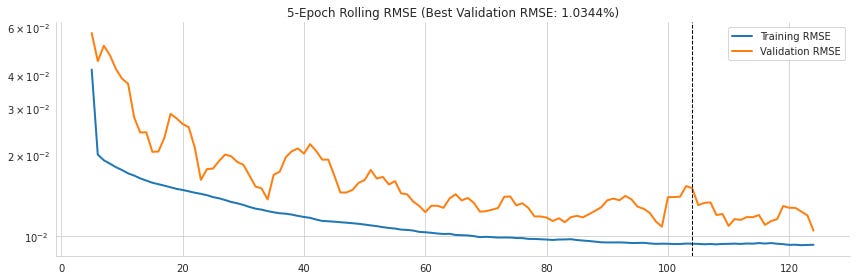
The purpose of this cell is to turn the training history into a clearer view of how the model’s error changed over time, and to save that diagnostic plot for later inspection. It starts by creating a figure and axes so the chart has a defined size and place to draw. Then it takes the recorded training history from the LSTM fit and converts the loss values into root mean squared error by taking the square root of each value. That matters because the original training loss was mean squared error, and RMSE is easier to interpret in the same style as the model’s later evaluation metrics.
The index is shifted so the epochs are numbered starting at 1 instead of 0, which makes the plot more natural to read. From that transformed history, the code finds the smallest validation RMSE and the epoch where that minimum occurred. Those two values are used for the plot title and for the vertical marker that will show the best validation point. The columns are then renamed so the two lines will appear as training RMSE and validation RMSE, which makes the legend easier to understand.
Before plotting, the code smooths both curves with a 5-epoch rolling mean. That reduces short-term wiggles and makes the overall training trend easier to see. The plot is drawn on a logarithmic y-axis, which helps compress the scale and makes it easier to compare improvement early in training with the finer changes later on. The saved output reflects all of that: the blue training curve drops steadily as the model learns, while the orange validation curve is noisier but also trends downward. The title at the top reports the best validation RMSE, and the dashed vertical line marks the epoch where that best score was reached. That line appears slightly after the point where the validation curve bottoms out because the code is marking the exact epoch of the minimum after smoothing and tracking the recorded history.
Finally, the cell removes unnecessary plot borders, tightens the layout so labels fit cleanly, and saves the figure to the results folder. The displayed image is the figure object itself, showing the completed error-tracking plot exactly as it was generated.
train_rmse_scaled = np.sqrt(rnn.evaluate(X_train, y_train, verbose=0))
test_rmse_scaled = np.sqrt(rnn.evaluate(X_test, y_test, verbose=0))
print(f'Train RMSE: {train_rmse_scaled:.4f} | Test RMSE: {test_rmse_scaled:.4f}')
Train RMSE: 0.0085 | Test RMSE: 0.0103The purpose of this step is to measure how well the trained recurrent model is fitting the training period and how accurately it generalizes to the unseen test period. It asks the model to predict the next-day values for both the training windows and the test windows, then compares those predictions to the true targets using the same loss function that was used during training. Because the model was compiled with mean squared error, the evaluation returns MSE values, and taking the square root turns them into RMSE, which is easier to interpret because it is on the same scale as the target variable after scaling.
Behind the scenes, the evaluation routine runs the trained network forward on each input sequence without updating any weights. It computes the average squared difference between predicted and actual values for the training set and then does the same for the test set. Taking the square root converts those averages into a more familiar error measure. The printed output shows very small errors in scaled space: 0.0085 for training and 0.0103 for testing. The test error is a bit higher, which is expected because the model is being judged on data it did not train on, but the two numbers are still fairly close, suggesting the model is not overfitting badly and is learning a pattern that carries over to the later period.
train_predict_scaled = rnn.predict(X_train)
test_predict_scaled = rnn.predict(X_test)
This step uses the trained recurrent neural network to generate forecasts for both the training period and the test period. The model takes the prepared sliding windows of past S&P 500 values and produces one predicted next-day value for each window. First it runs through the training inputs, which gives a prediction for every training example, and then it does the same for the held-out test inputs. The results are kept in scaled form because the model was trained on normalized values rather than raw index levels. Since there is no saved output shown here, the main effect of the cell is the creation of these two arrays of predictions, which will be used in later steps for evaluation, inverse scaling, and plotting against the actual series.
train_ic = spearmanr(y_train, train_predict_scaled)[0]
test_ic = spearmanr(y_test, test_predict_scaled)[0]
print(f'Train IC: {train_ic:.4f} | Test IC: {test_ic:.4f}')
Train IC: 0.9986 | Test IC: 0.9817The purpose here is to measure how well the model preserves the ordering of the true values, not just how close the numbers are in a squared-error sense. Spearman correlation is used for that because it checks whether larger actual values tend to line up with larger predicted values, which is a good way to judge whether the forecast captures the overall rank relationship in the series. The first calculation compares the training targets with the model’s training predictions, and the second does the same for the test set. Each call returns several values, but only the correlation coefficient itself is kept, since that is the summary number being reported here.
After those two values are computed, they are printed in a compact format with four decimal places. The saved output shows very high correlations on both splits: 0.9986 for training and 0.9817 for testing. That means the model’s predictions track the ups and downs of the S&P 500 very closely, especially on the data it was trained on, and still remain strongly aligned on the unseen test period. The slightly lower test value is expected because the model is being evaluated on new data, but the fact that it stays so close to 1 suggests it is capturing the general movement of the series quite well.
Convert predictions back to the original scale
train_predict = pd.Series(scaler.inverse_transform(train_predict_scaled).squeeze(), index=y_train.index)
test_predict = (pd.Series(scaler.inverse_transform(test_predict_scaled)
                          .squeeze(),
                          index=y_test.index))
The goal here is to take the model’s predictions, which are still in the normalized 0-to-1 scale, and convert them back into actual S&P 500 values. The first line applies the inverse of the earlier scaling step to the training predictions, then squeezes the result down from a two-dimensional array into a simple one-dimensional series of values. Those restored values are wrapped in a pandas Series and given the same date index as the training targets, so each prediction lines up with the correct point in time.
The second line does the same thing for the test predictions. After reversing the scaling and flattening the result, it stores the values as a pandas Series indexed by the dates in the test target set. That indexing matters because it lets the predictions be compared, plotted, and evaluated directly against the real observed values for each period. There is no saved output because nothing is being displayed yet; the cell is quietly preparing the prediction series in their original units for the next evaluation and visualization steps.
y_train_rescaled = scaler.inverse_transform(y_train.to_frame()).squeeze()
y_test_rescaled = scaler.inverse_transform(y_test.to_frame()).squeeze()
The purpose here is to convert the target values for both the training period and the test period back into their original S&P 500 scale. Earlier, the series was normalized to a 0-to-1 range so the neural network could train more easily, but those scaled numbers are not very meaningful on their own. To make the results interpretable again, each target series is first turned into a one-column table, because the scaler expects the same kind of 2D input shape it saw during fitting. The inverse transformation then undoes the earlier min-max scaling and restores the values to their original price levels. After that, the extra column structure is removed so the results become plain one-dimensional arrays again.
Nothing is displayed in the output area because the cell only prepares data for later steps. What it produces is two rescaled versions of the true target values, one for training and one for testing, which can then be compared directly with the model’s predictions and used in plots or error calculations in the original units of the index.
train_rmse = np.sqrt(mean_squared_error(train_predict, y_train_rescaled))
test_rmse = np.sqrt(mean_squared_error(test_predict, y_test_rescaled))
f'Train RMSE: {train_rmse:.2f} | Test RMSE: {test_rmse:.2f}'
'Train RMSE: 18.18 | Test RMSE: 22.15'The cell measures how far the model’s predictions are from the actual S&P 500 values after both have been returned to their original scale. It first computes the mean squared error separately for the training predictions and the test predictions, then takes the square root of each value so the result is expressed in the same units as the index itself. That makes the numbers easier to interpret, because an RMSE tells you the typical size of the prediction error in points rather than in squared points. After those two error values are calculated, they are inserted into a formatted string that rounds them to two decimal places for display.
The saved output shows those final error summaries: the training RMSE is 18.18 and the test RMSE is 22.15. The test error is higher, which is what you would usually expect when a model performs a little better on data it has already seen than on newer, unseen data. The fact that both values are fairly close suggests the model is capturing some of the pattern in the series, while still making noticeable forecasting errors, especially when the market moves more sharply.
sp500['Train Predictions'] = train_predict
sp500['Test Predictions'] = test_predict
sp500 = sp500.join(train_predict.to_frame('predictions').assign(data='Train')
                        .append(test_predict.to_frame('predictions').assign(data='Test')))
The goal here is to add the model’s forecasts back into the original S&P 500 data so they can be compared directly with the true index values. First, the training predictions are placed into a new column in the main data frame, and the test predictions are placed into another new column. That gives the table a simple side-by-side record of what the model predicted on each part of the timeline.
Next, the predictions are reorganized into a separate table that labels each row as either coming from the training period or the test period. The two pieces are stacked together and then joined to the original S&P 500 data. Behind the scenes, the join aligns everything by date index, so each prediction ends up attached to the correct trading day. The added data label is useful later because it makes it easy to distinguish training-period forecasts from test-period forecasts when plotting or analyzing results.
There is no saved output from this cell because its job is mainly to reshape and enrich the data rather than display something immediately. Its effect is stored in the updated data frame, preparing the forecast results for the final visual comparisons and error analysis.
Visualize the results
fig=plt.figure(figsize=(14,7))
ax1 = plt.subplot(221)

sp500.loc['2015':, 'SP500'].plot(lw=4, ax=ax1, c='k')
sp500.loc['2015':, ['Test Predictions', 'Train Predictions']].plot(lw=1, ax=ax1, ls='--')
ax1.set_title('In- and Out-of-sample Predictions')


with sns.axes_style("white"):
    ax3 = plt.subplot(223)
    sns.scatterplot(x='SP500', y='predictions', data=sp500, hue='data', ax=ax3)
    ax3.text(x=.02, y=.95, s=f'Test IC ={test_ic:.2%}', transform=ax3.transAxes)
    ax3.text(x=.02, y=.87, s=f'Train IC={train_ic:.2%}', transform=ax3.transAxes)
    ax3.set_title('Correlation')
    ax3.legend(loc='lower right')

    ax2 = plt.subplot(222)
    ax4 = plt.subplot(224, sharex = ax2, sharey=ax2)
    sns.distplot(train_predict.squeeze()- y_train_rescaled, ax=ax2)
    ax2.set_title('Train Error')
    ax2.text(x=.03, y=.92, s=f'Train RMSE ={train_rmse:.4f}', transform=ax2.transAxes)
    sns.distplot(test_predict.squeeze()-y_test_rescaled, ax=ax4)
    ax4.set_title('Test Error')
    ax4.text(x=.03, y=.92, s=f'Test RMSE ={test_rmse:.4f}', transform=ax4.transAxes)

sns.despine()
fig.tight_layout()
fig.savefig(results_path / 'rnn_sp500_regression', dpi=300);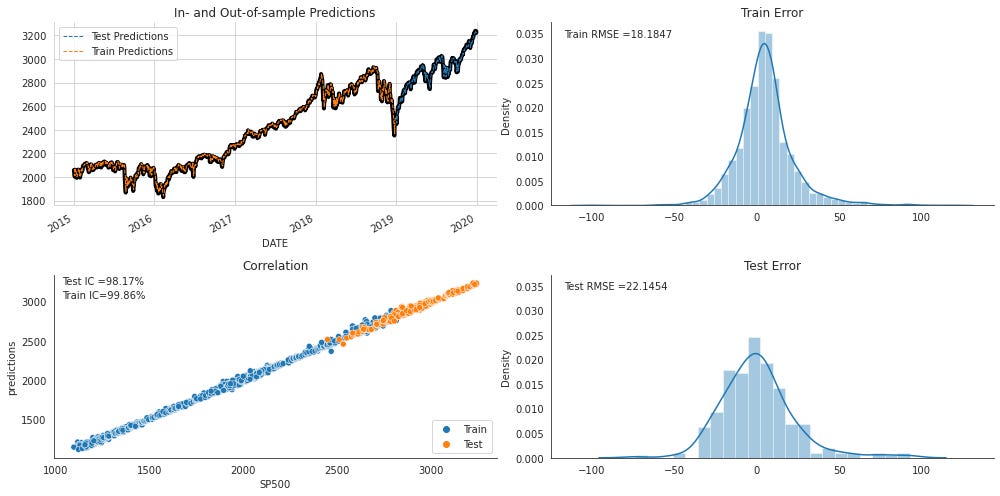
The cell brings together the model’s results into one summary figure so the forecast can be judged visually from several angles at once. It starts by creating a large canvas and placing a line plot in the upper-left panel. There, the actual S&P 500 values from 2015 onward are drawn as a thick black line, and the model’s train and test predictions are layered on top with thinner dashed lines. That choice makes it easy to see whether the predictions track the broad market movement and whether they stay close to the real series once the model moves from the training period into the held-out test period. The saved figure shows that the predicted lines sit very close to the black price path, with the test section continuing the same pattern into 2019 and 2020.
The next part switches to a cleaner white plotting style and builds a scatter plot in the lower-left panel. Here, actual S&P 500 values are placed on the horizontal axis and predicted values on the vertical axis, with train and test points colored separately. If the model were perfect, all the points would fall exactly on a diagonal line, because each prediction would equal the true value. In the saved output, the points cluster tightly around that diagonal, which is why the plot looks almost like a narrow rising band. The text annotations inside the panel report the rank correlations for both splits, and those values are very high, which matches the strong visual alignment between actual and predicted values. This panel is useful because it shows not just whether the line forecasts are close in time, but whether the model preserves the ordering of low and high market levels.
The remaining two panels look at errors rather than predictions. The upper-right panel shows the training residuals, and the lower-right panel shows the test residuals. Each distribution is built from the difference between the predicted values and the rescaled true values, so the histograms tell you how far off the model tends to be and whether those errors are centered around zero. A bell-shaped curve is overlaid to give a smoother sense of the spread. In the saved figure, both error distributions are concentrated near zero, which suggests the model is usually close, although the test errors are a bit wider than the training ones. The RMSE values printed inside each panel summarize that spread in a single number, and the test RMSE is larger than the train RMSE, which is what you would expect once the model is evaluated on unseen data.
After the plots are assembled, the figure is cleaned up with lighter borders and tighter spacing so the four panels fit together neatly. Finally, the figure is saved to the results folder as an image file, which is why the saved output shows the complete 2-by-2 dashboard exactly as constructed in the cell.
Notebook 3 of 8: 02_stacked_lstm_with_feature_embeddings
Source file: `02_stacked_lstm_with_feature_embeddings_processed.ipynb`
Stacked LSTMs for Time Series Classification in TensorFlow
We will now construct a somewhat deeper network by placing two LSTM layers on top of each other and training it on the Quandl stock price data. In addition to the sequential price history, we will also feed in non-sequential features, specifically indicator variables that identify the equity and the month.
Imports
import warnings
warnings.filterwarnings('ignore')
The purpose of this cell is to quiet down warning messages so they do not clutter the notebook output. It first imports Python’s warnings module, which is the standard way to control how warnings are handled during execution. Then it tells the system to ignore warnings entirely, so any non-fatal notices that would normally appear during later steps are suppressed. Since this cell only changes how future messages are displayed and does not perform any calculation or produce a visible result, there is no saved output.
%matplotlib inline

from pathlib import Path
import numpy as np
import pandas as pd
from scipy.stats import spearmanr
from sklearn.metrics import roc_auc_score

import tensorflow as tf
from tensorflow.keras.callbacks import ModelCheckpoint, EarlyStopping
from tensorflow.keras.models import Model
from tensorflow.keras.layers import Dense, LSTM, Input, concatenate, Embedding, Reshape, BatchNormalization
import tensorflow.keras.backend as K

import matplotlib.pyplot as plt
import seaborn as sns
The cell sets up the tools needed for the rest of the notebook by bringing together plotting, data handling, statistics, machine learning metrics, and deep learning components. The first line tells Jupyter to render plots directly inside the notebook, so any figures created later will appear inline instead of opening in a separate window.
After that, it imports a few general-purpose libraries for working with files and numerical arrays, along with pandas for tabular data. It also brings in Spearman correlation and ROC AUC from scientific and machine learning libraries, since those are useful for evaluating how well the model ranks and classifies outcomes. TensorFlow and several Keras building blocks are imported next, including the model class itself, dense and recurrent layers, an embedding layer, reshaping, batch normalization, and callbacks for saving the best model and stopping training early if performance stops improving. The backend import gives access to lower-level TensorFlow/Keras utilities if they are needed later.
Finally, matplotlib and Seaborn are imported to support plotting and styling the training history and evaluation figures. There is no saved output because this cell only prepares the environment; nothing is calculated or displayed yet, but everything imported here will be used in later cells to build, train, evaluate, and visualize the neural network.
gpu_devices = tf.config.experimental.list_physical_devices('GPU')
if gpu_devices:
    print('Using GPU')
    tf.config.experimental.set_memory_growth(gpu_devices[0], True)
else:
    print('Using CPU')
Using CPUThe purpose here is to check what kind of hardware TensorFlow can use before the model starts training. It first asks TensorFlow to list any available GPU devices. If at least one GPU is found, the notebook announces that it is using a GPU and turns on memory growth for the first one, which tells TensorFlow to reserve GPU memory gradually instead of grabbing all of it at once. That helps avoid unnecessary memory allocation issues when multiple processes share the same machine. If no GPU is available, the notebook falls back to the CPU path and prints that instead. The saved output shows exactly that fallback happening, so TensorFlow did not detect a usable GPU on this run and the work will continue on the CPU.
idx = pd.IndexSlice
sns.set_style('whitegrid')
np.random.seed(42)
This cell is setting up a few small but important defaults that will be used later in the notebook. The first line creates a shortcut for Pandas indexing syntax, so that later selections from MultiIndex data can be written more cleanly and readably. That is especially useful when working with time-series data organized by more than one index level, because it makes it easier to refer to slices without repeating the full indexing machinery each time.
The next line changes the plotting style in Seaborn to a white grid theme. That affects how any future charts will look, giving them a cleaner background with light grid lines, which tends to make trends and comparisons easier to read. Since no figure is drawn here, there is no saved output yet; the change simply updates the default appearance for plots that will be created later.
The final line sets the NumPy random seed to 42. Behind the scenes, this tells NumPy to produce the same sequence of random numbers each time the notebook runs, which helps make results reproducible. That matters for tasks like model initialization, shuffling, and any other randomized operation, because it makes it easier to compare runs and debug behavior consistently.
results_path = Path('results', 'lstm_embeddings')
if not results_path.exists():
    results_path.mkdir(parents=True)
This step sets up the folder where the notebook will store its results. It first builds a path pointing to a subdirectory named results/lstm_embeddings, then checks whether that folder already exists. If the folder is missing, it creates it, including any parent folders that may also be needed along the way. Nothing is printed because the cell is only preparing the file system behind the scenes, making sure later steps have a safe place to save things like training plots, checkpoints, or other outputs.
Data
Data generated by the notebook build_dataset.
data = pd.read_hdf('data.h5', 'returns_weekly')The purpose here is to load the prepared weekly returns dataset from disk so it can be used in the modeling steps that follow. The data is read from an HDF file, which is a convenient format for storing larger tabular datasets efficiently. The specific table being pulled in is the one keyed by returns_weekly, so the result is a DataFrame containing the weekly return features and related fields that were previously saved.
Nothing is displayed as output because the operation only assigns the loaded data to a variable. Behind the scenes, pandas opens the file, locates the named dataset inside it, and reconstructs it into memory as a DataFrame. That loaded object becomes the starting point for the rest of the preprocessing and model-building workflow.
data['ticker'] = pd.factorize(data.index.get_level_values('ticker'))[0]The goal here is to turn the ticker names in the dataset into a numeric form that a neural network can work with. The ticker symbols are stored as part of the index, and the expression pulls out that ticker level from the index and then factorizes it, which means each unique ticker gets assigned its own integer code. Those codes are then saved into a new column called ticker. This is a common preprocessing step for categorical data because machine learning models cannot use text labels directly, but they can learn from consistent integer identifiers. Behind the scenes, the factorization also preserves the one-to-one mapping between each ticker and its assigned number, so every row for the same company receives the same code. There is no visible output because the operation simply updates the data in place, preparing it for the embedding layer that will use these integer ticker IDs later on.
data['month'] = data.index.get_level_values('date').month
data = pd.get_dummies(data, columns=['month'], prefix='month')
The first step pulls the month number out of each row’s date, using the date level of the index so every observation is tagged with the month it belongs to. That gives the model a simple seasonal signal, which can be useful in financial data because behavior may differ across the calendar year. The next step turns that month column into a set of separate binary indicator columns, one for each month, instead of keeping it as a single numeric value. Behind the scenes, this one-hot encoding creates a cleaner categorical representation: a month is no longer treated as if December is “larger” than January, but simply as one of twelve distinct possibilities. There is no visible output because these operations only change the data frame in memory, preparing it for the later model inputs.
data.info()<class 'pandas.core.frame.DataFrame'>
MultiIndex: 1167341 entries, ('A', Timestamp('2009-01-11 00:00:00')) to ('ZUMZ', Timestamp('2017-12-31 00:00:00'))
Data columns (total 67 columns):
# Column Non-Null Count Dtype
--- ------ -------------- -----
0 fwd_returns 1167341 non-null float64
1 1 1167341 non-null float64
2 2 1167341 non-null float64
3 3 1167341 non-null float64
4 4 1167341 non-null float64
5 5 1167341 non-null float64
6 6 1167341 non-null float64
7 7 1167341 non-null float64
8 8 1167341 non-null float64
9 9 1167341 non-null float64
10 10 1167341 non-null float64
11 11 1167341 non-null float64
12 12 1167341 non-null float64
13 13 1167341 non-null float64
14 14 1167341 non-null float64
15 15 1167341 non-null float64
16 16 1167341 non-null float64
17 17 1167341 non-null float64
18 18 1167341 non-null float64
19 19 1167341 non-null float64
20 20 1167341 non-null float64
21 21 1167341 non-null float64
22 22 1167341 non-null float64
23 23 1167341 non-null float64
24 24 1167341 non-null float64
25 25 1167341 non-null float64
26 26 1167341 non-null float64
27 27 1167341 non-null float64
28 28 1167341 non-null float64
29 29 1167341 non-null float64
30 30 1167341 non-null float64
31 31 1167341 non-null float64
32 32 1167341 non-null float64
33 33 1167341 non-null float64
34 34 1167341 non-null float64
35 35 1167341 non-null float64
36 36 1167341 non-null float64
37 37 1167341 non-null float64
38 38 1167341 non-null float64
39 39 1167341 non-null float64
40 40 1167341 non-null float64
41 41 1167341 non-null float64
42 42 1167341 non-null float64
43 43 1167341 non-null float64
44 44 1167341 non-null float64
45 45 1167341 non-null float64
46 46 1167341 non-null float64
47 47 1167341 non-null float64
48 48 1167341 non-null float64
49 49 1167341 non-null float64
50 50 1167341 non-null float64
51 51 1167341 non-null float64
52 52 1167341 non-null float64
53 label 1167341 non-null int64
54 ticker 1167341 non-null int64
55 month_1 1167341 non-null uint8
56 month_2 1167341 non-null uint8
57 month_3 1167341 non-null uint8
58 month_4 1167341 non-null uint8
59 month_5 1167341 non-null uint8
60 month_6 1167341 non-null uint8
61 month_7 1167341 non-null uint8
62 month_8 1167341 non-null uint8
63 month_9 1167341 non-null uint8
64 month_10 1167341 non-null uint8
65 month_11 1167341 non-null uint8
66 month_12 1167341 non-null uint8
dtypes: float64(53), int64(2), uint8(12)
memory usage: 507.7+ MBThe purpose here is to quickly inspect the prepared dataset before it is fed into the model. Calling the information summary on the DataFrame prints a compact structural report so you can verify that the data loaded correctly, see how many observations are present, check the index format, and confirm that the expected columns and data types are in place.
The output shows that the dataset is indexed by a MultiIndex with ticker symbols and dates, which matches the time-series setup used later in the notebook. It also reveals that there are 1,167,341 rows, stretching from early 2009 through the end of 2017, so the data covers the full training and test period. That matters because the later split depends on date order, and this output confirms that the dates are available in the index exactly where they need to be.
The column listing is just as important. The summary shows 67 total columns: one forward return column, 52 lagged return columns numbered 1 through 52, a label column, a ticker identifier, and 12 month indicator columns. That lines up with the model design, where the return history becomes the LSTM input, ticker becomes a learned categorical feature, and month becomes a one-hot seasonal feature. The fact that all 52 lag columns are non-null and stored as floating-point values tells you the sequential input is complete and numerically ready for neural network training.
The label and ticker columns are stored as integers, which is appropriate because the label is the target for classification and the ticker code will later be treated as an embedding input. The month columns are stored as uint8 values, which is typical for one-hot dummy variables because they only need to represent zeros and ones. The memory usage at the bottom, a little over 500 MB, gives a sense of how large the assembled dataset is and why it is helpful to check its structure before training begins.
Train-test split
Because this is time series data, the split has to preserve chronological order. For that reason, we reserve the final portion of the sample as the hold-out test set, using the observations from 2017.
window_size=52
sequence = list(range(1, window_size+1))
ticker = 1
months = 12
n_tickers = data.ticker.nunique()
This step sets up a few basic constants that will be used to describe the model’s inputs. The lookback window is fixed at 52, which means each training example will use 52 past weekly returns as its sequence history. A matching sequence of positions from 1 through 52 is created so the weeks can be referred to in order. The ticker value is set to 1 as a simple placeholder example, and months is set to 12 because the model will later use a one-hot representation with one feature for each month of the year. The number of tickers is then calculated from the data by counting how many unique ticker identifiers are present, which is important for sizing the embedding layer correctly so every ticker can be assigned its own learned representation. Since nothing is printed or displayed here, there is no saved output; the cell simply prepares these values for the model-building steps that follow.
train_data = data.drop('fwd_returns', axis=1).loc[idx[:, :'2016'], :]
test_data = data.drop('fwd_returns', axis=1).loc[idx[:, '2017'],:]
The purpose here is to split the prepared dataset into two separate groups for modeling: one for training and one for final evaluation. The first line removes the forward returns column, which is not needed as an input feature for the model because it would represent information from the future. After that, the data is filtered by date using the index, so everything up through the end of 2016 becomes the training set. The second line takes only the rows from 2017 and sets them aside as the test set.
Because the split is based on time rather than random sampling, it preserves the natural order of the financial data and avoids leaking future information into training. The result is that traindata contains the historical observations the model will learn from, while testdata holds a completely later period that can be used to check how well the model generalizes to unseen market data. There is no saved output because nothing is displayed here; the cell simply prepares two new data tables for the next steps.
For both the training and test sets, we build a three-part input list made up of the return sequence, the stock ticker encoded as an integer, and the month represented as an integer, as illustrated below:
X_train = [
    train_data.loc[:, sequence].values.reshape(-1, window_size , 1),
    train_data.ticker,
    train_data.filter(like='month')
]
y_train = train_data.label
[x.shape for x in X_train], y_train.shape
([(1035424, 52, 1), (1035424,), (1035424, 12)], (1035424,))The purpose here is to assemble the training inputs in the exact format the model expects. The first item in the list is the 52-week return history for each training example. The selected lag columns are pulled out of the training table, converted to raw values, and reshaped so that each sample becomes a sequence with 52 time steps and 1 feature per step. That extra last dimension matters because the LSTM layers are built to read sequences shaped like a series of vectors, even when each vector contains only one number.
The second item is the ticker identifier for each example. Rather than turning it into a sequence, it stays as a simple one-dimensional array because it will later be passed through an embedding layer, which learns a dense representation for each ticker. The third item is the set of month features. Those columns are selected by name pattern, so the result is a 12-column one-hot style matrix that captures which month the sample belongs to. Together, these three pieces form the multi-input training set: sequential market history, categorical ticker identity, and seasonal month information.
The target values are collected separately into y_train, which contains the binary label the model is trying to predict. The final line checks the shapes of everything so it is easy to verify that the data has been prepared correctly before training begins. The saved output confirms that the sequence input has 1,035,424 samples, each shaped as 52 by 1, that the ticker input has the same number of entries as a flat vector, and that the month input has 12 features per sample. The label array also has 1,035,424 values, which matches the number of training examples and shows that the inputs and targets are aligned.
# keep the last year for testing
X_test = [
    test_data.loc[:, list(range(1, window_size+1))].values.reshape(-1, window_size , 1),
    test_data.ticker,
    test_data.filter(like='month')
]
y_test = test_data.label
[x.shape for x in X_test], y_test.shape
([(131917, 52, 1), (131917,), (131917, 12)], (131917,))The purpose of this cell is to assemble the test set in exactly the same three-part form the model expects at prediction time. It takes the held-out data from the final year and separates it into a sequence input, a ticker input, and a month input. The first part pulls the weekly return columns for each sample, covering the full lookback window, and reshapes them into a three-dimensional array so each example looks like a 52-step sequence with one feature at each step. The second part keeps the ticker identifier as a single categorical value for each row, because that will later be passed through the embedding layer. The third part collects all columns whose names contain “month,” which gives the one-hot seasonal indicators the model can use alongside the sequence.
The target labels are pulled out at the end and stored separately as the test outcomes the model is supposed to predict. The final line prints the shapes of each input and the label vector so it is easy to confirm everything lines up correctly. The saved output shows that there are 131,917 test samples, each return history has shape 52 by 1, the ticker input is one value per sample, and the month features expand to 12 columns. The label array also has 131,917 entries, which matches the number of samples and confirms that the inputs and targets are aligned properly for evaluation.
Define the model architecture
Keras’s functional API is well suited to models that need several inputs or outputs. In this case, the network takes three separate sources of information:
two LSTM layers arranged one after the other, with 25 units in the first layer and 10 units in the second
an embedding layer that learns a real-valued 10-dimensional representation for the equities
a one-hot encoded month feature vector
All of this can be built in only a few lines. For background, see the general Keras documentation and the LSTM documentation.
When setting up the optimizer, follow the Keras guidance for recurrent neural networks.
We start by declaring the three inputs and their corresponding shapes, as outlined below:
K.clear_session()This step resets Keras’ internal state so the notebook can start cleanly before building or training another model. Clearing the session removes the layers, graphs, and variables that Keras has kept in memory from earlier runs, which helps avoid confusion if the model is rebuilt more than once in the same notebook. It also frees up resources, especially useful when working with neural networks that can leave behind a lot of leftover state after experimentation. Since nothing is printed or displayed, there is no visible output; the effect is entirely behind the scenes.
n_features = 1This step sets up a small piece of configuration for the model by recording that each time step in the return sequence has one numeric feature. In practical terms, that means the LSTM will receive a single value at each week in the 52-week history, rather than a vector of multiple measurements per week. That choice matches the shape of the prepared return data and helps keep the later model definitions consistent, since the input layer needs to know how many features appear at each point in the sequence. Because the cell only assigns a value and does not produce any printed result or display anything, there is no saved output.
returns = Input(shape=(window_size, n_features),
                name='Returns')

tickers = Input(shape=(1,),
                name='Tickers')

months = Input(shape=(12,),
               name='Months')
The purpose here is to define the three separate inputs that the model will accept later on. One input is reserved for the sequence of past returns, one for the ticker identity, and one for the month-of-year features. These inputs are created before any layers are connected so that the model can be built as a multi-input network rather than a single straight stack of layers.
The first input is shaped to hold a rolling window of return history, with the number of time steps given by the window size and the number of values per step given by the feature count. That means each sample will arrive as a small sequence, not just a flat vector, which is exactly what the recurrent layers need. The next input is a single integer for the ticker, because the ticker will later be treated as a categorical label and turned into a learned embedding. The last input is a 12-element vector for the months, which matches the one-hot encoding of January through December.
Nothing is displayed when this cell runs because it is only setting up placeholders for the model graph. The result is a set of named input tensors that define the shape and meaning of each branch of the network, ready to be connected to the layers that follow.
LSTM Layers
To build stacked LSTM layers, we set the return_sequences argument to True. That makes the first layer output a sequence with the three-dimensional shape the next layer expects. We also include dropout for regularization and use the functional API so the tensor produced by one layer can be fed directly into the next one:
lstm1_units = 25
lstm2_units = 10
The purpose here is to set the size of the two LSTM layers before the model is built. One variable is assigned to the first recurrent layer and the other to the second, so the network architecture can refer to these values later without hard-coding them directly into the model definition. That makes the design easier to read and adjust, since changing the number of hidden units only requires updating these two lines.
Behind the scenes, these names simply store integer values that control how much learning capacity each LSTM layer will have. The first layer is given a larger size, which is common because it processes the full return sequence and needs enough room to capture patterns in the weekly history. The second layer is smaller, acting more like a compact summary stage that further distills the information coming from the first layer. Since the cell only defines these settings and does not run any computation by itself, there is no displayed output.
lstm1 = LSTM(units=lstm1_units,
             input_shape=(window_size,
                          n_features),
             name='LSTM1',
             dropout=.2,
             return_sequences=True)(returns)

lstm_model = LSTM(units=lstm2_units,
             dropout=.2,
             name='LSTM2')(lstm1)
The purpose here is to build the recurrent part of the model that learns from the weekly return history. The first LSTM layer takes the sequence of past returns as input, with the shape telling it how many time steps to expect in each sample and how many values are stored at each step. Its job is to read through the 52-week window and produce a learned representation of the whole sequence rather than treating each week independently. The dropout setting randomly drops some connections during training, which helps reduce overfitting and encourages the layer to learn more robust patterns.
The important detail in the first layer is that it keeps the full sequence output instead of collapsing everything into a single vector right away. That makes it possible to stack another LSTM on top of it, because the second recurrent layer needs a sequence to process. The second LSTM then takes the transformed sequence from the first layer and compresses it into one final hidden representation for the entire return window. This second layer acts like a higher-level summary of the temporal pattern, turning the earlier sequence features into a compact signal that can later be combined with the ticker and month inputs in the rest of the model.
There is no saved output because nothing is printed or displayed here. The cell simply defines the stacked LSTM pathway that will be reused when the full neural network is assembled.
Embedding layer
The Embedding layer must be created with an input_dim argument, which sets the number of distinct items it can represent, an output_dim argument, which controls the length of each learned vector, and an input_length argument, which specifies how many values are fed into the layer at once. In this case, each sample contains just a single ticker.
Before this embedding output can be merged with the LSTM branch and the month features, it has to be reshaped into a flat vector, as shown below:
ticker_embedding = Embedding(input_dim=n_tickers,
                             output_dim=5,
                             input_length=1)(tickers)
ticker_embedding = Reshape(target_shape=(5,))(ticker_embedding)
The purpose here is to turn the ticker input into a learned numeric representation that the neural network can use alongside the return history. Instead of treating each ticker ID as a meaningful number on its own, the embedding layer learns a small dense vector for every ticker, so the model can discover relationships between stocks during training.
First, the ticker IDs are passed through an embedding layer with one row for each ticker in the universe and five values in each embedding vector. Behind the scenes, the layer looks up the vector associated with each ticker ID and updates those vectors during training so they become useful features for the prediction task. The input length is set to one because each sample contains a single ticker identifier rather than a sequence of tickers.
The result of that lookup is still wrapped in an extra dimension, so it is reshaped into a flat five-element vector. That makes it compatible with the other branches of the model, especially the LSTM output and the month features, which will later be joined together into one combined feature representation. Since this cell only builds part of the model graph, it does not produce any visible output when run; its effect is to define the ticker-embedding pathway that will be used later in the full network.
Combine the model branches
Now the three tensors can be merged into a single representation, after which dense layers can learn the relationship between the time-series signal, the ticker embedding, and the month features and the final target, which is whether the return in the next week is positive or negative, as illustrated below:
merged = concatenate([lstm_model,
                      ticker_embedding,
                      months], name='Merged')

bn = BatchNormalization()(merged)
hidden_dense = Dense(10, name='FC1')(bn)

output = Dense(1, name='Output', activation='sigmoid')(hidden_dense)

rnn = Model(inputs=[returns, tickers, months], outputs=output)
The purpose here is to combine the three separate streams of information the model has been building into one shared representation, and then turn that combined representation into a final binary prediction. The stacked LSTM branch has already distilled the 52-week return history into a compact sequence-based feature vector, while the ticker embedding captures which stock is being modeled and the month features add a seasonal signal. Those three pieces are concatenated into a single merged layer so the network can consider them together rather than separately.
After the merge, batch normalization is applied to stabilize the scale of the combined features. Behind the scenes, this helps keep the values flowing into the next dense layer more consistent, which can make training smoother and less sensitive to initialization. The result is then passed through a fully connected layer with 10 units, which gives the model a small learned space to mix and refine the information from all inputs.
Finally, a single-output dense layer with a sigmoid activation produces the prediction. Because sigmoid squashes the value into the range from 0 to 1, the output can be interpreted as the model’s estimated probability of the positive class. The last line wraps everything into a Keras Model object with the three inputs and that final prediction as the output, creating the complete neural network that will later be compiled and trained.
The summary describes this somewhat more advanced architecture, which contains 29,371 parameters, in the following way:
rnn.summary()Model: "model"
__________________________________________________________________________________________________
Layer (type) Output Shape Param # Connected to
==================================================================================================
Returns (InputLayer) [(None, 52, 1)] 0
__________________________________________________________________________________________________
Tickers (InputLayer) [(None, 1)] 0
__________________________________________________________________________________________________
LSTM1 (LSTM) (None, 52, 25) 2700 Returns[0][0]
__________________________________________________________________________________________________
embedding (Embedding) (None, 1, 5) 12445 Tickers[0][0]
__________________________________________________________________________________________________
LSTM2 (LSTM) (None, 10) 1440 LSTM1[0][0]
__________________________________________________________________________________________________
reshape (Reshape) (None, 5) 0 embedding[0][0]
__________________________________________________________________________________________________
Months (InputLayer) [(None, 12)] 0
__________________________________________________________________________________________________
Merged (Concatenate) (None, 27) 0 LSTM2[0][0]
reshape[0][0]
Months[0][0]
__________________________________________________________________________________________________
batch_normalization (BatchNorma (None, 27) 108 Merged[0][0]
__________________________________________________________________________________________________
FC1 (Dense) (None, 10) 280 batch_normalization[0][0]
__________________________________________________________________________________________________
Output (Dense) (None, 1) 11 FC1[0][0]
==================================================================================================
Total params: 16,984
Trainable params: 16,930
Non-trainable params: 54
__________________________________________________________________________________________________Printing the model summary gives a compact blueprint of the neural network that has been assembled, so you can verify the architecture before training or evaluation. The output starts by naming the model and then lists each layer in order, along with the shape of the data flowing through it, how many parameters each layer contains, and which earlier layer feeds into it. The first input is the return history, shaped as a 52-step sequence with a single value at each step, and that is what enters the first LSTM layer. Because this first LSTM is configured to pass along the full sequence, its output still has a time dimension, which allows the second LSTM to process it and compress the sequence down to a smaller 10-unit representation.
At the same time, the ticker input is sent through an embedding layer, which turns each ticker identifier into a learned 5-number vector. That is why the embedding output initially has shape with a length of 1 and an embedding size of 5, and then a reshape layer removes the extra sequence dimension so it can be combined with the other features. The month input arrives separately as a 12-dimensional vector, already one-hot encoded, so it can be merged directly. Those three branches meet in the concatenation layer, producing a 27-dimensional combined feature vector made up of the LSTM output, the ticker embedding, and the month indicators.
After the merge, batch normalization is applied to stabilize the feature values before they go into a small dense layer with 10 units, and finally into the single-node output layer. That last layer uses one output because the task is binary classification, so it produces a score that can be interpreted as the probability of the positive class. The parameter counts shown beside each layer reflect how many weights the model has learned at each stage, and the totals at the bottom summarize the whole network: almost all of the parameters are trainable, with a small non-trainable portion coming from batch normalization’s internal statistics.
Fit the Model
We compile the model so it can track a custom AUC metric in the following way:
optimizer = tf.keras.optimizers.RMSprop(lr=0.001,
                                        rho=0.9,
                                        epsilon=1e-08,
                                        decay=0.0)
This line creates the optimizer that will be used when the neural network is trained. RMSprop is a gradient-based method that adjusts the learning rate for each parameter using a moving average of recent squared gradients, which often works well for recurrent networks like LSTMs because it helps keep training stable when the signals through time can be noisy. The learning rate is set to 0.001, which controls how large each update step can be, while rho at 0.9 determines how much recent gradient history is remembered. The epsilon value is a very small number added for numerical stability so the updates do not run into divide-by-zero problems. The decay setting is left at 0.0, so the learning rate is not reduced over time by this optimizer itself. There is no saved output because creating the optimizer only defines the training rule; nothing is printed yet and no computation is run on the data at this stage.
rnn.compile(loss='binary_crossentropy',
            optimizer=optimizer,
            metrics=['accuracy',
                     tf.keras.metrics.AUC(name='AUC')])
The model is being prepared for training by telling Keras exactly how it should judge its predictions. Because the task is binary classification, the loss function is set to binary cross-entropy, which measures how far the predicted probabilities are from the true 0-or-1 labels. The optimizer is supplied from earlier setup, so the network will use that chosen learning rule to adjust its weights during training. Alongside the loss, two evaluation metrics are attached: accuracy, which checks how often the model’s rounded predictions match the labels, and AUC, which looks at how well the model separates the positive class from the negative class across all possible thresholds. Nothing is printed here because compiling a model only configures it internally; it does not train anything yet or produce a visible result.
lstm_path = (results_path / 'lstm.classification.h5').as_posix()

checkpointer = ModelCheckpoint(filepath=lstm_path,
                               verbose=1,
                               monitor='val_AUC',
                               mode='max',
                               save_best_only=True)
The purpose here is to set up a checkpoint so the model can be saved automatically during training whenever validation performance improves. First, the path for the saved model file is built by combining the results folder with the filename for the LSTM classifier, then converting that path into a plain string format that Keras can use. After that, a ModelCheckpoint callback is created. Behind the scenes, this callback watches the validation AUC score during training, and because the goal is to maximize AUC, it is told to treat higher values as better. With savebestonly enabled, the checkpoint will overwrite the file only when the current epoch produces a new best validation AUC. The verbose setting means training will print a message whenever a new best model is saved, which is why there is no output at this moment: the cell only prepares the saving mechanism and does not run training itself.
early_stopping = EarlyStopping(monitor='val_AUC',
                              patience=5,
                              restore_best_weights=True,
                              mode='max')
This sets up an early stopping rule for model training so the network does not keep running once validation performance stops improving. The training process will watch the validation AUC, which is a metric that measures how well the model ranks positive cases above negative ones. Because the goal is to maximize that value, the monitoring mode is set to max. The patience value of 5 means training is allowed to continue for up to five more epochs after the best validation AUC is reached, giving the model a little time to recover if the metric briefly dips before improving again. The option to restore the best weights ensures that, when training finishes, the model keeps the parameter values from the epoch with the strongest validation AUC rather than the final epoch, which helps preserve the most useful version of the model.
training = rnn.fit(X_train,
                   y_train,
                   epochs=50,
                   batch_size=32,
                   validation_data=(X_test, y_test),
                   callbacks=[early_stopping, checkpointer],
                   verbose=1)
Epoch 1/50
32356/32357 [============================>.] - ETA: 0s - loss: 0.6892 - accuracy: 0.5375 - AUC: 0.5504
Epoch 00001: val_AUC improved from -inf to 0.61860, saving model to results/lstm_embeddings/lstm.classification.h5
32357/32357 [==============================] - 335s 10ms/step - loss: 0.6892 - accuracy: 0.5375 - AUC: 0.5504 - val_loss: 0.6701 - val_accuracy: 0.5826 - val_AUC: 0.6186
Epoch 2/50
32354/32357 [============================>.] - ETA: 0s - loss: 0.6855 - accuracy: 0.5493 - AUC: 0.5680
Epoch 00002: val_AUC improved from 0.61860 to 0.63500, saving model to results/lstm_embeddings/lstm.classification.h5
32357/32357 [==============================] - 338s 10ms/step - loss: 0.6855 - accuracy: 0.5493 - AUC: 0.5680 - val_loss: 0.6668 - val_accuracy: 0.5902 - val_AUC: 0.6350
Epoch 3/50
32352/32357 [============================>.] - ETA: 0s - loss: 0.6857 - accuracy: 0.5488 - AUC: 0.5671
Epoch 00003: val_AUC improved from 0.63500 to 0.63709, saving model to results/lstm_embeddings/lstm.classification.h5
32357/32357 [==============================] - 308s 10ms/step - loss: 0.6857 - accuracy: 0.5488 - AUC: 0.5671 - val_loss: 0.6732 - val_accuracy: 0.5825 - val_AUC: 0.6371
Epoch 4/50
32352/32357 [============================>.] - ETA: 0s - loss: 0.6831 - accuracy: 0.5471 - AUC: 0.5660
Epoch 00004: val_AUC did not improve from 0.63709
32357/32357 [==============================] - 254s 8ms/step - loss: 0.6831 - accuracy: 0.5471 - AUC: 0.5660 - val_loss: 0.6747 - val_accuracy: 0.5803 - val_AUC: 0.6361
Epoch 5/50
32353/32357 [============================>.] - ETA: 0s - loss: 0.6807 - accuracy: 0.5487 - AUC: 0.5676
Epoch 00005: val_AUC improved from 0.63709 to 0.67301, saving model to results/lstm_embeddings/lstm.classification.h5
32357/32357 [==============================] - 253s 8ms/step - loss: 0.6807 - accuracy: 0.5486 - AUC: 0.5676 - val_loss: 0.5795 - val_accuracy: 0.6061 - val_AUC: 0.6730
Epoch 6/50
32357/32357 [==============================] - ETA: 0s - loss: 0.6798 - accuracy: 0.5489 - AUC: 0.5687
Epoch 00006: val_AUC improved from 0.67301 to 0.68151, saving model to results/lstm_embeddings/lstm.classification.h5
32357/32357 [==============================] - 251s 8ms/step - loss: 0.6798 - accuracy: 0.5489 - AUC: 0.5687 - val_loss: 0.5815 - val_accuracy: 0.6175 - val_AUC: 0.6815
Epoch 7/50
32355/32357 [============================>.] - ETA: 0s - loss: 0.6780 - accuracy: 0.5508 - AUC: 0.5718
Epoch 00007: val_AUC did not improve from 0.68151
32357/32357 [==============================] - 254s 8ms/step - loss: 0.6780 - accuracy: 0.5508 - AUC: 0.5718 - val_loss: 0.6432 - val_accuracy: 0.6144 - val_AUC: 0.6721
Epoch 8/50
32355/32357 [============================>.] - ETA: 0s - loss: 0.6814 - accuracy: 0.5497 - AUC: 0.5694
Epoch 00008: val_AUC did not improve from 0.68151
32357/32357 [==============================] - 255s 8ms/step - loss: 0.6814 - accuracy: 0.5497 - AUC: 0.5694 - val_loss: 0.5745 - val_accuracy: 0.6122 - val_AUC: 0.6757
Epoch 9/50
32353/32357 [============================>.] - ETA: 0s - loss: 0.6759 - accuracy: 0.5525 - AUC: 0.5750
Epoch 00009: val_AUC did not improve from 0.68151
32357/32357 [==============================] - 254s 8ms/step - loss: 0.6759 - accuracy: 0.5525 - AUC: 0.5750 - val_loss: 0.5710 - val_accuracy: 0.6176 - val_AUC: 0.6813
Epoch 10/50
32352/32357 [============================>.] - ETA: 0s - loss: 0.6760 - accuracy: 0.5529 - AUC: 0.5758
Epoch 00010: val_AUC did not improve from 0.68151
32357/32357 [==============================] - 246s 8ms/step - loss: 0.6760 - accuracy: 0.5529 - AUC: 0.5758 - val_loss: 0.5733 - val_accuracy: 0.6151 - val_AUC: 0.6765
Epoch 11/50
32346/32357 [============================>.] - ETA: 0s - loss: 0.6743 - accuracy: 0.5537 - AUC: 0.5768
Epoch 00011: val_AUC did not improve from 0.68151
32357/32357 [==============================] - 141s 4ms/step - loss: 0.6743 - accuracy: 0.5537 - AUC: 0.5768 - val_loss: 0.5703 - val_accuracy: 0.6161 - val_AUC: 0.6797The purpose here is to start training the neural network and let Keras monitor how well it learns from the training set while checking performance on the held-out test set after each epoch. The fit call takes the prepared training inputs and labels, runs for up to 50 passes through the data, and uses a batch size of 32, which means the model updates its weights after seeing small chunks of 32 samples at a time rather than all at once. By supplying the test data as validation_data, the model can report validation loss, validation accuracy, and validation AUC at the end of every epoch, giving a direct picture of how well it generalizes beyond the training examples. The callbacks are what make the training more practical: early stopping watches the validation metric so training can halt once progress stops improving, and the checkpoint saves the best-performing version of the model to disk whenever validation AUC gets better.
The printed output is the training log that Keras produces while this learning process is underway. Each epoch line shows the main quantities being tracked: loss measures how far the model’s predictions are from the true labels, accuracy shows the fraction of correct classifications at the current threshold, and AUC measures how well the model ranks positive cases above negative ones across all thresholds. At the beginning, the model is only slightly better than guessing, with accuracy around the mid-50% range and AUC a little above 0.55 on the training set, while validation AUC starts near 0.62. Whenever validation AUC improves, the checkpoint message appears and the model is saved to the file in the results folder; that is why the output repeatedly says the score improved and the model was saved. Later epochs show that validation AUC rises into the high 0.6 range, peaking at 0.68151 in epoch 6, after which several epochs fail to beat that score. That pattern is exactly what the callbacks are meant to reveal: training continues while there is still improvement, but the best version of the model is preserved automatically. The decreasing time per epoch also reflects the fact that the model is running through a large dataset efficiently once the training loop is underway, with the progress bar showing nearly all batches completed each time.
Training ends after 18 epochs. The strongest checkpoint reaches a test area under the curve of 0.63, and the best result comes from the model after 13 training rounds. Each epoch takes roughly three minutes on a single GPU.
loss_history = pd.DataFrame(training.history)The purpose here is to take the training log produced by the model and turn it into a tidy table that is easier to inspect and plot. The history object returned by model training stores the values for each metric at every epoch in a Python dictionary-like form, with separate entries for things like loss, accuracy, AUC, and their validation counterparts. Wrapping that history in a DataFrame arranges those lists into columns, so each row corresponds to one epoch and each column corresponds to a metric tracked during training.
Behind the scenes, this makes the recorded training results much more convenient to work with. Instead of dealing with a nested history structure, the metrics are now organized in a tabular format that can be summarized, sliced, exported, or plotted directly. There is no visible output from the cell itself because it is just creating and storing this DataFrame for later use, not displaying it yet.
def which_metric(m):
    return m.split('_')[-1]
The cell defines a small helper function that pulls the metric name out of a longer string. When it receives a string, it splits that string wherever there is an underscore and then returns the last piece. The purpose is to make labels easier to group later on, especially when metric names arrive with prefixes such as training or validation tags. For example, a name like this would be reduced to just the metric itself, which makes it simpler to organize results and plot them cleanly. Nothing is displayed when the cell runs because the function only gets created and stored for later use; the actual effect appears later when other code needs a way to interpret metric names.
fig, axes = plt.subplots(ncols=3, figsize=(18,4))
for i, (metric, hist) in enumerate(loss_history.groupby(which_metric, axis=1)):
    hist.plot(ax=axes[i], title=metric)
    axes[i].legend(['Training', 'Validation'])

sns.despine()
fig.tight_layout()
fig.savefig(results_path / 'lstm_stacked_classification', dpi=300);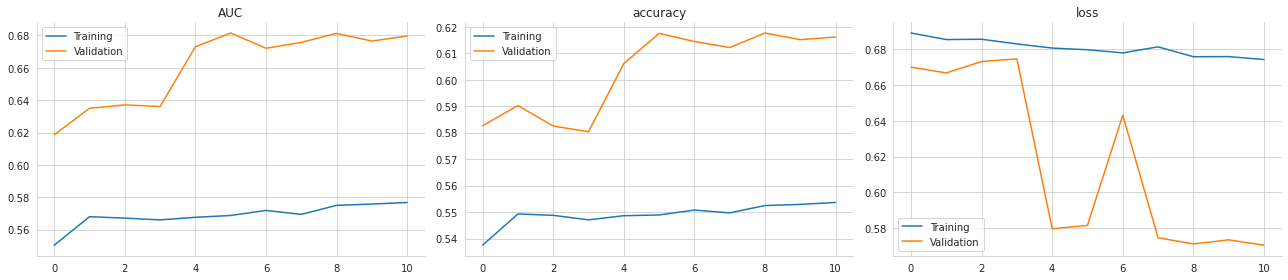
The purpose here is to turn the training history into a compact visual summary and save it for later inspection. First, a figure with three side-by-side panels is created, which gives enough room to compare separate metrics without crowding the lines. Then the recorded history is grouped by metric name, so each subplot receives the pair of training and validation curves for one measure at a time. As each group is plotted, the panel title is set to the metric name, and the legend is simplified so the two lines are clearly labeled as training and validation.
The saved image shows exactly that setup: one panel for AUC, one for accuracy, and one for loss. The curves reflect how those quantities changed over the course of training, so the line shapes come directly from the values collected during each epoch. The AUC and accuracy panels show the validation scores rising and then flattening, while the loss panel shows the training loss drifting gently downward and the validation loss fluctuating more sharply. That visual gap between the training and validation behavior is useful because it helps reveal whether the model is improving steadily or starting to overfit. After the plots are drawn, the notebook removes the top and right borders for a cleaner look, tightens the layout so the subplots fit neatly, and saves the finished figure into the results folder at high resolution so it can be reused outside the notebook.
Assess model performance
test_predict = pd.Series(rnn.predict(X_test).squeeze(), index=y_test.index)The purpose of this line is to run the trained recurrent neural network on the test set and store the model’s predicted probabilities in a convenient pandas Series. The model receives the test inputs, produces one score for each sample, and those scores are squeezed down from a two-dimensional array into a flat one-dimensional shape so they are easier to work with. By attaching the predictions to the same index as the test labels, the results stay aligned with the original observations, which makes later comparisons, plotting, and metric calculations much simpler.
Behind the scenes, the model is applying everything it learned during training to unseen 2017 data and outputting a probability-like value for each example, reflecting how likely it thinks the label is positive. Wrapping that output in a Series gives the predictions a meaningful pandas structure rather than leaving them as a raw NumPy array. Since there is no saved output from the cell itself, nothing is displayed here; the main effect is preparing a labeled set of test predictions for the evaluation steps that follow.
roc_auc_score(y_score=test_predict, y_true=y_test)0.6815303447045473The purpose here is to measure how well the trained model separates the two classes on the held-out test set. The model has already produced a score for each test example, and those scores are passed together with the true test labels into the ROC AUC calculation. Behind the scenes, the metric is checking how often a randomly chosen positive example receives a higher predicted score than a randomly chosen negative example, so it focuses on ranking quality rather than just a fixed cutoff.
The result shown, 0.6815303447045473, is the model’s area under the ROC curve on the test data. A value of 0.5 would mean the scores are no better than random guessing, while a value of 1.0 would mean perfect separation. So this output indicates that the model has learned some useful predictive signal and ranks positive cases ahead of negative ones more often than chance, though it is still far from perfect.
((test_predict>.5) == y_test).astype(int).mean()0.6174943335582223This line turns the model’s predicted probabilities into a simple yes-or-no forecast by checking whether each prediction is above 0.5. Predictions above that threshold are treated as class 1, and predictions at or below it are treated as class 0. That binary forecast is then compared element by element with the true test labels, so each example is marked as correct or incorrect. Converting those True/False results into 1s and 0s and taking the mean gives the overall classification accuracy.
The saved output, 0.6174943335582223, means the model got about 61.7% of the test cases right when using 0.5 as the cutoff. The decimal form appears because accuracy is calculated as an average across many individual predictions rather than being rounded to a percentage.
spearmanr(test_predict, y_test)[0]0.3105869204256358This line measures how well the model’s predicted scores line up with the true test labels using Spearman rank correlation. Rather than checking whether the predictions are exactly right, it asks whether higher predicted probabilities tend to correspond to the positive class and lower probabilities tend to correspond to the negative class, even if the relationship is not perfectly linear. The two inputs being compared are the model’s test predictions and the actual labels for the test set, and the function returns a correlation value along with a p-value. By selecting the first element, the cell keeps only the correlation coefficient itself. The saved output, 0.3105869204256358, shows a moderate positive relationship, which means the model’s ranking of examples is somewhat aligned with the true outcomes, though far from perfect.
Notebook 4 of 8: 03_stacked_lstm_with_feature_embeddings_regression
Source file: `03_stacked_lstm_with_feature_embeddings_regression_processed.ipynb`
Stacked LSTMs for Time Series Regression
We will now construct a somewhat deeper network by placing two LSTM layers on top of each other and training it on the Quandl stock price data. For the full implementation details, refer to the stackedlstmwithfeatureembeddings notebook. In addition to the time series input, this model also incorporates non-sequential information: one set of indicator variables to identify the equity and another to represent the month.
Imports
import warnings
warnings.filterwarnings('ignore')
The purpose here is to quiet down warning messages so they do not clutter the notebook as it runs. First, the warnings module is imported, which gives access to Python’s built-in warning system. Then the warning filter is set to ignore warnings, so messages that would normally appear during execution are suppressed. Since this cell only changes the notebook’s message behavior and does not produce any calculations, plots, or printed results, there is no saved output.
%matplotlib inline

from pathlib import Path
import numpy as np
import pandas as pd

from scipy.stats import spearmanr

import tensorflow as tf
from tensorflow.keras.callbacks import ModelCheckpoint, EarlyStopping
from tensorflow.keras.models import Sequential, Model
from tensorflow.keras.layers import Dense, LSTM, Input, concatenate, Embedding, Reshape, BatchNormalization
import tensorflow.keras.backend as K

import matplotlib.pyplot as plt
from matplotlib.ticker import FuncFormatter
import seaborn as sns
The purpose of this cell is to set up the main tools the notebook will use for modeling, analysis, and plotting. It begins by enabling inline matplotlib output, which tells Jupyter to display any later charts directly in the notebook rather than in a separate window. After that, it brings in the standard data and numerical libraries so the later cells can work with tables and arrays efficiently. Path handling is added so file locations can be managed cleanly, while NumPy and pandas provide the numerical and tabular foundation for the rest of the workflow.
Next, the cell imports a statistical function for Spearman rank correlation, which is especially useful when the goal is to judge whether predictions preserve the right ordering rather than match exact values. The TensorFlow and Keras imports prepare the deep learning pieces: model containers, recurrent layers, dense layers, embeddings, reshaping, normalization, and the training callbacks that will later save the best model and stop training when improvement stalls. The backend import is there for lower-level Keras control if needed in later cells.
The final imports bring in plotting utilities from matplotlib and seaborn, including a formatter for customizing axis labels. Since no output is produced here, the cell’s role is purely preparatory: it loads the libraries and functions that later cells depend on, so the notebook can build the model, train it, evaluate rank-based performance, and visualize the results without needing to repeat these setup steps.
gpu_devices = tf.config.experimental.list_physical_devices('GPU')
if gpu_devices:
    print('Using GPU')
    tf.config.experimental.set_memory_growth(gpu_devices[0], True)
else:
    print('Using CPU')
Using CPUThe cell checks whether TensorFlow can see a GPU on the machine and then adjusts how it will use the available hardware. It first asks TensorFlow for a list of physical GPU devices. If that list is not empty, it would print a message saying a GPU is being used and then turn on memory growth for the first GPU, which tells TensorFlow to allocate GPU memory gradually instead of reserving everything up front. That helps avoid grabbing more GPU memory than needed and can make it easier to share the device with other processes. If no GPU is found, the cell falls back to the CPU path and prints that it will use the CPU instead.
The saved output shows “Using CPU,” which means TensorFlow did not detect a GPU in the runtime environment. As a result, none of the GPU-specific configuration is applied, and the rest of the notebook will run on the processor rather than on a graphics device.
idx = pd.IndexSlice
sns.set_style('whitegrid')
np.random.seed(42)
The cell sets up a few small but important defaults that will be used later in the notebook. First, it creates a shorthand reference for pandas indexing so that more complex row and column selections can be written more cleanly in later cells. That kind of helper is especially useful when working with multi-level indexes, where selecting a slice of data can otherwise become fairly verbose.
Next, it applies a seaborn plotting style with a white grid background. This affects the appearance of any charts produced afterward, making them easier to read and giving them a consistent visual theme. Because plotting settings change the look of future figures rather than producing an immediate result, there is no visible output from this line on its own.
The final line fixes NumPy’s random seed at 42. That step makes random number generation reproducible, which is important for machine learning experiments and any other operations that involve randomness. With the seed set, later steps that depend on random initialization or random sampling will behave the same way each time the notebook is run, as long as the surrounding setup stays the same. Since these are configuration changes rather than calculations or displays, the cell produces no saved output.
results_path = Path('results', 'lstm_embeddings')
if not results_path.exists():
    results_path.mkdir(parents=True)
This step sets up the folder where the model’s results will be stored. It first points to a location named results/lstm_embeddings, which is a path object representing a directory on disk. Then it checks whether that directory already exists. If it does not, the code creates it, including any missing parent folders along the way. That means later cells can safely save files such as model checkpoints, prediction tables, or plots into this location without worrying about the folder being missing. Since this cell only prepares the filesystem and does not print anything or display anything, there is no saved output.
Data
Data generated by the notebook build_dataset.
data = pd.read_hdf('data.h5', 'returns_weekly').drop('label', axis=1)The goal here is to load the prepared weekly returns dataset from the HDF5 file and immediately remove the extra label column that is not needed for the modeling workflow. The data is read from the stored table named returns_weekly, which brings it back into memory as a pandas DataFrame with the original index and feature columns intact. Right after loading, the label column is dropped along the column axis, leaving only the fields that will actually be used later for building model inputs and evaluating predictions. Since this step only prepares the DataFrame and does not print, plot, or save anything, there is no visible output when the cell runs.
data['ticker'] = pd.factorize(data.index.get_level_values('ticker'))[0]The purpose here is to turn each stock’s ticker symbol into a numeric category ID that the model can work with. The data is indexed by ticker and date, so the ticker names are stored as labels rather than numbers. Since neural networks cannot directly use text labels, the ticker level is pulled out of the index, factorized, and converted into integers. Each unique ticker gets its own consistent ID, and those IDs are then stored in a new ticker column in the data table. Behind the scenes, this creates a simple mapping from ticker names to zero-based numbers, which is exactly what the later embedding layer needs so it can learn a compact representation for each stock. There is no saved output because the operation only modifies the dataframe in memory; it quietly prepares the data for the next modeling steps without displaying anything.
data['month'] = data.index.get_level_values('date').month
data = pd.get_dummies(data, columns=['month'], prefix='month')
The first step here is to pull the month out of each row’s date and store it as a new column called month. Since the data is indexed by date, the month can be read directly from the date values without needing any extra lookup. After that, the month column is converted into one-hot encoded indicator variables, which means each month is turned into its own separate yes-or-no column. Instead of keeping month as a single number from 1 to 12, the data now has a set of binary columns that tell the model exactly which month each observation belongs to.
That transformation is useful because month is a categorical feature, not a continuous one. If it were left as a plain number, the model might incorrectly treat December as being “larger” or “farther away” than January in a numeric sense. One-hot encoding avoids that problem by giving each month its own independent signal. There is no saved output because the cell only reshapes the DataFrame in memory; it prepares the data for later modeling, but it does not print anything or display a table.
data.info()<class 'pandas.core.frame.DataFrame'>
MultiIndex: 1167341 entries, ('A', Timestamp('2009-01-11 00:00:00')) to ('ZUMZ', Timestamp('2017-12-31 00:00:00'))
Data columns (total 66 columns):
# Column Non-Null Count Dtype
--- ------ -------------- -----
0 fwd_returns 1167341 non-null float64
1 1 1167341 non-null float64
2 2 1167341 non-null float64
3 3 1167341 non-null float64
4 4 1167341 non-null float64
5 5 1167341 non-null float64
6 6 1167341 non-null float64
7 7 1167341 non-null float64
8 8 1167341 non-null float64
9 9 1167341 non-null float64
10 10 1167341 non-null float64
11 11 1167341 non-null float64
12 12 1167341 non-null float64
13 13 1167341 non-null float64
14 14 1167341 non-null float64
15 15 1167341 non-null float64
16 16 1167341 non-null float64
17 17 1167341 non-null float64
18 18 1167341 non-null float64
19 19 1167341 non-null float64
20 20 1167341 non-null float64
21 21 1167341 non-null float64
22 22 1167341 non-null float64
23 23 1167341 non-null float64
24 24 1167341 non-null float64
25 25 1167341 non-null float64
26 26 1167341 non-null float64
27 27 1167341 non-null float64
28 28 1167341 non-null float64
29 29 1167341 non-null float64
30 30 1167341 non-null float64
31 31 1167341 non-null float64
32 32 1167341 non-null float64
33 33 1167341 non-null float64
34 34 1167341 non-null float64
35 35 1167341 non-null float64
36 36 1167341 non-null float64
37 37 1167341 non-null float64
38 38 1167341 non-null float64
39 39 1167341 non-null float64
40 40 1167341 non-null float64
41 41 1167341 non-null float64
42 42 1167341 non-null float64
43 43 1167341 non-null float64
44 44 1167341 non-null float64
45 45 1167341 non-null float64
46 46 1167341 non-null float64
47 47 1167341 non-null float64
48 48 1167341 non-null float64
49 49 1167341 non-null float64
50 50 1167341 non-null float64
51 51 1167341 non-null float64
52 52 1167341 non-null float64
53 ticker 1167341 non-null int64
54 month_1 1167341 non-null uint8
55 month_2 1167341 non-null uint8
56 month_3 1167341 non-null uint8
57 month_4 1167341 non-null uint8
58 month_5 1167341 non-null uint8
59 month_6 1167341 non-null uint8
60 month_7 1167341 non-null uint8
61 month_8 1167341 non-null uint8
62 month_9 1167341 non-null uint8
63 month_10 1167341 non-null uint8
64 month_11 1167341 non-null uint8
65 month_12 1167341 non-null uint8
dtypes: float64(53), int64(1), uint8(12)
memory usage: 498.8+ MBThe purpose here is to inspect the structure of the dataset after it has been loaded and transformed, so you can confirm that it has the expected shape before moving on to modeling. Calling the DataFrame’s information summary prints a compact inventory of what is inside: how many rows there are, how the index is organized, what columns exist, how many non-missing values each one has, and what data types they use.
The output shows that the data is organized with a MultiIndex made up of ticker and date, which means each row represents one stock at one weekly time point. There are 1,167,341 rows in total, spanning from an early observation for ticker A in 2009 to a late observation for ticker ZUMZ in 2017. That immediately tells you the dataset is large and time-ordered across many securities, which is exactly what a weekly return prediction model needs.
Below the index summary, the output lists 66 columns. The first column is the forward return target, and the next 52 columns are the lagged weekly returns numbered 1 through 52. Those are stored as floating-point numbers, which makes sense because returns are continuous values. After that comes the ticker identifier, stored as an integer, which will later be used as the categorical input for the embedding layer. The final 12 columns are the month dummy variables, one for each month of the year, stored as small unsigned integers because they are just 0/1 indicators. Seeing all 12 month columns confirms that the seasonal features were added correctly.
The “Non-Null Count” column is also important because it shows that every one of these fields is fully populated for all rows. That is a good sign that the earlier preprocessing steps worked cleanly and that there are no missing values that would interrupt model training. The memory usage line at the bottom gives a sense of scale as well: this is a fairly large table, using nearly 500 MB in memory, which helps explain why the notebook checks resources and why efficient data handling matters.
Overall, this summary verifies that the dataset has the exact ingredients the model expects: a target, a 52-week return history, a ticker identity field, and month indicators, all aligned by ticker and date.
Train-test split
Because this is time series data, the last portion of the sample is reserved as the hold-out set. In this case, the notebook uses all observations from 2017 as the test period.
window_size=52
sequence = list(range(1, window_size+1))
ticker = 1
months = 12
n_tickers = data.ticker.nunique()
The cell sets up a few small pieces of configuration that are used later when the model inputs are built. It starts by choosing a window size of 52, which means the model will look at 52 weeks of past return information for each sample. Right after that, it creates a simple sequence of numbers from 1 through 52, which serves as a convenient label or reference for those weekly lag positions. It then assigns a placeholder ticker value of 1 and sets the number of months to 12, matching the twelve calendar months that will be represented in the month input. Finally, it calculates how many unique tickers are present in the dataset, so the model knows the size of the ticker vocabulary when building the embedding layer. Since this cell only defines values and does not print anything or create a figure, there is no saved output.
train_data = data.loc[idx[:, :'2016'], :]
test_data = data.loc[idx[:, '2017'],:]
The purpose here is to split the full dataset into a training portion and a held-out test portion based on time. The data appears to be indexed by ticker and date, so the selection uses the date level of the index to separate everything up through 2016 into the training set and everything from 2017 into the test set. That means the model will learn from older observations and then be evaluated on future data it has not seen before, which is especially important for time-dependent financial data because it avoids leaking information from the future into the past.
Behind the scenes, the first selection pulls all rows whose date is less than or equal to the end of 2016, while the second selection grabs all rows from 2017. The resulting variables hold two matching slices of the same original table, just divided by year. Since this cell only creates these filtered DataFrames and does not print anything, there is no saved output to show.
For both the training set and the test set, we build a three-part input structure made up of the return history, the stock ticker converted into integer codes, and the month represented as an integer, as illustrated below:
X_train = [
    train_data.loc[:, sequence].values.reshape(-1, window_size , 1),
    train_data.ticker,
    train_data.filter(like='month')
]
y_train = train_data.fwd_returns
[x.shape for x in X_train], y_train.shape
([(1035424, 52, 1), (1035424,), (1035424, 12)], (1035424,))The purpose here is to assemble the training inputs in exactly the shape the neural network expects. The model is designed to take three separate pieces of information for each stock-week example: a sequence of past returns, the ticker identity, and the month of the observation. Each of those gets pulled from the training table and stored as its own element in a list so it can later be fed into the matching input branch of the model.
The first item is built from the return-history columns selected by the sequence variable. Those values are converted into a NumPy array and reshaped so every sample becomes a 52-step sequence with one feature at each step. That extra final dimension of size 1 is important because LSTM layers expect sequence data to be three-dimensional, even when there is only a single numeric value per time step. The second item is the ticker column, kept as a one-dimensional array of integer IDs so it can be used by the embedding layer. The third item is formed by taking all columns whose names include month, which gives the one-hot encoded month indicators as a 12-column matrix. Together, these three arrays describe the same set of training observations from different angles: recent price behavior, which stock it is, and what time of year it is.
After the inputs are prepared, the target values are pulled out separately into y_train by taking the forward return column. That is the number the network will try to predict from the three inputs. The final line checks the shapes of all these arrays, which is a quick sanity check before model training begins. The saved output confirms everything lines up correctly: there are 1,035,424 training examples, the return sequence input has shape 1,035,424 by 52 by 1, the ticker input is a single integer per example, the month input has 12 features per example, and the target vector has one value per example.
# keep the last year for testing
X_test = [
    test_data.loc[:, list(range(1, window_size+1))].values.reshape(-1, window_size , 1),
    test_data.ticker,
    test_data.filter(like='month')
]
y_test = test_data.fwd_returns
[x.shape for x in X_test], y_test.shape
([(131917, 52, 1), (131917,), (131917, 12)], (131917,))The purpose of this cell is to assemble the test inputs in exactly the format the model expects, and then quickly verify that those inputs and the target line up correctly. The first item in the test input list is built from the 52 weekly return columns. Those values are pulled from the test set, converted into a NumPy array, and reshaped so each sample becomes a 52-step sequence with one feature at each step. That is why the shape shows 131,917 rows, 52 time steps, and 1 channel.
The second item is the ticker identifier for each row. It stays one-dimensional because the model treats ticker as a categorical label rather than a sequence or numeric feature. The third item is the set of month indicator columns, which provides a 12-dimensional one-hot-style representation of seasonality for each sample. Together, these three pieces match the three-input model architecture built earlier.
The target values are taken from the forward returns column and stored separately as the test labels. The final line asks for the shapes of each input and the target so the notebook can confirm everything is aligned before prediction. The saved output shows exactly that: all three test inputs contain 131,917 samples, with the expected dimensions for sequence data, ticker IDs, and month features, and the target array has the same number of samples. That match is important because it confirms the model can evaluate each test example against its correct forward return without any shape mismatch.
Define the model structure
The Keras functional API is well suited to models that need several inputs or outputs. In this example, the network takes three separate inputs:
Two LSTM layers are stacked on top of each other, with 25 units in the first layer and 10 units in the second
An embedding layer learns a compact real-valued representation of the equities
The month is represented with one-hot encoding
Only a small amount of code is needed to build this kind of model. Helpful references include:
When setting up the optimizer, follow the Keras guidance for RNNs.
We start by defining the three inputs and their corresponding shapes, as shown below:
K.clear_session()The purpose here is to reset Keras’ internal state before defining or training another model. Clearing the session wipes away the computation graphs, layer names, and model objects that Keras has been holding onto from earlier steps, which helps prevent old models from lingering in memory and avoids naming collisions if new layers or models are created afterward. It is a common housekeeping step in notebook workflows, especially when experimenting with multiple architectures. Since this operation only changes the backend state and does not produce any printed result or visual output, there is no saved output for the cell.
n_features = 1This line sets the number of features used for each time step in the return sequence to 1. In other words, each weekly observation in the LSTM input is treated as a single value rather than a multi-dimensional feature vector. That fits the way the return history has been prepared earlier: the model is working with one sequence of weekly returns, and each week contributes one scalar return value. This small setting becomes important later when the sequence is reshaped for the network, because it tells the model to expect input shaped like a 52-step series with one feature at each step. Since the cell only assigns a value and does not display anything, there is no saved output.
returns = Input(shape=(window_size, n_features), name='Returns')
tickers = Input(shape=(1,), name='Tickers')
months = Input(shape=(12,), name='Months')
The purpose here is to define the three separate pieces of information that the model will receive for each stock observation. One input is the recent return history, shaped as a sequence with a fixed window length and a set number of features, so it can be passed into the LSTM layers that learn from time-ordered data. A second input is the ticker identifier, stored as a single integer value because it will later be turned into a learned embedding that helps the model distinguish one stock from another. The third input is the month representation, given as a 12-element vector so the model can pick up seasonal patterns tied to the calendar.
Behind the scenes, these lines are not yet training anything or producing predictions. They are creating symbolic input placeholders in Keras, which act like named entry points for the model graph. Later layers will be connected to these inputs, but at this stage the notebook is just telling the model what shapes to expect. Since nothing is being computed or displayed yet, there is no saved output for the cell.
Recurrent sequence layers
To build the stacked LSTM block, the first layer is configured with return_sequences set to True. That choice makes the layer output a three-dimensional tensor, which is what the next LSTM layer expects. The code also applies dropout for regularization, and the functional API is used to carry each layer’s tensor output directly into the following layer:
lstm1_units = 25
lstm2_units = 10
The cell sets the size of the two LSTM layers that will be used later in the model. One variable is assigned 25 units for the first recurrent layer, and the other is assigned 10 units for the second. These values act like hyperparameters: they control how much representational capacity each LSTM layer has when it processes the stock return sequence. A larger number of units lets the layer learn more complex patterns, while a smaller number keeps the model more compact. Nothing is produced on screen because the cell is only defining these configuration values for use in the model-building steps that follow.
lstm1 = LSTM(units=lstm1_units,
             input_shape=(window_size,
                          n_features),
             name='LSTM1',
             dropout=.2,
             return_sequences=True)(returns)

lstm_model = LSTM(units=lstm2_units,
             dropout=.2,
             name='LSTM2')(lstm1)
The purpose here is to build the sequence-processing part of the model: a pair of stacked LSTM layers that read the historical return window and turn it into a compact learned summary. The first LSTM takes the return sequence as input, with the window length and number of features already defined earlier, and it is configured to keep the full sequence of hidden states instead of collapsing everything immediately. That matters because the next LSTM layer needs a sequence to work with, not just a single final value. Dropout is turned on as a regularization step, which randomly ignores some inputs during training so the model is less likely to memorize the training data.
The second LSTM sits on top of the first one and consumes the sequence produced by it. Unlike the first layer, it does not return a sequence, so it condenses the information into one final vector that represents the whole lookback window. That compressed representation becomes the learned temporal feature summary used later when the model combines this branch with the ticker and month inputs. There is no saved output because the cell only defines these layers and stores the resulting layer objects; nothing is printed or displayed at this stage.
Ticker Embedding Layer
The embedding layer is configured with three key settings. The input_dim value tells the model how many distinct embeddings it should learn, output_dim sets the length of each embedding vector, and input_length specifies how many items are fed into the layer at once, which in this case is just one ticker for each sample.
To make the embedding output compatible with the LSTM output and the month features, it has to be reshaped into a flat vector first, as shown below:
ticker_embedding = Embedding(input_dim=n_tickers,
                             output_dim=5,
                             input_length=1)(tickers)
ticker_embedding = Reshape(target_shape=(5,))(ticker_embedding)
The purpose of this step is to turn each ticker ID into a small learned vector that the neural network can use as a compact representation of the stock itself. Instead of treating the ticker as a simple number with no meaning, the model gives each one its own position in a five-dimensional embedding space, where similar tickers can end up with similar learned representations if that helps prediction. The input dimension is set by the total number of unique tickers, and the output dimension is five, so every ticker is mapped to a vector of length five.
After that mapping is created, the result still has an extra dimension because the embedding layer produces one vector per ticker input in a format that is convenient for sequence models and other layers. Since the ticker input here represents a single category for each sample, that extra dimension is unnecessary for the later merge step. Reshaping it into a plain five-element vector makes it easier to concatenate with the other branches of the model, such as the LSTM output and the month indicators. No output is shown because the cell is just defining an intermediate model component rather than displaying or calculating a final result.
Combine the model branches
Now we can join the three tensors together and pass them through dense layers so the model can learn how to translate the time series pattern, the ticker representation, and the month indicators into the target outcome: whether the return in the next week is positive or negative, as shown here:
merged = concatenate([lstm_model,
                      ticker_embedding,
                      months], name='Merged')

bn = BatchNormalization()(merged)
hidden_dense = Dense(10, name='FC1')(bn)

output = Dense(1, name='Output')(hidden_dense)

rnn = Model(inputs=[returns, tickers, months], outputs=output)
The goal here is to assemble the separate model branches into one final prediction network. By this point, the sequence of weekly returns, the ticker identity embedding, and the month indicators have each been processed on their own, and now they are brought together into a single combined representation. The concatenation step merges those three feature streams side by side, so the model can learn from temporal patterns, security-specific effects, and seasonal effects all at once.
Once those pieces are merged, batch normalization is applied to stabilize the combined activations. Behind the scenes, this helps keep the values flowing into the next layer on a more consistent scale, which usually makes training smoother and less sensitive to the exact distribution of the incoming features. After that, the merged representation is passed through a fully connected layer with 10 hidden units. That layer gives the network a chance to learn a compact interaction between the different inputs before making the final prediction.
The last layer reduces everything down to a single number, which is the model’s regression output for the forward return target. After that, the full Keras model is defined by specifying the three inputs and the one output. The resulting object represents the complete network architecture, ready to be compiled and trained. Since there is no saved output for this cell, nothing is displayed when it runs; its effect is to build and name the finished multi-input model so the later training cell can use it.
This overview describes the more advanced version of the model, which contains 29,371 trainable parameters, in the following way:
rnn.summary()Model: "model"
__________________________________________________________________________________________________
Layer (type) Output Shape Param # Connected to
==================================================================================================
Returns (InputLayer) [(None, 52, 1)] 0
__________________________________________________________________________________________________
Tickers (InputLayer) [(None, 1)] 0
__________________________________________________________________________________________________
LSTM1 (LSTM) (None, 52, 25) 2700 Returns[0][0]
__________________________________________________________________________________________________
embedding (Embedding) (None, 1, 5) 12445 Tickers[0][0]
__________________________________________________________________________________________________
LSTM2 (LSTM) (None, 10) 1440 LSTM1[0][0]
__________________________________________________________________________________________________
reshape (Reshape) (None, 5) 0 embedding[0][0]
__________________________________________________________________________________________________
Months (InputLayer) [(None, 12)] 0
__________________________________________________________________________________________________
Merged (Concatenate) (None, 27) 0 LSTM2[0][0]
reshape[0][0]
Months[0][0]
__________________________________________________________________________________________________
batch_normalization (BatchNorma (None, 27) 108 Merged[0][0]
__________________________________________________________________________________________________
FC1 (Dense) (None, 10) 280 batch_normalization[0][0]
__________________________________________________________________________________________________
Output (Dense) (None, 1) 11 FC1[0][0]
==================================================================================================
Total params: 16,984
Trainable params: 16,930
Non-trainable params: 54
__________________________________________________________________________________________________The purpose of this line is to print a structural summary of the neural network that was built earlier, so you can inspect the model before using it further. When it runs, Keras walks through every layer in the network and reports how data flows from the inputs to the final prediction, along with the size of each layer’s output and how many trainable parameters it contains.
The saved output shows that the model has three separate inputs. One input holds the 52-week return sequence, another holds the ticker identifier, and the third holds the month indicators. From there, the sequence input passes through the first LSTM layer, which keeps the time dimension and produces a sequence of 25 features at each of the 52 time steps. That sequence is then fed into the second LSTM layer, which condenses the temporal information down to a single 10-dimensional vector. In parallel, the ticker input goes through an embedding layer, which learns a compact 5-number representation for each ticker. Because embeddings are stored with a small extra dimension, that output is reshaped into a flat vector before being combined with the other features.
The month input enters directly as a 12-dimensional vector, since it is already in one-hot form. All three branches are then merged into one 27-dimensional representation, which is why the concatenated layer shows an output shape of 27. After that, batch normalization adjusts the combined activations to make training more stable, and the dense layer with 10 units creates a small fully connected hidden representation. The final dense layer produces a single number, which matches the regression target the model is trying to predict.
The parameter counts in the output reflect how much the model has learned in each part. The first LSTM has the most parameters among the recurrent layers because it has to learn how to process the full input sequence. The embedding layer’s parameters come from storing a learned vector for each ticker. The batch normalization layer contributes a few non-trainable values used to track running statistics during training, which is why the summary also separates trainable and non-trainable parameters at the bottom. Overall, the summary confirms that the network is a multi-input regression model that combines sequence information, ticker identity, and seasonality into one prediction.
Fit the Model
optimizer =tf.keras.optimizers.Adam()

rnn.compile(loss='mse',
            optimizer=optimizer)
The purpose of this step is to prepare the neural network for training by choosing how it will learn and what it will try to minimize. An Adam optimizer is created first, which gives the model an efficient, adaptive way to update its weights during gradient descent. Adam is commonly used because it automatically adjusts learning rates for different parameters and usually trains recurrent models like this one more smoothly than plain stochastic gradient descent.
After that, the model is compiled, which is the moment where Keras turns the network definition into a trainable object. The loss function is set to mean squared error, so the model will be judged by how close its predicted values are to the actual target returns, with larger mistakes penalized more heavily. The optimizer created just above is then attached to the model so Keras knows how to update the weights while minimizing that loss. Since the cell only sets up the training configuration and does not run fitting or evaluation, there is no visible output yet; the effect of this step will show up later when the model starts learning from the training data.
lstm_path = (results_path / 'lstm.regression.h5').as_posix()

checkpointer = ModelCheckpoint(filepath=lstm_path,
                               verbose=1,
                               monitor='val_loss',
                               mode='min',
                               save_best_only=True)
The cell sets up where the model will be saved and prepares a checkpointing rule so training can keep the best version automatically. First it builds the full file path for the saved model by combining the results directory with the filename for the LSTM regression checkpoint, then converts that path into a plain string format that Keras can use. After that, it creates a ModelCheckpoint object, which acts like an automatic save button during training. The key idea is that the model will be monitored using validation loss, and because the goal is to minimize that value, the checkpoint is configured to watch for the lowest valloss. The savebest_only setting means Keras will only write the model to disk when it finds a new best validation score, rather than overwriting the file at every epoch. Verbose output is enabled so training will report when a checkpoint is saved. There is no visible output from the cell itself because it is only defining the path and the checkpointing callback, not training the model yet; the actual save message would appear later, during fitting, when a better validation result is reached.
early_stopping = EarlyStopping(monitor='val_loss',
                              patience=5,
                              restore_best_weights=True)
This sets up an early stopping rule for model training so the network does not keep learning once validation performance stops improving. The training process will watch the validation loss, which is the error measured on the held-out data after each epoch. If that loss fails to get better for five epochs in a row, training will be stopped automatically. The patience value gives the model a little room for temporary fluctuation, since validation loss can bounce around from epoch to epoch. The restorebestweights setting is especially useful because it means that when training ends, the model is rolled back to the version that achieved the lowest validation loss, rather than keeping the weights from the final epoch. There is no visible output from the cell because nothing is being displayed or computed yet beyond defining this training callback for later use.
training = rnn.fit(X_train,
                   y_train,
                   epochs=50,
                   batch_size=64,
                   validation_data=(X_test, y_test),
                   callbacks=[early_stopping, checkpointer],
                   verbose=1)
Epoch 1/50
16174/16179 [============================>.] - ETA: 0s - loss: 0.0097
Epoch 00001: val_loss improved from inf to 0.00157, saving model to results/lstm_embeddings/lstm.regression.h5
16179/16179 [==============================] - 157s 10ms/step - loss: 0.0097 - val_loss: 0.0016
Epoch 2/50
16179/16179 [==============================] - ETA: 0s - loss: 0.0029
Epoch 00002: val_loss improved from 0.00157 to 0.00155, saving model to results/lstm_embeddings/lstm.regression.h5
16179/16179 [==============================] - 155s 10ms/step - loss: 0.0029 - val_loss: 0.0015
Epoch 3/50
16179/16179 [==============================] - ETA: 0s - loss: 0.0029
Epoch 00003: val_loss did not improve from 0.00155
16179/16179 [==============================] - 155s 10ms/step - loss: 0.0029 - val_loss: 0.0016
Epoch 4/50
16173/16179 [============================>.] - ETA: 0s - loss: 0.0028
Epoch 00004: val_loss did not improve from 0.00155
16179/16179 [==============================] - 156s 10ms/step - loss: 0.0028 - val_loss: 0.0015
Epoch 5/50
16178/16179 [============================>.] - ETA: 0s - loss: 0.0028
Epoch 00005: val_loss did not improve from 0.00155
16179/16179 [==============================] - 155s 10ms/step - loss: 0.0028 - val_loss: 0.0016
Epoch 6/50
16178/16179 [============================>.] - ETA: 0s - loss: 0.0028
Epoch 00006: val_loss improved from 0.00155 to 0.00154, saving model to results/lstm_embeddings/lstm.regression.h5
16179/16179 [==============================] - 154s 10ms/step - loss: 0.0028 - val_loss: 0.0015
Epoch 7/50
16179/16179 [==============================] - ETA: 0s - loss: 0.0028
Epoch 00007: val_loss did not improve from 0.00154
16179/16179 [==============================] - 145s 9ms/step - loss: 0.0028 - val_loss: 0.0016
Epoch 8/50
16177/16179 [============================>.] - ETA: 0s - loss: 0.0028
Epoch 00008: val_loss did not improve from 0.00154
16179/16179 [==============================] - 145s 9ms/step - loss: 0.0028 - val_loss: 0.0015
Epoch 9/50
16179/16179 [==============================] - ETA: 0s - loss: 0.0028
Epoch 00009: val_loss improved from 0.00154 to 0.00154, saving model to results/lstm_embeddings/lstm.regression.h5
16179/16179 [==============================] - 149s 9ms/step - loss: 0.0028 - val_loss: 0.0015
Epoch 10/50
16178/16179 [============================>.] - ETA: 0s - loss: 0.0028
Epoch 00010: val_loss did not improve from 0.00154
16179/16179 [==============================] - 144s 9ms/step - loss: 0.0028 - val_loss: 0.0015
Epoch 11/50
16177/16179 [============================>.] - ETA: 0s - loss: 0.0028
Epoch 00011: val_loss did not improve from 0.00154
16179/16179 [==============================] - 148s 9ms/step - loss: 0.0028 - val_loss: 0.0015
Epoch 12/50
16175/16179 [============================>.] - ETA: 0s - loss: 0.0028
Epoch 00012: val_loss did not improve from 0.00154
16179/16179 [==============================] - 144s 9ms/step - loss: 0.0028 - val_loss: 0.0016
Epoch 13/50
16173/16179 [============================>.] - ETA: 0s - loss: 0.0028
Epoch 00013: val_loss improved from 0.00154 to 0.00154, saving model to results/lstm_embeddings/lstm.regression.h5
16179/16179 [==============================] - 147s 9ms/step - loss: 0.0028 - val_loss: 0.0015
Epoch 14/50
16177/16179 [============================>.] - ETA: 0s - loss: 0.0027
Epoch 00014: val_loss did not improve from 0.00154
16179/16179 [==============================] - 148s 9ms/step - loss: 0.0027 - val_loss: 0.0016
Epoch 15/50
16176/16179 [============================>.] - ETA: 0s - loss: 0.0027
Epoch 00015: val_loss did not improve from 0.00154
16179/16179 [==============================] - 145s 9ms/step - loss: 0.0027 - val_loss: 0.0015
Epoch 16/50
16179/16179 [==============================] - ETA: 0s - loss: 0.0027
Epoch 00016: val_loss did not improve from 0.00154
16179/16179 [==============================] - 149s 9ms/step - loss: 0.0027 - val_loss: 0.0015
Epoch 17/50
16174/16179 [============================>.] - ETA: 0s - loss: 0.0027
Epoch 00017: val_loss did not improve from 0.00154
16179/16179 [==============================] - 146s 9ms/step - loss: 0.0027 - val_loss: 0.0016
Epoch 18/50
16177/16179 [============================>.] - ETA: 0s - loss: 0.0027
Epoch 00018: val_loss did not improve from 0.00154
16179/16179 [==============================] - 149s 9ms/step - loss: 0.0027 - val_loss: 0.0015The model training step begins here, where the network is fit on the training sequences and asked to learn how past weekly returns, ticker identity, and month information relate to the forward return target. It runs for up to 50 epochs with batches of 64 samples at a time, which means the data is processed in many small chunks so the optimizer can update the weights repeatedly without loading everything into one giant step. The validation data is set to the held-out test period, so after each epoch the model is judged on unseen 2017 examples to see whether it is genuinely improving rather than just memorizing the training set.
The progress log shows that the training loss drops quickly at the start and then settles into a narrow range, while the validation loss also becomes very small and fluctuates only slightly. That pattern suggests the model learns useful structure early on and then reaches a fairly stable plateau. The checkpoint callback is active throughout this process, so whenever the validation loss reaches a new best value, the model is saved to the file in the results folder. That is why the output repeatedly says the validation loss improved and the model was saved to results/lstm_embeddings/lstm.regression.h5. Even when the printed improvement is tiny, Keras still treats it as a new best if it beats the previous lowest validation loss by any amount.
The early stopping callback is also watching the validation loss at the same time. Since the validation metric stops making meaningful progress for several epochs in a row, training is eventually poised to stop before using all 50 epochs. This is a practical safeguard: it keeps the model from continuing to train once the holdout performance has leveled off, and it also ensures that the saved checkpoint corresponds to the best validation result seen during the run.
loss_history = pd.DataFrame(training.history)The purpose of this step is to take the training record that Keras collected while the model was fitting and turn it into a pandas table that is easier to inspect and analyze. The training process stores metrics such as the loss for each epoch inside a history object, with each metric organized as a list over time. Wrapping that history in a DataFrame converts those lists into columns, so each row corresponds to one epoch and each column corresponds to one tracked value, such as training loss and validation loss if they were recorded. That makes it much simpler to plot the learning curve, compare how the model improved from epoch to epoch, or look for signs of overfitting. There is no visible output from the cell itself because it is just creating and storing this table in memory for later use rather than displaying or saving anything at this moment.
Assess model performance
test_predict = pd.Series(rnn.predict(X_test).squeeze(), index=y_test.index)The purpose here is to take the trained recurrent neural network and use it to generate predictions for the held-out test set. The model’s prediction method is run on the test input data, which returns a value for each sample. Those raw predictions come back in a model-friendly array form, so they are squeezed down to a simple one-dimensional shape and then wrapped in a pandas Series. Using the test target’s index for that Series is important because it keeps each predicted value aligned with the correct ticker-date observation, which makes later comparison, plotting, and evaluation much easier.
Nothing is displayed when the cell runs because it only creates and stores the prediction series in memory. The result is a neatly indexed collection of model forecasts that can be lined up directly with the true test returns in the next steps.
df = y_test.to_frame('ret').assign(y_pred=test_predict)The goal here is to put the model’s predictions and the true test returns side by side in one tidy table. The target values for the test period are first converted into a DataFrame with a readable column name, so the actual weekly return is stored as ret. Then the model’s predicted values are added as a second column called ypred. Behind the scenes, this creates a new DataFrame indexed the same way as ytest, so each row still lines up with the correct stock and date. Nothing is displayed because the result is just being assigned to df for later use, likely so the predictions can be analyzed, grouped, or plotted against the actual returns in the following steps.
by_date = df.groupby(level='date')
df['deciles'] = by_date.y_pred.apply(pd.qcut, q=5, labels=False, duplicates='drop')
The purpose here is to turn the model’s predictions into groups that are easy to compare. The data frame is first grouped by date, which matters because stock return predictions are usually evaluated across all stocks on the same day rather than one row at a time. That way, each day gets its own set of predicted returns, and the ranking is relative to the stocks available on that specific date.
Once the data is split into daily groups, the predicted values are divided into five buckets using quantile cuts. Even though the new column is named deciles, the setting used here creates quintiles, not ten groups. For each date, the predictions are sorted and then sliced into five roughly equal-sized bins, with labels numbered from 0 to 4. The duplicates option helps avoid errors on days where many predictions are tied or where there are too few distinct values to form all the desired cut points.
The result is added back into the data frame as a new column, so every stock-date observation now carries a group assignment based on how strong its predicted return was relative to other stocks on that same day. There is no saved output because the cell is just creating this classification column in memory; the effect shows up later when the grouped return performance is analyzed.
ic = by_date.apply(lambda x: spearmanr(x.ret, x.y_pred)[0]).mul(100)The purpose here is to turn the day-by-day prediction results into a single time series of rank correlations, one value per date. The data has already been grouped by date, so the operation walks through each date’s cross-sectional slice and compares the actual returns against the model’s predicted returns using Spearman correlation. That correlation is a rank-based measure, so it focuses on whether the model correctly orders stocks on a given day rather than whether it predicts the exact return values. The result of that calculation is then multiplied by 100, which simply rescales the numbers into percentage-style units that are easier to read and plot.
Behind the scenes, the apply step runs the same small calculation for each date group. For each one, it pulls the actual return column and the predicted return column, feeds them into the correlation function, and keeps only the correlation coefficient from the result. Because the output is not a single number but a value for every date, the saved object is a series indexed by date. There is no displayed output from the cell itself, but the variable created here becomes the input for later evaluation and visualization, where these daily information coefficients are typically summarized or plotted over time.
df.info()<class 'pandas.core.frame.DataFrame'>
MultiIndex: 131917 entries, ('A', Timestamp('2017-01-01 00:00:00')) to ('ZUMZ', Timestamp('2017-12-31 00:00:00'))
Data columns (total 3 columns):
# Column Non-Null Count Dtype
--- ------ -------------- -----
0 ret 131917 non-null float64
1 y_pred 131917 non-null float32
2 deciles 131917 non-null int64
dtypes: float32(1), float64(1), int64(1)
memory usage: 3.1+ MBThe purpose here is to quickly inspect the structure of the data frame and confirm that the prediction results were assembled the way expected. Calling the information summary prints a compact snapshot of the table’s size, indexing scheme, column names, missing-value counts, and data types, which is a convenient way to sanity-check the output before moving on to analysis or saving.
The printed summary shows that the table contains 131,917 rows and uses a MultiIndex made up of ticker and date values. That tells you the data is organized at the stock-date level, so each row represents one stock on one day within the 2017 evaluation period. The first and last index entries shown, from A on 2017-01-01 to ZUMZ on 2017-12-31, simply reflect the range of observations included in the frame.
The three listed columns are the actual return, the model’s prediction, and the decile assignment based on the prediction. The fact that all three columns have the same non-null count means there are no missing values in this result set, which is important because later ranking and grouping calculations depend on complete rows. The dtypes also make sense for the kind of data being stored: actual returns are floating-point numbers, predicted values are stored as float32 to save memory, and decile labels are integers because they represent bucket numbers. The memory usage line at the bottom shows the whole table is relatively small, which is typical once the data has been reduced to just the columns needed for evaluation.
test_predict = test_predict.to_frame('prediction')
test_predict.index.names = ['symbol', 'date']
test_predict.to_hdf(results_path / 'predictions.h5', 'predictions')
The purpose here is to take the model’s test-set predictions, package them into a clean table, and save them to disk so they can be reused later without rerunning the model. First, the predictions are converted into a DataFrame with a single column named prediction. That step is useful because it turns a bare series of numbers into a labeled table, which is easier to inspect, align with other data, and store in a structured file format.
Next, the index names are set to symbol and date. This matters because the predictions are tied to a specific stock and a specific point in time, so giving those index levels clear names makes the saved file much more informative. It also ensures the results line up properly with the rest of the analysis, since later steps can refer to predictions by ticker and date instead of by unnamed index positions.
Finally, the DataFrame is written to an HDF5 file in the results folder under the key predictions. The lack of saved output is expected here because the cell is performing a file write rather than displaying anything on screen. The result is a persistent predictions file that contains the model’s output in a compact, indexed format, ready for later evaluation, plotting, or comparison with other models.
rho, p = spearmanr(df.ret, df.y_pred)
print(f'{rho*100:.2f} ({p:.2%})')
4.68 (0.00%)The purpose of this step is to measure how well the model’s predictions line up with the actual forward returns. It takes the two columns in the results table, one containing the true return values and the other containing the predicted values, and compares their rankings using Spearman correlation. That matters here because the goal is not just to predict the exact return level, but to see whether higher predicted values tend to correspond to higher actual outcomes.
Behind the scenes, Spearman correlation first ranks both sets of values and then checks how similar those rank orders are. A positive value means the predictions are generally pointing in the right direction, while a value near zero would mean little useful relationship. The second value returned alongside the correlation is a p-value, which indicates how likely it is to see a result this strong if there were really no relationship at all.
The printed result, 4.68 (0.00%), reflects both parts of that calculation in a compact form. The first number is the correlation multiplied by 100, so 4.68 means the rank correlation is about 0.0468. That is a small but positive association. The percentage in parentheses is the p-value formatted as a percentage, and 0.00% means it is extremely small, so the correlation is statistically significant even though the magnitude is modest.
fig, axes = plt.subplots(ncols=2, figsize=(14,4))
sns.barplot(x='deciles', y='ret', data=df, ax=axes[0])
axes[0].set_title('Weekly Fwd Returns by Predicted Quintile')
axes[0].yaxis.set_major_formatter(FuncFormatter(lambda y, _: '{:.2%}'.format(y)))
axes[0].set_ylabel('Weekly Returns')
axes[0].set_xlabel('Quintiles')

avg_ic = ic.mean()
title = f'4-Week Rolling IC | Weekly avg: {avg_ic:.2f} | Overall: {rho*100:.2f}'
ic.rolling(4).mean().dropna().plot(ax=axes[1], title=title)
axes[1].axhline(avg_ic, ls='--', c='k', lw=1)
axes[1].axhline(0, c='k', lw=1)
axes[1].set_ylabel('IC')
axes[1].set_xlabel('Date')

sns.despine()
fig.tight_layout()
fig.savefig(results_path / 'lstm_reg');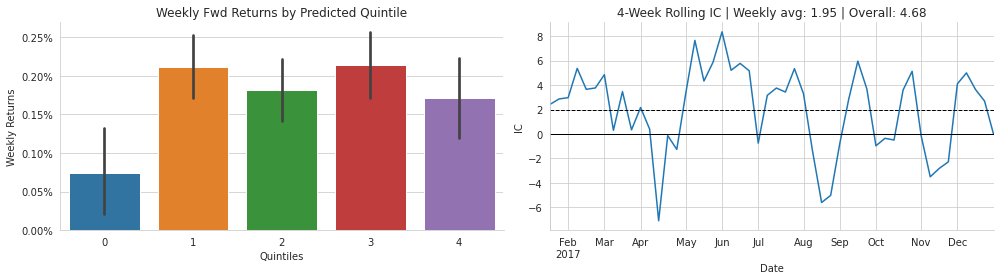
The purpose of this cell is to turn the model’s test-period results into two visual summaries: one that shows whether stocks predicted to be better had higher realized forward returns, and another that shows how stable the model’s ranking skill was through time. It starts by creating a figure with two side-by-side panels, which is why the saved output appears as a two-plot image in a single window.
On the left, a bar chart is drawn from the DataFrame containing the prediction buckets and realized returns. The predicted values have already been sorted into groups, so each bar represents one quintile of the model’s ranking. The bars summarize the average weekly forward return for each group, and the error bars show the uncertainty or spread around those averages. The y-axis is formatted as percentages, which makes the returns easier to read in the small decimal values typical of weekly stock performance. The title and axis labels are then added so the plot clearly communicates that this is comparing forward returns across predicted quintiles. In the saved image, the lowest bucket has the weakest average return and the higher buckets generally perform better, which suggests the model has some ability to rank stocks by expected return, even if the pattern is not perfectly smooth.
The right panel focuses on information coefficient, or IC, which is the rank correlation between predicted and actual returns over time. First, the code computes the average IC across all dates and uses it in the plot title along with the overall rank correlation percentage. Then it smooths the IC series with a 4-period rolling mean before plotting it. That smoothing step is why the line in the saved output looks less jagged than raw daily or weekly correlations would, making it easier to see the general trend in model quality across the year. The horizontal dashed line marks the average IC, and the solid zero line provides a neutral reference point. In the image, the IC moves above and below zero through the year, showing that the model’s ranking power varies by period rather than staying constant.
After both plots are created, the notebook removes extra chart borders for a cleaner appearance, tightens the layout so the two panels fit neatly, and saves the figure to disk in the results folder. The saved output you see is the rendered version of that final figure, so its structure and labels directly reflect the plotting steps in the cell.
Notebook 5 of 8: 04_multivariate_timeseries
Source file: `04_multivariate_timeseries_processed.ipynb`
Multivariate Time Series Regression
So far, the examples have focused on one series at a time. Recurrent neural networks are a natural fit for data with multiple time series, and they provide a nonlinear option in place of the Vector Autoregressive, or VAR, models introduced in Chapter 8, Time Series Models.
Imports and configuration
import warnings
warnings.filterwarnings('ignore')
This step is just setting up a cleaner run by suppressing warning messages. The warnings module is imported first, and then the warning filter is changed so that future warnings will be hidden from the notebook output. Nothing is computed or displayed here, so there is no saved output. The main effect is practical rather than analytical: later cells can focus on the actual data, plots, and model results without being cluttered by repeated library warnings that are often informative for developers but distracting in a teaching notebook.
%matplotlib inline

from pathlib import Path
import numpy as np
import pandas as pd
import pandas_datareader.data as web

from sklearn.metrics import mean_absolute_error
from sklearn.preprocessing import minmax_scale

import tensorflow as tf
from tensorflow.keras.callbacks import ModelCheckpoint, EarlyStopping
from tensorflow.keras.models import Sequential, Model
from tensorflow.keras.layers import Dense, LSTM
import tensorflow.keras.backend as K

import matplotlib.pyplot as plt
import seaborn as sns
The cell sets up the tools needed for the rest of the forecasting workflow. It begins by making matplotlib plots display directly inside the notebook, which is helpful because later cells will create figures for the data, the training history, and the predictions. After that, it imports the standard building blocks for working with files, arrays, tables, plotting, machine learning evaluation, data scaling, and deep learning.
Several of the imports are there because the notebook will work with monthly economic time series pulled from FRED, so it brings in the data reader used to download those series and the pandas and NumPy libraries used to organize and transform them. It also imports mean absolute error and min-max scaling from scikit-learn, since the model will be evaluated with MAE and the transformed data will be rescaled before training.
The TensorFlow and Keras imports prepare the neural network side of the notebook. The model will be built with a Sequential architecture using LSTM and Dense layers, and the training process will rely on callbacks that save the best model and stop early if validation performance stops improving. The backend import is included so the notebook can manage Keras session state when needed.
Finally, matplotlib and seaborn are imported for visualization. Together, these imports provide everything needed to load the time series, preprocess it, train the recurrent network, and then inspect the results graphically. There is no visible output from this cell because it only prepares the notebook environment and loads libraries; the real action comes in the later cells that use these imports.
gpu_devices = tf.config.experimental.list_physical_devices('GPU')
if gpu_devices:
    print('Using GPU')
    tf.config.experimental.set_memory_growth(gpu_devices[0], True)
else:
    print('Using CPU')
Using CPUThe cell checks whether TensorFlow can see a GPU on the system, which matters because a GPU can speed up neural network training a great deal. It asks TensorFlow for the list of available GPU devices and stores that result. If at least one GPU is found, it announces that the GPU will be used and turns on memory growth for the first device so TensorFlow only claims the GPU memory it actually needs instead of grabbing everything at once. If no GPU is available, it falls back to the CPU and prints that message instead. The saved output shows “Using CPU,” so TensorFlow did not detect a usable GPU in this environment, and the rest of the notebook will run on the processor rather than on graphics hardware.
sns.set_style('whitegrid')
np.random.seed(42)
The purpose here is to set up a consistent look for any plots that come later and to make the random behavior in the notebook reproducible. The first line switches Seaborn to a white grid style, which gives charts a clean background with light grid lines, making time series plots easier to read. The next line fixes NumPy’s random seed at 42. That means any operations in the notebook that rely on NumPy-generated randomness will produce the same results each time the notebook is run, which is especially helpful for comparing experiments or debugging. There is no visible output because both actions simply change the notebook’s plotting and randomness settings in memory; they prepare the environment for later cells rather than display anything on their own.
results_path = Path('results', 'multivariate_time_series')
if not results_path.exists():
    results_path.mkdir(parents=True)
This cell makes sure there is a place to store the figures and other results produced later in the analysis. It builds a path pointing to a folder named results/multivariatetimeseries, then checks whether that folder already exists on disk. If it does not, the folder is created, including any missing parent directories along the way. Behind the scenes, this is a simple setup step that helps later plotting and saving commands run smoothly, because they can write files into a known location without having to worry about whether the directory is already there. Since the cell only prepares the filesystem and does not print anything or display a figure, there is no saved output.
Load the data
For a direct comparison, we show how recurrent neural networks can be used to model and forecast multiple time series with the same data set from the VAR example. The data consists of monthly consumer sentiment and industrial production series obtained from the Federal Reserve FRED service in Chapter 8, Time Series Models:
df = web.DataReader(['UMCSENT', 'IPGMFN'], 'fred', '1980', '2019-12').dropna()
df.columns = ['sentiment', 'ip']
df.info()
<class 'pandas.core.frame.DataFrame'>
DatetimeIndex: 480 entries, 1980-01-01 to 2019-12-01
Data columns (total 2 columns):
# Column Non-Null Count Dtype
--- ------ -------------- -----
0 sentiment 480 non-null float64
1 ip 480 non-null float64
dtypes: float64(2)
memory usage: 11.2 KBThe purpose here is to pull the two monthly economic series that will be used in the forecasting example and then take a quick look at what was loaded. The data reader fetches consumer sentiment and industrial production from FRED for the period from January 1980 through December 2019, and the missing values are dropped right away so the dataframe is left with only complete observations. After that, the two original FRED ticker names are replaced with clearer labels, so the columns are easier to work with later: one for sentiment and one for industrial production.
The call to the dataframe summary then prints a compact check of the result. The saved output shows 480 monthly observations indexed by date, which makes sense for a 40-year span of monthly data. Both columns are stored as float64 values, and there are no remaining missing values in either series after the drop step. This quick inspection confirms that the dataset is ready for the next stages of transformation and modeling, with the time index intact and the two variables aligned month by month.
df.head() sentiment ip
DATE
1980-01-01 67.0 46.8770
1980-02-01 66.9 47.9757
1980-03-01 56.5 48.4793
1980-04-01 52.7 47.0662
1980-05-01 51.7 45.6995The purpose here is simply to take a quick look at the first rows of the dataframe so you can confirm that the data loaded correctly and has the shape you expect before moving on to any modeling steps. Displaying the beginning of the table is a common sanity check in time series work because it lets you verify the column names, the date index, and the kind of values being carried through the pipeline.
The output shows two variables, sentiment and ip, indexed by DATE. The dates begin in January 1980 and advance monthly, which tells you the series has been organized as a proper time-indexed monthly dataset. The numbers also make sense in their original scale: sentiment is around the 50s and 60s, while industrial production is around the mid-40s. Seeing the first few observations laid out like this confirms that the data has been renamed and combined correctly, and it gives you a concrete view of the raw inputs before later steps transform them for the LSTM model.
Data preparation
Making the series stationary
We use the same preprocessing step here that was introduced in Chapter 8 on Time Series Models: both series are differenced over a 12 month span, and industrial production is first transformed with a logarithm so the result is more stationary.
df_transformed = (pd.DataFrame({'ip': np.log(df.ip).diff(12),
                                'sentiment': df.sentiment.diff(12)})
                  .dropna())
The goal here is to turn the raw monthly series into a form that is easier for the forecasting model to learn from. Industrial production is first put on a logarithmic scale before differencing, which helps stabilize changes in a series that grows over time. Then both industrial production and consumer sentiment are differenced by 12 months, so each value represents how much the series has changed compared with the same month a year earlier. That kind of year-over-year transformation removes a lot of trend and seasonal structure and makes the series more suitable for models that work better with more stationary patterns.
After those two transformed columns are assembled into a new dataframe, any rows that now contain missing values are removed. Those missing values appear at the beginning because a 12-month difference cannot be computed until at least 12 earlier observations exist. The result is a cleaned dataframe containing only the aligned, transformed observations, ready for the later scaling and sequence-building steps. There is no displayed output from this cell because it is preparing the data quietly in memory rather than printing or plotting anything.
Rescaling the data
Next, we rescale the transformed data so that all values fall between 0 and 1:
df_transformed = df_transformed.apply(minmax_scale)The goal here is to put the transformed series onto the same numerical scale before feeding them into the neural network. After the differencing and log transformation, the two columns can still have very different ranges, and an LSTM generally trains more smoothly when each input feature lives in a comparable interval. Applying the scaling function column by column rescales each series independently so that its smallest value becomes 0 and its largest value becomes 1, with everything else spread proportionally in between.
Behind the scenes, the operation takes each column of the transformed dataframe and replaces its values with their min-max normalized versions. Because the dataframe is being overwritten, the original transformed values are no longer kept in this variable; from this point on, the model preparation steps work with the rescaled data. There is no visible output because the cell simply updates the dataframe in memory rather than printing or plotting anything, but it changes the data in an important way for the next stages of the workflow.
Plot the raw and transformed time series
fig, axes = plt.subplots(ncols=2, figsize=(14,4))
columns={'ip': 'Industrial Production', 'sentiment': 'Sentiment'}
df.rename(columns=columns).plot(ax=axes[0], title='Original Series')
df_transformed.rename(columns=columns).plot(ax=axes[1], title='Transformed Series')
sns.despine()
fig.tight_layout()
fig.savefig(results_path / 'multi_rnn', dpi=300)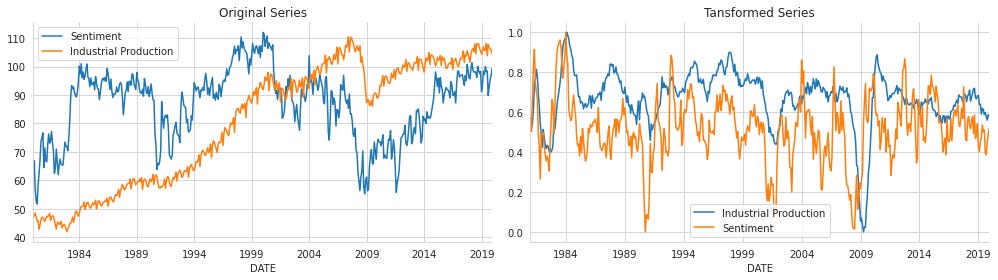
The purpose of this cell is to compare the raw monthly series with the version that has been prepared for the recurrent model, so you can see how the preprocessing changes the data before forecasting starts. It first creates a figure with two side-by-side panels, which gives enough room to look at both series together without crowding the display. The column names are then replaced with more readable labels so the plots are easier to interpret at a glance.
On the left, the original consumer sentiment and industrial production series are plotted in their raw form. This view shows the strong long-term upward trend in industrial production and the more irregular swings in sentiment over time. On the right, the transformed version of the same two series is plotted after the stationarity step. Because the data have been differenced and scaled, the values are now compressed into a much narrower range and the long-term trend has been removed. That is why the lines on the right look more stable and fluctuate around similar levels instead of steadily rising or falling.
The saved figure reflects exactly this contrast: the original panel shows the broad economic history in the raw measurements, while the transformed panel shows the normalized, model-ready version that the LSTM will actually learn from. The call to remove extra chart spines gives the plot a cleaner appearance, and the layout adjustment prevents labels and titles from overlapping before the figure is written to disk in the results folder.
Convert the data to the format expected by the RNN
We could reshape the data straight away and obtain separate, non-overlapping sequences. In that setup, each year would become a single sample, but this only works when the total number of observations can be evenly divided by the window size:
df.values.reshape(-1, 12, 2).shape(40, 12, 2)This step checks the shape of the transformed data after reshaping it into fixed time windows. The underlying dataframe has already been converted into a NumPy array, and the values are being reorganized into groups of 12 time steps with 2 variables in each step. That means each sample now represents one year of monthly observations for the two series, rather than one long continuous table of rows.
The result, (40, 12, 2), tells us there are 40 such samples, each made up of 12 time points and 2 features. Behind the scenes, NumPy is simply taking the flat sequence of values and laying them out in that three-dimensional form. The shape is useful because recurrent networks expect inputs organized as samples, time steps, and features, so this confirms that the data has been arranged into the structure an LSTM can work with.
But the sequence data should advance with a sliding window rather than being split into separate, non-overlapping blocks. The create_multivariate_rnn_data function converts a multivariate time series dataset into the format expected by Keras RNN layers, with dimensions of n_samples by window_size by n_series, as shown below:
def create_multivariate_rnn_data(data, window_size):
    y = data[window_size:]
    n = data.shape[0]
    X = np.stack([data[i: j]
                  for i, j in enumerate(range(window_size, n))], axis=0)
    return X, y
A helper function is being defined here to turn a regular multivariate time series into the kind of input an LSTM can learn from. The key idea is that a recurrent network does not work with one row at a time in the same way a standard regression model does; instead, it learns from short sequences of past observations. This function prepares those sequences by taking a rolling window over the data.
First, it sets aside the targets, which are the observations that come after each window. Since the window has a fixed length, everything from that point onward becomes the expected output. Then it gets the total number of observations in the dataset so it can step through the series from start to finish. For each position in time, it collects the preceding block of rows with the chosen window size, and stacks all of those overlapping windows into one three-dimensional array. That stacked array becomes the input data, where each sample contains a sequence of past time steps and each time step contains all variables in the series.
The result is a pair of arrays that line up naturally for supervised learning: one array of input windows and one array of next-step targets. Nothing is displayed yet because the function is only being created at this point, not executed. It will be used later to reshape the transformed time series into training examples for the RNN.
We will set the window size to 24 months and then construct the input sequences needed for the RNN model in the following way:
window_size = 18This step sets the length of the input window the recurrent network will look at before making a prediction. By choosing a value of 18, the model is told to use the previous 18 monthly observations from both series together as its context for forecasting the next point. Behind the scenes, this number controls how the time series is broken into overlapping sequences later on: each training example will contain 18 consecutive time steps, and the target will be the observation that comes immediately after that window. Since there is no printed result here, the cell simply stores this setting for use in the later data reshaping step.
X, y = create_multivariate_rnn_data(df_transformed, window_size=window_size)This step turns the transformed time series into the kind of input and target data an LSTM expects. The helper function walks through the dataframe with a sliding window of fixed length and, for each position, collects a block of past observations as one training example. Because the data contains two variables, each window keeps both series together at every time step, so the model can learn how they move jointly over time rather than treating them separately. At the end of each window, the function takes the next observation as the prediction target, which creates a supervised learning setup from what was originally just a chronological dataset.
The result is two arrays: one holding the overlapping sequences that will be fed into the network, and one holding the corresponding next-step values the network should learn to predict. Nothing is printed here because the cell is mainly preparing data rather than displaying it, but it is an essential transition point in the workflow. After this, the transformed monthly series is no longer just a table of values; it has been reshaped into input-output pairs that can be used to train the recurrent model.
X.shape, y.shape((450, 18, 2), (450, 2))The purpose here is to quickly verify that the sliding-window transformation produced the expected supervised-learning shapes. The first object, X, contains the input sequences for the LSTM, so its shape shows 450 examples, each made up of 18 time steps and 2 features. Those 2 features are the two transformed monthly series being modeled together. The second object, y, contains the targets the model should learn to predict, so its shape shows 450 matching target rows with 2 values each, again one for each series.
The result confirms that the data was reshaped correctly for a multivariate sequence-to-one forecasting setup. The 18-step window matches the chosen lookback length, and the equal number of rows in X and y means each input window has a corresponding next-step target. Seeing 450 samples also tells us how many usable training examples remained after differencing, scaling, and converting the full time series into overlapping windows.
df_transformed.head() ip sentiment
DATE
1981-01-01 0.526669 0.576214
1981-02-01 0.513795 0.502513
1981-03-01 0.542863 0.670017
1981-04-01 0.613397 0.832496
1981-05-01 0.731775 0.914573The purpose here is simply to look at the beginning of the transformed dataset after the time series have been differenced and scaled. Showing the first few rows is a quick sanity check: it lets you confirm that the transformation worked, that the data is still indexed by date, and that both series are present in the expected order.
What appears in the output is a small table with two columns, industrial production and sentiment, and a monthly date index starting in 1981. The first date is not the original start of the raw data because annual differencing removes the first 12 months, so the transformed series cannot begin until there is enough history to compute those changes. The values are between 0 and 1 because the data was then scaled to that range, which is exactly what you would expect before feeding it into the recurrent neural network. The numbers themselves are not important individually here; what matters is that they are smooth, numerical, and ready for sequence modeling.
At this point, the dataset is divided into training and testing portions. The most recent 24 months are held back for evaluating how well the model performs on unseen data, as illustrated below:
test_size =24
train_size = X.shape[0]-test_size
The purpose here is to split the sequence data into a training portion and a final holdout portion for evaluation. The model has already been turned into overlapping input windows, so the first step is to decide how many of those windows should be kept for training and how many should be reserved for testing. A test size of 24 means the last 24 time steps are set aside as unseen data, which is a common choice in forecasting because it lets us check how well the model performs on the most recent period rather than on random samples from the past.
From there, the training size is calculated by taking the total number of available windows and subtracting those 24 held-out observations. That gives the number of sequences the model can learn from before it reaches the test period. Nothing is displayed when the cell runs because it is only setting up two values for later use, but those values are important: they control the slice points used to create the training and test sets in the next step, and they help preserve the time order that matters in a forecasting problem.
X_train, y_train = X[:train_size], y[:train_size]
X_test, y_test = X[train_size:], y[train_size:]
The purpose here is to split the supervised time series data into a training portion and a testing portion while preserving the original order of the observations. The first slice takes the earliest part of the input windows and their matching targets and assigns them to the training sets. The second slice takes everything from the training cutoff onward and assigns it to the test sets.
Because these are time-ordered sequences, the split is done by position rather than by random shuffling. That matters in forecasting problems, since the model should learn from earlier history and then be evaluated on later, unseen periods. The training arrays therefore contain the past examples used to fit the LSTM, while the test arrays hold the most recent windows reserved for checking how well the model generalizes to future data.
There is no displayed output because the operation is just an assignment step. It prepares four separate datasets for the next stages of model fitting and evaluation, but it does not print, plot, or calculate anything visible on its own.
X_train.shape, X_test.shape((426, 18, 2), (24, 18, 2))The purpose of this cell is to quickly check how the data was split before training and evaluation. It asks for the shapes of the training and test feature arrays, which is a simple but important sanity check after the rolling-window transformation and the time-based split.
The first shape, 426 by 18 by 2, shows that the training set contains 426 separate examples. Each example is an 18-month window, and each month in that window has two features, one for each time series. The second shape, 24 by 18 by 2, shows that the test set uses the same window structure, but only for 24 examples from the later part of the timeline. Behind the scenes, this confirms that the data was organized into overlapping sequences rather than into one long flat table, which is exactly what an LSTM expects.
The output makes sense because every sample must preserve both the time dimension and the multivariate structure of the series. The equal window length and feature count in both sets show that the model will see the same input format during training and testing, while the different number of samples reflects the fact that most of the available sequences were reserved for training and only the most recent ones were held out for evaluation.
Build the Model Structure
We use a comparable network design made up of two LSTM layers placed one after the other, with 12 units in the first layer and 6 in the second. A dense layer with 10 units comes next, and the final output layer contains two units so the model can produce one value for each time series. The model is then compiled with mean absolute error as the loss function and RMSProp as the optimizer, as shown below:
K.clear_session()Before building or retraining the network, the TensorFlow/Keras backend is cleared so any previous model state, layer definitions, or computational graphs are removed from memory. This is a reset step that helps avoid conflicts from earlier experiments and makes the next model start from a clean slate. It is especially useful in notebooks, where running cells multiple times can otherwise leave old objects around and interfere with the new training run.
n_features = output_size = 2This line sets two related variables at the same time: the model will work with two input features and it will also produce two output values. That matches the structure of the dataset, which contains two time series being modeled together, so each training example feeds in both series and the prediction tries to estimate both series at the next time step. Keeping the input and output size aligned like this is important because the LSTM is being used as a multivariate forecasting model rather than a single-series predictor.
lstm_units = 12
dense_units = 6
This step sets the size of two parts of the neural network before the model is built. The first value determines how many memory units the LSTM layer will use, which controls how much temporal pattern information it can retain while it processes the input sequence. The second value sets the number of neurons in the intermediate dense layer, which acts as a compact nonlinear transformation between the LSTM output and the final forecast. Choosing relatively small numbers keeps the model simple and limits the number of trainable parameters, which is useful when working with a modest-sized time series dataset. Since this cell only assigns these settings, it does not produce any visible output; instead, it prepares values that will be used immediately in the model definition that follows.
rnn = Sequential([
    LSTM(units=lstm_units,
         dropout=.1,
         recurrent_dropout=.1,
         input_shape=(window_size, n_features), name='LSTM',
         return_sequences=False),
    Dense(dense_units, name='FC'),
    Dense(output_size, name='Output')
])
A small recurrent neural network is being assembled here for the forecasting task. The model is built as a simple stack of layers, which means the data will flow straight through each layer in sequence from input to output. The first layer is an LSTM, the part of the network designed to read the time window one step at a time and learn patterns that depend on order and memory. Its input shape tells the model to expect each training example as a sequence with the chosen window length and two features at each time step, one for each economic series. The dropout settings add a bit of regularization by randomly ignoring some connections during training, which helps reduce overfitting. Because return sequences is set to false, the LSTM produces just one final summary vector for the whole input window rather than a separate output at every time step.
That summary then passes into a fully connected hidden layer, which gives the network a chance to combine the LSTM’s learned features in a more flexible way before making a forecast. The last dense layer produces the final prediction with one value for each target series, so the model outputs both the future industrial production value and the future sentiment value together. No result appears yet because this cell only defines the architecture; the actual learning and predictions happen later once the model is compiled and trained.
The model contains 1,268 trainable parameters, as displayed below:
rnn.summary()Model: "sequential"
_________________________________________________________________
Layer (type) Output Shape Param #
=================================================================
LSTM (LSTM) (None, 12) 720
_________________________________________________________________
FC (Dense) (None, 6) 78
_________________________________________________________________
Output (Dense) (None, 2) 14
=================================================================
Total params: 812
Trainable params: 812
Non-trainable params: 0
_________________________________________________________________The model summary gives a compact snapshot of the neural network that has just been built, showing how data will flow through it and how many parameters the model has to learn. The first layer is an LSTM, which receives each input sequence and compresses the information across time into a 12-dimensional representation. That is why its output shape is shown as a batch of vectors with 12 values each, and most of the model’s parameters live here, since the LSTM has to learn both how to keep memory over time and how to combine the two input series.
The next layer is a fully connected hidden layer with 6 units. Its role is to take the LSTM’s learned representation and transform it into a smaller, more useful feature space before the final prediction step. Because it is a standard dense layer, its parameter count is much smaller than the LSTM’s. The final output layer has 2 units, matching the two variables being forecast: consumer sentiment and industrial production. Its output shape reflects that the network produces one prediction for each series at each forecast step.
The total parameter count, 812, tells us the model is relatively small, which makes sense for a monthly economic forecasting problem with only two variables and a modest training set. The fact that all 812 parameters are trainable means every weight in the network will be updated during training, and there are no frozen layers. The summary therefore confirms the architecture, the output dimensionality, and the overall scale of the model before training and evaluation.
rnn.compile(loss='mae', optimizer='RMSProp')The model is being prepared for training by telling Keras exactly how it should measure mistakes and how it should adjust its weights. Using mean absolute error as the loss means the network will be trained to minimize the average size of its prediction errors, treating overestimates and underestimates symmetrically and keeping the objective easy to interpret in the same units as the scaled target values. Choosing RMSProp as the optimizer sets the update rule that will be used to move the weights in the direction that reduces that error, which is a common and effective choice for recurrent networks because it adapts the learning rate as training progresses and tends to work well on sequence data. Nothing is displayed yet because compiling is only a setup step: the model is not learning at this point, but it is being configured so that the next training cell can run with a defined loss function and optimization strategy.
Fit the Model
We fit the model for up to 50 epochs, use a batch size of 20, and apply early stopping to stop training when the validation performance no longer improves.
lstm_path = (results_path / 'lstm.h5').as_posix()

checkpointer = ModelCheckpoint(filepath=lstm_path,
                               verbose=1,
                               monitor='val_loss',
                               mode='min',
                               save_best_only=True)
The purpose here is to set up a checkpoint so the best version of the LSTM model gets saved during training. First, the path for the saved model file is built by taking the results folder and adding the name lstm.h5, then converting that path into a standard string that TensorFlow can work with easily. After that, a ModelCheckpoint callback is created. Its job is to watch the validation loss while the model trains and keep track of the best-performing epoch. Because it is configured with savebestonly set to true and the mode set to min, it will save a new copy of the model only when val_loss gets lower than before, since lower validation loss means better performance. The verbose setting means training will print a message whenever the checkpoint is updated. Nothing is displayed immediately when this cell runs, because it is only preparing the callback object to be passed into the training step later.
early_stopping = EarlyStopping(monitor='val_loss',
                              patience=10,
                              restore_best_weights=True)
The purpose here is to set up an automatic stopping rule for training the neural network so it does not keep learning once performance on unseen data stops improving. The training process is monitored using the validation loss, which is the error measured on the held-out validation set after each epoch. By watching that value, the model can tell whether additional training is actually helping generalization or just fitting the training data more tightly.
The patience setting gives the model some flexibility by allowing up to 10 epochs without improvement before training is stopped. That prevents the process from ending too quickly because of a small temporary fluctuation in the validation loss. At the same time, restorebestweights is turned on so that when training eventually stops, the model rolls back to the version from the epoch with the lowest validation loss rather than keeping the last epoch’s weights. Since this cell only creates the stopping rule and does not run training itself, there is no saved output yet. The effect of this setup appears later, when the model fitting process ends early once validation performance stops getting better.
result = rnn.fit(X_train,
                 y_train,
                 epochs=100,
                 batch_size=20,
                 shuffle=False,
                 validation_data=(X_test, y_test),
                 callbacks=[early_stopping, checkpointer],
                 verbose=1)
Epoch 1/100
19/22 [========================>.....] - ETA: 0s - loss: 0.2743
Epoch 00001: val_loss improved from inf to 0.04285, saving model to results/multivariate_time_series/lstm.h5
22/22 [==============================] - 1s 25ms/step - loss: 0.2536 - val_loss: 0.0429
Epoch 2/100
20/22 [==========================>...] - ETA: 0s - loss: 0.1013
Epoch 00002: val_loss improved from 0.04285 to 0.03912, saving model to results/multivariate_time_series/lstm.h5
22/22 [==============================] - 0s 13ms/step - loss: 0.0991 - val_loss: 0.0391
Epoch 3/100
20/22 [==========================>...] - ETA: 0s - loss: 0.0956
Epoch 00003: val_loss did not improve from 0.03912
22/22 [==============================] - 0s 12ms/step - loss: 0.0941 - val_loss: 0.0404
Epoch 4/100
19/22 [========================>.....] - ETA: 0s - loss: 0.0965
Epoch 00004: val_loss improved from 0.03912 to 0.03764, saving model to results/multivariate_time_series/lstm.h5
22/22 [==============================] - 0s 14ms/step - loss: 0.0945 - val_loss: 0.0376
Epoch 5/100
18/22 [=======================>......] - ETA: 0s - loss: 0.0910
Epoch 00005: val_loss did not improve from 0.03764
22/22 [==============================] - 0s 12ms/step - loss: 0.0918 - val_loss: 0.0504
Epoch 6/100
21/22 [===========================>..] - ETA: 0s - loss: 0.0903
Epoch 00006: val_loss improved from 0.03764 to 0.03714, saving model to results/multivariate_time_series/lstm.h5
22/22 [==============================] - 0s 13ms/step - loss: 0.0898 - val_loss: 0.0371
Epoch 7/100
20/22 [==========================>...] - ETA: 0s - loss: 0.0898
Epoch 00007: val_loss did not improve from 0.03714
22/22 [==============================] - 0s 12ms/step - loss: 0.0885 - val_loss: 0.0376
Epoch 8/100
19/22 [========================>.....] - ETA: 0s - loss: 0.0908
Epoch 00008: val_loss did not improve from 0.03714
22/22 [==============================] - 0s 13ms/step - loss: 0.0884 - val_loss: 0.0491
Epoch 9/100
19/22 [========================>.....] - ETA: 0s - loss: 0.0899
Epoch 00009: val_loss did not improve from 0.03714
22/22 [==============================] - 0s 12ms/step - loss: 0.0876 - val_loss: 0.0418
Epoch 10/100
19/22 [========================>.....] - ETA: 0s - loss: 0.0906
Epoch 00010: val_loss improved from 0.03714 to 0.03557, saving model to results/multivariate_time_series/lstm.h5
22/22 [==============================] - 0s 13ms/step - loss: 0.0892 - val_loss: 0.0356
Epoch 11/100
19/22 [========================>.....] - ETA: 0s - loss: 0.0916
Epoch 00011: val_loss did not improve from 0.03557
22/22 [==============================] - 0s 13ms/step - loss: 0.0894 - val_loss: 0.0463
Epoch 12/100
18/22 [=======================>......] - ETA: 0s - loss: 0.0883
Epoch 00012: val_loss did not improve from 0.03557
22/22 [==============================] - 0s 13ms/step - loss: 0.0877 - val_loss: 0.0389
Epoch 13/100
18/22 [=======================>......] - ETA: 0s - loss: 0.0882
Epoch 00013: val_loss did not improve from 0.03557
22/22 [==============================] - 0s 13ms/step - loss: 0.0873 - val_loss: 0.0451
Epoch 14/100
18/22 [=======================>......] - ETA: 0s - loss: 0.0879
Epoch 00014: val_loss improved from 0.03557 to 0.03552, saving model to results/multivariate_time_series/lstm.h5
22/22 [==============================] - 0s 14ms/step - loss: 0.0867 - val_loss: 0.0355
Epoch 15/100
20/22 [==========================>...] - ETA: 0s - loss: 0.0854
Epoch 00015: val_loss improved from 0.03552 to 0.03534, saving model to results/multivariate_time_series/lstm.h5
22/22 [==============================] - 0s 12ms/step - loss: 0.0837 - val_loss: 0.0353
Epoch 16/100
19/22 [========================>.....] - ETA: 0s - loss: 0.0864
Epoch 00016: val_loss did not improve from 0.03534
22/22 [==============================] - 0s 13ms/step - loss: 0.0841 - val_loss: 0.0412
Epoch 17/100
22/22 [==============================] - ETA: 0s - loss: 0.0837
Epoch 00017: val_loss did not improve from 0.03534
22/22 [==============================] - 0s 14ms/step - loss: 0.0837 - val_loss: 0.0356
Epoch 18/100
20/22 [==========================>...] - ETA: 0s - loss: 0.0859
Epoch 00018: val_loss did not improve from 0.03534
22/22 [==============================] - 0s 15ms/step - loss: 0.0845 - val_loss: 0.0357
Epoch 19/100
20/22 [==========================>...] - ETA: 0s - loss: 0.0845
Epoch 00019: val_loss did not improve from 0.03534
22/22 [==============================] - 0s 14ms/step - loss: 0.0832 - val_loss: 0.0376
Epoch 20/100
20/22 [==========================>...] - ETA: 0s - loss: 0.0837
Epoch 00020: val_loss did not improve from 0.03534
22/22 [==============================] - 0s 13ms/step - loss: 0.0824 - val_loss: 0.0357
Epoch 21/100
18/22 [=======================>......] - ETA: 0s - loss: 0.0839
Epoch 00021: val_loss did not improve from 0.03534
22/22 [==============================] - 0s 14ms/step - loss: 0.0825 - val_loss: 0.0379
Epoch 22/100
21/22 [===========================>..] - ETA: 0s - loss: 0.0827
Epoch 00022: val_loss did not improve from 0.03534
22/22 [==============================] - 0s 14ms/step - loss: 0.0822 - val_loss: 0.0359
Epoch 23/100
22/22 [==============================] - ETA: 0s - loss: 0.0818
Epoch 00023: val_loss did not improve from 0.03534
22/22 [==============================] - 0s 13ms/step - loss: 0.0818 - val_loss: 0.0375
Epoch 24/100
21/22 [===========================>..] - ETA: 0s - loss: 0.0823
Epoch 00024: val_loss did not improve from 0.03534
22/22 [==============================] - 0s 15ms/step - loss: 0.0820 - val_loss: 0.0359
Epoch 25/100
18/22 [=======================>......] - ETA: 0s - loss: 0.0823
Epoch 00025: val_loss did not improve from 0.03534
22/22 [==============================] - 0s 13ms/step - loss: 0.0810 - val_loss: 0.0471The model is now being trained on the rolling input windows from the training set, with the goal of learning how the two economic series move together from one month to the next. The fit process runs for up to 100 epochs, but it does not simply train blindly that long. Each epoch updates the network weights using the training sequences, then immediately checks performance on the held-out test set, which is being used here as validation data. Because the data are time ordered, shuffling is turned off so the network sees the sequences in their original chronological order rather than in a random mix.
The lines printed during training show two losses at every epoch: the training loss and the validation loss. The training loss steadily falls from about 0.25 to around 0.08, which means the model is fitting the training patterns better and better. The validation loss is what matters most for deciding whether the model is actually generalizing to newer, unseen months. Whenever that validation score improves, the checkpoint callback saves the current weights to the file in the results folder, so the best-performing version is preserved automatically. That is why several epochs report that the validation loss improved and the model was saved.
Early stopping is also watching the validation loss in the background. Once the model goes long enough without meaningful improvement, training will eventually stop before reaching all 100 epochs. In the printed output shown here, you can already see the validation loss bouncing around rather than decreasing smoothly, which is a typical sign that the model is nearing the point where extra training is no longer helping. The saved model file in the results directory is therefore the best version encountered during training, not just the final epoch’s weights.
Review the Results
Training ends ahead of schedule at 22 epochs, and the resulting test mean absolute error is 1.71. This is lower than the VAR model’s test mean absolute error of 1.91, although the two results are not fully comparable because the forecasting setups are not the same.
However, these two results are not directly comparable. The RNN model generates 24 separate one-step-ahead forecasts, while the VAR model feeds its own predicted values back into the model when producing its out-of-sample forecast. If you want a fairer comparison, you may need to adjust the VAR specification so that both models are evaluated under the same forecasting setup and then compare their performance:
pd.DataFrame(result.history).plot();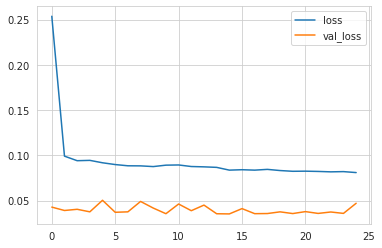
The goal here is to turn the recorded training history into a quick visual summary so it is easier to see how the model behaved over the epochs. The history object collected during fitting contains the values of the training loss and the validation loss at the end of each epoch, and wrapping that data in a dataframe makes those two series easy to plot together. When the dataframe is plotted, the result is the small line chart shown in the output, with one curve for loss and one for val_loss.
The shape of the figure reflects exactly what was tracked during training. The training loss starts high and drops sharply in the first few epochs, which is what you expect when the model is quickly learning the broad patterns in the data. After that, the line flattens out, showing that improvements become smaller and the model is converging. The validation loss stays much lower and wiggles slightly from epoch to epoch instead of falling smoothly. That kind of behavior is common when the validation set is small or when the model is being tuned on a time series that is not especially easy to predict. The plot gives a fast visual check on whether training is still helping, whether the model is overfitting, and whether early stopping likely made sense.
y_pred = pd.DataFrame(rnn.predict(X_test),
                      columns=y_test.columns,
                      index=y_test.index)
y_pred.info()
<class 'pandas.core.frame.DataFrame'>
DatetimeIndex: 24 entries, 2018-01-01 to 2019-12-01
Data columns (total 2 columns):
# Column Non-Null Count Dtype
--- ------ -------------- -----
0 ip 24 non-null float32
1 sentiment 24 non-null float32
dtypes: float32(2)
memory usage: 384.0 bytesThe goal here is to turn the model’s raw numerical predictions into a pandas DataFrame that lines up exactly with the real test targets. The LSTM produces predictions for the held-out test window, and those predictions are wrapped in a table using the same column names and date index as the actual test set. That way, the forecasted values for industrial production and sentiment can be compared directly to the observed values later on without any alignment issues.
Behind the scenes, the model returns a two-column array of predicted values, one for each output series. By assigning ytest.columns, the result keeps the labels ip and sentiment instead of leaving the columns anonymous. Using ytest.index preserves the monthly dates from the test period, so the predictions are tied to the same time stamps as the true observations, running from 2018-01-01 through 2019-12-01. That makes the predictions much easier to inspect, plot, and score against the actual data.
The saved output confirms that the transformation worked as intended. The printed summary shows a DataFrame with 24 rows, matching the 24 test months, and two float32 columns with no missing values. The float32 type is typical of TensorFlow/Keras outputs and reflects the model’s numeric predictions. The small memory footprint also makes sense because this is just a compact set of forecast values for a short test period.
test_mae = mean_absolute_error(y_pred, y_test)The cell computes a single evaluation number that summarizes how far the model’s forecasts are from the true test values. It uses mean absolute error, which measures the average size of the prediction mistakes without worrying about whether the model was too high or too low. Because the targets and predictions were previously arranged to match the same test months, the function can compare them directly and produce one score for the two output series together. A smaller value means the forecasts are closer to the actual data, so this result is a quick way to judge how well the LSTM performed on unseen time periods.
print(test_mae)0.03533523602534612The purpose here is simply to report the model’s final test error as a single number. By the time this line runs, the predictions on the held-out test set have already been generated and compared against the true target values, so the variable holding the mean absolute error is ready to be displayed. Printing it sends that value straight to the output area, which is why the cell produces one plain number rather than a table or plot.
The value shown, 0.03533523602534612, is the average absolute difference between the model’s predicted values and the actual test values after the data has been transformed and scaled. Because the series were normalized earlier in the workflow, this error is expressed on that scaled 0-to-1 range rather than in the original economic units. A small number like this indicates that, on average, the predictions are fairly close to the true observations in the test period.
y_test.indexDatetimeIndex(['2018-01-01', '2018-02-01', '2018-03-01', '2018-04-01',
'2018-05-01', '2018-06-01', '2018-07-01', '2018-08-01',
'2018-09-01', '2018-10-01', '2018-11-01', '2018-12-01',
'2019-01-01', '2019-02-01', '2019-03-01', '2019-04-01',
'2019-05-01', '2019-06-01', '2019-07-01', '2019-08-01',
'2019-09-01', '2019-10-01', '2019-11-01', '2019-12-01'],
dtype='datetime64[ns]', name='DATE', freq=None)The purpose here is simply to inspect the time index attached to the test targets, so you can confirm exactly which months the model is being evaluated on. The result shows a DatetimeIndex running from January 2018 through December 2019, which means the final 24 monthly observations were held out as the test period. That matches the earlier train-test split and makes it clear that the forecast evaluation is happening on the most recent part of the series, not on shuffled or randomly selected points.
Seeing the dates laid out like this is helpful because time series models depend on order. The index preserves the calendar structure of the data, so each predicted value can be aligned back to the correct month. That is why the output is just the sequence of dates rather than raw numbers: it confirms the exact evaluation window and provides the timeline used when the forecast plots and error calculations are built later.
fig, axes = plt.subplots(ncols=3, figsize=(17, 4))
pd.DataFrame(result.history).rename(columns={'loss': 'Training',
                                              'val_loss': 'Validation'}).plot(ax=axes[0], title='Train & Validation Error')
axes[0].set_xlabel('Epoch')
axes[0].set_ylabel('MAE')
col_dict = {'ip': 'Industrial Production', 'sentiment': 'Sentiment'}

for i, col in enumerate(y_test.columns, 1):
    y_train.loc['2010':, col].plot(ax=axes[i], label='training', title=col_dict[col])
    y_test[col].plot(ax=axes[i], label='out-of-sample')
    y_pred[col].plot(ax=axes[i], label='prediction')
    axes[i].set_xlabel('')

axes[1].set_ylim(.5, .9)
axes[1].fill_between(x=y_test.index, y1=0.5, y2=0.9, color='grey', alpha=.5)

axes[2].set_ylim(.3, .9)
axes[2].fill_between(x=y_test.index, y1=0.3, y2=0.9, color='grey', alpha=.5)

plt.legend()
fig.suptitle('Multivariate RNN - Results | Test MAE = {:.4f}'.format(test_mae), fontsize=14)
sns.despine()
fig.tight_layout()
fig.subplots_adjust(top=.85)
fig.savefig(results_path / 'multivariate_results', dpi=300);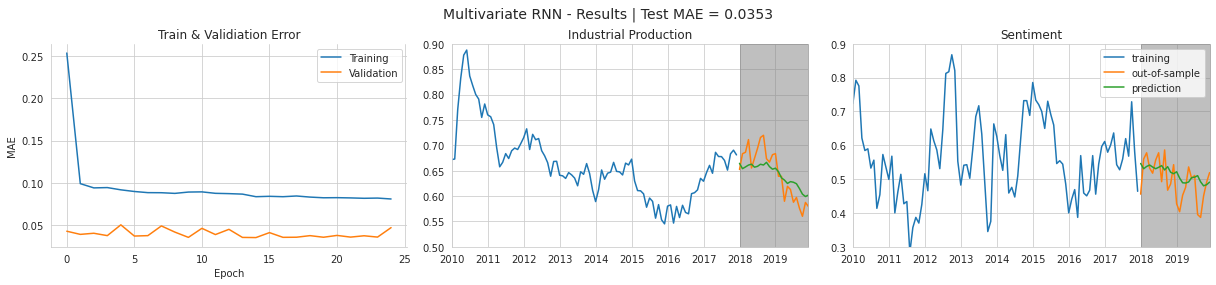
The aim here is to pull the training story and the forecast results into one final figure and save it for later inspection. The cell starts by creating a row of three plots, which gives enough room to show the model’s learning curve alongside the two target series. It then takes the recorded training history, turns it into a small table, renames the loss columns so they read more clearly as training and validation error, and plots those values on the first panel. Because the loss being tracked is mean absolute error, the y-axis is labeled accordingly, and the x-axis is the epoch number, so you can see how performance changed as training progressed.
After that, the cell prepares a small name mapping so the abbreviated series names can be shown in a friendlier form. It then loops through the two target variables and, for each one, overlays three lines on its own panel: the later part of the training data, the held-out test observations, and the model’s predictions. The training series is only shown from 2010 onward so the plot focuses on the most relevant recent history rather than the full dataset. The test period and predictions line up on the same dates, which makes it easy to judge how well the model followed the actual movement of each series.
The gray shaded regions on the last two panels mark the forecast window, making it obvious which part of the timeline belongs to the out-of-sample evaluation. The y-limits are also narrowed on each of those panels so the eye stays focused on the portion of the scale where the series actually move during the test period. That is why the plot looks compact and centered on the recent forecast range instead of showing the full vertical span of the data. The legend is added so the three lines can be distinguished, and the title is updated to include the final test MAE, which appears in the saved figure as 0.0353. That number reflects the error computed earlier from the model’s predictions, and it is displayed here so the visual summary and the quantitative score reinforce each other.
Finally, the notebook tidies the figure layout, pulls the top margin down a bit so the title fits cleanly, and saves the finished image to the results folder. The saved output shown below is exactly that figure: training error falling quickly and then flattening out, validation error staying fairly low and stable, and the two forecast panels showing the model tracking the held-out industrial production and sentiment series reasonably closely over the shaded test period.
Notebook 6 of 8: 05_sentiment_analysis_imdb
Source file: `05_sentiment_analysis_imdb_processed.ipynb`
Sentiment Classification with Word Embeddings and a Recurrent Network
RNNs are widely used for many natural language processing problems. In part three of this book, we already worked through an example of sentiment analysis with text.
Here, we will show how an RNN can be used with text to identify whether a review is positive or negative, and this setup could later be adapted to a more detailed sentiment range. To represent the words in each document, we will rely on word embeddings. As discussed in Chapter 15, Word Embeddings, these embeddings are a strong way to map text into a dense vector form, where distances between words in the learned space reflect semantic meaning drawn from how those words appear in context.
In the earlier RNN example, we also saw that Keras includes an embedding layer that can learn vectors tailored to the specific task. Another option is to start from pretrained vectors instead.
Imports and configuration
import warnings
warnings.filterwarnings('ignore')
The purpose here is to quiet down non-essential warning messages so the rest of the notebook runs more cleanly. First, the warnings module is imported, which gives access to Python’s built-in warning system. Then the warning filter is set to ignore, telling Python not to display warning messages that would normally appear during execution. Behind the scenes, this does not fix or remove the situations that trigger warnings; it simply hides them from view. Since there is no saved output, the effect of the cell is not something visible on the page. Instead, it prepares the environment so later steps can run without being interrupted by repeated or noisy warning messages.
%matplotlib inline

from pathlib import Path

import numpy as np
import pandas as pd
from sklearn.metrics import roc_auc_score

import tensorflow as tf
from tensorflow.keras.callbacks import ModelCheckpoint, EarlyStopping
from tensorflow.keras.datasets import imdb
from tensorflow.keras.models import Sequential
from tensorflow.keras.layers import Dense, GRU, Embedding
from tensorflow.keras.preprocessing.sequence import pad_sequences
import tensorflow.keras.backend as K

import matplotlib.pyplot as plt
import seaborn as sns
The purpose of this cell is to bring together all the tools needed for the sentiment analysis workflow and make the notebook ready for plotting, data handling, model building, and evaluation. The first line turns on inline plotting so that any charts created later appear directly inside the notebook instead of in a separate window. After that, the standard library utility for working with file paths is imported, which will make it easier to create and manage output folders and saved files in a platform-independent way.
Next come the numerical and data-handling libraries. NumPy is imported for array-based computation, and pandas is brought in for working with tabular results such as training histories or evaluation summaries. The rocaucscore function is imported from scikit-learn so the model can later be judged using ROC AUC, a useful metric for binary classification because it focuses on how well the model separates positive from negative reviews across different thresholds.
The TensorFlow imports prepare the deep learning side of the notebook. The callbacks for model checkpointing and early stopping will later help save the best-performing model and stop training when validation performance stops improving. The IMDB dataset loader is imported so the built-in movie review dataset can be fetched easily. Sequential provides the simple model container used to stack layers in order, while Dense, GRU, and Embedding are the actual neural network layers that will form the sentiment classifier. Pad_sequences is imported because the reviews come in different lengths and must be converted into fixed-size arrays before they can be passed into the network. The Keras backend module is also imported, usually so the session can be cleared before building a new model and avoid leftover state from earlier runs.
Finally, Matplotlib and Seaborn are imported for visualization. Matplotlib will be used for the actual plotting, and Seaborn will make the plots look cleaner and more readable with nicer default styling. There is no printed output from this cell because it only sets up the environment and loads the libraries needed for later steps; its effect is to prepare everything so the following cells can load data, build the model, train it, and display results smoothly.
gpu_devices = tf.config.experimental.list_physical_devices('GPU')
if gpu_devices:
    print('Using GPU')
    tf.config.experimental.set_memory_growth(gpu_devices[0], True)
else:
    print('Using CPU')
Using CPUThe purpose here is to check what kind of hardware TensorFlow can use before the model starts training. It asks TensorFlow for a list of available GPU devices, and then looks at whether that list is empty or not. If at least one GPU is found, it announces that a GPU is being used and turns on memory growth for the first GPU, which tells TensorFlow to allocate GPU memory gradually instead of grabbing most of it all at once. That can help avoid unnecessary memory reservation and make coexistence with other processes smoother. In this run, no GPU was detected, so the fallback path was taken and the message printed was “Using CPU.” That output simply confirms that computation will rely on the processor rather than a graphics card for the rest of the notebook.
sns.set_style('whitegrid')
np.random.seed(42)
The cell is setting up a cleaner, more consistent environment for any plots and making the random behavior repeatable. Applying the whitegrid style tells Seaborn to draw charts with a light background grid, which usually makes trends and comparisons easier to read. Right after that, the random seed is fixed at 42 for NumPy, so any later operation that relies on NumPy’s random number generator will produce the same results each time the notebook is run. That matters because it helps keep the experiment reproducible, especially when data splits, weight initialization, or other randomized steps are involved. Since this cell only changes settings and does not create a figure or print anything, there is no visible output when it runs.
results_path = Path('results', 'sentiment_imdb')
if not results_path.exists():
    results_path.mkdir(parents=True)
The purpose here is to make sure there is a folder ready to hold the model’s results. A path object is created for a directory named results/sentiment_imdb, which gives the notebook a clean, organized place to save things like plots or model files later on. After that, the notebook checks whether that folder already exists. If it does not, it creates the directory and any missing parent folders along the way. Since nothing is printed or displayed, there is no saved output, and that makes sense because the cell is only setting up the file system behind the scenes rather than producing a visible result.
Load the Review Data
To keep the example practical, we will work with the IMDB reviews dataset. It includes 50,000 movie reviews labeled as positive or negative, split evenly between training and test sets, and the labels are balanced within each split. In total, the full vocabulary contains 88,586 tokens.
Keras includes this dataset directly, and it can be loaded so that every review is stored as a sequence of integers. When loading the data, we can restrict the vocabulary to num_words, remove very common and likely less useful words with skip_top, and discard reviews longer than maxlen. We can also set oov_char, which is the value used for tokens that are left out of the vocabulary because they are too infrequent, as shown below:
vocab_size = 20000This line sets the size of the vocabulary the model will work with, limiting it to the 20,000 most frequent words in the dataset. Behind the scenes, that means any word outside this range will be treated as unknown rather than given its own separate index, which keeps the input space smaller and the model easier to train. Using a fixed vocabulary size also makes later steps, like embedding lookup and sequence preparation, consistent because the model knows the maximum number of distinct word IDs it may encounter.
(X_train, y_train), (X_test, y_test) = imdb.load_data(seed=42,
                                                      skip_top=0,
                                                      maxlen=None,
                                                      oov_char=2,
                                                      index_from=3,
                                                      num_words=vocab_size)
The purpose here is to load the IMDB movie review dataset into memory in a form that can be used for sentiment classification. The dataset comes already tokenized, so instead of raw text you get reviews represented as sequences of integer word indices, along with labels indicating whether each review is positive or negative. The assignment splits the loaded data into training and test parts, giving separate sets for model fitting and final evaluation.
Several arguments shape what gets loaded. The random seed is set to 42 so that the train-test split is reproducible, meaning the same examples will be chosen each time the notebook runs. The vocabulary is limited by numwords to the most frequent words defined earlier, which keeps the dataset manageable and trims away rarer terms. The indexfrom setting shifts the word indices so special tokens can occupy the lower numbers, and oov_char provides a placeholder for words that fall outside the allowed vocabulary. Because maxlen is left as None here, the reviews are not truncated yet; they remain variable-length sequences for now and are only standardized later when padding is applied.
Since no output is saved for this cell, nothing is displayed on the page when it runs. Its role is simply to prepare the raw training and test arrays that the next steps will reshape and feed into the neural network.
ax = sns.displot([len(review) for review in X_train])
ax.set(xscale='log');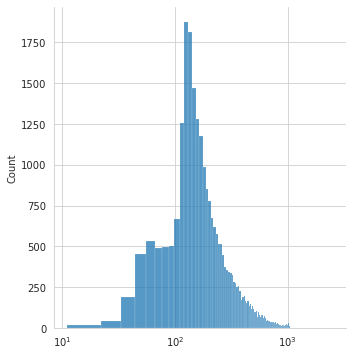
The goal here is to look at how long the movie reviews are before they are padded or truncated. The expression inside the plot first measures the length of every review in the training set, so each review is reduced to a single number representing how many tokens it contains. Those lengths are then passed to Seaborn’s distribution plot, which turns them into a histogram showing how frequently reviews of different sizes appear.
After the plot is created, the x-axis is switched to a logarithmic scale. That matters because review lengths vary a lot: there are many short and medium reviews, but also a smaller number of very long ones. On a normal linear axis, the shorter reviews would be compressed together and the overall shape would be harder to read. Using a log scale spreads the values out more evenly and makes the full range of lengths easier to see.
The saved output is the histogram that results from this calculation. Most reviews cluster around the low hundreds of tokens, which is why the tallest bars appear near that region. The long tail stretching to the right shows that there are also some much longer reviews, but they occur less often. The reason the plot looks the way it does is that the IMDB dataset contains many moderate-length reviews and comparatively fewer extremely short or extremely long ones, so the distribution naturally peaks around the typical review length and tapers off on both sides.
Prepare the data
In the next stage, turn the integer lists into arrays with a uniform size so they can be stacked together and passed into the RNN. The pad_sequence function creates same-length arrays by trimming and padding them to match maxlen, as shown below:
maxlen = 100This line sets the maximum sequence length that the model will work with to 100 tokens. Since the IMDB reviews in the dataset are naturally different lengths, this value acts as the standard size used later when the reviews are padded or truncated. Reviews longer than 100 words will be cut down, while shorter ones will be extended with empty positions so that every input has the same length. That fixed size is important because neural networks expect inputs with a consistent shape, and the recurrent model built later can then process each review in a uniform way. No output appears here because the cell only assigns a value for use in later steps rather than producing a visible result.
X_train_padded = pad_sequences(X_train,
                        truncating='pre',
                        padding='pre',
                        maxlen=maxlen)

X_test_padded = pad_sequences(X_test,
                       truncating='pre',
                       padding='pre',
                       maxlen=maxlen)
The purpose here is to turn the IMDB review sequences into a uniform shape that a neural network can process efficiently. The raw reviews are lists of word indices, but each review can be a different length, and models like an embedding layer followed by a recurrent network work best when every input example has the same number of time steps. Padding solves that by adding zeros to shorter reviews and trimming longer ones down to a fixed length.
First, the training reviews are passed through the padding utility to create a new array with exactly the same length for every review. The same transformation is then applied to the test reviews so that both datasets are prepared in exactly the same way. The settings make the adjustment happen at the beginning of each sequence rather than the end, which means shorter reviews are left-padded with zeros and longer reviews lose tokens from the front. That choice is often used when the most recent words in a review are considered more informative, or simply to keep the most recent part of the sequence aligned at the end.
The maximum length is controlled by the maxlen value defined earlier, so every review is either shortened or extended to match that limit. Behind the scenes, the result is that the model will receive a rectangular input array instead of a jagged collection of lists, which is required for batch training. There is no visible output from the cell because it is a data-preparation step only; it just creates the padded training and test arrays that the model will use in the next stages.
X_train_padded.shape, X_test_padded.shape((25000, 100), (25000, 100))This cell is simply checking the shapes of the padded training and test data after the earlier preprocessing step. Since the review texts were converted from variable-length sequences into fixed-length sequences, the shape tells you both how many examples are in each split and how long each sequence now is. The output shows 25,000 training reviews and 25,000 test reviews, and each one has been padded or truncated to a length of 100 tokens. That is why the result appears as two two-dimensional arrays with the same second dimension: the model needs a uniform input size, and this confirms that both datasets are ready to be fed into the neural network.
Build the Model Structure
Now we can build the RNN structure. The opening layer is responsible for learning the word embeddings. As before, we specify the size of the embedding space with output_dim, tell the layer how many distinct tokens it must represent with input_dim, and indicate the expected length of each sequence through the input length setting.
K.clear_session()This line resets the current Keras backend state before building or training another model. Clearing the session removes any existing computation graphs, layers, variables, and other leftover objects from previous model runs, which helps avoid clutter in memory and prevents older models from interfering with the new one. It is especially useful in notebooks where cells may be executed multiple times, since repeated model creation can otherwise accumulate resources and sometimes lead to confusing behavior. Nothing is displayed as output because the operation simply performs cleanup behind the scenes and returns no visible result.
Training Objective and Evaluation Metric
embedding_size = 100This line sets the size of the embedding vectors to 100. In the model, each word will be represented by a dense numerical vector with 100 values, which gives the network a compact way to learn relationships between words during training. A smaller size would make the representation less expressive, while a much larger one would add more parameters and make training heavier. Since this cell only assigns a value, it does not produce any visible output; it simply prepares a setting that will be used later when the embedding layer is built.
This time, the model uses GRUs, which tend to train more quickly and often work better when the dataset is relatively small. Regularization is handled with dropout, as shown below:
rnn = Sequential([
    Embedding(input_dim=vocab_size,
              output_dim= embedding_size,
              input_length=maxlen),
    GRU(units=32,
        dropout=0.2, # comment out to use optimized GPU implementation
        recurrent_dropout=0.2),
    Dense(1, activation='sigmoid')
])
rnn.summary()
WARNING:tensorflow:Layer gru will not use cuDNN kernel since it doesn't meet the cuDNN kernel criteria. It will use generic GPU kernel as fallback when running on GPU
Model: "sequential"
_________________________________________________________________
Layer (type) Output Shape Param #
=================================================================
embedding (Embedding) (None, 100, 100) 2000000
_________________________________________________________________
gru (GRU) (None, 32) 12864
_________________________________________________________________
dense (Dense) (None, 1) 33
=================================================================
Total params: 2,012,897
Trainable params: 2,012,897
Non-trainable params: 0
_________________________________________________________________The purpose of this cell is to assemble the neural network that will read the padded movie reviews and turn them into sentiment predictions. It builds the model layer by layer using a simple sequential stack, which means the output of each layer becomes the input to the next one. The first layer is an embedding layer, whose job is to convert word indices into dense vectors of learned numbers. Because the vocabulary is limited to the most frequent words and each review has been padded to a fixed length of 100 tokens, the embedding layer produces a sequence of 100 vectors, each with 100 learned features. That is why the summary shows an output shape of 100 by 100 for that layer, and why the parameter count is large: the model is learning a separate vector representation for each word in the vocabulary.
The next layer is a GRU, which is a recurrent layer designed to scan through the sequence and capture patterns that depend on word order. Instead of keeping the full 100-step sequence, it compresses the information into a single 32-value representation that summarizes the review. The dropout settings tell the layer to randomly ignore some connections during training, which helps reduce overfitting, although it also means the faster cuDNN version cannot be used here. That is exactly what the warning in the output is saying: the GRU does not meet the conditions for the optimized GPU kernel, so TensorFlow falls back to a more general implementation. After that comes the final dense layer with one neuron and a sigmoid activation. Its job is to take the GRU’s summary vector and convert it into a number between 0 and 1, which can be interpreted as the probability that the review is positive.
The model summary printed at the end confirms the architecture and shows how many parameters are being learned at each stage. Most of the parameters live in the embedding layer, since it stores a vector for each word in the vocabulary. The GRU adds a smaller number of parameters to learn how sequences behave over time, and the final dense layer adds just a few more to make the binary decision. Since all of these weights are trainable, the total and trainable parameter counts are the same, and there are no frozen parts in the network.
The finished model contains more than 2 million trainable parameters.
We configure the model to track the custom AUC metric described earlier and fit it with early stopping enabled:
rnn.compile(loss='binary_crossentropy',
            optimizer='RMSProp',
            metrics=['accuracy',
                     tf.keras.metrics.AUC(name='AUC')])
The model is being prepared for training by setting the rules it will use to learn from the sentiment data. The loss function is binary cross-entropy, which is the standard choice when the task is to decide between two classes, such as positive or negative review. Behind the scenes, this tells the network to compare its predicted probability with the true label and measure how far off it is in a way that works well for probabilities.
The optimizer is RMSProp, which controls how the model adjusts its weights after each batch of examples. It helps the network move through the parameter space efficiently by adapting the learning steps based on recent gradient history, which is especially useful for recurrent models like this one.
The metrics list adds two ways to monitor performance during training and evaluation. Accuracy shows the fraction of reviews classified correctly, while the AUC metric measures how well the model separates positive from negative examples across different decision thresholds. Because AUC looks at ranking quality rather than just a single cutoff, it gives a more informative picture for a probability-based binary classifier.
There is no saved output for this cell because compiling a model does not train it or produce predictions. Instead, it simply configures the network so that the next training step knows which objective to minimize and which performance measures to report.
rnn_path = (results_path / 'lstm.h5').as_posix()

checkpointer = ModelCheckpoint(filepath=rnn_path,
                               verbose=1,
                               monitor='val_AUC',
                               mode='max',
                               save_best_only=True)
The cell sets up where the model checkpoints will be saved during training. It first builds a file path inside the results folder and gives the saved model file a name ending in .h5, which is a common format for storing Keras models. After that, it creates a ModelCheckpoint callback, which is a training helper that watches a chosen metric and writes the model to disk whenever performance improves.
Here the callback is configured to look at validation AUC, so it is not saving models after every epoch blindly. Instead, it compares the current epoch’s validation AUC with the best one seen so far, and only keeps the model if that score is higher. The mode is set to max because AUC is better when it increases. The verbose setting means training will print a message when a new best model is saved, and savebestonly makes sure only the strongest version is preserved. Since this cell only defines the path and the checkpointing rule, there is no visible output yet; the effect will show up later when training runs and the best model gets written to that file.
early_stopping = EarlyStopping(monitor='val_AUC',
                               mode='max',
                              patience=5,
                              restore_best_weights=True)
This sets up an early stopping rule for model training, using the validation AUC as the signal to watch. As training runs, Keras will keep checking whether the model is still improving on the validation data, and because the goal metric is AUC, higher values are better, so the monitoring mode is set to maximize it. The patience value of 5 means training is allowed to continue for five epochs after the last improvement, giving the model a little time in case performance briefly levels off before rising again. If no better validation AUC appears during that window, training stops automatically. The restorebestweights option ensures that once training ends, the model reverts to the weights from the epoch that achieved the best validation AUC, rather than keeping the possibly worse weights from the final epoch. That makes this callback especially useful for preventing overfitting while preserving the strongest version of the model seen during training.
Training ends after eight epochs, and we restore the best model weights, which gives a strong test AUC score of 0.9346:
training = rnn.fit(X_train_padded,
                   y_train,
                   batch_size=32,
                   epochs=100,
                   validation_data=(X_test_padded, y_test),
                   callbacks=[early_stopping, checkpointer],
                   verbose=1)
Epoch 1/100
782/782 [==============================] - ETA: 0s - loss: 0.4345 - accuracy: 0.7942 - AUC: 0.8801
Epoch 00001: val_AUC improved from -inf to 0.93268, saving model to results/sentiment_imdb/lstm.h5
782/782 [==============================] - 117s 150ms/step - loss: 0.4345 - accuracy: 0.7942 - AUC: 0.8801 - val_loss: 0.3455 - val_accuracy: 0.8501 - val_AUC: 0.9327
Epoch 2/100
782/782 [==============================] - ETA: 0s - loss: 0.2887 - accuracy: 0.8803 - AUC: 0.9492
Epoch 00002: val_AUC improved from 0.93268 to 0.93450, saving model to results/sentiment_imdb/lstm.h5
782/782 [==============================] - 116s 148ms/step - loss: 0.2887 - accuracy: 0.8803 - AUC: 0.9492 - val_loss: 0.3317 - val_accuracy: 0.8568 - val_AUC: 0.9345
Epoch 3/100
782/782 [==============================] - ETA: 0s - loss: 0.2442 - accuracy: 0.9023 - AUC: 0.9634
Epoch 00003: val_AUC did not improve from 0.93450
782/782 [==============================] - 117s 149ms/step - loss: 0.2442 - accuracy: 0.9023 - AUC: 0.9634 - val_loss: 0.4815 - val_accuracy: 0.8212 - val_AUC: 0.9343
Epoch 4/100
782/782 [==============================] - ETA: 0s - loss: 0.2143 - accuracy: 0.9160 - AUC: 0.9716
Epoch 00004: val_AUC improved from 0.93450 to 0.94048, saving model to results/sentiment_imdb/lstm.h5
782/782 [==============================] - 116s 148ms/step - loss: 0.2143 - accuracy: 0.9160 - AUC: 0.9716 - val_loss: 0.3312 - val_accuracy: 0.8645 - val_AUC: 0.9405
Epoch 5/100
782/782 [==============================] - ETA: 0s - loss: 0.1901 - accuracy: 0.9269 - AUC: 0.9774
Epoch 00005: val_AUC improved from 0.94048 to 0.94152, saving model to results/sentiment_imdb/lstm.h5
782/782 [==============================] - 116s 148ms/step - loss: 0.1901 - accuracy: 0.9269 - AUC: 0.9774 - val_loss: 0.3367 - val_accuracy: 0.8658 - val_AUC: 0.9415
Epoch 6/100
782/782 [==============================] - ETA: 0s - loss: 0.1693 - accuracy: 0.9361 - AUC: 0.9819
Epoch 00006: val_AUC did not improve from 0.94152
782/782 [==============================] - 116s 148ms/step - loss: 0.1693 - accuracy: 0.9361 - AUC: 0.9819 - val_loss: 0.3186 - val_accuracy: 0.8632 - val_AUC: 0.9399
Epoch 7/100
782/782 [==============================] - ETA: 0s - loss: 0.1519 - accuracy: 0.9426 - AUC: 0.9851
Epoch 00007: val_AUC did not improve from 0.94152
782/782 [==============================] - 115s 147ms/step - loss: 0.1519 - accuracy: 0.9426 - AUC: 0.9851 - val_loss: 0.5009 - val_accuracy: 0.8056 - val_AUC: 0.9354
Epoch 8/100
782/782 [==============================] - ETA: 0s - loss: 0.1364 - accuracy: 0.9505 - AUC: 0.9878
Epoch 00008: val_AUC did not improve from 0.94152
782/782 [==============================] - 117s 150ms/step - loss: 0.1364 - accuracy: 0.9505 - AUC: 0.9878 - val_loss: 0.3860 - val_accuracy: 0.8547 - val_AUC: 0.9337
Epoch 9/100
782/782 [==============================] - ETA: 0s - loss: 0.1206 - accuracy: 0.9564 - AUC: 0.9902
Epoch 00009: val_AUC did not improve from 0.94152
782/782 [==============================] - 119s 152ms/step - loss: 0.1206 - accuracy: 0.9564 - AUC: 0.9902 - val_loss: 0.3833 - val_accuracy: 0.8562 - val_AUC: 0.9343
Epoch 10/100
782/782 [==============================] - ETA: 0s - loss: 0.1061 - accuracy: 0.9620 - AUC: 0.9922
Epoch 00010: val_AUC did not improve from 0.94152
782/782 [==============================] - 118s 151ms/step - loss: 0.1061 - accuracy: 0.9620 - AUC: 0.9922 - val_loss: 0.3820 - val_accuracy: 0.8545 - val_AUC: 0.9315The model training begins here, where the recurrent network is fit on the padded IMDB review sequences and the corresponding sentiment labels. The training set is used to learn the parameters of the embedding layer and GRU, while the test set is supplied as validation data so the model can be checked after every epoch on reviews it has not trained on. A batch size of 32 means the optimizer updates the weights after seeing 32 reviews at a time, and the process is allowed to run for up to 100 epochs, although other controls can stop it earlier if performance stops improving.
As training starts, the output shows one epoch at a time, along with the loss, accuracy, and AUC measured on the training data, plus the validation loss, validation accuracy, and validation AUC measured on the held-out set. In the first epoch, the model is already learning a useful separation between positive and negative reviews, and the validation AUC jumps to 0.93268, which triggers the checkpoint callback to save the model to the file in the results folder. That saved message appears because the model is configured to keep the version with the best validation AUC so far, rather than just the latest one.
On the next few epochs, the training scores keep improving, which is a sign that the model is fitting the training data better and better. The validation AUC improves a little more in epoch 2, then briefly stalls in epoch 3, then reaches its best value so far in epoch 4 and again in epoch 5. Each time that happens, the checkpoint saves the new best model over the previous one. This is why the output repeatedly mentions that the validation AUC improved and that the model is being saved.
After epoch 5, the validation AUC stops getting better, even though the training metrics continue to rise. That pattern suggests the model is starting to specialize more strongly to the training set and is not gaining further generalization performance on the validation data. You can see this especially in the growing gap between training accuracy and validation accuracy. Because early stopping is watching validation AUC, it will eventually stop training once there has been no improvement for several epochs, and it will restore the best weights it saw earlier. The training output shown here reaches epoch 10, but the repeated “did not improve” messages make it clear that the model is no longer finding a better validation AUC after epoch 5, which is exactly the situation those callbacks are designed to detect.
Assess the Results
history = pd.DataFrame(training.history)
history.index += 1
The purpose here is to turn the training history into a more convenient tabular form. After the model has finished fitting, the training process stores all of the recorded values in a history object, including things like loss, accuracy, and validation metrics for each epoch. Converting that history into a pandas DataFrame makes it easier to inspect, plot, or analyze the results later because each metric becomes a column and each epoch becomes a row.
Right after that, the index is shifted up by one so the epochs are numbered starting at 1 instead of 0. That makes the table line up with the way training is usually described to people, since epoch counts are typically shown as 1, 2, 3, and so on rather than zero-based numbering. There is no saved output from the cell because nothing is being printed or displayed yet; it simply prepares a cleaner version of the training records for the next steps in the notebook.
fig, axes = plt.subplots(ncols=2, figsize=(14, 4))
df1 = (history[['accuracy', 'val_accuracy']]
       .rename(columns={'accuracy': 'Training',
                        'val_accuracy': 'Validation'}))
df1.plot(ax=axes[0], title='Accuracy', xlim=(1, len(history)))

axes[0].axvline(df1.Validation.idxmax(), ls='--', lw=1, c='k')

df2 = (history[['AUC', 'val_AUC']]
       .rename(columns={'AUC': 'Training',
                        'val_AUC': 'Validation'}))
df2.plot(ax=axes[1], title='Area under the ROC Curve', xlim=(1, len(history)))

axes[1].axvline(df2.Validation.idxmax(), ls='--', lw=1, c='k')

for i in [0, 1]:
    axes[i].set_xlabel('Epoch')

sns.despine()
fig.tight_layout()
fig.savefig(results_path / 'rnn_imdb_cv', dpi=300)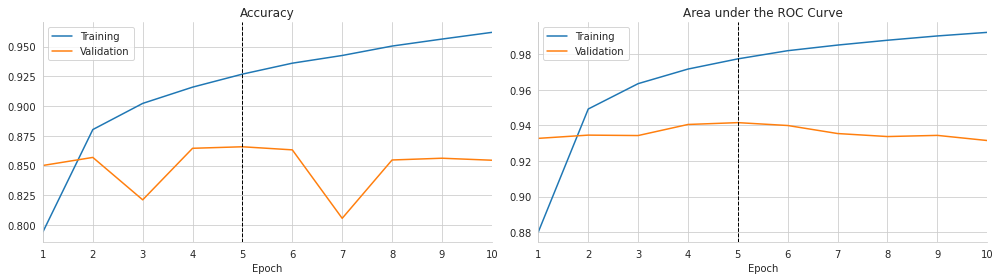
The purpose here is to turn the training history into an easy-to-read comparison of how the model performed on the training set versus the validation set over time, and then save that visualization for later use. It starts by creating a figure with two side-by-side panels, which gives room to show accuracy on one side and ROC AUC on the other without crowding the labels or lines.
The next step reshapes the recorded training history into a cleaner form for plotting. The first table keeps the accuracy values from training and validation, then renames the columns so the legend reads “Training” and “Validation” instead of the raw metric names. That cleaned-up table is plotted on the left axis, with the x-axis limited to the range of actual epochs. The result is the accuracy chart shown in the saved output, where the blue line rises steadily as the model gets better at fitting the training data, while the orange validation line moves more unevenly. The dashed vertical line marks the epoch where validation accuracy reached its highest point, which helps highlight the point at which performance on unseen data was best.
The same process is repeated for AUC on the right panel. AUC is especially useful here because it measures how well the model separates positive from negative reviews across all classification thresholds, not just at one cutoff. After renaming the columns, the history is plotted again, and another dashed vertical line is drawn at the validation peak. In the saved figure, the training AUC climbs smoothly toward the top of the chart, while validation AUC improves early and then levels off, which is a typical sign that the model keeps learning the training data even after validation performance stops improving.
After both plots are drawn, the x-axis label is set to “Epoch” on each panel so it is clear that the horizontal direction tracks training progress. The styling is then cleaned up by removing extra plot borders and tightening the layout so the two charts fit neatly side by side. Finally, the figure is saved to disk at the specified results path, which is why the output appears as a rendered image and also gets written out as a reusable file.
y_score = rnn.predict(X_test_padded)
y_score.shape
(25000, 1)The purpose here is to use the trained recurrent neural network to generate sentiment scores for every review in the padded test set. The model takes the fixed-length review sequences and runs them forward through the embedding layer, the GRU layer, and the final sigmoid output layer, producing one probability-like value per review that represents how likely the model thinks the review is positive.
The prediction step returns those values in an array called y_score. Because the test set contains 25,000 reviews and the model is set up for binary classification, each review gets a single output score, so the result is shaped as 25,000 rows and 1 column. That is why the saved output shows (25000, 1): it confirms that the model has produced one sentiment prediction for each test example, with each prediction stored as a single numeric value rather than as separate class labels.
roc_auc_score(y_score=y_score.squeeze(), y_true=y_test)0.941730672This final evaluation step measures how well the model separates positive reviews from negative ones using the predicted probabilities it produced for the test set. The scores are first squeezed down to a simple one-dimensional array, which matches the shape expected for a binary classification metric like ROC AUC, and then compared against the true test labels. ROC AUC focuses on ranking quality rather than a fixed decision threshold, so it tells you how often the model assigns a higher score to a genuinely positive review than to a genuinely negative one. The resulting value, 0.941730672, is quite strong and means the model is doing a very good job overall at distinguishing the two classes.
Notebook 7 of 8: 06_sentiment_analysis_pretrained_embeddings
Source file: `06_sentiment_analysis_pretrained_embeddings_processed.ipynb`
Sentiment analysis using pretrained word embeddings
In Chapter 15 on word embeddings, we looked at ways to train embeddings that are specific to a particular domain. Methods such as Word2vec and other similar algorithms can generate strong word representations, but they usually depend on very large corpora. Because of that, it is common for research teams to release word vectors that have already been trained on massive datasets, much like the pretrained weights used in deep learning transfer learning, which we covered in the previous chapter.
In this section, we will show how to work with pretrained Global Vectors for Word Representation, or GloVe, from the Stanford NLP group, using the IMDB review dataset.
%matplotlib inline

from pathlib import Path

import numpy as np
import pandas as pd

from sklearn.metrics import roc_auc_score

import tensorflow as tf
from tensorflow.keras.callbacks import ModelCheckpoint, EarlyStopping
from tensorflow.keras.models import Sequential
from tensorflow.keras.layers import Dense, GRU, Embedding
from tensorflow.keras.preprocessing.sequence import pad_sequences
from tensorflow.keras.preprocessing.text import Tokenizer
import tensorflow.keras.backend as K

import matplotlib.pyplot as plt
import seaborn as sns
The cell sets up the environment needed for the rest of the notebook by bringing in the libraries for data handling, modeling, evaluation, and plotting. It also enables inline Matplotlib output so any figures created later will appear directly inside the notebook instead of opening in a separate window. After that, it imports tools for working with file paths, numerical arrays, tabular data, AUC scoring, and the TensorFlow and Keras components used to build and train the neural network.
The deep learning imports prepare the pieces for a text model: a Sequential container to stack layers, an Embedding layer to turn word indices into vectors, a GRU layer to process the sequence information, and a Dense layer for the final binary prediction. The padding and tokenization utilities are imported now because the text will later need to be converted into fixed-length numeric sequences before it can be fed into the model. Training callbacks such as ModelCheckpoint and EarlyStopping are also loaded so the training process can automatically save the best-performing model and stop when validation performance stops improving. Finally, Matplotlib and Seaborn are imported for visualizing the training history and setting a consistent plotting style.
There is no saved output here because the cell is just preparing the notebook’s working environment. Its effect is to make the later cells runnable, but it does not yet compute anything or display any results.
gpu_devices = tf.config.experimental.list_physical_devices('GPU')
if gpu_devices:
    print('Using GPU')
    tf.config.experimental.set_memory_growth(gpu_devices[0], True)
else:
    print('Using CPU')
Using CPUThe purpose here is to check what kind of hardware TensorFlow can use before the model work begins. It asks TensorFlow to list the available GPU devices on the machine, and then looks at the result to decide whether accelerated computation is possible. If at least one GPU is found, the notebook announces that it is using the GPU and turns on memory growth for the first one, which tells TensorFlow not to grab all of the GPU memory at once. That helps avoid problems where TensorFlow reserves more memory than it needs right away. If no GPU is available, it falls back to the CPU instead.
The saved output shows “Using CPU,” which means TensorFlow did not detect any GPU device in the environment. That is why the notebook took the fallback branch and printed the CPU message. Nothing else is displayed because the cell is only performing this environment check and making a small runtime configuration choice, not producing data or model results.
sns.set_style('whitegrid')
np.random.seed(42)
The purpose of this cell is to set up a consistent look for later plots and make the notebook’s random behavior more repeatable. First, the plotting style is changed to a white background with grid lines, which gives figures a cleaner, more readable appearance and makes it easier to compare values visually when graphs are displayed later. Then the NumPy random seed is fixed at 42. That means any later step that relies on NumPy’s random number generation will produce the same results each time the notebook is run, which is useful for reproducibility and for making debugging easier. Nothing is printed or displayed here, so there is no saved output; the effect of the cell is simply to quietly adjust the plotting style and the random state for the rest of the notebook.
results_path = Path('results', 'sentiment_imdb')
if not results_path.exists():
    results_path.mkdir(parents=True)
The purpose here is to make sure there is a place on disk where the notebook can save later results, such as model checkpoints or plots. A Path object is created for the folder named results/sentiment_imdb, which gives a convenient, platform-independent way to work with file paths. The next step checks whether that folder already exists. If it does not, the folder is created, and the parents option allows any missing intermediate folders to be made as well. Nothing is printed or displayed because the cell is only preparing the filesystem in the background. When it runs successfully, it quietly ensures that any later attempt to write files into this location will not fail because the directory is missing.
Read in the review files
We will pull in the IMDB dataset directly from its original source so that we can handle the preprocessing ourselves.
Data source: Stanford IMDB Reviews Dataset
Download the dataset, extract it, and move the files into a newly created data directory. After that, your folder layout should resemble this:
19_recurrent_neural_nets
 |-data
     |-aclimdb
          |-train
              |-neg
              |-pos
              ...
          |-test
          |-imdb.vocab
path = Path('data', 'aclImdb')This line creates a Path object that points to the dataset folder where the IMDB review files are stored. Instead of working with a plain text string, it uses a Path so later file operations can be handled more cleanly and readably. The result is simply a reusable reference to the directory named data/aclImdb, which serves as the starting location for everything that follows when the reviews are loaded from disk. Since the cell only assigns a path and does not display anything or compute a visible result, there is no saved output.
files = path.glob('**/*.txt')
len(list(files))50003The cell is checking how many text files are present under the folder pointed to by the path variable. It first creates a recursive file search that looks through the directory and all of its subdirectories for anything ending in .txt, which matches the review files stored in the dataset. Then it converts that search result into a list so the matches can be counted, and finally it asks for the length of that list.
The saved output, 50003, is the total number of text files found in that directory tree. That number makes sense because the dataset contains many individual review files spread across training and test folders, along with a small number of extra text files that are not review data. Counting them here is a quick sanity check that the dataset has been unpacked correctly and that the file structure is what the later loading code expects.
files = path.glob('*/**/*.txt')
outcomes = set()
data = []
for f in files:
    if f.stem.startswith(('urls_', 'imdbEr')):
        continue
    _, _, data_set, outcome = f.parent.as_posix().split('/')
    if outcome == 'unsup':
        continue
    data.append([data_set, int(outcome == 'pos'),
                 f.read_text(encoding='latin1')])
The purpose here is to walk through the IMDB folder structure, collect each review file, and turn the raw text files into a simple list of records that can be used later for training and testing. It starts by looking for every text file under the target directory, including files in nested folders, so it can gather all the review documents without having to name them one by one.
As it loops through those files, it first skips a few filenames that are not actual reviews. The files whose names begin with the special prefixes are metadata or helper files rather than sentiment examples, so they are ignored. Next, the code figures out where each review belongs by reading the folder names in its path. From that, it extracts whether the review came from the training or test split, and whether it was stored in the positive or negative folder. Reviews in the unlabeled subset are excluded as well, because they do not provide a sentiment label and therefore cannot be used for supervised learning.
For every remaining review, the code adds one row to a list containing three pieces of information: the split name, a numeric label for sentiment, and the full text of the review itself. The label is converted into 1 for positive reviews and 0 for negative reviews, which makes it easier to use later with a binary classifier. The text is read directly from disk using the Latin-1 character encoding, which helps avoid problems if the reviews contain characters that would not decode cleanly under a stricter default encoding.
There is no saved output because the cell is only preparing data in memory. Its result is the list of collected review records, which will be used in the next steps to build a structured dataset.
data = pd.DataFrame(data, columns=['dataset', 'label', 'review'])The purpose of this line is to turn the collected review records into a structured table that is easier to work with later. Up to this point, the review information has been gathered as a plain Python collection of rows, with each row representing one review and its associated metadata. By passing that collection into a pandas DataFrame and assigning the column names at the same time, the data becomes organized into three clearly labeled fields: which split it belongs to, whether the review is positive or negative, and the review text itself.
Behind the scenes, pandas is arranging each row into a tabular format where every review becomes one record in the table and each of the three pieces of information gets its own column. This makes the data much more convenient for filtering, splitting into training and test sets, and feeding into the later text-processing steps. There is no saved output because nothing is being printed or displayed here; the important effect is the creation of the DataFrame itself, which will be used by the next cells.
data.info()<class 'pandas.core.frame.DataFrame'>
RangeIndex: 50000 entries, 0 to 49999
Data columns (total 3 columns):
# Column Non-Null Count Dtype
--- ------ -------------- -----
0 dataset 50000 non-null object
1 label 50000 non-null int64
2 review 50000 non-null object
dtypes: int64(1), object(2)
memory usage: 1.1+ MBA quick structural check of the review table is being performed here to confirm that the dataset was loaded the way the earlier steps intended. Calling the information summary on the DataFrame prints a compact overview of its shape, column names, data types, and how many non-missing values each column contains. The output shows 50,000 total rows, which matches the full IMDB corpus after combining the training and test reviews.
The three columns are exactly the ones expected: a dataset field identifying whether each review came from the training or test split, a label field stored as integers, and the review text itself stored as objects. The summary also shows that every row has a value in each column, so there are no missing entries to worry about before moving on. The memory usage line gives a rough sense of how much space the table occupies in memory, which is useful when working with large text datasets because the review column, being textual, takes up most of that space.
train_data = data.loc[data.dataset=='train', ['label', 'review']]
test_data = data.loc[data.dataset=='test', ['label', 'review']]
The goal here is to separate the full review table into the two standard splits used for model development: training data and test data. The first line filters the larger DataFrame down to only the rows marked as belonging to the training set, and it keeps just the two columns needed for sentiment work, the label and the review text. The second line does the same thing for the test set. Behind the scenes, pandas applies the boolean condition on the dataset column, finds all matching rows, and returns a smaller DataFrame view containing only those selected records.
Nothing is displayed because the cell only creates two new variables and does not ask to print them or show a preview. Its purpose is purely organizational: from this point on, the positive and negative reviews are cleanly separated into training and test collections, which makes the later tokenization, padding, and evaluation steps much easier to manage.
train_data.label.value_counts()0 12500
1 12500
Name: label, dtype: int64The purpose of this line is to check how many examples there are in each sentiment class within the training data. By asking for the value counts of the label column, pandas tallies up each unique label and reports how often it appears. Because the labels are encoded as 0 for negative reviews and 1 for positive reviews, the result gives a quick view of whether the training set is balanced or skewed toward one class.
The saved output shows that both classes appear exactly 12,500 times. That means the training set is perfectly balanced, with the same number of negative and positive reviews. The output is displayed as a small table-like Series, where the label values are listed alongside their counts, and the name of the column is shown at the bottom. This kind of check is useful before model training because a balanced dataset makes accuracy easier to interpret and reduces the chance that the model can look good simply by favoring one class.
test_data.label.value_counts()0 12500
1 12500
Name: label, dtype: int64This step checks how many reviews of each class are present in the test set by counting the values in the label column. Since the labels were encoded as 0 for negative reviews and 1 for positive reviews, the result shows the class balance directly. The saved output reports 12,500 reviews with label 0 and 12,500 reviews with label 1, which means the test data is perfectly balanced between the two sentiment classes. That kind of balance is useful because it avoids the model being biased toward one class simply because it appears more often than the other. The output is a simple frequency table, so it naturally appears as two rows with the label values as the index and the counts beside them.
Data Preparation
Text tokenizer
Keras includes a tokenizer, and we will use it here to turn the text documents into sequences of integers.
num_words = 10000
t = Tokenizer(num_words=num_words,
              lower=True,
              oov_token=2)
t.fit_on_texts(train_data.review)
The purpose here is to build a text tokenizer from the training reviews so the model can later work with numbers instead of raw words. The first line sets a limit on the vocabulary size, keeping only the 10,000 most useful words. That matters because natural language contains a huge number of rare words, and reducing the vocabulary helps keep the model simpler and more efficient.
Next, a tokenizer object is created with a few important settings. It will convert text to lowercase before processing, so words like “Good” and “good” are treated as the same token. It is also given an out-of-vocabulary token, which provides a fallback for words that were not seen often enough to be included in the limited vocabulary. Behind the scenes, the tokenizer will later assign integer IDs to words based on how frequently they appear in the training data.
The final line fits the tokenizer on the training reviews. This is the step where it scans through all the review text in train_data.review, learns the word frequencies, and builds the internal word-to-index mapping. Nothing is displayed in the saved output because this cell is setting up a preprocessing tool rather than producing a visible result. The important outcome is the tokenizer’s vocabulary, which will be used in the next steps to turn reviews into sequences of integers.
vocab_size = len(t.word_index) + 1
vocab_size88586The goal here is to determine how large the tokenizer’s vocabulary is so the model can later use the correct input dimension for the embedding layer. The tokenizer has already built a word index that assigns an integer to each distinct word it saw in the training data, and taking its length gives the number of unique words known to that tokenizer. Adding 1 accounts for the reserved index 0, which is typically used for padding and therefore is not counted as a real word. The final value, 88586, shows that the tokenizer has learned 88,585 distinct word entries plus that extra padding slot. That single number is important because it defines the size of the lookup table the neural network will need when it converts word indices into vectors.
train_data_encoded = t.texts_to_sequences(train_data.review)
test_data_encoded = t.texts_to_sequences(test_data.review)
The goal here is to turn the review text into numbers that the neural network can work with. The tokenizer that was fitted earlier has already built a vocabulary and assigned an integer index to each known word, so this step uses that mapping to replace each review with a sequence of token IDs. Each review becomes a list of integers in the order the words appear, which preserves the structure of the sentence while converting it into a machine-readable form.
The training reviews are converted first, and then the test reviews are converted using the same tokenizer. Using the same fitted tokenizer matters because it keeps the word-to-number mapping consistent between training and testing. Words that were not seen during fitting are handled through the tokenizer’s out-of-vocabulary setting, so they still get represented in a controlled way rather than being lost entirely. Nothing is displayed as output here because the operation is just transforming the data and storing the encoded sequences in new variables for the next preprocessing step.
max_length = 100The purpose of this line is to set a fixed length for every review sequence that will be fed into the model. By assigning the value 100 to max_length, the notebook establishes a consistent size for the padded text data used later in training and evaluation. That matters because reviews naturally come in very different lengths, but neural networks need inputs with the same shape in every example. This value is then used when the integer word sequences are padded or truncated, so shorter reviews will be extended with zeros and longer ones will be cut down to the first 100 tokens. Since this cell only assigns a number and does not perform any computation or display anything, there is no saved output.
Pad and truncate the review sequences
We also rely on the pad_sequences function to turn the uneven lists of tokens into fixed-length arrays by padding shorter reviews and truncating longer ones for both the training and test datasets:
X_train_padded = pad_sequences(train_data_encoded,
                            maxlen=max_length,
                            padding='post',
                           truncating='post')
y_train = train_data['label']
X_train_padded.shape
(25000, 100)The purpose here is to turn the training reviews from variable-length token sequences into a single, consistent array that the neural network can process. The reviews have already been converted into lists of word indices, but those lists are not all the same length, so they need to be standardized before training. Padding is used for that standardization: shorter reviews are extended with zeros at the end, and longer reviews are cut off at the end, with both behaviors controlled to match the same maximum length setting used earlier in the pipeline. At the same time, the training labels are pulled out from the data so they can be paired with the padded review sequences during model fitting.
The saved output shows the shape of the padded training array, and that shape is 25,000 rows by 100 columns. The 25,000 rows mean there is one processed sequence for each training review, and the 100 columns reflect the fixed sequence length chosen for every review. That is exactly what you would expect after padding and truncation: every review, no matter how long or short it originally was, is now represented as a uniform 100-token sequence ready for input to the model.
X_test_padded = pad_sequences(test_data_encoded,
                            maxlen=max_length,
                            padding='post',
                           truncating='post')
y_test = test_data['label']
X_test_padded.shape
(25000, 100)The goal here is to turn the encoded test reviews into the same fixed-length format used for training. The test reviews have already been converted into sequences of word indices, but those sequences can vary in length from one review to another. Padding and truncating them makes every example line up to a common length so the neural network can process them in a single batch.
The sequences are adjusted to a maximum length of 100. Reviews shorter than that are extended with zeros at the end, while longer reviews are cut off at the end as well. Using post-padding and post-truncation keeps the earlier words at the front of each review and reserves the end for either added zeros or dropped excess text. After that, the labels from the test DataFrame are pulled out into y_test so the model has the correct target values for evaluation.
The final line asks for the shape of the padded test array, and the saved output shows (25000, 100). That means there are 25,000 test reviews in total, and each one has been represented as a sequence of exactly 100 token positions. The output confirms that the preprocessing worked as intended and that the test set is now in the same consistent shape the model expects.
Load pretrained embeddings
Assuming the GloVe files have already been downloaded and extracted to the path used in the code, the next step is to build a lookup dictionary that links each GloVe word token to its 100-dimensional vector representation.
# load the whole embedding into memory
glove_path = Path('..', 'data', 'glove', 'glove.6B.100d.txt')
embeddings_index = dict()

for line in glove_path.open(encoding='latin1'):
    values = line.split()
    word = values[0]
    try:
        coefs = np.asarray(values[1:], dtype='float32')
    except:
        continue
    embeddings_index[word] = coefs
The purpose of this cell is to read the pretrained GloVe word vectors from disk and keep them in memory so they can be matched later with the vocabulary built from the reviews. It starts by pointing to the file that contains the 100-dimensional GloVe embeddings, then creates an empty dictionary that will eventually hold every word it successfully reads along with its vector representation.
It then opens the embedding file and processes it one line at a time. Each line in a GloVe file typically begins with a word, followed by a long list of numbers that represent that word in vector form. The line is split into separate pieces, the first piece is treated as the word itself, and the remaining pieces are interpreted as the numerical coordinates for that word. Those coordinates are converted into a NumPy array of 32-bit floating-point values, which is the format neural network code can work with efficiently.
There is a small safeguard here as well: if a line cannot be converted cleanly into numbers, it is skipped instead of causing the whole load process to fail. For all valid lines, the word becomes a key in the dictionary and its vector becomes the associated value. By the time the file has been read through completely, the dictionary contains a lookup table for pretrained embeddings, which will later be used to build the model’s embedding matrix.
There is no saved output from the cell because it is performing file loading and data preparation rather than printing or displaying anything. The result is stored in memory quietly, ready for the next step in the notebook.
print('Loaded {:,d} word vectors.'.format(len(embeddings_index)))Loaded 399,883 word vectors.The purpose of this line is to confirm that the pretrained GloVe vocabulary has been read successfully and to show how many word-to-vector mappings are now available in memory. The program takes the size of the dictionary holding the embeddings, formats that number with commas for readability, and prints it to the screen. That is why the saved output says “Loaded 399,883 word vectors.” The number reflects the total count of unique words found in the embedding file and stored in the lookup table, so it acts as a quick checkpoint that the loading step worked and that the model now has a large set of pretrained vectors to draw from when building the embedding matrix.
About three hundred and forty thousand word vectors are available, and we use them to build an embedding matrix aligned with the vocabulary. This lets the RNN look up each embedding directly from the token index.
embedding_matrix = np.zeros((vocab_size, 100))
for word, i in t.word_index.items():
    embedding_vector = embeddings_index.get(word)
    if embedding_vector is not None:
        embedding_matrix[i] = embedding_vector
A matrix is created to hold the pretrained word vectors in a form the model can use. Its shape matches the tokenizer vocabulary size and the 100-dimensional GloVe embeddings, so each row can correspond to one word index and each column position stores one feature of that word’s vector. Starting with zeros means that every word begins with no embedding information until a match is found.
The loop then goes through the tokenizer’s word index, which maps each word to the integer the model will use for it. For each word, the code looks up its pretrained vector in the dictionary of loaded GloVe embeddings. When a match exists, that 100-number vector is copied into the appropriate row of the matrix, using the tokenizer’s index so the row order lines up with the integer sequences produced earlier. Words that are not present in the GloVe file are left as zero rows, which means the model will have no pretrained representation for them.
Nothing is printed because the cell is just building data in memory for later use. The result is an embedding matrix ready to be plugged into the embedding layer, where it will act as a lookup table that converts word indices into their pretrained semantic representations.
embedding_matrix.shape(88586, 100)This cell checks the size of the embedding matrix that was built from the tokenizer vocabulary and the pretrained GloVe vectors. The first number, 88,586, is the total number of rows in the matrix, which means there is one row reserved for each vocabulary index the tokenizer knows about. The second number, 100, shows that each row contains a 100-dimensional vector, matching the GloVe word embeddings that were loaded earlier. The saved output, (88586, 100), confirms that the matrix is ready in the expected shape for the embedding layer to look up word vectors by index during training.
Set Up the Model Structure
The key distinction from the RNN model used in the previous example is that the embedding layer will receive the pretrained embedding matrix and keep those weights frozen throughout training, so they do not get updated:
embedding_size = 100This cell simply sets the dimensionality of the word embeddings to 100. That number matters because each word vector in the pretrained GloVe file has 100 values, so using the same size here keeps the later embedding matrix and the model’s embedding layer aligned. By storing the value in a single variable, the notebook can reuse it consistently in later cells instead of hard-coding 100 in multiple places, which makes the setup easier to read and less error-prone.
rnn = Sequential([
    Embedding(input_dim=vocab_size,
              output_dim= embedding_size,
              input_length=max_length,
              weights=[embedding_matrix],
              trainable=False),
    GRU(units=32,  dropout=0.2, recurrent_dropout=0.2),
    Dense(1, activation='sigmoid')
])
rnn.summary()
WARNING:tensorflow:Layer gru will not use cuDNN kernel since it doesn't meet the cuDNN kernel criteria. It will use generic GPU kernel as fallback when running on GPU
Model: "sequential"
_________________________________________________________________
Layer (type) Output Shape Param #
=================================================================
embedding (Embedding) (None, 100, 100) 8858600
_________________________________________________________________
gru (GRU) (None, 32) 12864
_________________________________________________________________
dense (Dense) (None, 1) 33
=================================================================
Total params: 8,871,497
Trainable params: 12,897
Non-trainable params: 8,858,600
_________________________________________________________________The purpose of this cell is to assemble the sentiment classifier and then print a structural summary so you can verify that the layers, shapes, and parameter counts all line up with the preprocessing choices made earlier. The model is built as a simple sequence-processing network: it starts by turning each padded review into a sequence of dense word vectors using the embedding layer, then reads that sequence with a GRU layer, and finally produces a single probability with a sigmoid output for binary sentiment prediction.
The first layer uses the pretrained embedding matrix, so each word index is mapped to a 100-dimensional vector rather than being learned from scratch. Because the embeddings are marked as non-trainable, those weights stay fixed during training, which is why the summary later shows almost all of the embedding parameters as non-trainable. The input length matches the fixed review length used earlier, so the network expects sequences of 100 tokens. Behind the scenes, this layer is doing lookup table indexing: every integer in the review sequence is replaced by the corresponding GloVe vector, and the padded zeros stay as zero vectors.
The next layer is a GRU with 32 units. Its job is to process the word vectors in order and compress the whole review into a learned representation that captures sentiment-related patterns across the sequence. The dropout settings tell it to randomly ignore some inputs and some recurrent connections during training, which helps reduce overfitting. The warning in the output appears because TensorFlow is unable to use the faster cuDNN-optimized GRU implementation with these settings, so it falls back to a more general GPU kernel instead. That warning is expected when features like recurrent dropout are enabled.
The last layer is a single dense unit with sigmoid activation, which converts the GRU’s output into one number between 0 and 1. That number represents the model’s predicted probability that a review is positive. The summary confirms the shape flow through the network: the embedding layer outputs a sequence of 100 vectors of size 100, the GRU condenses that into a 32-dimensional vector, and the final dense layer reduces it to a single prediction.
The parameter counts in the summary reflect the design choices here. The embedding layer contains most of the weights, but they are frozen, so they are counted as non-trainable. Only the GRU and dense layers contribute trainable parameters, which is why the trainable total is much smaller than the overall parameter count. The summary is a useful checkpoint because it confirms that the model is wired correctly before training begins and that the pretrained embeddings are being used in the intended fixed form.
rnn.compile(loss='binary_crossentropy',
            optimizer='RMSProp',
            metrics=['accuracy',
                     tf.keras.metrics.AUC(name='AUC')])
The model is being prepared for training by telling Keras exactly how to judge its predictions and how to update its weights. The loss function is set to binary cross-entropy, which is the standard choice when the task has only two possible labels, such as positive versus negative sentiment. Behind the scenes, this loss measures how far the model’s predicted probabilities are from the true 0-or-1 targets, and it gives the optimizer a signal to improve the network step by step.
RMSProp is chosen as the optimizer, so once training begins it will handle the weight updates by adjusting the learning rate adaptively for each parameter. That often works well for recurrent networks like this one because it can make training steadier than a plain gradient descent approach. The metrics list adds two ways of tracking performance during training: accuracy, which counts how often the predicted class matches the true label, and AUC, which is especially useful for binary classification because it measures how well the model separates the two classes across different decision thresholds.
There is no saved output here because compiling a model usually does not produce visible results. Instead, it quietly sets up the training configuration so that the next step can run with the chosen loss, optimizer, and evaluation measures already in place.
rnn_path = (results_path / 'lstm.pretrained.h5').as_posix()

checkpointer = ModelCheckpoint(filepath=rnn_path,
                               verbose=1,
                               monitor='val_AUC',
                               mode='max',
                               save_best_only=True)
The cell prepares a checkpoint location for saving the model during training, then sets up a callback that will automatically write out the best version of the network as validation performance improves. First, a path is built inside the results folder and converted into a standard string path so Keras can use it easily. The filename chosen suggests a saved model file for the pretrained recurrent network, even though the exact architecture was built earlier.
After that, a ModelCheckpoint object is created and configured to watch the validation AUC metric. Because the goal is to maximize AUC, the monitoring mode is set to “max,” so only higher values are treated as improvements. The savebestonly setting means the file will be overwritten only when a new best validation AUC is reached, rather than saving a copy after every epoch. The verbose setting tells Keras to report when a new checkpoint is written during training. Since there is no saved output for this cell, nothing is printed immediately; its purpose is to define the checkpointing behavior that will take effect later when the model begins training.
early_stopping = EarlyStopping(monitor='val_AUC',
                               patience=5,
                               mode='max',
                               restore_best_weights=True)
This cell sets up a training safeguard that watches the model’s validation AUC and decides when learning has stopped improving. The callback is configured to monitor the validation metric named valAUC, which means it will check performance on the validation data after each epoch rather than looking only at the training results. Since the goal is to maximize AUC, the mode is set to max, so the callback treats higher values as better. The patience value of 5 gives the model a small grace period: if the validation AUC does not improve for five consecutive epochs, training will be stopped early. The restorebest_weights option makes the process more useful by rolling the model back to the version from the epoch with the best validation AUC, instead of leaving it at the last epoch reached. There is no visible output because the cell is only creating this callback object and storing it for use later during model training.
training = rnn.fit(X_train_padded,
                   y_train,
                   batch_size=32,
                   epochs=100,
                   validation_data=(X_test_padded,
                                    y_test),
                   callbacks=[early_stopping,
                              checkpointer],
                   verbose=1)
Epoch 1/100
782/782 [==============================] - ETA: 0s - loss: 0.6505 - accuracy: 0.6087 - AUC: 0.6565
Epoch 00001: val_AUC improved from -inf to 0.80524, saving model to results/sentiment_imdb/lstm.pretrained.h5
782/782 [==============================] - 111s 141ms/step - loss: 0.6505 - accuracy: 0.6087 - AUC: 0.6565 - val_loss: 0.7026 - val_accuracy: 0.6586 - val_AUC: 0.8052
Epoch 2/100
782/782 [==============================] - ETA: 0s - loss: 0.5053 - accuracy: 0.7570 - AUC: 0.8316
Epoch 00002: val_AUC improved from 0.80524 to 0.86949, saving model to results/sentiment_imdb/lstm.pretrained.h5
782/782 [==============================] - 111s 143ms/step - loss: 0.5053 - accuracy: 0.7570 - AUC: 0.8316 - val_loss: 0.4681 - val_accuracy: 0.7776 - val_AUC: 0.8695
Epoch 3/100
782/782 [==============================] - ETA: 0s - loss: 0.4538 - accuracy: 0.7872 - AUC: 0.8679
Epoch 00003: val_AUC improved from 0.86949 to 0.88737, saving model to results/sentiment_imdb/lstm.pretrained.h5
782/782 [==============================] - 117s 149ms/step - loss: 0.4538 - accuracy: 0.7872 - AUC: 0.8679 - val_loss: 0.4352 - val_accuracy: 0.7931 - val_AUC: 0.8874
Epoch 4/100
782/782 [==============================] - ETA: 0s - loss: 0.4303 - accuracy: 0.8000 - AUC: 0.8823
Epoch 00004: val_AUC improved from 0.88737 to 0.89225, saving model to results/sentiment_imdb/lstm.pretrained.h5
782/782 [==============================] - 109s 139ms/step - loss: 0.4303 - accuracy: 0.8000 - AUC: 0.8823 - val_loss: 0.4404 - val_accuracy: 0.7947 - val_AUC: 0.8922
Epoch 5/100
782/782 [==============================] - ETA: 0s - loss: 0.4138 - accuracy: 0.8062 - AUC: 0.8915
Epoch 00005: val_AUC improved from 0.89225 to 0.89876, saving model to results/sentiment_imdb/lstm.pretrained.h5
782/782 [==============================] - 109s 139ms/step - loss: 0.4138 - accuracy: 0.8062 - AUC: 0.8915 - val_loss: 0.4284 - val_accuracy: 0.7994 - val_AUC: 0.8988
Epoch 6/100
782/782 [==============================] - ETA: 0s - loss: 0.4064 - accuracy: 0.8123 - AUC: 0.8959
Epoch 00006: val_AUC improved from 0.89876 to 0.90227, saving model to results/sentiment_imdb/lstm.pretrained.h5
782/782 [==============================] - 109s 139ms/step - loss: 0.4064 - accuracy: 0.8123 - AUC: 0.8959 - val_loss: 0.4015 - val_accuracy: 0.8176 - val_AUC: 0.9023
Epoch 7/100
782/782 [==============================] - ETA: 0s - loss: 0.3959 - accuracy: 0.8201 - AUC: 0.9016
Epoch 00007: val_AUC improved from 0.90227 to 0.90520, saving model to results/sentiment_imdb/lstm.pretrained.h5
782/782 [==============================] - 108s 138ms/step - loss: 0.3959 - accuracy: 0.8201 - AUC: 0.9016 - val_loss: 0.4228 - val_accuracy: 0.8072 - val_AUC: 0.9052
Epoch 8/100
782/782 [==============================] - ETA: 0s - loss: 0.3884 - accuracy: 0.8230 - AUC: 0.9054
Epoch 00008: val_AUC improved from 0.90520 to 0.90554, saving model to results/sentiment_imdb/lstm.pretrained.h5
782/782 [==============================] - 118s 151ms/step - loss: 0.3884 - accuracy: 0.8230 - AUC: 0.9054 - val_loss: 0.4152 - val_accuracy: 0.8064 - val_AUC: 0.9055
Epoch 9/100
782/782 [==============================] - ETA: 0s - loss: 0.3814 - accuracy: 0.8264 - AUC: 0.9090
Epoch 00009: val_AUC improved from 0.90554 to 0.90921, saving model to results/sentiment_imdb/lstm.pretrained.h5
782/782 [==============================] - 107s 137ms/step - loss: 0.3814 - accuracy: 0.8264 - AUC: 0.9090 - val_loss: 0.3939 - val_accuracy: 0.8167 - val_AUC: 0.9092
Epoch 10/100
782/782 [==============================] - ETA: 0s - loss: 0.3766 - accuracy: 0.8275 - AUC: 0.9112
Epoch 00010: val_AUC improved from 0.90921 to 0.90976, saving model to results/sentiment_imdb/lstm.pretrained.h5
782/782 [==============================] - 108s 138ms/step - loss: 0.3766 - accuracy: 0.8275 - AUC: 0.9112 - val_loss: 0.3896 - val_accuracy: 0.8194 - val_AUC: 0.9098
Epoch 11/100
782/782 [==============================] - ETA: 0s - loss: 0.3698 - accuracy: 0.8348 - AUC: 0.9147
Epoch 00011: val_AUC improved from 0.90976 to 0.91103, saving model to results/sentiment_imdb/lstm.pretrained.h5
782/782 [==============================] - 142s 182ms/step - loss: 0.3698 - accuracy: 0.8348 - AUC: 0.9147 - val_loss: 0.3808 - val_accuracy: 0.8267 - val_AUC: 0.9110
Epoch 12/100
782/782 [==============================] - ETA: 0s - loss: 0.3644 - accuracy: 0.8345 - AUC: 0.9174
Epoch 00012: val_AUC improved from 0.91103 to 0.91111, saving model to results/sentiment_imdb/lstm.pretrained.h5
782/782 [==============================] - 106s 136ms/step - loss: 0.3644 - accuracy: 0.8345 - AUC: 0.9174 - val_loss: 0.3912 - val_accuracy: 0.8201 - val_AUC: 0.9111
Epoch 13/100
782/782 [==============================] - ETA: 0s - loss: 0.3600 - accuracy: 0.8369 - AUC: 0.9195
Epoch 00013: val_AUC improved from 0.91111 to 0.91143, saving model to results/sentiment_imdb/lstm.pretrained.h5
782/782 [==============================] - 111s 142ms/step - loss: 0.3600 - accuracy: 0.8369 - AUC: 0.9195 - val_loss: 0.3763 - val_accuracy: 0.8279 - val_AUC: 0.9114
Epoch 14/100
782/782 [==============================] - ETA: 0s - loss: 0.3553 - accuracy: 0.8398 - AUC: 0.9217
Epoch 00014: val_AUC improved from 0.91143 to 0.91288, saving model to results/sentiment_imdb/lstm.pretrained.h5
782/782 [==============================] - 108s 138ms/step - loss: 0.3553 - accuracy: 0.8398 - AUC: 0.9217 - val_loss: 0.3769 - val_accuracy: 0.8277 - val_AUC: 0.9129
Epoch 15/100
782/782 [==============================] - ETA: 0s - loss: 0.3505 - accuracy: 0.8433 - AUC: 0.9239
Epoch 00015: val_AUC improved from 0.91288 to 0.91290, saving model to results/sentiment_imdb/lstm.pretrained.h5
782/782 [==============================] - 110s 141ms/step - loss: 0.3505 - accuracy: 0.8433 - AUC: 0.9239 - val_loss: 0.3991 - val_accuracy: 0.8195 - val_AUC: 0.9129
Epoch 16/100
782/782 [==============================] - ETA: 0s - loss: 0.3488 - accuracy: 0.8429 - AUC: 0.9247
Epoch 00016: val_AUC did not improve from 0.91290
782/782 [==============================] - 110s 140ms/step - loss: 0.3488 - accuracy: 0.8429 - AUC: 0.9247 - val_loss: 0.4081 - val_accuracy: 0.8132 - val_AUC: 0.9118
Epoch 17/100
782/782 [==============================] - ETA: 0s - loss: 0.3450 - accuracy: 0.8452 - AUC: 0.9264
Epoch 00017: val_AUC improved from 0.91290 to 0.91368, saving model to results/sentiment_imdb/lstm.pretrained.h5
782/782 [==============================] - 110s 140ms/step - loss: 0.3450 - accuracy: 0.8452 - AUC: 0.9264 - val_loss: 0.3795 - val_accuracy: 0.8306 - val_AUC: 0.9137
Epoch 18/100
782/782 [==============================] - ETA: 0s - loss: 0.3430 - accuracy: 0.8460 - AUC: 0.9272
Epoch 00018: val_AUC did not improve from 0.91368
782/782 [==============================] - 108s 138ms/step - loss: 0.3430 - accuracy: 0.8460 - AUC: 0.9272 - val_loss: 0.3891 - val_accuracy: 0.8221 - val_AUC: 0.9127
Epoch 19/100
782/782 [==============================] - ETA: 0s - loss: 0.3376 - accuracy: 0.8477 - AUC: 0.9296
Epoch 00019: val_AUC did not improve from 0.91368
782/782 [==============================] - 106s 135ms/step - loss: 0.3376 - accuracy: 0.8477 - AUC: 0.9296 - val_loss: 0.3822 - val_accuracy: 0.8267 - val_AUC: 0.9134
Epoch 20/100
782/782 [==============================] - ETA: 0s - loss: 0.3368 - accuracy: 0.8516 - AUC: 0.9300
Epoch 00020: val_AUC improved from 0.91368 to 0.91385, saving model to results/sentiment_imdb/lstm.pretrained.h5
782/782 [==============================] - 105s 135ms/step - loss: 0.3368 - accuracy: 0.8516 - AUC: 0.9300 - val_loss: 0.3994 - val_accuracy: 0.8138 - val_AUC: 0.9139
Epoch 21/100
782/782 [==============================] - ETA: 0s - loss: 0.3340 - accuracy: 0.8532 - AUC: 0.9312
Epoch 00021: val_AUC did not improve from 0.91385
782/782 [==============================] - 105s 135ms/step - loss: 0.3340 - accuracy: 0.8532 - AUC: 0.9312 - val_loss: 0.3741 - val_accuracy: 0.8297 - val_AUC: 0.9131
Epoch 22/100
782/782 [==============================] - ETA: 0s - loss: 0.3310 - accuracy: 0.8509 - AUC: 0.9324
Epoch 00022: val_AUC improved from 0.91385 to 0.91487, saving model to results/sentiment_imdb/lstm.pretrained.h5
782/782 [==============================] - 107s 137ms/step - loss: 0.3310 - accuracy: 0.8509 - AUC: 0.9324 - val_loss: 0.3795 - val_accuracy: 0.8306 - val_AUC: 0.9149Epoch 23/100
782/782 [==============================] - ETA: 0s - loss: 0.3276 - accuracy: 0.8534 - AUC: 0.9339
Epoch 00023: val_AUC did not improve from 0.91487
782/782 [==============================] - 107s 137ms/step - loss: 0.3276 - accuracy: 0.8534 - AUC: 0.9339 - val_loss: 0.3904 - val_accuracy: 0.8244 - val_AUC: 0.9135
Epoch 24/100
782/782 [==============================] - ETA: 0s - loss: 0.3266 - accuracy: 0.8554 - AUC: 0.9343
Epoch 00024: val_AUC did not improve from 0.91487
782/782 [==============================] - 108s 138ms/step - loss: 0.3266 - accuracy: 0.8554 - AUC: 0.9343 - val_loss: 0.3725 - val_accuracy: 0.8280 - val_AUC: 0.9141
Epoch 25/100
782/782 [==============================] - ETA: 0s - loss: 0.3221 - accuracy: 0.8580 - AUC: 0.9361
Epoch 00025: val_AUC did not improve from 0.91487
782/782 [==============================] - 123s 158ms/step - loss: 0.3221 - accuracy: 0.8580 - AUC: 0.9361 - val_loss: 0.3825 - val_accuracy: 0.8276 - val_AUC: 0.9142
Epoch 26/100
782/782 [==============================] - ETA: 0s - loss: 0.3206 - accuracy: 0.8590 - AUC: 0.9367
Epoch 00026: val_AUC did not improve from 0.91487
782/782 [==============================] - 127s 162ms/step - loss: 0.3206 - accuracy: 0.8590 - AUC: 0.9367 - val_loss: 0.3769 - val_accuracy: 0.8284 - val_AUC: 0.9144
Epoch 27/100
782/782 [==============================] - ETA: 0s - loss: 0.3195 - accuracy: 0.8608 - AUC: 0.9372
Epoch 00027: val_AUC did not improve from 0.91487
782/782 [==============================] - 125s 160ms/step - loss: 0.3195 - accuracy: 0.8608 - AUC: 0.9372 - val_loss: 0.3782 - val_accuracy: 0.8279 - val_AUC: 0.9142The cell starts the actual model training run by fitting the recurrent network on the padded training reviews and checking its progress on the held-out test reviews after every epoch. The batch size is set to 32, so the data is processed in small chunks rather than all at once, which is a standard way to make training manageable in memory. The model is allowed to run for up to 100 epochs, but that is just an upper limit because the stopping callback can end training earlier if validation performance stops improving. The validation_data argument tells the model to calculate loss, accuracy, and AUC on the test set at the end of each epoch, and the callbacks list attaches two pieces of training logic: one that saves the best-performing model so far and another that watches validation AUC and eventually halts training if it plateaus. The result is stored in a variable named training, which keeps the full training history for later inspection and plotting.
The saved output shows the training loop advancing epoch by epoch and reporting both the learning progress on the training set and the model’s behavior on the validation set. In the first epoch, the network begins with moderate performance, which is typical because the weights are still being adjusted from their initial state. As the epochs continue, the loss steadily drops while accuracy and AUC rise, indicating that the model is learning to separate positive from negative reviews better and better. Each time the validation AUC improves, the checkpoint callback prints a message saying the model was saved to the results file, which explains why that message appears repeatedly early on. The filename reflects the saved best checkpoint, so the model on disk is always the version with the strongest validation AUC seen so far.
Later in training, the validation AUC stops improving every epoch, and the output begins to alternate between improvement messages and notices that the score did not get better. That pattern is exactly what the early-stopping and checkpoint logic is designed to track: the model keeps training as long as there is still meaningful progress, but once validation performance starts leveling off, improvements become less frequent and the callback starts counting those non-improving epochs. By the final visible epoch, the model is still training, but the validation scores are hovering in a narrow range around the best value reached so far, which suggests the network has reached a fairly stable performance level on this task.
y_score = rnn.predict(X_test_padded)
roc_auc_score(y_score=y_score.squeeze(), y_true=y_test)0.914964528The model first uses its learned weights to make predictions for every padded review in the test set. The prediction step produces a score for each example, and because the final layer uses a sigmoid activation, those scores represent estimated probabilities that a review is positive. The result is stored so it can be reused immediately in the next line.
After that, the predictions are compared with the true test labels using ROC AUC. This metric looks at how well the model ranks positive reviews above negative ones across all possible decision thresholds, rather than judging it at just one cutoff. The predicted scores are squeezed down into a one-dimensional array so they match the label format expected by the metric function. The saved output, 0.914964528, is the resulting AUC value, which means the model has strong ability to distinguish positive from negative reviews on the test set. The number appears by itself because that is the single scalar returned by the evaluation call.
df = pd.DataFrame(training.history)
best_auc = df.val_AUC.max()
best_acc = df.val_accuracy.max()

fig, axes = plt.subplots(ncols=2, figsize=(14,4))
df.index = df.index.to_series().add(1)
df[['AUC', 'val_AUC']].plot(ax=axes[0],
                            title=f'AUC | Best: {best_auc:.4f}',
                            legend=False,
                            xlim=(1, 33),
                            ylim=(.7, .95))

axes[0].axvline(df.val_AUC.idxmax(), ls='--', lw=1, c='k')
df[['accuracy', 'val_accuracy']].plot(ax=axes[1],
                                              title=f'Accuracy | Best: {best_acc:.2%}',
                                              legend=False,
                                              xlim=(1, 33),
                                      ylim=(.7, .9))
axes[1].axvline(df.val_accuracy.idxmax(), ls='--', lw=1, c='k')
axes[0].set_xlabel('Epoch')
axes[0].set_ylabel('AUC')
axes[1].set_xlabel('Epoch')
axes[1].set_ylabel('Accuracy')
fig.suptitle('Sentiment Analysis - Pretrained Vectors', fontsize=14)
fig.legend(['Train', 'Validation'], loc='center right')

sns.despine()
fig.tight_layout()
fig.subplots_adjust(top=.9)
fig.savefig(results_path / 'imdb_pretrained', dpi=300);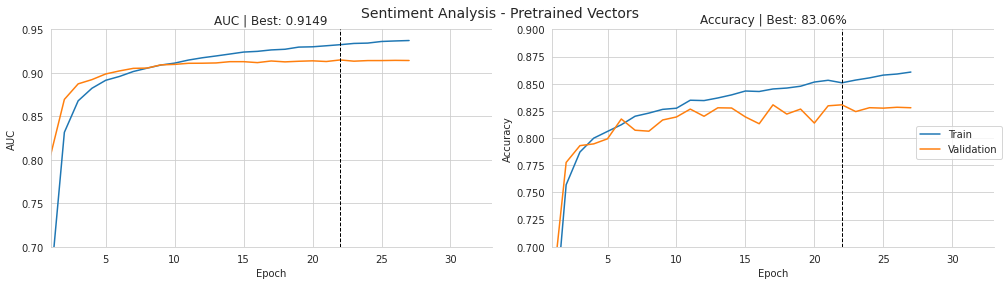
The purpose of this cell is to turn the recorded training history into a clear visual summary of how the model performed over time, and then save that summary for later use. It begins by converting the history object from training into a DataFrame, which makes the epoch-by-epoch values for loss, AUC, accuracy, and validation metrics easier to work with. From there, it pulls out the best validation AUC and best validation accuracy so those peak values can be highlighted in the plot titles.
Next, the cell creates a figure with two side-by-side panels. The history index is shifted so the epochs are labeled starting at 1 instead of 0, which makes the chart easier to read. The left panel plots training AUC and validation AUC together, while the right panel plots training accuracy and validation accuracy together. The titles include the best validation score for each metric, so the viewer can immediately see the strongest point reached during training. The vertical dashed lines mark the exact epoch where each validation metric reached its maximum, which helps connect the summary number in the title to the corresponding place in the curve.
After the curves are drawn, the axes are labeled so it is obvious that the horizontal direction represents epochs and the vertical direction represents either AUC or accuracy. The overall figure title identifies the experiment as sentiment analysis with pretrained vectors, and a shared legend is added on the right so the blue and orange lines are interpreted consistently across both panels. The styling steps that follow remove extra plot borders, tighten the layout, and make room for the title so the figure looks polished and balanced.
The saved output shows exactly what this sequence produces: a two-panel training history figure where AUC rises quickly and then levels off, accuracy increases more gradually, and the validation curves stay a bit below the training curves. The dashed black lines appear at the epochs where validation performance peaks, and the titles report those best values, which is why the plot is both informative and easy to scan. Finally, the figure is written to the results folder as an image file, so the visual summary is preserved even after the notebook finishes running.
Notebook 8 of 8: 07_sec_filings_return_prediction
Source file: `07_sec_filings_return_prediction_processed.ipynb`
Using RNNs and Word Embeddings to Forecast Returns from SEC Filings
RNNs are widely used across many natural language processing problems. In part three of this book, we already saw how text data can be used for sentiment analysis.
Here, we will use an RNN on SEC filings to learn task-specific word embeddings, as discussed in Chapter 16, and to estimate the stock return for the week following each filing date.
Imports and Configuration
import warnings
warnings.filterwarnings('ignore')
The purpose here is simply to quiet down warning messages so the rest of the notebook runs without a lot of unnecessary noise. First, the warnings module is imported, which gives access to Python’s built-in warning system. Then the warning filter is changed so that warnings are ignored. After that setting is applied, any non-fatal warning that would normally appear during execution is suppressed, which can make the notebook output much easier to read. Since this cell only changes that global warning behavior and does not actually produce anything to display, there is no saved output.
%matplotlib inline

from pathlib import Path
from time import time
from collections import Counter
from datetime import datetime, timedelta
from tqdm import tqdm

import numpy as np
import pandas as pd
from scipy.stats import spearmanr
import yfinance as yf

from gensim.models.word2vec import LineSentence
from gensim.models.phrases import Phrases, Phraser

from sklearn.model_selection import train_test_split

import tensorflow as tf
from tensorflow.keras.models import Sequential
from tensorflow.keras.layers import (Dense, GRU, Bidirectional,
                                     Embedding, BatchNormalization, Dropout)
from tensorflow.keras.preprocessing.sequence import pad_sequences
from tensorflow.keras.callbacks import EarlyStopping
from tensorflow.keras.metrics import RootMeanSquaredError, MeanAbsoluteError
import tensorflow.keras.backend as K

import matplotlib.pyplot as plt
import seaborn as sns
This cell sets up the main tools the rest of the notebook will rely on. It begins by making plots display inline, which means any charts created later will appear directly in the notebook rather than in a separate window. After that, it imports a collection of standard utilities for working with files, dates, timing, counting values, and showing progress bars, since the workflow involves moving through many filings and tracking how long the processing takes.
It then brings in the numerical and data libraries used throughout the pipeline. NumPy and pandas handle arrays and tables, while SciPy provides the Spearman correlation calculation used later to evaluate predictions. YFinance is included for pulling stock price data. Gensim’s sentence and phrase tools are imported because the text will be tokenized into sentences and then combined into common multi-word phrases such as bigrams and trigrams.
Next come the machine learning tools. Scikit-learn supplies the train-test split function, and TensorFlow Keras provides the neural network pieces: the sequential model container, dense layers, the GRU recurrent layer, bidirectional wrapping, embeddings, normalization, dropout, padding utilities, early stopping, and error metrics like RMSE and MAE. The backend module is imported as well for lower-level TensorFlow operations if needed later.
Finally, Matplotlib and Seaborn are imported for visualization. These libraries will be used to plot training curves and prediction results, making it easier to inspect how well the model learns and how its outputs compare with the actual returns.
There is no saved output here because the cell is purely about preparation. Its job is to load everything needed so later cells can read data, transform text, train the neural network, and visualize the results without repeatedly importing the same tools.
gpu_devices = tf.config.experimental.list_physical_devices('GPU')
if gpu_devices:
    print('Using GPU')
    tf.config.experimental.set_memory_growth(gpu_devices[0], True)
else:
    print('Using CPU')
Using CPUThe cell checks whether TensorFlow can see a GPU on the machine and then chooses a sensible setup based on what it finds. It asks TensorFlow for the available physical GPU devices, which returns a list. If that list is not empty, the cell would announce that a GPU is being used and turn on memory growth for the first GPU so TensorFlow does not reserve all GPU memory at once. That setting is helpful because it lets memory usage expand only as needed, which is safer when other processes may also need the GPU.
In the saved output, the message says “Using CPU,” which means no GPU device was detected by TensorFlow at runtime. So the code followed the else branch instead of the GPU branch. Behind the scenes, that means the rest of the notebook will run on the CPU, which is usually slower for neural network training, but it still allows the workflow to continue normally.
np.random.seed(42)
tf.random.set_seed(42)
The purpose of this cell is to make the notebook’s randomness reproducible. By setting the NumPy random seed and the TensorFlow random seed to the same fixed value, it ensures that any later steps that rely on random number generation will start from a consistent state each time the notebook is run.
Behind the scenes, many parts of machine learning workflows use randomness, such as shuffling data, initializing model weights, or choosing batches during training. Without fixed seeds, those operations can lead to slightly different results from one run to the next. Using the same seed helps make experiments easier to compare and debug, because the sequence of random values will be the same each time.
There is no saved output because nothing needs to be displayed here. The effect of the cell happens quietly in the background by changing the random state for the rest of the notebook.
idx = pd.IndexSlice
sns.set_style('whitegrid')
The purpose here is to set up a couple of reusable plotting and indexing helpers for later cells. First, an index-slicing shortcut is assigned so that complex pandas selections can be written more conveniently when working with multi-level indexes. That kind of shorthand is useful when filtering or slicing time series and panel-style data, because it makes those selections easier to read and reuse. Then the plotting style is switched to a white-grid theme in Seaborn, which changes the default look of future charts to have a cleaner background and visible grid lines. There is no visible output because neither line produces a printed result or a plot; they simply prepare the notebook environment for later data manipulation and visualization.
def format_time(t):
    m, s = divmod(t, 60)
    h, m = divmod(m, 60)
    return f'{h:02.0f}:{m:02.0f}:{s:02.0f}'
This cell defines a small helper for turning a time value into a human-readable clock-style string. It takes a number of seconds and breaks it down into hours, minutes, and remaining seconds using repeated division and remainder operations. The first split separates total seconds into minutes and seconds, and the second split separates those minutes into hours and leftover minutes. The result is then formatted so each part always appears with two digits, which makes timings easier to read and compare later on. Since the cell only creates the function and does not call it, there is no saved output yet; it simply prepares a utility that can be reused whenever the notebook wants to display elapsed time in a neat format.
deciles = np.arange(.1, 1, .1).round(1)The cell creates a simple NumPy array of decile cut points, starting at 0.1 and increasing by 0.1 up to 0.9. Rounding to one decimal place keeps the values neat and avoids tiny floating-point artifacts that can sometimes appear when generating evenly spaced numbers. The result is not displayed because the cell only defines a variable for later use, likely to support descriptive statistics or percentile-based summaries elsewhere in the notebook.
Retrieve stock price history
File locations
data_path = Path('..', 'data', 'sec-filings')This line sets up a path object pointing to the folder that contains the SEC filing data. The notebook uses that folder as the base location for later file reads and writes, so defining it once here makes the rest of the workflow easier to manage and less error-prone. Instead of hard-coding the same long directory string repeatedly, the path is stored in a reusable variable that can be combined with other folder or file names later on. Since nothing is printed or displayed, there is no visible output from the cell; its purpose is simply to prepare a reference to the data directory for later steps.
results_path = Path('results', 'sec-filings')

selected_section_path = results_path / 'ngrams_1'
ngram_path = results_path / 'ngrams'
vector_path = results_path / 'vectors'

for path in [vector_path, selected_section_path, ngram_path]:
    if not path.exists():
        path.mkdir(parents=True)
The cell is setting up a few output folders that later steps in the workflow will use to store processed text and model inputs. It first defines a base results directory for the SEC filings project, then builds three more paths underneath it: one for the cleaned one-gram text, one for the n-gram versions of the text, and one for the integer vector files. After that, it checks each of those folders one by one and creates any that are missing, including parent directories if needed. That means the notebook can safely save intermediate files later without failing just because a directory was never created before. Since nothing is printed or returned, there is no visible output from the cell; its effect is purely to prepare the file system for the preprocessing pipeline that follows.
Retrieve filing details
filing_index = (pd.read_csv(data_path / 'filing_index.csv',
                            parse_dates=['DATE_FILED'])
                .rename(columns=str.lower))
filing_index.index += 1
The goal here is to load the master filing index that will act as the lookup table for everything else in the workflow. It reads the filingindex.csv file from the data directory, and while doing so it tells pandas to treat the DATEFILED column as a real date rather than plain text. That matters because later steps need to compare filing dates with stock-price windows, and date-aware values make those calculations much easier and less error-prone.
After the file is loaded, the column names are converted to lowercase. That is mostly a housekeeping step, but it helps keep the dataset consistent and avoids problems later if other parts of the notebook refer to columns in lowercase form. The final line shifts the DataFrame index so it starts at 1 instead of 0. That does not change the actual filing records, but it makes the row labels line up better with the filing IDs used elsewhere in the project, which is useful when those IDs are treated as one-based identifiers.
There is no saved output from this cell because it only prepares the filing_index table in memory. Its effect is to make a cleaned, date-parsed version of the index available for the next stages of the notebook.
filing_index.info()<class 'pandas.core.frame.DataFrame'>
RangeIndex: 22631 entries, 1 to 22631
Data columns (total 11 columns):
# Column Non-Null Count Dtype
--- ------ -------------- -----
0 cik 22631 non-null int64
1 company_name 22631 non-null object
2 form_type 22631 non-null object
3 date_filed 22631 non-null datetime64[ns]
4 edgar_link 22631 non-null object
5 quarter 22631 non-null int64
6 ticker 22631 non-null object
7 sic 22461 non-null object
8 exchange 20619 non-null object
9 hits 22555 non-null object
10 year 22631 non-null int64
dtypes: datetime64[ns](1), int64(3), object(7)
memory usage: 1.9+ MBThe purpose here is to inspect the structure of the filing metadata table before using it for the rest of the workflow. A quick summary of the DataFrame helps confirm that the data loaded correctly, shows how many filing records are available, and reveals whether any columns have missing values or unexpected data types.
The output reports that the table contains 22,631 rows and 11 columns, so each row represents one filing record. Most of the fields are present for every record, but a few columns have some missing entries: the SIC industry code is missing for a small number of rows, the exchange field has more gaps, and the hits field also has a few missing values. That kind of information is important because it tells you which fields can be trusted as complete and which may need caution later.
The data types in the output also show that the table is already in a useful form. The filing date has been parsed as a datetime column, which means it can be used for time-based filtering and alignment with market data. The CIK, quarter, and year fields are stored as integers, while the rest are text-based object columns such as company name, form type, ticker, and EDGAR link. The memory usage line gives a sense of the table size in memory, which is modest enough for exploratory analysis and further processing.
filing_index.head() cik company_name form_type date_filed \
1 1000180 SANDISK CORP 10-K 2013-02-19
2 1000209 MEDALLION FINANCIAL CORP 10-K 2013-03-13
3 1000228 HENRY SCHEIN INC 10-K 2013-02-13
4 1000229 CORE LABORATORIES N V 10-K 2013-02-19
5 1000232 KENTUCKY BANCSHARES INC KY 10-K 2013-03-28
edgar_link quarter ticker sic exchange \
1 edgar/data/1000180/0001000180-13-000009.txt 1 SNDK 3572 NASDAQ
2 edgar/data/1000209/0001193125-13-103504.txt 1 TAXI 6199 NASDAQ
3 edgar/data/1000228/0001000228-13-000010.txt 1 HSIC 5047 NASDAQ
4 edgar/data/1000229/0001000229-13-000009.txt 1 CLB 1389 NYSE
5 edgar/data/1000232/0001104659-13-025094.txt 1 KTYB 6022 OTC
hits year
1 3 2013
2 0 2013
3 3 2013
4 2 2013
5 0 2013The purpose here is to take a quick first look at the filing metadata table and make sure it has loaded the way expected. Showing the first few rows is a simple sanity check: it confirms that the dataset contains one row per filing, and it lets you inspect the main identifying columns before moving on to any matching with stock prices or text processing.
The displayed result shows the top entries of the table, which is why only five filings appear. Each row includes a company identifier, the company name, the filing form type, the date the filing was submitted, a link to the SEC filing text, the fiscal quarter, ticker symbol, industry code, exchange, a hits count, and the year. Seeing values like the filing date and ticker side by side is especially useful because those are the fields that later let the workflow connect a specific SEC filing to market data for the same company and time period.
The output also tells you something about the structure and cleanliness of the dataset. The index starts at 1 rather than 0, the dates are already in a readable form, and the table includes both SEC-specific identifiers and market-oriented identifiers like ticker and exchange. The repeated appearance of 10-K filings in these early rows suggests that the dataset is focused on annual reports, which makes sense because those filings are rich in narrative content and are often used for later return prediction.
filing_index.ticker.nunique()6630The goal here is to check how many distinct stock tickers appear in the filing index. By looking at the ticker column and counting only the unique values, the cell gives a quick sense of the breadth of the dataset rather than the total number of filings. The saved result, 6630, means there are 6,630 different companies or symbols represented in the filing records. That number is useful because it tells us the corpus is spread across a fairly large and diverse set of tickers, which matters later when the filings are matched up with market data and used for modeling.
filing_index.date_filed.describe()count 22631
unique 980
top 2014-03-31 00:00:00
freq 442
first 2013-01-02 00:00:00
last 2016-12-30 00:00:00
Name: date_filed, dtype: objectThe purpose here is to get a quick summary of the filing dates in the dataset, so you can see how much time the records cover and whether the dates are spread out or clustered. The date_filed column is treated like a standard descriptive series, and the summary statistics are calculated automatically for it.
The output shows that there are 22,631 filing date entries in total. Among those, 980 dates are distinct, which means many filings share the same filing day. The most common date is 2014-03-31 00:00:00, and it appears 442 times, so that day had an especially large number of filings. The first and last values show the span of the dataset, running from 2013-01-02 00:00:00 through 2016-12-30 00:00:00. Behind the scenes, because this is a date-like field rather than a numeric one, the summary focuses on counts and date-related extremes instead of averages or quartiles.
Retrieve stock price history with yfinance
yfinance may occasionally fail when the connection is interrupted. If that happens, it is a good idea to save intermediate outputs so you can resume without repeating the entire process.
yf_data, missing = [], []
for i, (symbol, dates) in enumerate(filing_index.groupby('ticker').date_filed, 1):

    if i % 250 == 0:
        print(i, len(yf_data), len(set(missing)), flush=True)

    ticker = yf.Ticker(symbol)
    for filing, date in dates.to_dict().items():
        start = date - timedelta(days=93)
        end = date + timedelta(days=31)
        df = ticker.history(start=start, end=end)
        if df.empty:
            missing.append(symbol)
        else:
            yf_data.append(df.assign(ticker=symbol, filing=filing))
The cell is gathering historical stock prices for each filing so later the text data can be paired with market reactions around the filing date. It starts by creating two empty containers: one for the price histories that are successfully downloaded, and another for ticker symbols where the download comes back empty. It then groups the filing index by ticker, so each symbol is handled once and all of its filing dates are processed together.
As the loop runs, it keeps track of progress with a small status print every 250 tickers. That message would show how far the download has gotten, how many price records have been collected so far, and how many distinct tickers have failed. For each ticker, it creates a Yahoo Finance object and then loops through that ticker’s filing dates. Around each filing date, it defines a window that begins 93 days before the filing and ends 31 days after it. That wider window gives enough trading history to measure performance before and after the filing event.
For each filing date, it asks Yahoo Finance for the price history in that date range. If no rows come back, the ticker is recorded as missing so it can be handled later through another data source. If rows do come back, the price table is stored after adding two identifying pieces of information: the ticker symbol and the filing ID. Those extra columns are important because they let the price rows be matched back to the exact filing that triggered the download. There is no saved output for this cell because it mainly performs data collection and only prints progress occasionally; if those progress points were not reached during execution, nothing would be displayed.
yf_data = pd.concat(yf_data).rename(columns=str.lower)This step takes the collection of Yahoo Finance results gathered earlier and stacks them into one continuous table. Each piece in the list is a separate price data frame, likely coming from a different filing or ticker window, and concatenating them makes it possible to treat all of those records as one dataset instead of many small ones. Renaming the columns to lowercase at the same time standardizes the table so later processing can refer to fields like open, high, low, close, and volume consistently without worrying about capitalization differences. Nothing is displayed here because the operation simply reshapes and cleans the data in memory, preparing it for the next stages where the price information will be saved, filtered, and matched to filings.
yf_data.to_hdf(results_path / 'sec_returns.h5', 'data/yfinance')This step saves the Yahoo Finance price data that has already been gathered and cleaned into an HDF5 file inside the results folder. HDF5 is a compact storage format that is useful when working with tabular financial data because it keeps large datasets organized and makes them easy to load back later without repeating the download process. The data is written under the key data/yfinance, which means it can be retrieved later from the same file as a named dataset rather than as a loose CSV. Since the cell only performs a save operation, there is no visible output; the result is the creation or update of the sec_returns.h5 file on disk.
yf_data = pd.read_hdf(results_path / 'sec_returns.h5', 'data/yfinance')The purpose here is to load the stock price data that was previously saved after being collected from Yahoo Finance. The file being read is an HDF5 store, which is a convenient format for keeping a large table on disk and bringing it back into memory later without having to download or rebuild it again. The specific key being requested, data/yfinance, points to the Yahoo Finance portion of that saved dataset.
Once this line runs, the table is pulled into a pandas DataFrame and assigned to yf_data. From that point on, the notebook can use this object as the working copy of the Yahoo-derived price history for the filing-related analysis. There is no visible output because the line is only loading data, not printing it or displaying it, so the result is simply that the variable becomes available for the next steps.
yf_data.ticker.nunique()The purpose here is to get a quick count of how many distinct stock tickers are represented in the downloaded price data. The expression looks at the ticker column in the table of Yahoo Finance data and asks for the number of unique values, which is a simple way to measure how many different companies are covered in that dataset. Behind the scenes, the data structure scans the ticker entries, identifies repeated symbols, and collapses them down to a single count. Since this is just a summary query and not a display or print operation, there is no saved output shown, even though the calculation itself still helps confirm the breadth of the data before moving on to later filtering and modeling steps.
yf_data.info()The purpose here is to inspect the structure of the Yahoo Finance data table after it has been loaded and cleaned. Calling the information summary on the dataframe gives a quick snapshot of how many rows and columns are present, what each column is named, what type of data each column holds, and how much missing data there may be. That makes it a useful checkpoint before moving on to later steps, because it helps confirm that the market data was imported in the expected shape and that the key fields needed for analysis are available. Since there is no saved output shown, the cell is functioning as a diagnostic check rather than producing a new table or visualization.
Recover some of the missing price history from Quandl
to_do = (filing_index.loc[~filing_index.ticker.isin(yf_data.ticker.unique()),
                          ['ticker', 'date_filed']])
The cell is creating a small lookup table of filings whose tickers were not found in the Yahoo Finance price data that had already been downloaded. It starts from the filing index, checks each ticker against the list of unique tickers present in the Yahoo Finance dataset, and keeps only the rows where the ticker is missing from that set. From those filtered rows, it extracts just the ticker symbol and the filing date, since those are the two pieces of information needed to try another source for the price history later on.
Behind the scenes, the filter is using a logical test that marks each filing as either present or absent in the Yahoo Finance results. The tilde in front of that test flips it, so only the missing tickers are selected. The result is stored in a new table called to_do, which is essentially a work list for the next step of the pipeline. Since the cell only builds and assigns this table without printing it, there is no saved output.
to_do.date_filed.min()This line checks the earliest filing date in the dataset by looking at the datefiled column and asking for its minimum value. Since datefiled is a column of dates, taking the minimum returns the first or oldest filing date available among all the records. Nothing is displayed here because the result was not saved as output, but if it were, it would be a single date value rather than a table or chart. This kind of quick check is often used to understand the time span covered by the filings before doing more detailed analysis.
quandl_tickers = (pd.read_hdf('../data/assets.h5', 'quandl/wiki/prices')
                  .loc[idx['2012':, :], :]
                  .index.unique('ticker'))
quandl_tickers = list(set(quandl_tickers).intersection(set(to_do.ticker)))
The purpose here is to identify which stock tickers still have usable price data available from the local Quandl store after 2012, and then narrow that list down to only the tickers that actually still need to be processed. It starts by reading the Quandl price table out of the HDF5 file and selecting only the rows from 2012 onward. From that filtered data, it pulls out the unique ticker symbols, so the result is a list of companies for which historical pricing exists in that store during the relevant time period.
Next, that list is compared with the tickers in the to-do set. Taking the intersection leaves only the symbols that appear in both places: tickers that are present in the Quandl data and also still require work in the pipeline. Nothing is printed because the cell is just building an intermediate list for later use, not displaying it. The end result is a smaller set of candidate tickers that can be used in the next step when the notebook fills in missing price histories.
len(quandl_tickers)This cell is simply checking how many unique ticker symbols are present in the Quandl-based price data that was collected to fill gaps in the Yahoo Finance data. By asking for the length of that ticker list, it gives a quick count of how many distinct stocks are represented in this fallback dataset. Since the result is just a single number and the notebook does not show a saved output here, the cell is being used as a small inspection step rather than something that creates a file or table.
to_do = filing_index.loc[filing_index.ticker.isin(quandl_tickers), ['ticker', 'date_filed']]The purpose here is to narrow the filing index down to just the records whose ticker symbols are present in the list of stocks available from Quandl. It looks through the full filing index, checks which rows have a ticker that appears in the Quandl ticker set, and then keeps only the ticker and filing date columns for those matching rows. The result is a smaller table of filing-date pairs that can be used later when filling in missing price history from the Quandl source. Because nothing is displayed or printed, there is no visible output from the cell; it simply prepares this filtered subset in memory for the next steps of the workflow.
to_do.info()The purpose of this step is to inspect the task list stored in the object named todo. Calling the information summary for it is a quick way to check what kind of data structure it is, how many entries it contains, whether any values are missing, and what the basic types look like. That kind of snapshot is useful before doing any further processing, because it confirms that the object was created correctly and gives a first sense of its shape and contents. Since there is no saved output here, the cell is simply preparing the notebook for the next stage by letting the user see the internal structure of todo when it is executed.
ohlcv = ['adj_open', 'adj_high', 'adj_low', 'adj_close', 'adj_volume']This line sets up a simple list of column names for adjusted market data: adjusted open, high, low, close, and volume. It serves as a small reference object that can be reused later whenever the notebook needs to work with a standardized set of price fields. Using adjusted values is important because they account for corporate actions like splits and dividends, which makes the time series more suitable for analysis and return calculations. Since the cell only defines a Python list, there is no printed output or visible result at execution time; it just prepares a convenient label collection for later steps.
quandl = (pd.read_hdf('../data/assets.h5', 'quandl/wiki/prices')
          .loc[idx['2012': , quandl_tickers], ohlcv]
          .rename(columns=lambda x: x.replace('adj_', '')))
The purpose here is to pull in a clean slice of the local Quandl price dataset so it can be used as a backup source of stock history. The data is read from an HDF5 file that already stores a large panel of price records, and then it is narrowed down to only the rows from 2012 onward and only the tickers that are needed later in the analysis. The selection also keeps just the standard price and volume columns, so the table is trimmed to the exact market fields that matter for modeling.
After that, the column names are simplified by removing the adjusted-price prefix. That means fields such as adjusted open, adjusted high, adjusted low, and adjusted close are converted to plain open, high, low, and close names. The result is a more convenient dataset with adjusted historical prices, but with labels that match the rest of the workflow. Since nothing is printed or displayed, there is no saved output; the cell simply prepares this cleaned Quandl table in memory for later use.
quandl.info()This cell is a quick check on the Quandl data store. When it runs, it asks pandas to show the structure and summary of the quandl object, which is usually a DataFrame loaded from the local price history file. The result would normally tell you how many rows and columns are available, what the column names are, how many non-missing values each column contains, and the data types for each field. That kind of summary is useful here because the notebook needs to know whether the backup price dataset actually contains the stock history needed to fill in gaps from the Yahoo Finance download. Since there is no saved output, the cell is just performing that inspection at runtime rather than displaying a recorded result.
quandl_data = []
for i, (symbol, dates) in enumerate(to_do.groupby('ticker').date_filed, 1):
    if i % 100 == 0:
        print(i, end=' ', flush=True)
    for filing, date in dates.to_dict().items():
        start = date - timedelta(days=93)
        end = date + timedelta(days=31)
        quandl_data.append(quandl.loc[idx[start:end, symbol], :].reset_index('ticker').assign(filing=filing))
quandl_data = pd.concat(quandl_data)
The purpose here is to collect historical price data from the local Quandl store for the filings that still need coverage. It starts by creating an empty list that will hold one slice of price history for each filing. The loop then groups the remaining filing records by ticker symbol, so all filings for the same stock are handled together instead of repeating work unnecessarily. As it moves through those groups, it prints a progress number every 100 symbols, which is just a simple way to show that the process is still running during what can be a fairly long data-gathering step.
For each ticker, the inner loop goes through that ticker’s filing dates one by one. Around each filing date, it defines a window that stretches 93 days before the filing and 31 days after it. That window is wide enough to capture both the pre-filing history and the post-filing reaction period that will later be used in the analysis. The code then pulls the matching rows from the Quandl price table for that exact ticker and date range, removes the ticker level from the index so the result is easier to work with, and adds a filing ID column so the price rows can be tied back to the correct filing. Each of these extracted slices is appended to the list.
At the end, all of those individual slices are combined into one large table. Since the cell is only building and assembling data rather than displaying anything, there is no saved output. The important result is the quandl_data dataframe, which now contains filing-centered price windows ready to be merged with the rest of the price data.
quandl_data.to_hdf(results_path / 'sec_returns.h5', 'data/quandl')This step saves the Quandl-derived market data into an HDF5 file so it can be reused later without having to reload or recompute it. The data is written under the results directory in a file named sec_returns.h5, and it is stored with the key data/quandl so it can be retrieved as a named table from the same file. Behind the scenes, HDF5 acts like a structured container for large datasets, which is useful here because the price history can be sizable and may need to be accessed repeatedly in later steps. There is no displayed output because the operation is simply writing the data to disk, so the cell completes quietly once the save finishes.
Merge, sanitize, and save results
data = (pd.read_hdf(results_path / 'sec_returns.h5', 'data/yfinance')
        .drop(['dividends', 'stock splits'], axis=1)
        .append(pd.read_hdf(results_path / 'sec_returns.h5',
                            'data/quandl')))
The goal here is to gather the stock-price data into one combined table so the later modeling steps can work from a single source instead of having to treat Yahoo Finance and Quandl separately. It starts by loading the Yahoo Finance portion from an HDF5 file, specifically the stored table under the yfinance key. Once that table is in memory, the two columns that are not needed for the return modeling task, dividends and stock splits, are removed. That leaves only the core price and volume information that will be useful for aligning prices with filing dates and computing returns.
After cleaning the Yahoo Finance records, the cell brings in the Quandl-based data from the same HDF5 file and appends it underneath the Yahoo data. The result is one larger dataframe named data that merges both price sources into a single dataset. Since this step only prepares and combines data without printing anything, there is no visible output. The effect is still important, though, because it creates the unified price table that the rest of the analysis can rely on.
data = data.loc[:, ['filing', 'ticker', 'open', 'high', 'low', 'close', 'volume']]The purpose here is to narrow the price dataset down to just the columns needed for the later modeling steps. From the larger market-data table, only the filing identifier, ticker symbol, and the core trading fields are kept: open, high, low, close, and volume. Everything else is dropped so the table becomes simpler and easier to work with.
Behind the scenes, this is a column selection operation that preserves the existing rows but trims away any extra information that is not part of the downstream return calculations or sequence alignment. Keeping the filing and ticker columns is important because they link each price record back to the correct document and symbol, while the OHLCV fields are the standard inputs used for financial analysis. Since this is just a filtering step, there is no printed output; the effect is that the data table is immediately replaced with a cleaner version containing only those seven columns.
data.info()This cell is a quick structural check of the current data table. It asks pandas to summarize the contents of the DataFrame so you can see how many rows there are, what columns are present, what data type each column uses, and how many non-missing values each one contains. That kind of summary is useful before moving further in the workflow because it confirms whether the dataset loaded correctly and whether any important fields have missing data or unexpected types.
Since there is no saved output here, the cell is simply preparing you to inspect the table’s shape and cleanliness at runtime. When executed in a notebook, it would display the DataFrame summary directly in the output area, giving an at-a-glance view of the dataset’s structure.
data[['filing', 'ticker']].nunique()The purpose here is to get a quick sense of how many distinct filings and ticker symbols are present in the data frame. By selecting just the filing and ticker columns and asking for the number of unique values in each one, the cell is checking the variety of the dataset along these two key dimensions. Behind the scenes, pandas scans each column separately and counts how many different entries appear, ignoring repeated rows. Since there is no saved output shown, the result would normally be a small summary telling you the unique count for filing IDs and the unique count for tickers, which helps confirm the dataset’s breadth before moving on to later analysis.