

The Hidden Forces Moving Every Market: A Quant's Deep Dive
PCA, Eigenportfolios & Crisis Dynamics Across 9 Major ETFs (2010–2024)

Download the code using the button at the end of this article!
Understanding the influence of hidden factors on the behavior of various assets during stable times and periods of financial turmoil is crucial.
Core Argument of This Notebook
Financial markets may seem intricate, with nine assets generating thousands of observations daily and an incessant flow of price changes. However, beneath this apparent chaos lies a compelling empirical consistency:
A small number of hidden factors account for the majority of the variance observed across different assets.
This insight is not just a statistical anomaly; it serves as a cornerstone for contemporary risk management practices, factor-based investing, and the monitoring of systemic risks.
When a portfolio manager at a major institution evaluates risk, their focus is not solely on the nine assets themselves; instead, they concentrate on two or three fundamental forces that largely dictate the fluctuations observed.
This notebook delves into the exploration of those fundamental forces.
Conceptual Foundations
Before engaging with the code, it is essential to establish a foundational understanding:
Latent structure pertains to the unseen organizational patterns within data that are not immediately visible but can be revealed through techniques like dimensionality reduction. In the context of financial markets, these patterns emerge as correlated movements among assets that appear distinct, indicating shared underlying risk exposures.
Effective dimensionality refers to the number of genuinely independent sources of variation present within a system. A market consisting of nine assets but exhibiting an effective dimensionality of two or three suggests that it is influenced by a limited number of macroeconomic factors—this is the essence of what PCA aims to reveal.
Crisis synchronization describes the well-documented observation that during periods of market stress, the correlations among assets tend to rise significantly, leading to a reduction in effective dimensionality and temporarily undermining the benefits of diversification.
These three concepts are fundamental to the analysis that follows.
1. Setting Up the Environment and Importing Libraries
We begin by creating a tidy and reproducible workspace. The design is intentionally minimalistic, as clarity is prioritized over embellishment in professional research settings.
# ── Core scientific stack ────────────────────────────────────────────────────
import warnings
warnings.filterwarnings('ignore')

import numpy as np
import pandas as pd
import matplotlib.pyplot as plt
import matplotlib.gridspec as gridspec
import matplotlib.ticker as mticker
import matplotlib.patches as mpatches
from matplotlib.colors import TwoSlopeNorm
import seaborn as sns
from scipy import stats
from scipy.cluster.hierarchy import dendrogram, linkage, fcluster
from scipy.spatial.distance import squareform

# ── ML / Stats ────────────────────────────────────────────────────────────────
from sklearn.preprocessing import StandardScaler
from sklearn.decomposition import PCA
from sklearn.cluster import KMeans
from sklearn.manifold import TSNE
from sklearn.metrics import silhouette_score
import statsmodels.api as sm

# ── Network ───────────────────────────────────────────────────────────────────
import networkx as nx

# ── Finance ───────────────────────────────────────────────────────────────────
import yfinance as yf

# ── Plotly (interactive sections) ────────────────────────────────────────────
import plotly.graph_objects as go
import plotly.express as px
from plotly.subplots import make_subplots

# ── Global aesthetics ─────────────────────────────────────────────────────────
RESEARCH_STYLE = {
    'figure.facecolor'    : 'white',
    'axes.facecolor'      : '#fafafa',
    'axes.spines.top'     : False,
    'axes.spines.right'   : False,
    'axes.grid'           : True,
    'grid.alpha'          : 0.25,
    'grid.linestyle'      : '--',
    'font.family'         : 'DejaVu Sans',
    'axes.titlesize'      : 13,
    'axes.labelsize'      : 11,
    'xtick.labelsize'     : 9,
    'ytick.labelsize'     : 9,
    'legend.fontsize'     : 9,
    'figure.dpi'          : 130,
}
plt.rcParams.update(RESEARCH_STYLE)

# ── Color system ──────────────────────────────────────────────────────────────
PALETTE = {
    'equity'   : '#1a6faf',   # institutional blue
    'defensive': '#c0392b',   # muted red
    'gold'     : '#d4a017',   # gold
    'bond'     : '#16a085',   # teal
    'reit'     : '#8e44ad',   # purple
    'emg'      : '#e67e22',   # orange
    'energy'   : '#2c3e50',   # dark
    'financial': '#27ae60',   # green
    'neutral'  : '#95a5a6',   # gray
    'crisis'   : '#e74c3c',
    'bull'     : '#27ae60',
    'bear'     : '#c0392b',
    'lateral'  : '#f39c12',
}

ASSET_COLORS = {
    'SPY':'#1a6faf','QQQ':'#2980b9','IWM':'#5dade2',
    'GLD':'#d4a017','TLT':'#16a085','VNQ':'#8e44ad',
    'EEM':'#e67e22','XLE':'#2c3e50','XLF':'#27ae60',
}
ASSET_NAMES = {
    'SPY':'S&P 500','QQQ':'Nasdaq 100','IWM':'Russell 2000',
    'GLD':'Gold','TLT':'Treasury 20Y','VNQ':'REITs',
    'EEM':'Emerging Mkts','XLE':'Energy','XLF':'Financials',
}

SEED = 42
np.random.seed(SEED)

# ── Crisis periods (used throughout) ─────────────────────────────────────────
CRISES = {
    'EU Debt Crisis\n2011'       : ('2011-07-01','2011-10-31'),
    'China Shock\n2015'          : ('2015-08-01','2016-02-28'),
    'Fed Rate Hike\n2018'        : ('2018-10-01','2018-12-31'),
    'COVID-19\n2020'             : ('2020-02-20','2020-04-30'),
    'Inflation/\nRate Hike 2022' : ('2022-01-01','2022-10-31'),
}

TICKERS = list(ASSET_NAMES.keys())
print("✅ Environment configured.")
print(f"   Assets  : {TICKERS}")
print(f"   Crises  : {list(CRISES.keys())}")
✅ Environment configured.
Assets : ['SPY', 'QQQ', 'IWM', 'GLD', 'TLT', 'VNQ', 'EEM', 'XLE', 'XLF']
Crises : ['EU Debt Crisis\n2011', 'China Shock\n2015', 'Fed Rate Hike\n2018', 'COVID-19\n2020', 'Inflation/\nRate Hike 2022']The purpose of this cell is to set up the environment needed for the analysis by importing various libraries and defining some important parameters and configurations. The first step involves importing a range of libraries that will be used throughout the notebook. These libraries include tools for data manipulation, statistical analysis, machine learning, network analysis, and financial data retrieval. By importing these libraries, the notebook gains access to a wide array of functions and methods that will facilitate the analysis of financial data.
Next, the cell establishes a global aesthetic style for the visualizations. This involves setting parameters that dictate how plots will look, such as colors, grid styles, and font sizes. By defining a consistent style, the visual output will be more cohesive and easier to interpret, which is particularly important when presenting complex data.
The cell also defines a color palette for different asset classes and specific assets. This color coding will help in visually distinguishing between various financial instruments in the plots, making it easier to analyze and interpret the relationships and behaviors of these assets. Additionally, it includes a dictionary that maps asset tickers to their more recognizable names, enhancing clarity in the visualizations.
A random seed is set to ensure that any random processes used later in the analysis produce consistent results across different runs of the notebook. This is crucial for reproducibility, especially in statistical analyses and machine learning applications.
Furthermore, the cell defines periods of financial crises, which will be referenced later in the analysis. By identifying these key events, the analysis can focus on understanding how these crises impacted the behavior of the selected assets.
Finally, the cell prints a confirmation message indicating that the environment has been successfully configured. It lists the assets that will be analyzed and the crises that will be considered. The output confirms that the setup is complete and provides a quick overview of the key components that will be used in the subsequent analysis. This output serves as a helpful reference point as the analysis progresses, ensuring that the reader is aware of the assets and crises being studied.
2. Data Collection & Preprocessing
Selection of Assets
The chosen nine ETFs are intended to encompass a wide array of significant market risk factors. These assets fall into various categories, each representing different aspects of investment risk. For instance, the US equities category includes SPY, QQQ, and IWM, which are characterized as risk-on and cyclical investments. In the fixed income category, TLT is included as a risk-off asset that is sensitive to interest rates. The commodities segment features GLD, recognized as a hedge against inflation and a safe haven. VNQ represents real assets, which are also sensitive to interest rates and closely related to equities. EEM captures international exposure, reflecting emerging market risks and sensitivity to the US dollar. Lastly, the sectors category includes XLE and XLF, which are influenced by commodity cycles and interest rate fluctuations.
This strategic selection of assets creates a deliberate contrast between risk-on and risk-off investments, which is essential for Principal Component Analysis to extract meaningful and interpretable orthogonal factors.
Approach to Preprocessing
In this analysis, we utilize log returns instead of raw price data for several key reasons:
Stationarity: While price series are typically non-stationary, log returns tend to exhibit stationarity, making them more suitable for analysis.
Additivity: Log returns possess the property of time-additivity, which allows for straightforward aggregation over weekly or monthly periods.
Comparability: This method eliminates discrepancies in scale among different assets, such as comparing the price of gold at two thousand dollars with that of IWM at two hundred dollars.
# ── Download & validate ──────────────────────────────────────────────────────
START, END = '2010-01-01', '2024-12-31'

print(f"Downloading {len(TICKERS)} assets  [{START} → {END}]...")
raw   = yf.download(TICKERS, start=START, end=END, auto_adjust=True, progress=False)
px_df = raw['Close'].dropna(how='all').ffill().dropna()

# Log returns (daily)
log_ret = np.log(px_df / px_df.shift(1)).dropna()

# Arithmetic returns (for portfolio math)
ari_ret = px_df.pct_change().dropna()

print(f"\n{'='*55}")
print(f"  Dataset Summary")
print(f"{'='*55}")
print(f"  Price series shape  : {px_df.shape}")
print(f"  Returns shape       : {log_ret.shape}")
print(f"  Date range          : {log_ret.index[0].date()} → {log_ret.index[-1].date()}")
print(f"  Calendar days       : {(log_ret.index[-1]-log_ret.index[0]).days}")
print(f"  Trading days        : {len(log_ret)}")
print(f"  Missing values      : {log_ret.isnull().sum().sum()}")
print(f"\n  Annualized return (%) per asset:")
ann_ret = log_ret.mean() * 252 * 100
for t in TICKERS:
    print(f"    {t:5s}  {ASSET_NAMES[t]:18s}  {ann_ret[t]:+.2f}%")
Downloading 9 assets [2010-01-01 → 2024-12-31]...
=======================================================
Dataset Summary
=======================================================
Price series shape : (3773, 9)
Returns shape : (3772, 9)
Date range : 2010-01-05 → 2024-12-30
Calendar days : 5473
Trading days : 3772
Missing values : 0
Annualized return (%) per asset:
SPY S&P 500 +12.84%
QQQ Nasdaq 100 +16.99%
IWM Russell 2000 +9.65%
GLD Gold +5.24%
TLT Treasury 20Y +2.62%
VNQ REITs +8.50%
EEM Emerging Mkts +2.00%
XLE Energy +5.72%
XLF Financials +11.14%The purpose of this cell is to download financial data for a selection of exchange-traded funds (ETFs) over a specified time period, calculate their log and arithmetic returns, and provide a summary of the dataset. It begins by defining the start and end dates for the data collection, which spans from January 1, 2010, to December 31, 2024. The cell then proceeds to download the closing prices of the specified ETFs using a financial data library. This process includes adjusting the prices for any stock splits or dividends, ensuring that the data reflects the true value of the assets over time.
Once the data is downloaded, it removes any rows where all closing prices are missing and fills any remaining gaps with the last available price. This step is crucial for maintaining the integrity of the dataset, as it ensures that the analysis will not be skewed by missing values. After preparing the price data, the cell calculates the log returns, which are a common way to measure the percentage change in asset prices over time. This is done by taking the natural logarithm of the ratio of current prices to previous prices, and any resulting missing values from this calculation are dropped.
In addition to log returns, the cell also computes arithmetic returns, which are simply the percentage change in price from one day to the next. This provides a different perspective that can be useful for portfolio calculations.
Following these calculations, the cell generates a summary of the dataset. It prints out the shape of the price series and the returns, indicating how many rows and columns are present. The date range of the log returns is displayed, along with the total number of calendar and trading days within that range. Importantly, it also checks for any missing values in the log returns, confirming that there are none.
Finally, the cell calculates the annualized return for each asset based on the average log return, scaled to reflect a full year of trading days. This annualized return is presented alongside the asset tickers and their corresponding names, giving a clear overview of how each ETF has performed on average over the specified period. The output reflects all these calculations and summaries, providing a comprehensive snapshot of the financial data that has been processed.
# ── Figure 1: Normalized prices + cumulative log returns ─────────────────────
fig, axes = plt.subplots(2, 1, figsize=(16, 10))

# Panel A: Normalized prices (base = 100)
ax = axes[0]
norm_px = px_df / px_df.iloc[0] * 100
for t in TICKERS:
    lw  = 2.2 if t in ('SPY','GLD','TLT') else 1.0
    alpha = 0.95 if t in ('SPY','GLD','TLT') else 0.55
    ax.plot(norm_px[t], lw=lw, alpha=alpha,
            color=ASSET_COLORS[t], label=ASSET_NAMES[t])
ax.set_yscale('log')
ax.set_title('Panel A — Normalized Price Series (Base = 100, Log Scale)', fontweight='bold')
ax.set_ylabel('Normalized Price')
ax.legend(ncol=5, fontsize=8, loc='upper left')
# Mark crises
for name,(s,e) in CRISES.items():
    ax.axvspan(pd.Timestamp(s), pd.Timestamp(e), alpha=0.07, color='#c0392b')

# Panel B: Cumulative log return divergence (subtract market)
ax2 = axes[1]
cum_log = log_ret.cumsum()
spy_base = cum_log['SPY']
for t in TICKERS:
    if t == 'SPY': continue
    excess = cum_log[t] - spy_base
    ax2.plot(excess, lw=0.9, alpha=0.8,
             color=ASSET_COLORS[t], label=ASSET_NAMES[t])
ax2.axhline(0, color='#1a6faf', lw=2, ls='--', label='S&P 500 (base)')
ax2.set_title('Panel B — Cumulative Log Return Excess vs S&P 500', fontweight='bold')
ax2.set_ylabel('Cumulative Log Return Differential')
ax2.legend(ncol=5, fontsize=8, loc='upper left')
for name,(s,e) in CRISES.items():
    ax2.axvspan(pd.Timestamp(s), pd.Timestamp(e), alpha=0.07, color='#c0392b')

plt.tight_layout()
plt.savefig('fig01_prices.png', dpi=150, bbox_inches='tight')
plt.show()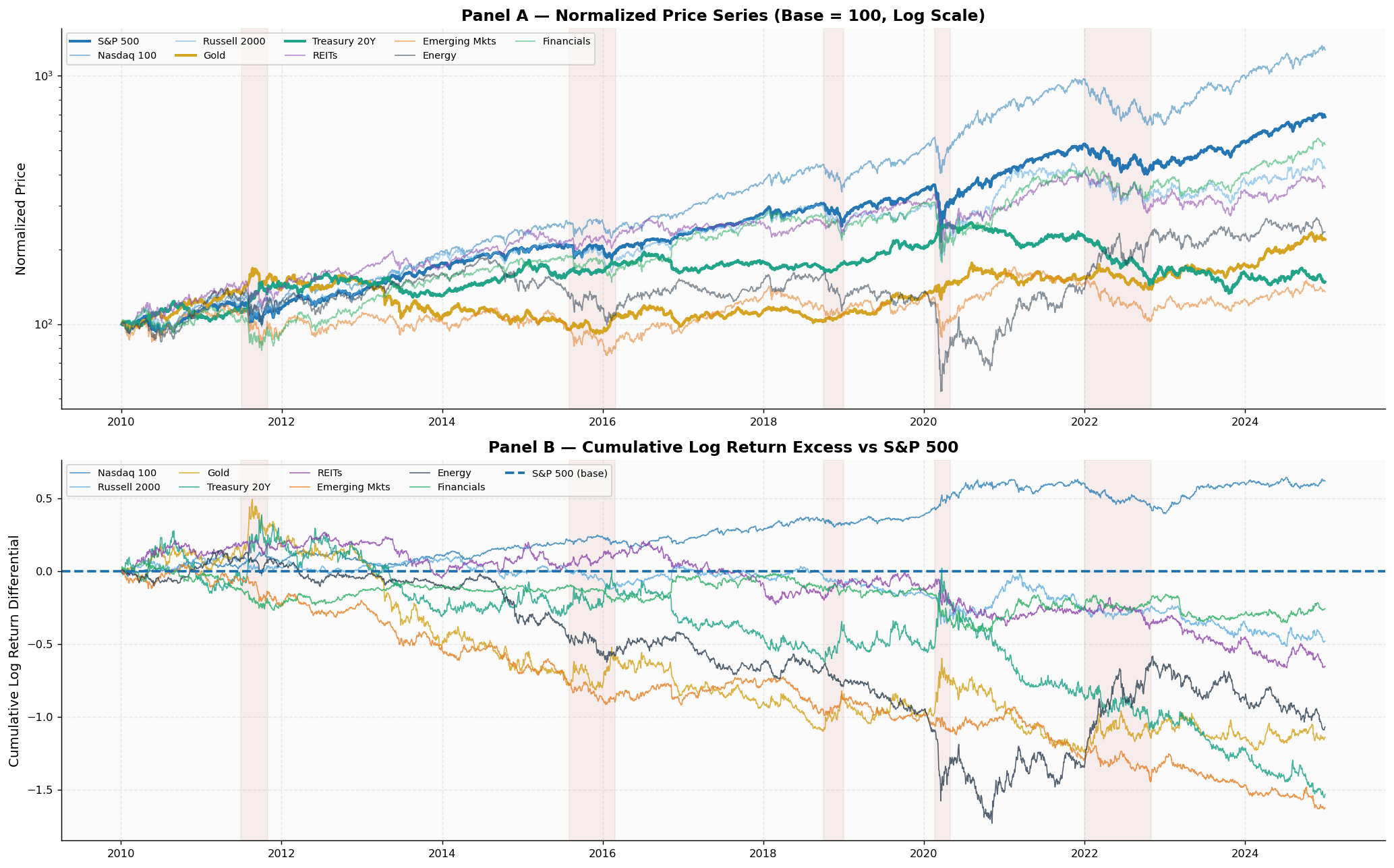
The purpose of this cell is to create a visual representation of the normalized prices and cumulative log returns of various financial assets over time, allowing for an analysis of their performance relative to each other and the broader market. The output consists of two panels, each conveying different but complementary information.
Initially, the first panel displays the normalized prices of selected assets, adjusting their values so that they all start at a common baseline of 100. This normalization allows for a direct comparison of price movements across different assets, regardless of their original price levels. The logarithmic scale enhances the visibility of relative changes, particularly for assets that experience significant price fluctuations. Each asset is represented by a distinct color, and the line widths and transparency levels are adjusted for key assets like the S&P 500, Gold, and Treasury bonds, making them more prominent in the visualization. Additionally, shaded regions indicate periods of financial crises, providing context for the observed price movements.
The second panel focuses on cumulative log returns, specifically showing how each asset's return diverges from that of the S&P 500, which serves as a benchmark. By subtracting the cumulative log return of the S&P 500 from that of each asset, the graph illustrates whether each asset has outperformed or underperformed relative to the market. A horizontal line at zero helps to easily identify which assets are performing better or worse than the S&P 500 over time. The same crisis periods are marked here as well, allowing viewers to correlate market events with changes in asset performance.
The resulting figure, saved as an image, visually encapsulates the dynamics of these financial assets, highlighting their relative strengths and weaknesses during different market conditions. The clear layout and distinct color coding facilitate an intuitive understanding of how these assets behave over time, especially in relation to significant market events.
# ── Return distribution diagnostics ─────────────────────────────────────────
fig, axes = plt.subplots(3, 3, figsize=(16, 12))
axes = axes.flatten()

for i, t in enumerate(TICKERS):
    ax = axes[i]
    r  = log_ret[t].dropna()

    # Histogram + KDE
    ax.hist(r, bins=90, density=True, color=ASSET_COLORS[t], alpha=0.45, zorder=2)
    xr = np.linspace(r.min(), r.max(), 300)
    ax.plot(xr, stats.norm.pdf(xr, r.mean(), r.std()),
            'k--', lw=1.5, alpha=0.7, label='Normal')

    # Annotations
    sk = stats.skew(r); ku = stats.kurtosis(r)
    ax.set_title(f'{t} — {ASSET_NAMES[t]}', fontweight='bold', fontsize=10)
    ax.text(0.97, 0.95, f'Kurt={ku:.1f}\nSkew={sk:.2f}',
            transform=ax.transAxes, ha='right', va='top', fontsize=8,
            bbox=dict(boxstyle='round,pad=0.3', fc='white', alpha=0.7))
    ax.set_xlabel('Daily Log Return')

plt.suptitle('Return Distributions — Fat Tails Are Ubiquitous\n(black dashed = Normal reference)',
             fontsize=13, fontweight='bold', y=1.01)
plt.tight_layout()
plt.savefig('fig02_distributions.png', dpi=150, bbox_inches='tight')
plt.show()

# Summary table
summary = pd.DataFrame({
    'Ann. Return %' : log_ret.mean()*252*100,
    'Ann. Vol %'    : log_ret.std()*np.sqrt(252)*100,
    'Sharpe (0rf)'  : log_ret.mean()*252 / (log_ret.std()*np.sqrt(252)),
    'Skewness'      : log_ret.apply(stats.skew),
    'Kurt (excess)' : log_ret.apply(stats.kurtosis),
    'Min Day %'     : log_ret.min()*100,
    'Max Day %'     : log_ret.max()*100,
}).round(3)
print(summary.to_string())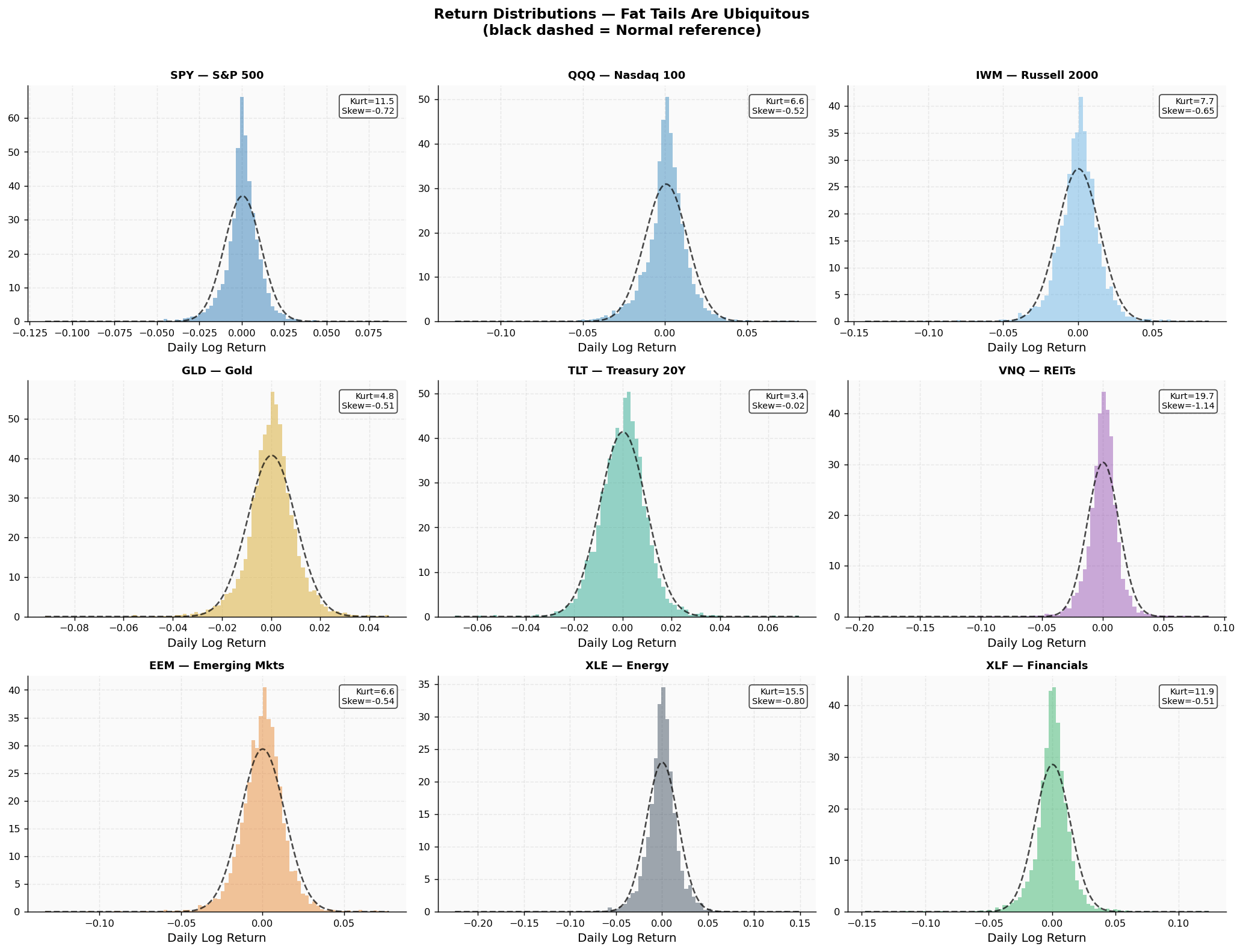
        Ann. Return %  Ann. Vol %  Sharpe (0rf)  Skewness  Kurt (excess)  Min Day %  Max Day %
Ticker
EEM             2.004      21.586         0.093    -0.536          6.631    -13.329      7.745
GLD             5.242      15.533         0.337    -0.508          4.811     -9.191      4.787
IWM             9.652      22.350         0.432    -0.649          7.679    -14.234      8.754
QQQ            16.989      20.484         0.829    -0.519          6.560    -12.759      8.131
SPY            12.843      17.103         0.751    -0.721         11.525    -11.589      8.673
TLT             2.623      15.283         0.172    -0.020          3.446     -6.901      7.250
VNQ             8.501      20.844         0.408    -1.140         19.658    -19.514      8.713
XLE             5.718      27.582         0.207    -0.797         15.482    -22.491     14.874
XLF            11.139      22.191         0.502    -0.506         11.914    -14.745     12.360
The purpose of this cell is to analyze the distribution of daily log returns for a selection of exchange-traded funds (ETFs). It aims to visually represent these distributions and summarize key statistical metrics that provide insights into the behavior of these assets.
The process begins by creating a grid of subplots, arranged in three rows and three columns, to accommodate the nine ETFs being analyzed. Each subplot will display the histogram of daily log returns for a specific ETF, allowing for a clear visual comparison across the different assets. As the loop iterates through each ETF, it calculates the log returns and drops any missing values to ensure the data is clean and usable.
For each ETF, a histogram is generated, showing the frequency of different log return values. The histogram is overlaid with a kernel density estimate (KDE) to provide a smooth representation of the distribution. Additionally, a normal distribution curve is plotted as a dashed line for reference, allowing for a visual comparison of how the actual return distribution aligns with the theoretical normal distribution.
Annotations are added to each subplot to highlight the skewness and kurtosis of the return distribution. Skewness indicates the asymmetry of the distribution, while kurtosis measures the "tailedness," or how heavy the tails are compared to a normal distribution. These metrics are crucial for understanding the risk characteristics of the assets, particularly in the context of extreme market movements.
Once all the individual plots are created, a main title is added to the figure, emphasizing the prevalence of "fat tails" in the return distributions, which is a common feature in financial data indicating a higher likelihood of extreme returns than would be expected under a normal distribution. The layout is adjusted for clarity, and the figure is saved as an image file for future reference.
Alongside the visual analysis, a summary table is generated that captures essential statistics for each ETF. This table includes annualized return percentages, annualized volatility, the Sharpe ratio (which measures risk-adjusted return), skewness, kurtosis, and the minimum and maximum daily returns. These statistics provide a quantitative overview of the performance and risk profile of each ETF, allowing for informed comparisons and investment decisions.
The saved output includes a detailed figure showcasing the return distributions for each ETF, along with a summary table that presents the calculated statistics. This comprehensive analysis not only visualizes the return behavior but also quantifies it, offering valuable insights into the risk and performance characteristics of the selected ETFs.
3. Cross-Asset Correlation Structure
Understanding Market Relationships
Prior to conducting Principal Component Analysis, it is essential to examine the underlying correlation dynamics. The correlation matrix captures the linear relationships between asset pairs, serving as the foundational input for PCA to uncover hidden patterns.
Key Observations:
Equity Cluster: The assets SPY, QQQ, IWM, VNQ, EEM, XLE, and XLF are expected to form a tightly-knit group with high correlations. These assets are all influenced by the global growth factor.
Defensive Assets: GLD and TLT are anticipated to exhibit low or even negative correlations with equities, acting as safe-haven investments that tend to perform well during periods of market stress.
Sub-groups within Equities: There may be divergence among sectors, such as technology (represented by QQQ) differing from energy (XLE) or small-cap stocks (IWM), indicating the presence of additional underlying factors.
To clarify these relationships, hierarchical clustering using Ward's method will be employed to create a dendrogram that illustrates the groupings based on correlation distances. The distance between assets is calculated in a way that translates correlation into a meaningful Euclidean distance: when assets are perfectly correlated, the distance is zero, while a perfect negative correlation results in a distance of two.
# ── Figure 2: Correlation heatmap + dendrogram ───────────────────────────────
corr = log_ret.corr()
dist = np.sqrt(2 * (1 - corr.clip(-1, 1)))
np.fill_diagonal(dist.values, 0)
condensed = squareform(dist.values)
Z = linkage(condensed, method='ward')

fig = plt.figure(figsize=(18, 7))
gs  = gridspec.GridSpec(1, 2, width_ratios=[1.4, 1], figure=fig, wspace=0.06)

# Left: Heatmap
ax_heat = fig.add_subplot(gs[0])
tick_labels = [ASSET_NAMES[t] for t in corr.columns]
mask = np.triu(np.ones_like(corr, dtype=bool), k=1)
cmap = sns.diverging_palette(220, 10, as_cmap=True)
sns.heatmap(corr, annot=True, fmt='.2f', cmap=cmap, center=0,
            vmin=-0.6, vmax=1.0,
            xticklabels=tick_labels, yticklabels=tick_labels,
            linewidths=0.4, linecolor='white',
            cbar_kws={'label':'Pearson ρ','shrink':0.85}, ax=ax_heat)
ax_heat.set_title('Cross-Asset Correlation Matrix (2010–2024)', fontweight='bold', fontsize=13)
ax_heat.tick_params(axis='x', rotation=30)

# Right: Dendrogram
ax_dend = fig.add_subplot(gs[1])
dend = dendrogram(Z, labels=tick_labels, orientation='right',
                  color_threshold=0.85, ax=ax_dend,
                  leaf_font_size=10)
ax_dend.set_title('Hierarchical Clustering\n(Ward linkage, correlation distance)',
                   fontweight='bold', fontsize=12)
ax_dend.set_xlabel('Ward Distance')
ax_dend.axvline(0.85, color='gray', ls='--', alpha=0.6, lw=1)

plt.suptitle('Market Taxonomy — Two Worlds: Risk-On vs Risk-Off',
             fontsize=14, fontweight='bold', y=1.01)
plt.savefig('fig03_correlation.png', dpi=150, bbox_inches='tight')
plt.show()

# Cluster assignments
cluster_id = fcluster(Z, t=0.85, criterion='distance')
print("\nCluster assignments (correlation distance threshold = 0.85):")
for t, c in zip(TICKERS, cluster_id):
    print(f"  {t:5s} {ASSET_NAMES[t]:18s}  →  Cluster {c}")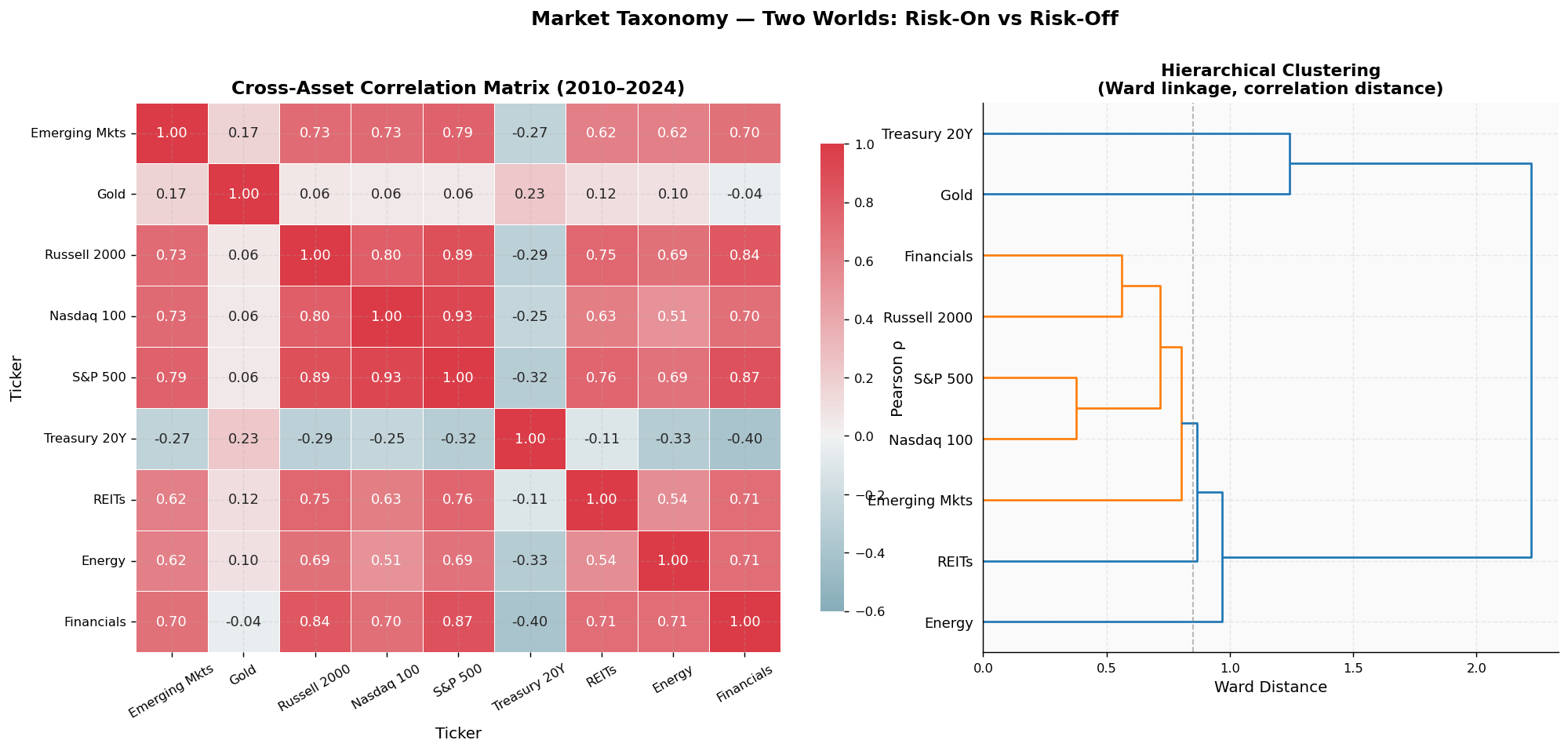
Cluster assignments (correlation distance threshold = 0.85):
  SPY   S&P 500             →  Cluster 1
  QQQ   Nasdaq 100          →  Cluster 4
  IWM   Russell 2000        →  Cluster 1
  GLD   Gold                →  Cluster 1
  TLT   Treasury 20Y        →  Cluster 1
  VNQ   REITs               →  Cluster 5
  EEM   Emerging Mkts       →  Cluster 2
  XLE   Energy              →  Cluster 3
  XLF   Financials          →  Cluster 1
The purpose of this code cell is to visualize the correlation structure among various financial assets and to perform hierarchical clustering based on these correlations. The analysis begins by calculating the correlation matrix of the log returns for the selected assets, which reveals how closely the assets move in relation to one another. This matrix is then transformed into a distance metric, specifically the correlation distance, which is essential for clustering.
To prepare for the clustering, the code computes a distance matrix using the formula that accounts for the correlation values. The diagonal of this distance matrix is filled with zeros, as the distance from any asset to itself is zero. This distance matrix is then converted into a condensed form suitable for hierarchical clustering, using the Ward linkage method, which minimizes the variance within clusters.
The visualization is structured into two parts. On the left, a heatmap displays the correlation matrix, where each cell represents the correlation coefficient between pairs of assets. The color gradient helps to quickly identify strong positive or negative correlations, with annotations providing the exact correlation values. The right side features a dendrogram, which illustrates the hierarchical relationships among the assets based on their correlation distances. This dendrogram helps to visualize how assets group together into clusters, indicating which assets behave similarly in terms of market movements.
The output includes a detailed heatmap alongside the dendrogram, providing a comprehensive view of the market taxonomy. The title emphasizes the distinction between "Risk-On" and "Risk-Off" environments, suggesting that the clustering may reveal different asset behaviors under varying market conditions.
Additionally, the cell prints out the cluster assignments for each asset based on a specified correlation distance threshold. This output categorizes the assets into different clusters, indicating which ones are more closely related to each other. For instance, assets like the S&P 500 and Russell 2000 are grouped together, suggesting they share similar market dynamics. Overall, this analysis not only visualizes relationships among assets but also categorizes them into meaningful clusters, enhancing our understanding of market behavior.
# ── Pairwise scatter: most interesting relationships ─────────────────────────
pairs = [('SPY','TLT'),('SPY','GLD'),('QQQ','XLE'),('TLT','GLD'),('SPY','EEM'),('XLE','XLF')]
fig, axes = plt.subplots(2, 3, figsize=(16, 8))
axes = axes.flatten()

for i, (t1, t2) in enumerate(pairs):
    ax = axes[i]
    x  = log_ret[t1]; y = log_ret[t2]
    ax.scatter(x, y, alpha=0.15, s=6, color='#2c3e50')

    # OLS fit
    slope, intercept, r, p, _ = stats.linregress(x, y)
    xl = np.linspace(x.quantile(0.01), x.quantile(0.99), 100)
    ax.plot(xl, intercept + slope*xl, color='#c0392b', lw=2)
    ax.set_xlabel(f'{t1} daily log return', fontsize=9)
    ax.set_ylabel(f'{t2} daily log return', fontsize=9)
    ax.set_title(f'{ASSET_NAMES[t1]} vs {ASSET_NAMES[t2]}\n'
                 f'β={slope:.2f}  ρ={r:.3f}  p={p:.2e}', fontsize=9, fontweight='bold')

plt.suptitle('Pairwise Scatter Plots — Key Asset Relationships', fontsize=13, fontweight='bold')
plt.tight_layout()
plt.savefig('fig04_scatter.png', dpi=150, bbox_inches='tight')
plt.show()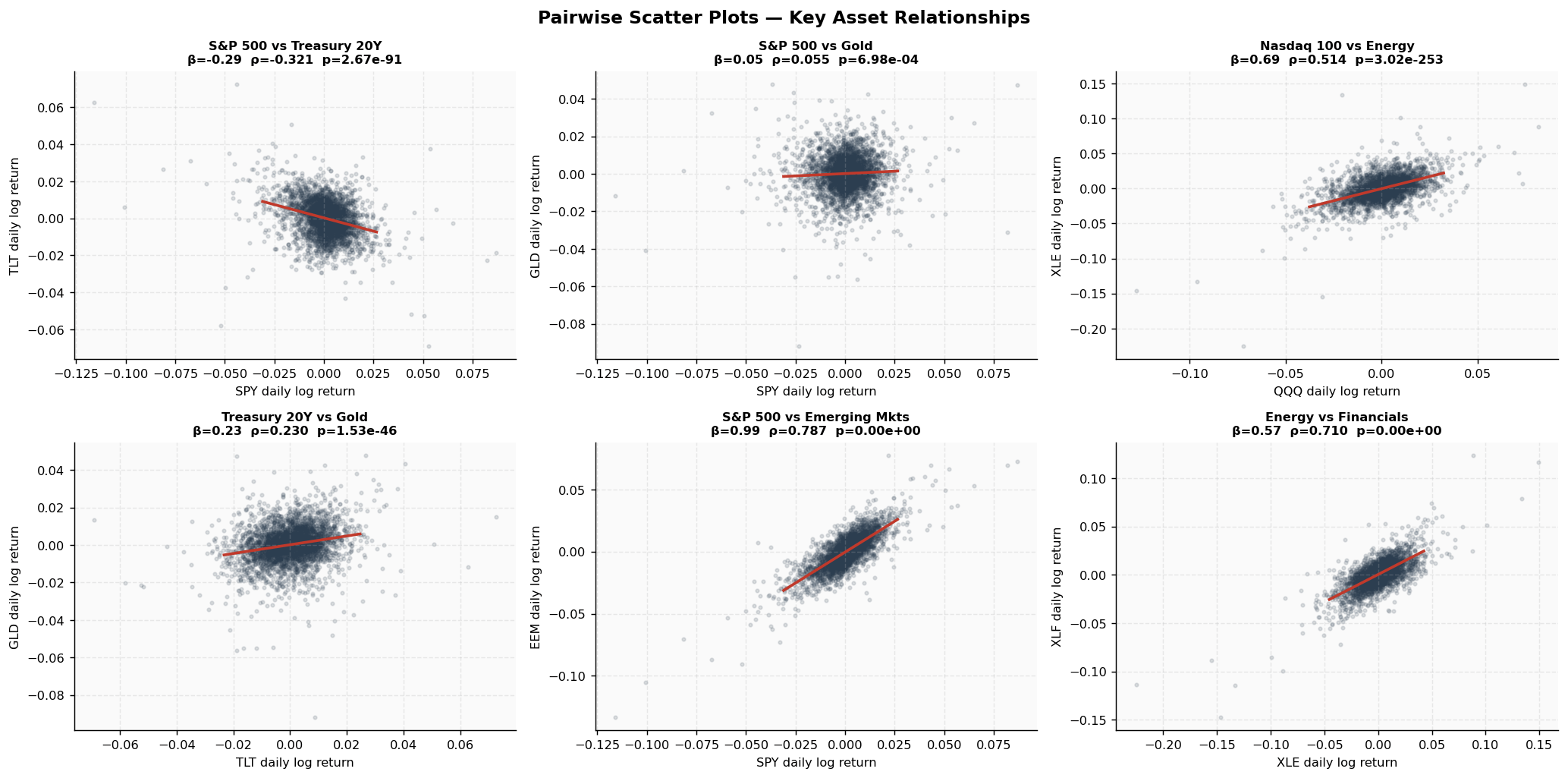
The purpose of this code cell is to create pairwise scatter plots that visualize the relationships between selected financial assets, specifically focusing on their daily log returns. The analysis aims to highlight interesting correlations and trends among these assets, which can provide insights into their interdependencies.
To begin, a list of asset pairs is defined, including combinations like S&P 500 with Treasury bonds, and Nasdaq 100 with Energy. A figure is then set up with a grid of subplots, arranged in two rows and three columns, to accommodate the six pairs being analyzed. Each subplot will display a scatter plot for one asset pair.
As the code iterates through each asset pair, it extracts the log returns for the two assets involved. A scatter plot is generated for these returns, with points plotted in a semi-transparent manner to allow for better visibility of the data density. This is particularly useful when there are many data points, as it helps to reveal the underlying distribution.
Next, a linear regression analysis is performed using ordinary least squares (OLS) to fit a line to the scatter plot. The slope and intercept of this line, along with the correlation coefficient and p-value, are calculated. These statistics provide valuable information about the strength and significance of the relationship between the two assets. The fitted line is then plotted over the scatter points, visually representing the linear relationship.
Each subplot is labeled with the respective asset names, the calculated slope (β), the correlation coefficient (ρ), and the p-value (p). This information is crucial for interpreting the strength and significance of the relationships depicted in the plots.
The overall figure is given a title, and the layout is adjusted for clarity. Finally, the figure is saved as an image file, ensuring that the visualizations can be easily shared or referenced later. The saved output is a comprehensive image that displays all six scatter plots, each illustrating the relationships between the chosen asset pairs. The plots clearly show the trends and correlations, with the fitted lines providing a quick reference for understanding the nature of these relationships.
4. Principal Component Analysis — The Core of the Investigation
Theoretical Basis
Principal Component Analysis (PCA) breaks down the covariance matrix of standardized returns into its fundamental components. This is represented as the product of a matrix of eigenvectors and a diagonal matrix of eigenvalues. The eigenvectors, which represent the principal components, indicate various directions in the asset space, essentially forming combinations of the assets. The eigenvalues, arranged in descending order, quantify the amount of variance that each direction accounts for.
The significant takeaway is that if the largest eigenvalue is substantially greater than the others, it suggests that a single dominant factor is responsible for the majority of the co-movement among assets.
Importance for Risk Management
The risk associated with a portfolio can be expressed as the variance, which is calculated by taking the weighted sum of the covariance matrix. This variance can also be represented in terms of the eigenvalues and eigenvectors, where each eigenvalue corresponds to the contribution of its respective factor to the overall portfolio risk. If the first principal component, often interpreted as the market factor, has a much larger eigenvalue than the subsequent ones, it indicates that nearly all the risk in the portfolio is concentrated through this primary factor, regardless of the number of assets included.
This mathematical framework illustrates why diversification tends to fail in times of financial distress.
4.1 Understanding Explained Variance and Dimensionality
In this section, we will delve into the concept of explained variance as it relates to dimensionality reduction techniques, particularly Principal Component Analysis. Explained variance quantifies how much of the total variability in the data can be attributed to each principal component. By analyzing this variance, we can determine the number of dimensions that effectively capture the underlying structure of the dataset.
When we apply PCA, we transform the original dataset into a new set of variables, known as principal components, which are linear combinations of the original variables. Each principal component accounts for a certain proportion of the total variance present in the data. The first principal component captures the most variance, followed by the second, and so on.
To make informed decisions about dimensionality, we can visualize the explained variance for each component. This visualization helps us identify a threshold where additional components contribute diminishing returns in terms of capturing variability. By selecting a subset of principal components that collectively explain a significant portion of the total variance, we can reduce the dimensionality of our dataset while retaining essential information.
Ultimately, understanding explained variance allows us to strike a balance between simplifying our model and preserving the complexity of the data. This balance is crucial for effective analysis and interpretation in the context of financial market behavior.
# ── PCA on standardized returns ──────────────────────────────────────────────
scaler = StandardScaler()
X      = scaler.fit_transform(log_ret)

pca_full = PCA(n_components=len(TICKERS))
pca_full.fit(X)

ev_ratio = pca_full.explained_variance_ratio_
ev_cum   = np.cumsum(ev_ratio)

# Effective dimensionality metrics
participation_ratio = 1.0 / np.sum(ev_ratio**2)  # Inverse Participation Ratio
entropy_dim = np.exp(-np.sum(ev_ratio * np.log(ev_ratio + 1e-12)))

fig, axes = plt.subplots(1, 3, figsize=(18, 6))

# --- Scree plot ---
ax = axes[0]
bars = ax.bar(range(1, len(TICKERS)+1), ev_ratio*100,
              color=[PALETTE['equity'] if i<2 else PALETTE['neutral']
                     for i in range(len(TICKERS))],
              alpha=0.85, edgecolor='white', lw=0.8)
ax.set_xlabel('Principal Component')
ax.set_ylabel('Explained Variance (%)')
ax.set_title('Scree Plot\n(blue = dominant factors)', fontweight='bold')
ax.set_xticks(range(1, len(TICKERS)+1))
for bar, val in zip(bars, ev_ratio*100):
    ax.text(bar.get_x()+bar.get_width()/2, bar.get_height()+0.3,
            f'{val:.1f}%', ha='center', fontsize=8)

# Marchenko-Pastur upper bound (random matrix theory)
T, N = X.shape
lambda_max_mp = (1 + np.sqrt(N/T))**2 / N
ax.axhline(lambda_max_mp*100, color='red', ls='--', lw=1.5,
           label=f'Random matrix\nupper bound ({lambda_max_mp*100:.1f}%)')
ax.legend(fontsize=8)

# --- Cumulative variance ---
ax2 = axes[1]
ax2.plot(range(1, len(TICKERS)+1), ev_cum*100,
         'o-', color=PALETTE['equity'], lw=2.5, ms=7)
for threshold, color in [(0.50,'#f39c12'),(0.70,'#e67e22'),(0.90,'#c0392b')]:
    ax2.axhline(threshold*100, color=color, ls=':', lw=1.5, alpha=0.8)
    n_pcs = int(np.searchsorted(ev_cum, threshold)) + 1
    ax2.text(len(TICKERS), threshold*100+1, f'{threshold*100:.0f}%  →  {n_pcs} PCs',
             ha='right', fontsize=8, color=color)
ax2.set_xlabel('Number of Principal Components')
ax2.set_ylabel('Cumulative Explained Variance (%)')
ax2.set_title('Cumulative Explained Variance\n(How many PCs to capture X%?)', fontweight='bold')
ax2.set_xticks(range(1, len(TICKERS)+1))

# --- Eigenvalue spectrum ---
ax3 = axes[2]
lambdas = pca_full.explained_variance_
ax3.stem(range(1, len(TICKERS)+1), lambdas, linefmt='C0-',
         markerfmt='C0o', basefmt='gray')
ax3.set_xlabel('Component Index')
ax3.set_ylabel('Eigenvalue (λ)')
ax3.set_title(f'Eigenvalue Spectrum\nIPR={participation_ratio:.2f}  '
              f'Entropy Dim={entropy_dim:.2f}', fontweight='bold')
ax3.axhline(1.0, color='red', ls='--', lw=1.5, label='λ=1 (Kaiser criterion)')
ax3.legend()

plt.suptitle('PCA Dimensionality Analysis — A Low-Dimensional Market',
             fontsize=14, fontweight='bold', y=1.02)
plt.tight_layout()
plt.savefig('fig05_scree.png', dpi=150, bbox_inches='tight')
plt.show()

print(f"\n{'='*60}")
print(f"  DIMENSIONALITY SUMMARY")
print(f"{'='*60}")
for i, (ev, cum) in enumerate(zip(ev_ratio, ev_cum), 1):
    bar_len = int(ev*100/2)
    print(f"  PC{i:2d}  λ={lambdas[i-1]:5.2f}  {ev*100:5.1f}%  cum={cum*100:5.1f}%  {'█'*bar_len}")
print(f"\n  Inverse Participation Ratio  : {participation_ratio:.3f}")
print(f"  Effective dimensionality      : {entropy_dim:.3f} (out of {len(TICKERS)})")
print(f"  PC1 alone explains            : {ev_ratio[0]*100:.1f}% of total variance")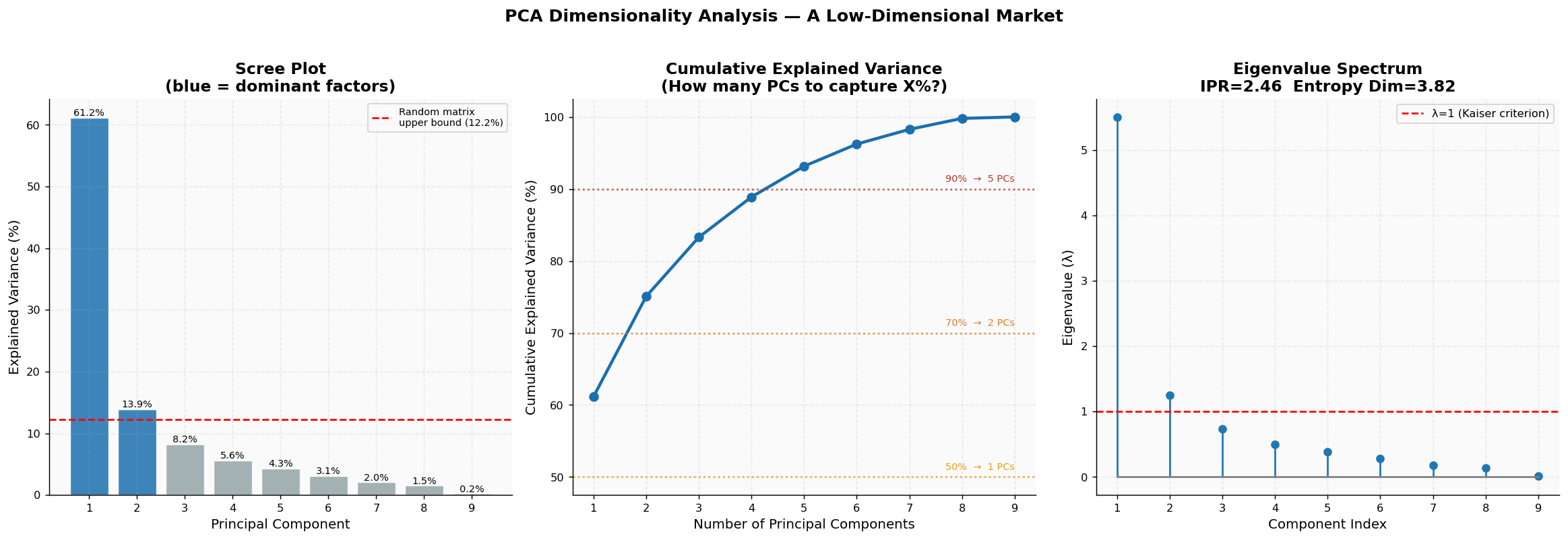
============================================================
  DIMENSIONALITY SUMMARY
============================================================
  PC 1  λ= 5.50   61.2%  cum= 61.2%  ██████████████████████████████
  PC 2  λ= 1.25   13.9%  cum= 75.1%  ██████
  PC 3  λ= 0.74    8.2%  cum= 83.3%  ████
  PC 4  λ= 0.50    5.6%  cum= 88.9%  ██
  PC 5  λ= 0.38    4.3%  cum= 93.2%  ██
  PC 6  λ= 0.28    3.1%  cum= 96.2%  █
  PC 7  λ= 0.18    2.0%  cum= 98.3%  █
  PC 8  λ= 0.14    1.5%  cum= 99.8%
  PC 9  λ= 0.02    0.2%  cum=100.0%

  Inverse Participation Ratio  : 2.459
  Effective dimensionality      : 3.817 (out of 9)
  PC1 alone explains            : 61.2% of total variance
The purpose of this cell is to perform Principal Component Analysis (PCA) on the standardized log returns of the selected ETFs, allowing us to uncover the underlying structures that explain the variance in the data. Initially, the log returns are standardized using a scaler, which transforms the data to have a mean of zero and a standard deviation of one. This step is crucial because PCA is sensitive to the scale of the data, and standardization ensures that each feature contributes equally to the analysis.
Once the data is standardized, PCA is applied to extract the principal components. The number of components is set to match the number of ETFs being analyzed. After fitting the PCA model, the explained variance ratio for each component is calculated, which indicates how much variance in the data is accounted for by each principal component. The cumulative explained variance is also computed, providing insight into how many components are needed to capture a certain percentage of the total variance.
To further analyze the dimensionality of the data, two effective dimensionality metrics are calculated: the Inverse Participation Ratio and the entropy dimension. These metrics help quantify how many dimensions are effectively contributing to the variance in the dataset.
The results are visualized through three plots. The first plot, known as a scree plot, displays the explained variance for each principal component. Here, the first component stands out significantly, explaining over 61% of the variance, while subsequent components contribute less. The second plot illustrates the cumulative explained variance, showing how many components are needed to reach thresholds of 50%, 70%, and 90% of the total variance. This visualization helps in determining the optimal number of components to retain for further analysis. The third plot presents the eigenvalue spectrum, where the eigenvalues corresponding to each principal component are displayed. The red dashed line indicates the Kaiser criterion, which suggests retaining components with eigenvalues greater than one.
The saved output includes a comprehensive figure that encapsulates these three visualizations, providing a clear overview of the PCA results. Additionally, the printed summary details the explained variance and cumulative variance for each principal component, along with the calculated effective dimensionality metrics. This output highlights that the first principal component alone accounts for a substantial portion of the total variance, emphasizing its significance in the analysis. The effective dimensionality metrics suggest that while there are nine components, only a few are truly influential in explaining the market dynamics captured in the dataset.
4.2 PCA Loadings — Uncovering the Underlying Factors
Loadings represent the relationships between the initial returns and the principal components. They provide insights into the extent to which each asset influences the various latent factors.
Guidelines for interpretation:
PC1 — This component is identified as the Market Factor. It is anticipated to exhibit strong positive loadings for all assets that behave like equities. Assets such as GLD and TLT might display loadings that are close to zero or even negative. This component signifies systemic risk, which is an inherent risk that cannot be mitigated through diversification.
PC2 — This component is likely indicative of a Risk-Off or Safe Haven factor. It is expected to show positive loadings for GLD and TLT while demonstrating negative loadings for cyclical stocks. This factor tends to become particularly pronounced during periods of financial distress.
PC3 and beyond — These components may reflect themes such as sector rotation, the contrast between growth and value investing, or other unique dimensions that do not fit into the previous categories.
# ── Figure: Loadings heatmap + barplots ──────────────────────────────────────
loadings = pd.DataFrame(
    pca_full.components_.T,
    index=TICKERS,
    columns=[f'PC{i+1}' for i in range(len(TICKERS))]
)
loadings.index = [ASSET_NAMES[t] for t in TICKERS]

fig, axes = plt.subplots(1, 2, figsize=(18, 6))

# Left: Heatmap of all loadings
ax = axes[0]
norm = TwoSlopeNorm(vmin=-0.7, vcenter=0, vmax=0.7)
im = ax.imshow(loadings.values, cmap='RdBu_r', norm=norm, aspect='auto')
ax.set_xticks(range(len(TICKERS)))
ax.set_xticklabels([f'PC{i+1}' for i in range(len(TICKERS))], fontsize=9)
ax.set_yticks(range(len(TICKERS)))
ax.set_yticklabels(loadings.index, fontsize=9)
for i in range(len(TICKERS)):
    for j in range(len(TICKERS)):
        ax.text(j, i, f'{loadings.iloc[i, j]:.2f}',
                ha='center', va='center', fontsize=7.5,
                color='white' if abs(loadings.iloc[i, j]) > 0.4 else 'black')
plt.colorbar(im, ax=ax, shrink=0.85, label='Loading')
ax.set_title('PCA Loadings Heatmap\n(all 9 components)', fontweight='bold')

# Right: PC1 + PC2 + PC3 barplots
ax2 = axes[1]
x    = np.arange(len(TICKERS))
w    = 0.25
cols = [PALETTE['equity'], PALETTE['crisis'], PALETTE['bond']]
for k in range(3):
    vals = loadings.iloc[:, k].values
    offset = (k-1)*w
    ax2.bar(x+offset, vals, w, label=f'PC{k+1} ({ev_ratio[k]*100:.1f}%)',
            color=cols[k], alpha=0.85, edgecolor='white')
ax2.axhline(0, color='black', lw=0.8)
ax2.set_xticks(x)
ax2.set_xticklabels(loadings.index, rotation=30, ha='right', fontsize=9)
ax2.set_ylabel('Loading magnitude')
ax2.set_title('PC1 / PC2 / PC3 Loadings\n(dominant factor structure)', fontweight='bold')
ax2.legend()

plt.suptitle('Hidden Factor Structure — Reading the Eigenvectors',
             fontsize=14, fontweight='bold', y=1.02)
plt.tight_layout()
plt.savefig('fig06_loadings.png', dpi=150, bbox_inches='tight')
plt.show()

print("\nPC1 (Market Factor) loadings (sorted):")
pc1 = loadings['PC1'].sort_values(ascending=False)
for name, val in pc1.items():
    bar = '█'*int(abs(val)*30) if val>0 else '░'*int(abs(val)*30)
    sign = '+' if val>0 else '-'
    print(f"  {name:20s}  {sign}{abs(val):.3f}  {bar}")
print(f"\nPC2 (Risk-Off Factor) loadings (sorted):")
pc2 = loadings['PC2'].sort_values(ascending=False)
for name, val in pc2.items():
    bar = '█'*int(abs(val)*30) if val>0 else '░'*int(abs(val)*30)
    sign = '+' if val>0 else '-'
    print(f"  {name:20s}  {sign}{abs(val):.3f}  {bar}")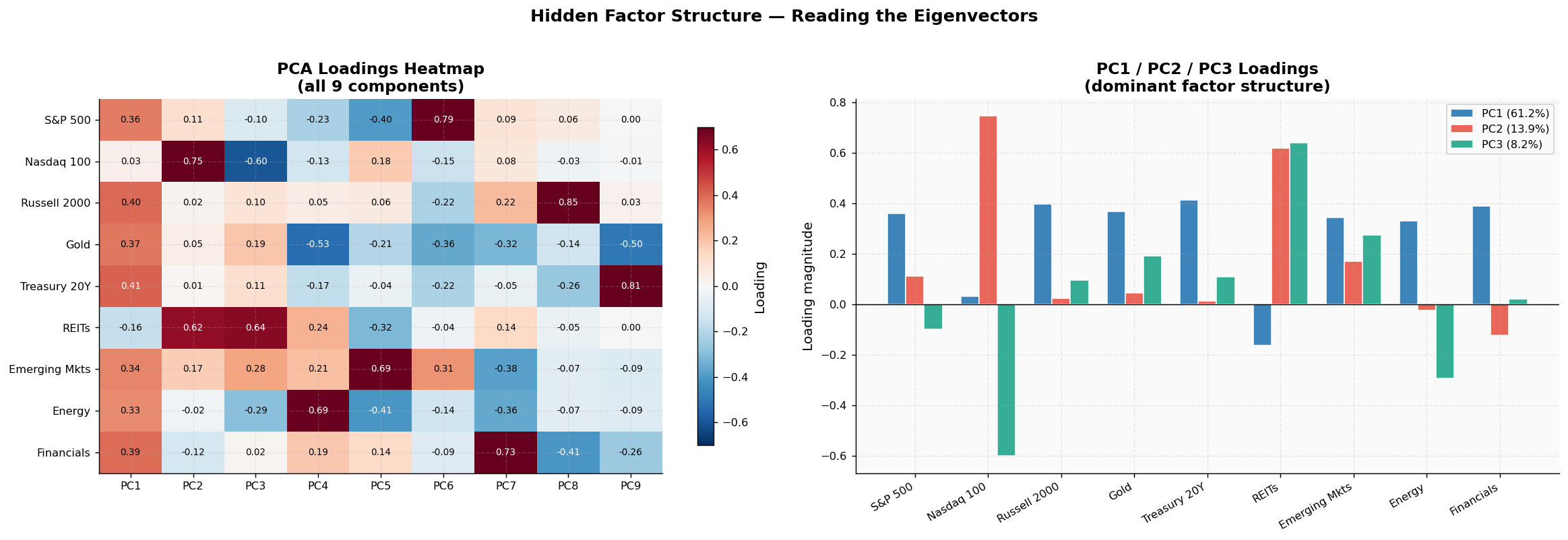
PC1 (Market Factor) loadings (sorted):
  Treasury 20Y          +0.413  ████████████
  Russell 2000          +0.397  ███████████
  Financials            +0.389  ███████████
  Gold                  +0.369  ███████████
  S&P 500               +0.360  ██████████
  Emerging Mkts         +0.343  ██████████
  Energy                +0.331  █████████
  Nasdaq 100            +0.033
  REITs                 -0.163  ░░░░

PC2 (Risk-Off Factor) loadings (sorted):
  Nasdaq 100            +0.746  ██████████████████████
  REITs                 +0.619  ██████████████████
  Emerging Mkts         +0.172  █████
  S&P 500               +0.113  ███
  Gold                  +0.046  █
  Russell 2000          +0.023
  Treasury 20Y          +0.012
  Energy                -0.023
  Financials            -0.121  ░░░
The purpose of this code cell is to visualize the loadings from a Principal Component Analysis (PCA) performed on the financial data, specifically focusing on how different assets contribute to the principal components. The analysis aims to uncover hidden factors that influence asset behavior, which can be crucial for understanding market dynamics.
Initially, the loadings from the PCA are organized into a DataFrame, where each row corresponds to an asset and each column represents a principal component. The assets are labeled with more descriptive names for clarity. This structured data serves as the foundation for the visualizations that follow.
Two subplots are created side by side. The first subplot displays a heatmap of the loadings for all principal components. This heatmap uses a color gradient to represent the magnitude and direction of the loadings, with red indicating positive loadings and blue indicating negative loadings. The normalization applied ensures that the color scale is centered around zero, allowing for easy interpretation of the loadings. Each cell in the heatmap is annotated with the exact loading value, making it straightforward to see how strongly each asset is associated with each principal component. The title of this subplot emphasizes that it represents the loadings for all nine components, providing a comprehensive view of the factor structure.
The second subplot consists of bar plots for the first three principal components, which are often the most significant in explaining variance in the data. Each bar represents the loading magnitude for a specific asset, with different colors assigned to each principal component. This visualization allows for a quick comparison of how each asset contributes to the dominant factors identified by the PCA. A horizontal line at zero helps to distinguish between positive and negative loadings, and a legend clarifies which color corresponds to which principal component.
The overall figure is titled to reflect its focus on the hidden factor structure derived from the PCA, and it is saved as an image file for future reference.
Additionally, the output includes sorted lists of the loadings for the first two principal components, labeled as the "Market Factor" and the "Risk-Off Factor." These lists provide a textual representation of the loadings, where each asset is accompanied by a visual bar indicating the magnitude of its loading. Positive values are represented with filled bars, while negative values are shown with lighter bars. This textual output complements the visualizations by summarizing the most influential assets for each factor, making it easier to interpret the results.
In summary, this cell effectively combines visual and textual representations to communicate the results of the PCA, highlighting the underlying factors that drive asset behavior in the financial markets.
4.3 Eigenportfolios — Synthetic Market Drivers
An eigenportfolio is a type of portfolio that is created by utilizing the weights derived from eigenvectors. This portfolio acts as a synthetic asset, effectively representing a distinct factor without interference from other influences.
Significance of eigenportfolios:
Orthogonality — These portfolios are designed such that their returns exhibit no correlation with one another. This characteristic is unique to this specific set of portfolios.
Efficiency in Factor Space — The first eigenportfolio represents the portfolio with the highest variance while adhering to a unit weight constraint. It serves as the optimal single indicator for systematic risk.
Factor Benchmarks — Financial institutions employ eigenportfolios to evaluate the extent to which a strategy's returns are driven by underlying factors compared to genuine alpha.
The cumulative return associated with each eigenportfolio indicates the periods during which each factor was influential, highlighting when it generated positive returns and when it resulted in losses.
# ── Eigenportfolio construction and analysis ─────────────────────────────────
# Weights = eigenvectors (normalized so weights sum to 1 in absolute value)
eigvecs = pca_full.components_  # shape: (n_components, n_assets)

def build_eigenportfolio(weights_raw, returns):
    # Rescale eigenvector to sum-of-abs = 1, compute portfolio returns
    w = weights_raw / np.sum(np.abs(weights_raw))
    return returns @ w

n_ep = 4  # show first 4 eigenportfolios
ep_returns = pd.DataFrame(index=log_ret.index)
for k in range(n_ep):
    ep_returns[f'EP{k+1}'] = build_eigenportfolio(eigvecs[k], log_ret.values)

ep_cum = ep_returns.cumsum()  # cumulative log returns

fig, axes = plt.subplots(2, 2, figsize=(18, 12))
axes = axes.flatten()

for k in range(n_ep):
    ax = axes[k]
    ep_name = f'Eigenportfolio {k+1} ({ev_ratio[k]*100:.1f}% variance)'

    # Cumulative return
    ax.plot(ep_cum[f'EP{k+1}'], lw=1.5, color=PALETTE['equity'], alpha=0.85)
    ax.fill_between(ep_cum.index, ep_cum[f'EP{k+1}'], 0,
                    where=ep_cum[f'EP{k+1}']>0, color='#27ae60', alpha=0.15)
    ax.fill_between(ep_cum.index, ep_cum[f'EP{k+1}'], 0,
                    where=ep_cum[f'EP{k+1}']<=0, color='#c0392b', alpha=0.15)
    ax.axhline(0, color='black', lw=0.7)

    # Crisis shading
    for name,(s,e) in CRISES.items():
        ax.axvspan(pd.Timestamp(s), pd.Timestamp(e), alpha=0.1, color='#c0392b')

    # Weights inset (bar chart)
    ax_ins = ax.inset_axes([0.72, 0.04, 0.26, 0.35])
    w_raw  = eigvecs[k]
    cols_w = ['#27ae60' if v>0 else '#c0392b' for v in w_raw]
    ax_ins.barh(range(len(TICKERS)), w_raw, color=cols_w, alpha=0.8)
    ax_ins.set_yticks(range(len(TICKERS)))
    ax_ins.set_yticklabels(TICKERS, fontsize=6)
    ax_ins.axvline(0, color='black', lw=0.5)
    ax_ins.set_facecolor('#f5f5f5')
    ax_ins.tick_params(labelsize=6)

    ax.set_title(f'EP{k+1}: {ep_name}', fontweight='bold', fontsize=11)
    ax.set_ylabel('Cumulative Log Return')

plt.suptitle('Eigenportfolios — Orthogonal Synthetic Market Factors\n'
             '(inset = eigenvector weights per asset)',
             fontsize=13, fontweight='bold', y=1.01)
plt.tight_layout()
plt.savefig('fig07_eigenportfolios.png', dpi=150, bbox_inches='tight')
plt.show()

# Correlation check (should be ~0)
ep_corr = ep_returns.corr()
print("Eigenportfolio cross-correlations (should be ≈ 0 by construction):")
print(ep_corr.round(4).to_string())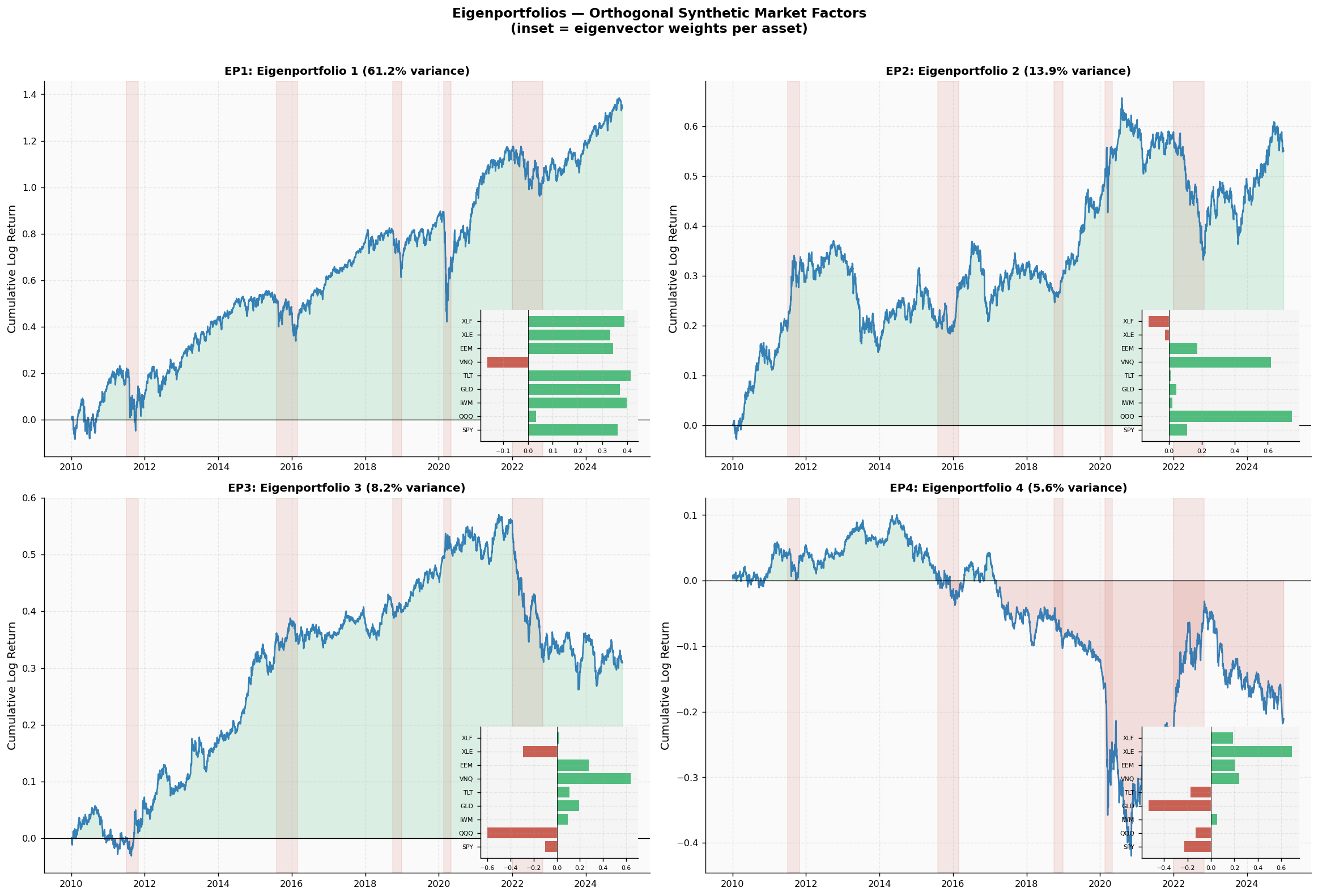
Eigenportfolio cross-correlations (should be ≈ 0 by construction):
        EP1     EP2     EP3     EP4
EP1  1.0000  0.0509 -0.0264  0.3210
EP2  0.0509  1.0000  0.0281 -0.0353
EP3 -0.0264  0.0281  1.0000 -0.2448
EP4  0.3210 -0.0353 -0.2448  1.0000
The purpose of this cell is to construct and analyze eigenportfolios, which are synthetic portfolios that represent underlying market factors derived from the principal component analysis (PCA) of financial data. The eigenvectors obtained from PCA serve as the weights for these portfolios, and they are normalized so that the absolute values of the weights sum to one. This normalization ensures that the portfolios are comparable in terms of their scale.